
Spring MVC 的核心应用-1

使用Spring MVC实现登录、注销
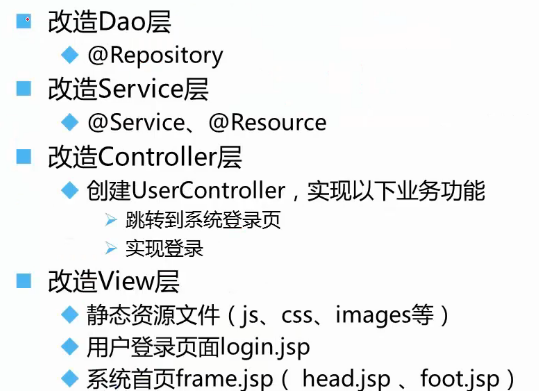
配置文件applicationcontext-jdbc.xml
 <?xml version="1.0" encoding="UTF-8"?>

 <beans xmlns="http://www.springframework.org/schema/beans"

         xmlns:xsi="http://www.w3.org/2001/XMLSchema-instance"

         xmlns:aop="http://www.springframework.org/schema/aop"

         xmlns:p="http://www.springframework.org/schema/p"

         xmlns:tx="http://www.springframework.org/schema/tx"

         xmlns:context="http://www.springframework.org/schema/context"

         xsi:schemaLocation="

             http://www.springframework.org/schema/beans http://www.springframework.org/schema/beans/spring-beans-2.5.xsd

             http://www.springframework.org/schema/aop http://www.springframework.org/schema/aop/spring-aop-2.5.xsd

             http://www.springframework.org/schema/tx http://www.springframework.org/schema/tx/spring-tx-2.5.xsd

             http://www.springframework.org/schema/context

             http://www.springframework.org/schema/context/spring-context.xsd">

     <!--

         使spring扫描包下的所有类,让标注spring注解的类生效

         若扫描到有@Component @Controller@Service等这些注解的类,则把这些类注册为bean

     -->

     <context:component-scan base-package="cn.smbms.service"/>

     <context:component-scan base-package="cn.smbms.dao"/>

 </beans>
配置web.xml
 <web-app xmlns:xsi="http://www.w3.org/2001/XMLSchema-instance" xmlns="http://java.sun.com/xml/ns/javaee" xmlns:web="http://java.sun.com/xml/ns/javaee/web-app_2_5.xsd" xsi:schemaLocation="http://java.sun.com/xml/ns/javaee http://java.sun.com/xml/ns/javaee/web-app_3_0.xsd" version="3.0">

   <display-name>springMVC</display-name>

   <welcome-file-list>

     <welcome-file>/WEB-INF/jsp/login.jsp</welcome-file>

   </welcome-file-list>

   <context-param>

     <param-name>contextConfigLocation</param-name>

     <param-value>classpath:applicationContext-*.xml</param-value>

   </context-param>

   <filter>

     <filter-name>encodingFilter</filter-name>

     <filter-class>

             org.springframework.web.filter.CharacterEncodingFilter

         </filter-class>

     <init-param>

       <param-name>encoding</param-name>

       <param-value>UTF-8</param-value>

     </init-param>

     <init-param>

       <param-name>forceEncoding</param-name>

       <param-value>true</param-value>

     </init-param>

   </filter>

   <filter-mapping>

     <filter-name>encodingFilter</filter-name>

     <url-pattern>/*</url-pattern>

   </filter-mapping>

   <servlet>

     <servlet-name>springmvc</servlet-name>

     <servlet-class>org.springframework.web.servlet.DispatcherServlet</servlet-class>

     <init-param>

       <param-name>contextConfigLocation</param-name>

       <param-value>classpath:springmvc-servlet.xml</param-value>

     </init-param>

     <load-on-startup>1</load-on-startup>

   </servlet>

   <servlet-mapping>

     <servlet-name>springmvc</servlet-name>

     <url-pattern>/</url-pattern>

   </servlet-mapping>

   <context-param>

     <param-name>log4jConfigLocation</param-name>

     <param-value>classpath:log4j.properties</param-value>

   </context-param>

   <context-param>

     <param-name>webAppRootKey</param-name>

     <param-value>SMBMS_C09_04.root</param-value>

   </context-param>

   <listener>

     <listener-class>

             org.springframework.web.util.Log4jConfigListener

     </listener-class>

   </listener>

   <listener>

     <listener-class>org.springframework.web.context.ContextLoaderListener</listener-class>

   </listener>

 </web-app>
配置Springmvc-servlet.xml
 <?xml version="1.0" encoding="UTF-8"?>

 <beans xmlns="http://www.springframework.org/schema/beans"

     xmlns:xsi="http://www.w3.org/2001/XMLSchema-instance"

     xmlns:mvc="http://www.springframework.org/schema/mvc"

     xmlns:p="http://www.springframework.org/schema/p"

     xmlns:context="http://www.springframework.org/schema/context"

     xsi:schemaLocation="

         http://www.springframework.org/schema/beans

         http://www.springframework.org/schema/beans/spring-beans.xsd

         http://www.springframework.org/schema/context

         http://www.springframework.org/schema/context/spring-context.xsd

         http://www.springframework.org/schema/mvc

         http://www.springframework.org/schema/mvc/spring-mvc.xsd">

     <context:component-scan base-package="cn.smbms.controller"/>

     <mvc:annotation-driven/>

     <mvc:resources mapping="/statics/**" location="/statics/" />

     <!-- 完成视图的对应 -->

     <!-- 对转向页面的路径解析。prefix:前缀, suffix:后缀 -->

     <bean class="org.springframework.web.servlet.view.InternalResourceViewResolver" >

         <property name="prefix" value="/WEB-INF/jsp/"/>

         <property name="suffix" value=".jsp"/>

     </bean>

 </beans>


静态资源文件的引用

Spring MVC 的核心应用-1的更多相关文章
- Spring MVC的核心控制器DispatcherServlet的作用
关于Spring MVC的核心控制器DispatcherServlet的作用,以下说法错误的是( )? 它负责接收HTTP请求 加载配置文件 实现业务操作 初始化上下应用对象ApplicationC ...
- spring mvc 框架核心文档
http://docs.spring.io/spring-data/ Parent Directory - cassandra/ 01-Apr-2014 01:50 - commons/ 29-Jan ...
- Spring MVC的核心流程(步骤)
具体步骤: 1.客户端发送请求先要经过前端控制器,请求被Spring 前端控制器DispatcherServlet获取,如详细图第一步:DispatcherServlet对请求URL进行解析(比如我们 ...
- Spring MVC学习------------核心类与接口
核心类与接口: 先来了解一下,几个重要的接口与类. 如今不知道他们是干什么的没关系,先混个脸熟,为以后认识他们打个基础. DispatcherServlet -- 前置控制器 HandlerMap ...
- 如何用Java类配置Spring MVC(不通过web.xml和XML方式)
DispatcherServlet是Spring MVC的核心,按照传统方式, 需要把它配置到web.xml中. 我个人比较不喜欢XML配置方式, XML看起来太累, 冗长繁琐. 还好借助于Servl ...
- 深入分析Spring 与 Spring MVC容器
1 Spring MVC WEB配置 Spring Framework本身没有Web功能,Spring MVC使用WebApplicationContext类扩展ApplicationContext, ...
- spring MVC mybatis dispacherServlet(源码解读)
以下源码版本(4.2.0.RELEASE) dispacherServlet是servlet的实现类,是spring MVC的前端转发器,是spring MVC的核心. 那么它做了哪些事呢? 它主要做 ...
- spring笔记2 spring MVC的基础知识2
2,spring MVC的注解驱动控制器,rest风格的支持 作为spring mvc的明星级别的功能,无疑是使得自己的code比较优雅的秘密武器: @RequestMapping处理用户的请求,下面 ...
- Spring MVC 原理小结
主要由DispatcherServlet.处理器映射.处理器.视图解析器.视图组成 1.DispatcherServlet接收到一个HTTP请求,根据对应配置文件中的处理机映射,找到处理器(Han ...
随机推荐
- c++ inline 的位置不当导致的 无法解析的外部符号
这几天编写代码碰到 无法解析的外部符号 visual studio. 在类中 inline 修饰符应该放在类函数定义的时候而不是声明的地方 即 // test.h 头文件 class A { publ ...
- ORACLE 角色授权
直接例子: 1.CREATE USER 用户名 identified by 密码 default tablespace 表空间名;GRANT CONNECT TO 用户名; GRANT RESOURC ...
- Python3.x 安装Scrapy框架
先判断pip是否已经安装 pip --version 确认已经安装后,使用pip安装库 pip3 install PackageName eg: pip3 install Scrapy 报错解决方案 ...
- Scrapy框架Windows下安装
在windows下安装好Python3 后,安装Scrapy也有许多种方法,我这里采用pip 安装.前提您已经安装了pip 直接在cmd命令行中 pip install Scrapy building ...
- 查询组成员(group)
查询组成员 $groupname = "groupname" $members = (get-adgroup $groupname -properties member).memb ...
- ZT 设计模式六大原则(5):迪米特法则
转贴: 设计模式六大原则(5):迪米特法则 原帖子的后续评论里面很多值得仔细去看 切记!像21楼 21楼 chenshufei2 2012-09-23 12:47发表 [回复] 上个例子,就是方法 ...
- python UI自动化实战记录三:pageobject-基类
脚本思路: 使用pageobject模式,写一个basepage基类,所有页面的通用方法封装到基类中.比如打开页面,关闭页面,等待时间,鼠标移到元素上,获取单个元素,获取一组元素,获取元素的子元素,截 ...
- redis持久化那些事(kēng)儿
这是一篇包含了介绍性质和吐槽性质的日志.主要介绍一下我学习redis持久化时候被坑的经历.redis的使用介绍现在没有打算写,因为比较多,以我如此懒的性格...好吧,还是有点这方面想法的,不过一篇博客 ...
- Mac iTerm2使用总结
1.快捷键大全新建标签:command + t关闭标签:command + w切换标签:command + 数字 command + 左右方向键切换全屏:command + enter查找:comma ...
- css层叠样式表总结
一.css css里注释只有一种 /* */ 二.css与HTML四种结合方式 1.行内样式 在标签中加入style属性 内部的写法:key1:value;key2:value; <div s ...