
使用Python 2.7实现的垃圾短信识别器
最近参加比赛,写了一个垃圾短信识别器,在这里做一下记录。
官方提供的数据是csv文件,其中训练集有80万条数据,测试集有20万条数据,训练集的格式为:行号 标记(0为普通短信,1为垃圾短信) 短信内容;测试集的格式为: 行号 短信内容;要求输出的数据格式要求为: 行号 标记,以csv格式保存。
实现的原理可概括为以下几步:
1.读取文件,输入数据
2.对数据进行分割,将每一行数据分成行号、标记、短信内容。由于短信内容中可能存在空格,故不能简单地用split()分割字符串,应该用正则表达式模块re进行匹配分割。
3.将分割结果存入数据库(MySQL),方便下次测试时直接从数据库读取结果,省略步骤。
4.对短信内容进行分词,这一步用到了第三方库结巴分词:https://github.com/fxsjy/jieba
5.将分词的结果用于训练模型,训练的算法为朴素贝叶斯算法,可调用第三方库Scikit-Learn:http://scikit-learn.org/stable
6.从数据库中读取测试集,进行判断,输出结果并写入文件。
最终实现出来一共有4个py文件:
1.ImportIntoDB.py 将数据进行预处理并导入数据库,仅在第一次使用。
2.DataHandler.py 从数据库中读取数据,进行分词,随后处理数据,训练模型。
3.Classifier.py 从数据库中读取测试集数据,利用训练好的模型进行判断,输出结果到文件中。
4.Main.py 程序的入口
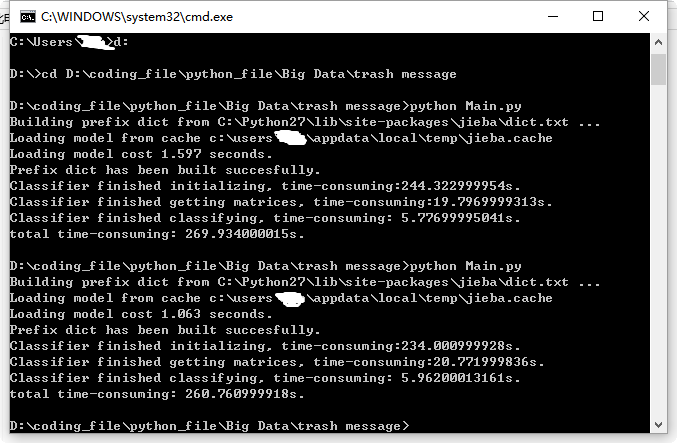
最终程序每次运行耗时平均在260秒-270秒之间,附代码:
ImportIntoDB.py:
 # -*- coding:utf-8 -*-

 __author__ = 'Jz'

 import MySQLdb

 import codecs

 import re

 import time

 # txt_path = 'D:/coding_file/python_file/Big Data/trash message/train80w.txt'

 txt_path = 'D:/coding_file/python_file/Big Data/trash message/test20w.txt'

 # use regular expression to split string into parts

 # split_pattern_80w = re.compile(u'([0-9]+).*?([01])(.*)')

 split_pattern_20w = re.compile(u'([0-9]+)(.*)')

 txt = codecs.open(txt_path, 'r')

 lines = txt.readlines()

 start_time = time.time()

 #connect mysql database

 con = MySQLdb.connect(host = 'localhost', port = 3306, user = 'root', passwd = '*****', db = 'TrashMessage', charset = 'UTF8')

 cur = con.cursor()

 # insert into 'train' table

 # sql = 'insert into train(sms_id, sms_type, content) values (%s, %s, %s)'

 # for line in lines:

 #     match = re.match(split_pattern_80w, line)

 #     sms_id, sms_type, content = match.group(1), match.group(2), match.group(3).lstrip()

 #     cur.execute(sql, (sms_id, sms_type, content))

 #     print sms_id

 # # commit transaction

 # con.commit()

 # insert into 'test' table

 sql = 'insert into test(sms_id, content) values (%s, %s)'

 for line in lines:

     match = re.match(split_pattern_20w, line)

     sms_id, content = match.group(1), match.group(2).lstrip()

     cur.execute(sql, (sms_id, content))

     print sms_id

 # commit transaction

 con.commit()

 cur.close()

 con.close()

 txt.close()

 end_time = time.time()

 print 'time-consuming: ' + str(end_time - start_time) + 's.'
DataHandler.py:
 # -*- coding:utf-8 -*-

 __author__ = 'Jz'

 import MySQLdb

 import jieba

 import re

 class DataHandler:

     def __init__(self):

         try:

             self.con = MySQLdb.connect(host = 'localhost', port = 3306, user = 'root', passwd = '*****', db = 'TrashMessage', charset = 'UTF8')

             self.cur = self.con.cursor()

         except MySQLdb.OperationalError, oe:

             print 'Connection error! Details:', oe

     def __del__(self):

         self.cur.close()

         self.con.close()

     # obsolete function

     # def getConnection(self):

     #     return self.con

     # obsolete function

     # def getCursor(self):

     #     return self.cur

     def query(self, sql):

         self.cur.execute(sql)

         result_set = self.cur.fetchall()

         return result_set

     def resultSetTransformer(self, train, test):

         # list of words divided by jieba module after de-duplication

         train_division = []

         test_division = []

         # list of classification of each message

         train_class = []

         # divide messages into words

         for record in train:

             train_class.append(record[1])

             division = jieba.cut(record[2])

             filtered_division_set = set()

             for word in division:

                 filtered_division_set.add(word + ' ')

             division = list(filtered_division_set)

             str_word = ''.join(division)

             train_division.append(str_word)

         # handle test set in a similar way as above

         for record in test:

             division = jieba.cut(record[1])

             filtered_division_set = set()

             for word in division:

                 filtered_division_set.add(word + ' ')

             division = list(filtered_division_set)

             str_word = ''.join(division)

             test_division.append(str_word)

         return train_division, train_class, test_division
Classifier.py:
 # -*- coding:utf-8 -*-

 __author__ = 'Jz'

 from DataHandler import DataHandler

 from sklearn.feature_extraction.text import TfidfVectorizer

 from sklearn.feature_extraction.text import TfidfTransformer

 from sklearn.feature_extraction.text import CountVectorizer

 from sklearn.naive_bayes import MultinomialNB

 import time

 class Classifier:

     def __init__(self):

         start_time = time.time()

         self.data_handler = DataHandler()

         # get result set

         self.train = self.data_handler.query('select * from train')

         self.test = self.data_handler.query('select * from test')

         self.train_division, self.train_class, self.test_division = self.data_handler.resultSetTransformer(self.train, self.test)

         end_time = time.time()

         print 'Classifier finished initializing, time-consuming:' + str(end_time - start_time) + 's.'

     def getMatrices(self):

         start_time = time.time()

         # convert a collection of raw documents to a matrix of TF-IDF features.

         self.tfidf_vectorizer = TfidfVectorizer()

         # learn vocabulary and idf, return term-document matrix [sample, feature]

         self.train_count_matrix = self.tfidf_vectorizer.fit_transform(self.train_division)

         # transform the count matrix of the train set to a normalized tf-idf representation

         self.tfidf_transformer = TfidfTransformer()

         self.train_tfidf_matrix = self.tfidf_transformer.fit_transform(self.train_count_matrix)

         end_time = time.time()

         print 'Classifier finished getting matrices, time-consuming:' + str(end_time - start_time) + 's.'

     def classify(self):

         self.getMatrices()

         start_time = time.time()

         # convert a collection of text documents to a matrix of token counts

         # scikit-learn doesn't support chinese vocabulary

         test_tfidf_vectorizer = CountVectorizer(vocabulary = self.tfidf_vectorizer.vocabulary_)

         # learn the vocabulary dictionary and return term-document matrix.

         test_count_matrix = test_tfidf_vectorizer.fit_transform(self.test_division)

         # transform a count matrix to a normalized tf or tf-idf representation

         test_tfidf_transformer = TfidfTransformer()

         test_tfidf_matrix = test_tfidf_transformer.fit(self.train_count_matrix).transform(test_count_matrix)

         # the multinomial Naive Bayes classifier is suitable for classification with discrete features

         # e.g., word counts for text classification).

         naive_bayes = MultinomialNB(alpha = 0.65)

         naive_bayes.fit(self.train_tfidf_matrix, self.train_class)

         prediction = naive_bayes.predict(test_tfidf_matrix)

         # output result to a csv file

         index = 0

         csv = open('result.csv', 'w')

         for sms_type in prediction:

             csv.write(str(self.test[index][0]) + ',' + str(sms_type) + '\n')

             index += 1

         csv.close()

         end_time = time.time()

         print 'Classifier finished classifying, time-consuming: ' + str(end_time - start_time) + 's.'
Main.py:
 # -*- coding:utf-8 -*-

 __author__ = 'Jz'

 import time

 from Classifier import Classifier

 start_time = time.time()

 classifier = Classifier()

 classifier.classify()

 end_time = time.time()

 print 'total time-consuming: ' + str(end_time - start_time) + 's.'
使用Python 2.7实现的垃圾短信识别器的更多相关文章
- python数据挖掘第三篇-垃圾短信文本分类
数据挖掘第三篇-文本分类 文本分类总体上包括8个步骤.数据探索分析->数据抽取->文本预处理->分词->去除停用词->文本向量化表示->分类器->模型评估.重 ...
- 利用python库twilio来免费发送短信
大家好,我是四毛,最近开通了个人公众号“用Python来编程”,欢迎大家“关注”,这样您就可以收到优质的文章了. 今天跟大家分享的主题是利用python库twilio来免费发送短信. 先放一张成品图 ...
- 新出台的治理iMessage垃圾短信的规则
工信部拟制定<通信短信息服务管理规定>,为治理垃圾短信提供执法根据.当中,对于苹果iMessage垃圾信息泛滥现象,工信部也将跟踪研究技术监測和防范手段.这意味着长期以来处于监管" ...
- ML.NET 示例:二元分类之垃圾短信检测
写在前面 准备近期将微软的machinelearning-samples翻译成中文,水平有限,如有错漏,请大家多多指正. 如果有朋友对此感兴趣,可以加入我:https://github.com/fei ...
- 用python twilio模块实现发手机短信的功能
前排提示:这个模块不是用于对陌生人进行短信轰炸和电话骚扰的,这个模块也没有这个功能,如果是抱着这个心态来的,可以关闭网页了 语言:python 步骤一:安装twilio模块 pip install t ...
- XSS之偷梁换柱--盲打垃圾短信平台
https://www.t00ls.net/thread-49742-1-1.html
- R 基于朴素贝叶斯模型实现手机垃圾短信过滤
# 读取数数据, 查看数据结构 df_raw <- read.csv("sms_spam.csv", stringsAsFactors=F) str(df_raw) leng ...
- 用Python免费发短信,实现程序实时报警
进入正文 今天跟大家分享的主题是利用python库twilio来免费发送短信. 先放一张成品图: 代码放在了本文最后的地址中 正文 眼尖的小伙伴已经发现了上面的短信的前缀显示这个短信来自于一个叫Twi ...
- python调用腾讯云短信接口
目录 python调用腾讯云短信接口 账号注册 python中封装腾讯云短信接口 python调用腾讯云短信接口 账号注册 去腾讯云官网注册一个腾讯云账号,通过实名认证 然后开通短信服务,创建短信应用 ...
随机推荐
- vue生命周期以及vue的计算属性
一.Vue生命周期(vue实例从创建到销毁的过程,称为生命周期,共有八个阶段) 1.beforeCreate :在实例初始化之后,数据观测 (data observer) 和 event/watche ...
- beego——模板函数
beego 支持用户定义模板函数,但是必须在 beego.Run() 调用之前,设置如下: func hello(in string)(out string){ out = in + "wo ...
- 【c++习题】【17/5/8】重载运算符
1.设计一个Complex(复数)类,完成如下要求: 该类具有实部(Real_Part)和虚部(Image_Part)通过重载运算符“+”实现两个复数的相加通过重载运算符“+”实现一个复数与一个数值的 ...
- python中访问限制
在Class内部,可以有属性和方法,而外部代码可以通过直接调用实例变量的方法来操作数据,这样,就隐藏了内部的复杂逻辑. 但是,从前面Student类的定义来看,外部代码还是可以自由地修改一个实例的na ...
- Sybase:删除表中的某列
Sybases:删除表中的某列 alter table tb1(表名) drop clo1(列名); commit;
- D3学习之动画和变换
D3学习之动画和变换 ##(17.02.27-02.28) 主要学习到了D3对动画和缓动函数的一些应用,结合前面的选择器.监听事件.自定义插值器等,拓展了动画的效果和样式. 主要内容 单元素动画 多元 ...
- Linux下针对路由功能配置iptables的方法详解
作为公司上网的路由器需要实现的功能有nat地址转换.dhcp.dns缓存.流量控制.应用程序控制,nat地址转换通过iptables可以直 接实现,dhcp服务需要安装dhcpd,dns缓存功能需要使 ...
- iOS开发进阶 - 日志输出框架CocoaLumberjack与XcodeColors插件的简单使用(swift版)
CocoaLumberjack是Mac和iOS上一个集快捷.简单.强大和灵活于一身的日志框架.XcodeColors是用于控制台着色的工具,配合着CocoaLumberjack用有更好的效果,不废话, ...
- Linux下MySQL 5.6.24的编译安装与部署
MySQL 5.6正式版发布了,相对于5.5版本作出了不少改进,其源码安装配置方式也有所变化,本文根据实际操作,不断尝试,精确还原了安装的具体步骤. 在Linux下安装MySQL前,先确认卸载系统自带 ...
- Google maps API
https://developers.google.com/kml/documentation/kml_tuthttps://developers.google.com/maps/documentat ...