概述
在javaweb高速发展的今天,我们软件设计人员往往会用很多种方式对软件划分模块,目的就是为了能有清晰的设计和低耦合性的,高重用性的软件。Maven有很好的依赖管理系统(Dependency Management System)和项目生命周期的管理(Project Leftcycle),而其中的依赖管理是本文阐述和做出实例的重点。
实例背景
利用一个教程的上面的例子,给大家做讲解。Maven安装有两种方式,一种是直接到
Maven官网下载自己电脑的操作系统相应的版本安装,不管是window,linux还是Max os同时
官网安装教程也是挺不错的。另外一种是安装eclipse的maven插件,这个很多人都用过,eclipse上面的plugin也是琳琅满目,具体教程网上很多哈。我们今天讲解主要针对后面一种方式,在eclipse进行的搭建Maven项目的操作。对于刚刚接触Maven和不熟悉command行的同学来说,可以是直观的操作,很好。
Maven是apache的一个项目,所以也是源于服务java项目的一个开源工具。所以很多概念也是和java中的基本概念很是相似,比如说继承。我们说java中的父类和子类的关系,子类可以引用父类中非private的变量和方法。反映到Maven项目的搭建也是一样的。Maven中的parent定义的dependency,其中继承者是可以直接使用parent中的Maven Dependencies的。
被继承的Maven项目中的POM的部分定义是
<groupId>com.company</groupId>

<artifactId>company-project-parent</artifactId>

<version>0.0.1-SNAPSHOT</version>

<packaging>pom</packaging>
继承的Maven项目中的POM的关键部分就是
<parent>

<groupId>com.taotao</groupId>

<artifactId>company-project-parent</artifactId>

<version>0.0.1-SNAPSHOT</version>

</parent>

<artifactId>company-project-children</artifactId>
操作步骤
1.建立Maven的parent项目
- 创建maven项目

- 填写group Id和artifact Id和选择Packaging

- 编辑web-parent中项目的pom文件
<projectxmlns="http://maven.apache.org/POM/4.0.0"xmlns:xsi="http://www.w3.org/2001/XMLSchema-instance"

xsi:schemaLocation="http://maven.apache.org/POM/4.0.0 http://maven.apache.org/xsd/maven-4.0.0.xsd">

<modelVersion>4.0.0</modelVersion>

<groupId>com.company</groupId>

<artifactId>web-parent</artifactId>

<version>0.0.1-SNAPSHOT</version>

<packaging>pom</packaging>

<!-- 集中定义依赖版本号 -->

<properties>

<junit.version>4.12</junit.version>

<spring.version>4.1.3.RELEASE</spring.version>

<mybatis.version>3.2.8</mybatis.version>

<mybatis.spring.version>1.2.2</mybatis.spring.version>

<mybatis.paginator.version>1.2.15</mybatis.paginator.version>

<mysql.version>5.1.32</mysql.version>

<slf4j.version>1.6.4</slf4j.version>

<jackson.version>2.4.2</jackson.version>

<druid.version>1.0.9</druid.version>

<httpclient.version>4.3.5</httpclient.version>

<jstl.version>1.2</jstl.version>

<servlet-api.version>2.5</servlet-api.version>

<jsp-api.version>2.0</jsp-api.version>

<joda-time.version>2.5</joda-time.version>

<commons-lang3.version>3.3.2</commons-lang3.version>

<commons-io.version>1.3.2</commons-io.version>

<commons-net.version>3.3</commons-net.version>

<pagehelper.version>3.4.2-fix</pagehelper.version>

<jsqlparser.version>0.9.1</jsqlparser.version>

<commons-fileupload.version>1.3.1</commons-fileupload.version>

<jedis.version>2.7.2</jedis.version>

<solrj.version>4.10.3</solrj.version>

</properties>

<!-- 只定义依赖的版本,并不实际依赖 -->

<dependencyManagement>

<dependencies>

<!-- 时间操作组件 -->

<dependency>

<groupId>joda-time</groupId>

<artifactId>joda-time</artifactId>

<version>${joda-time.version}</version>

</dependency>

<!-- Apache工具组件 -->

<dependency>

<groupId>org.apache.commons</groupId>

<artifactId>commons-lang3</artifactId>

<version>${commons-lang3.version}</version>

</dependency>

<dependency>

<groupId>org.apache.commons</groupId>

<artifactId>commons-io</artifactId>

<version>${commons-io.version}</version>

</dependency>

<dependency>

<groupId>commons-net</groupId>

<artifactId>commons-net</artifactId>

<version>${commons-net.version}</version>

</dependency>

<!-- Jackson Json处理工具包 -->

<dependency>

<groupId>com.fasterxml.jackson.core</groupId>

<artifactId>jackson-databind</artifactId>

<version>${jackson.version}</version>

</dependency>

<!-- httpclient -->

<dependency>

<groupId>org.apache.httpcomponents</groupId>

<artifactId>httpclient</artifactId>

<version>${httpclient.version}</version>

</dependency>

<!-- 单元测试 -->

<dependency>

<groupId>junit</groupId>

<artifactId>junit</artifactId>

<version>${junit.version}</version>

<scope>test</scope>

</dependency>

<!-- 日志处理 -->

<dependency>

<groupId>org.slf4j</groupId>

<artifactId>slf4j-log4j12</artifactId>

<version>${slf4j.version}</version>

</dependency>

<!-- Mybatis -->

<dependency>

<groupId>org.mybatis</groupId>

<artifactId>mybatis</artifactId>

<version>${mybatis.version}</version>

</dependency>

<dependency>

<groupId>org.mybatis</groupId>

<artifactId>mybatis-spring</artifactId>

<version>${mybatis.spring.version}</version>

</dependency>

<dependency>

<groupId>com.github.miemiedev</groupId>

<artifactId>mybatis-paginator</artifactId>

<version>${mybatis.paginator.version}</version>

</dependency>

<dependency>

<groupId>com.github.pagehelper</groupId>

<artifactId>pagehelper</artifactId>

<version>${pagehelper.version}</version>

</dependency>

<!-- MySql -->

<dependency>

<groupId>mysql</groupId>

<artifactId>mysql-connector-java</artifactId>

<version>${mysql.version}</version>

</dependency>

<!-- 连接池 -->

<dependency>

<groupId>com.alibaba</groupId>

<artifactId>druid</artifactId>

<version>${druid.version}</version>

</dependency>

<!-- Spring -->

<dependency>

<groupId>org.springframework</groupId>

<artifactId>spring-context</artifactId>

<version>${spring.version}</version>

</dependency>

<dependency>

<groupId>org.springframework</groupId>

<artifactId>spring-beans</artifactId>

<version>${spring.version}</version>

</dependency>

<dependency>

<groupId>org.springframework</groupId>

<artifactId>spring-webmvc</artifactId>

<version>${spring.version}</version>

</dependency>

<dependency>

<groupId>org.springframework</groupId>

<artifactId>spring-jdbc</artifactId>

<version>${spring.version}</version>

</dependency>

<dependency>

<groupId>org.springframework</groupId>

<artifactId>spring-aspects</artifactId>

<version>${spring.version}</version>

</dependency>

<!-- JSP相关 -->

<dependency>

<groupId>jstl</groupId>

<artifactId>jstl</artifactId>

<version>${jstl.version}</version>

</dependency>

<dependency>

<groupId>javax.servlet</groupId>

<artifactId>servlet-api</artifactId>

<version>${servlet-api.version}</version>

<scope>provided</scope>

</dependency>

<dependency>

<groupId>javax.servlet</groupId>

<artifactId>jsp-api</artifactId>

<version>${jsp-api.version}</version>

<scope>provided</scope>

</dependency>

<!-- 文件上传组件 -->

<dependency>

<groupId>commons-fileupload</groupId>

<artifactId>commons-fileupload</artifactId>

<version>${commons-fileupload.version}</version>

</dependency>

<!-- Redis客户端 -->

<dependency>

<groupId>redis.clients</groupId>

<artifactId>jedis</artifactId>

<version>${jedis.version}</version>

</dependency>

<!-- solr客户端 -->

<dependency>

<groupId>org.apache.solr</groupId>

<artifactId>solr-solrj</artifactId>

<version>${solrj.version}</version>

</dependency>

</dependencies>

</dependencyManagemen>

<build>

        <finalName>${project.artifactId}</finalName>

        <plugins>

            <!-- 资源文件拷贝插件 -->

            <plugin>

                <groupId>org.apache.maven.plugins</groupId>

                <artifactId>maven-resources-plugin</artifactId>

                <version>2.7</version>

                <configuration>

                    <encoding>UTF-8</encoding>

                </configuration>

            </plugin>

            <!-- java编译插件 -->

            <plugin>

                <groupId>org.apache.maven.plugins</groupId>

                <artifactId>maven-compiler-plugin</artifactId>

                <version>3.2</version>

                <configuration>

                    <source>1.7</source>

                    <target>1.7</target>

                    <encoding>UTF-8</encoding>

                </configuration>

            </plugin>

        </plugins>

        <pluginManagement>

            <plugins>

                <!-- 配置Tomcat插件 -->

                <plugin>

                    <groupId>org.apache.tomcat.maven</groupId>

                    <artifactId>tomcat7-maven-plugin</artifactId>

                    <version>2.2</version>

                </plugin>

            </plugins>

        </pluginManagement>

    </build>t>

</project>
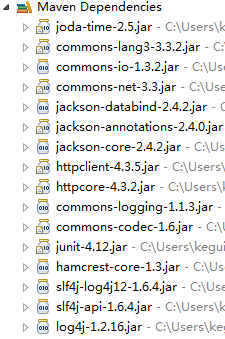
其中<modelVersion>、<groupId>、<artifactId>、<version>、<packaging>是创建Maven项目的时候有了,但是<properties>、<dependencyManagement>、<build>中的内容是后面添加的。<dependencyManagement>是定义一个虚拟的资源,这个部分并不直接使用,而<dependencyManagement>中的<dependency>,它的<version>会直接引用到<properties>中的各个resource的版本号。由于<dependencyManagement>中的资源不会直接使用,我们会发现,即使我们定义完这些具体的资源,项目中也没有具体的Maven Dependencies的jar包出现。
这个现象有点像java中interface,定义了变量和方法,但是不会直接使用,得有具体的class来实现。所以我们发现继承了的Maven项目如果在<dependencies>“实现”了parent maven的<dependency>,就会直接的出现改jar包。
当然,如果第一次建立Maven项目,要等待很长时间去maven的网上资源库下载到相应的文件,所以不要着急。
|
2.创建子项目web-common
- 创建一个子项目,packagin要选择jar,parent project要选择要继承的maven project。packaging中有三种选项,一种是pom,一种是jar,一种是war。无论选择哪一种,最后都是maven项目,所有都带有pom配置文件。但是jar和war是会有其他一些文件(jar中有libraries, resources and accessories files like property files,而war将会被部署在一些服务容器上面,所以war有jsp, html, javascript and other files necessary )

web-common的pom的文件会如下
<projectxmlns="http://maven.apache.org/POM/4.0.0"xmlns:xsi="http://www.w3.org/2001/XMLSchema-instance"

xsi:schemaLocation="http://maven.apache.org/POM/4.0.0 http://maven.apache.org/xsd/maven-4.0.0.xsd">

<modelVersion>4.0.0</modelVersion>

<parent>

<groupId>com.company</groupId>

<artifactId>web-parent</artifactId>

<version>0.0.1-SNAPSHOT</version>

</parent>

<groupId>com.company</groupId>

<artifactId>web-common</artifactId>

<version>0.0.1-SNAPSHOT</version>

</project>
- 但是我们要添加部分内容
<dependencies>

<dependency>

<groupId>joda-time</groupId>

<artifactId>joda-time</artifactId>

</dependency>

<!-- Apache工具组件 -->

<dependency>

<groupId>org.apache.commons</groupId>

<artifactId>commons-lang3</artifactId>

</dependency>

<dependency>

<groupId>org.apache.commons</groupId>

<artifactId>commons-io</artifactId>

</dependency>

<dependency>

<groupId>commons-net</groupId>

<artifactId>commons-net</artifactId>

</dependency>

<!-- Jackson Json处理工具包 -->

<dependency>

<groupId>com.fasterxml.jackson.core</groupId>

<artifactId>jackson-databind</artifactId>

</dependency>

<!-- httpclient -->

<dependency>

<groupId>org.apache.httpcomponents</groupId>

<artifactId>httpclient</artifactId>

</dependency>

<!-- 单元测试 -->

<dependency>

<groupId>junit</groupId>

<artifactId>junit</artifactId>

<scope>test</scope>

</dependency>

<!-- 日志处理 -->

<dependency>

<groupId>org.slf4j</groupId>

<artifactId>slf4j-log4j12</artifactId>

</dependency>

</dependencies>
- Finish后,我们会看pom和war的Maven项目的不同
- 到这里我们就会讲完了继承的关系了,在下一篇会讲到聚合的重点,这也是十分重要的。
|
- Maven聚合与继承的实例讲解(二)
继续上一节讲Maven的内容,我们这个节继续讲Maven继承和聚合的其他内容. 现在我们新建一个实例来测试Maven有关于聚合的部分 测试开始 一.建立以pom为packaging的项目 ...
- 06 Maven 聚合和继承
Maven 聚合和继承 1. 聚合 2. 继承 <parent> <groupId>org.apache.karaf.demos</groupId> <art ...
- maven聚合与继承笔记
maven聚合 聚合的目的是为了快速构建项目,当我们有几个maven模块,想要一次性构建,而不是到每个模块下面去执行maven命令,这时候就需要使用maven聚合(或者称为多模块). 使用聚合的时候, ...
- (十四)Maven聚合与继承
1.Maven聚合 我们在平时的开发中,项目往往会被划分为好几个模块,比如common公共模块.system系统模块.log日志模块.reports统计模块.monitor监控模块等等.这时我们肯定会 ...
- Maven——聚合与继承
原文:http://www.cnblogs.com/xdp-gacl/p/4058008.html 一.聚合 如果我们想一次构建多个项目模块,那我们就需要对多个项目模块进行聚合 1.1.聚合配置代码 ...
- Maven聚合和继承的详细解释
说到聚合与继承我们都非常熟悉,maven相同也具备这种设计原则.以下我们来看一下Maven的pom怎样进行聚合与继承的配置实现. 一.为什么要聚合? 随着技术的飞速发展和各类用户对软件的要求越来越高. ...
- 笔记:Maven 聚合和继承
聚合模块 我们希望一次构建两个或更多项目,而不是到每个模块的目录下分别执行mvn命令,Maven 聚合这一特性就是为该需求服务的, 为了使用聚合,我们必须创建一个聚合模块,通过该模块与其他项目聚合,并 ...
- maven课程 项目管理利器-maven 3-10 maven聚合和继承 4星
本节主要讲了以下内容: 1 maven聚合 2 maven继承 1 maven聚合 <!-- 聚合特有标签 --> <groupId>com.hongxing</grou ...
- maven学习(十二)——maven聚合与继承实战
聚合与继承实战 创建四个Maven项目,如下图所示:
随机推荐
- [Cocos2D-x For WP8]Sprite精灵
精灵(Sprite)是游戏里面的角色,比如敌人,游戏里面运动的物体等等,所以精灵是游戏里面一个非常常见的概念,几乎无处不在.在Cocos2D-x里面精灵是用CCSprite类来进行表示的,它可以用一张 ...
- wamp环境下安装memcached最好的详解教程^.^:(只需要3个步骤 )
win8.1 wampserver2.5 -Apache-2.4.9-Mysql-5.6.17-php5.5.12-64b 可以参考一下部分讲解有图,我就是看4-5个讲解,结合有一篇的截图最终才搞定的 ...
- Bootstrap做的HTML页面在本地IE打开正常,放到服务器上显示就不正常了
<meta name="renderer" content="webkit"> <meta http-equiv="X-UA-Com ...
- C#中如何在字符串中设置上标
一.HTML中:如字符串"21st" 想要把st 设置为上标,在html标签中是21<sup>st</sup> 二.C#编辑器中你可以使用 unicode ...
- nodejs模仿http请求组件nodegrass简单例子
1.搭建nodejs环境. 2.执行npm install nodegrass命令. 3.引入模块,var ng= require(nodegrass); 4.下面先看nodegrass底层的get方 ...
- Connect模块解析
Connect模块背景 Node.js的愿望是成为一个能构建高速,可伸缩的网络应用的平台,它本身具有基于事件,异步,非阻塞,回调等特性,这在前几篇专栏中有过描述. 正是基于这样的一些特性,Node.j ...
- 常见MVC框架比较
常见MVC框架比较 运行性能上: Jsp+servlet>struts1>spring mvc>struts2+freemarker>>struts2,ognl,值栈. ...
- mysql相似于oracle的to_char() to_date()方法
mysql日期和字符相互转换方法, date_format(date,'%Y-%m-%d') -------------->oracle中的to_char(); str_to_date(dat ...
- iosiPhone屏幕尺寸、分辨率及适配
iosiPhone屏幕尺寸.分辨率及适配 1.iPhone尺寸规格 设备 iPhone 宽 Width 高 Height 对角线 Diagonal 逻辑分辨率(point) Scale Fac ...
- [CareerCup] 16.2 Measure Time in a Context Switch 测量上下文转换的时间
16.2 How would you measure the time spent in a context switch? 上下文转换发生在两个进程之间,比如让一个等待进程进入执行和让一个运行进程进 ...
