
C#使用Command将dataGrideView表格内数据与数据库交互
本文主要介绍通过Command类使用SQL插入指令insert与查询指令select将dataGrideView表格内添加至数据库,与从数据库读出数据存放在dataGrideView表格中。
C#制作的界面如下:(制作过程不再详述)
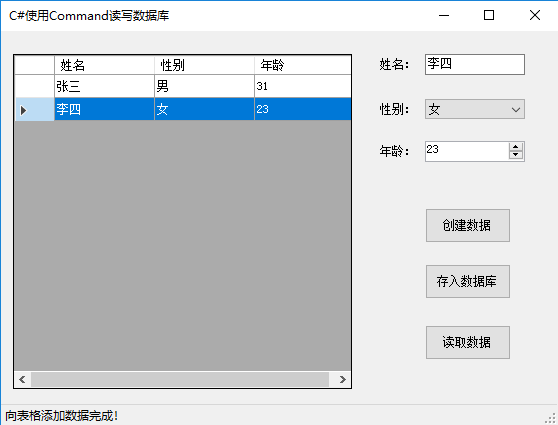
- 点击"创建数据"按钮,将姓名、性别、年龄文本框中的数据写入表格;
- 点击"存入数据库"按钮,将表格中数据存入数据库,存入成功后将表格内容清除;
- 点击"读取数据"按钮,将读取数据库中的内容并添加到表格中。
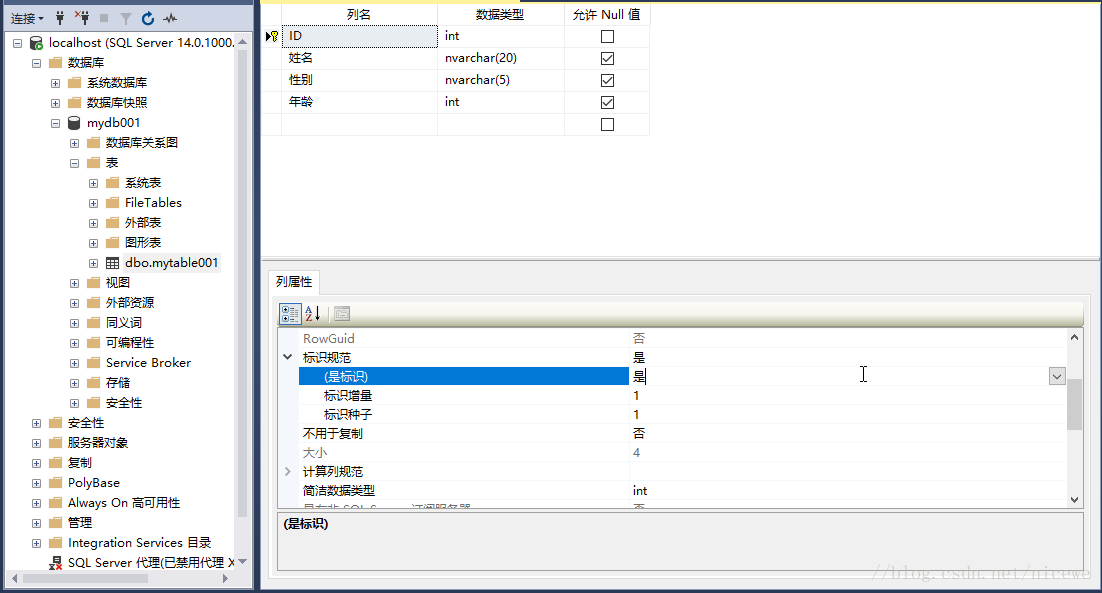
在编程之前向使用SQL Server创建数据库:mydb001,并在数据库中创建数据表:mytable001;
在数据表mytable001中添加列信息:ID(主键、自动赋值)、姓名(nvarchar(20))、性别(nvarchar(5))、年龄(int)。
如图:
C#代码如下:
 using System;

 using System.Windows.Forms;

 using System.Data.SqlClient;

 namespace 使用Command将表格中数据写入数据库

 {

     public partial class Form1 : Form

     {

         private SqlConnection myConnection = new SqlConnection();

         public Form1()

         {

             InitializeComponent();

         }

         private void Form1_Load(object sender, EventArgs e)

         {

             //定义字符串

             string connectionStr = "Server=localhost;integrated security=SSPI;Initial Catalog=mydb001";

             //创建连接对象

             myConnection = new SqlConnection(connectionStr);

             //测试是否连接成功

             try

             {

                 myConnection.Open();//打开数据库

             }

             catch

             {

                 MessageBox.Show("数据库连接错误","错误提示");

             }

             finally

             {

                 myConnection.Close();//关闭数据库

             }

             listGender.Items.Add("男");

             listGender.Items.Add("女");

             listGender.SelectedIndex = ;

             textName.Text = "";

             toolStripStatusLabel1.Text = "";

         }

         private void btnCreatData_Click(object sender, EventArgs e)

         {

             if (textName.Text.Trim() == "")

             {

                 MessageBox.Show("请输入姓名!","错误提示");

                 return;

             }

             int index = dataGridView1.Rows.Add();

             dataGridView1.Rows[index].Cells[].Value = textName.Text.Trim();

             dataGridView1.Rows[index].Cells[].Value = listGender.SelectedItem.ToString();

             dataGridView1.Rows[index].Cells[].Value = numAge.Value;

             toolStripStatusLabel1.Text = "向表格添加数据完成!";

         }

         private void btnSaveData_Click(object sender, EventArgs e)

         {

             bool result = true;

             try

             {

                 myConnection.Open();//打开数据库

                 for (int i = ; i < dataGridView1.RowCount; i++)

                 {

                     string commandSQLStr = "";//命令字符串

                     string commandSQLStr1 = "insert into mytable001(";//命令字符串

                     string commandSQLStr2 = ")values(";//命令字符串

                     string commandSQLStr3 = ")";//命令字符串

                     for (int j = ; j < dataGridView1.ColumnCount; j++)

                     {

                         if (j == )

                         {

                             commandSQLStr1 = commandSQLStr1 + dataGridView1.Columns[j].HeaderText.ToString();

                             if (dataGridView1.Rows[i].Cells[j].Value.GetType() == typeof(string))

                             {

                                 commandSQLStr2 = commandSQLStr2 +"\'"+ dataGridView1.Rows[i].Cells[j].Value.ToString() + "\'";

                             }

                             else

                             {

                                 commandSQLStr2 = commandSQLStr2 + dataGridView1.Rows[i].Cells[j].Value.ToString();

                             }

                         }

                         else

                         {

                             commandSQLStr1 = commandSQLStr1 + "," + dataGridView1.Columns[j].HeaderText.ToString();

                             if (dataGridView1.Rows[i].Cells[j].Value.GetType() == typeof(string))

                             {

                                 commandSQLStr2 = commandSQLStr2 + "," + "\'" + dataGridView1.Rows[i].Cells[j].Value.ToString() + "\'";

                             }

                             else

                             {

                                 commandSQLStr2 = commandSQLStr2 + "," + dataGridView1.Rows[i].Cells[j].Value.ToString();

                             }

                         }

                     }

                     commandSQLStr = commandSQLStr1 + commandSQLStr2 + commandSQLStr3;

                     SqlCommand myCommand = new SqlCommand(commandSQLStr, myConnection);//创建Command对象

                     myCommand.CommandTimeout = ;//设置超时时间为5秒

                     myCommand.ExecuteNonQuery();

                 }

             }

             catch

             {

                 result = false;

             }

             finally

             {

                 myConnection.Close();//关闭数据库

             }

             if (result)

             {

                 dataGridView1.Rows.Clear();

                 toolStripStatusLabel1.Text = "写入数据库成功!";

             }

             else

             {

                 toolStripStatusLabel1.Text = "写入数据库失败!";

             }

         }

         private void btnReadData_Click(object sender, EventArgs e)

         {

             try

             {

                 myConnection.Open();

                 string commandSQLStr = "select * from mytable001";//命令字符串

                 SqlCommand myCommand = new SqlCommand(commandSQLStr, myConnection);//创建Command对象

                 myCommand.CommandTimeout = ;//设置超时时间为5秒

                 SqlDataReader myDataReader = myCommand.ExecuteReader();

                 while (myDataReader.Read())

                 {

                     int index = dataGridView1.Rows.Add();

                     dataGridView1.Rows[index].Cells[].Value = myDataReader.GetValue();

                     dataGridView1.Rows[index].Cells[].Value = myDataReader.GetValue();

                     dataGridView1.Rows[index].Cells[].Value = myDataReader.GetValue();

                 }

                 myDataReader.Close();

                 toolStripStatusLabel1.Text = "从数据库读取数据完成!";

             }

             catch

             {

                 toolStripStatusLabel1.Text = "从数据库读取数据失败!";

             }

             finally

             {

                 myConnection.Close();

             }

         }

     }

 }
C#使用Command将dataGrideView表格内数据与数据库交互的更多相关文章
- 如何将Excl内数据导入数据库?
最近有个Excl表格内的数据需要导入SQL Server数据库内,使用SQL Server Management Studio客户端图形界面操作了一番,步骤还挺多,感觉有必要分享给大家一下,顺便自己也 ...
- BootStrap table动态增删改表格内数据
1:添加一个[操作]列 { title: "操作", align: 'center', valign: 'middle', width: 160, // 定义列的宽度,单位为像 ...
- js遍历获取表格内数据方法
1.一般的表格结构如下 <table> <tr> <td>id</td> <td>name</td> </tr> & ...
- 从Excel表格导入数据到数据库
数据库:SQL 1.小数据直接粘贴 2.用导入向导 3.用SSIS包 4.用SQL语句 现在详细说一下第4种方法,以.xlsx文件为例 .xlsx文件需要用provider“Microsoft.ACE ...
- Android系统编程入门系列之应用内数据保存数据库
上篇文章已经介绍了如何使用SharedPreferences存储键值对形式的轻量级数据,对于那些相同结构的多组数据,类似于存储Java中定义的类的多个对象属性值,如果按照键值对的形式一条条读写,需要分 ...
- Python+Selenium+Mysql(动态获取数据,数据库交互)
一.创建数据库连接 #!coding:utf-8 import pymysql ''' Python3之后不再支持MySQLdb的方式进行访问mysql数据库: 可以采用pymysql的方式 连接方式 ...
- 使用openpyxl模块将Excel中的数据导入数据库
这里将不介绍openpyxl模块的详细操作. 主要就是记录一个使用openpyxl模块将Excel表格的数据导入数据库中的实例. from openpyxl import load_workbook ...
- 怎么把excel表格内的数据导入数据库?
第一种方法: 思路:想要把excel表格内的数据直接导入数据库不是那么容易,可以把excel表格另存为.csv格式的文档(特点:内容以逗号分割):然后通过一系列的文档操作函数处理成为一个二维数组,然后 ...
- Linqpad使用(调试Linq、结合linq调试业务场景、表格内编辑数据)
linqpad是一款linq语句调试工具,功能如下: 1.直接执行linq语句并查看生成的原生sql语句 2.可结合linq+C#代码进行业务场景调试 3.表格内直接新增.修改.删除数据 4.直接 ...
随机推荐
- Codeforces Round #254 (Div. 2)B. DZY Loves Chemistry
B. DZY Loves Chemistry time limit per test 1 second memory limit per test 256 megabytes input standa ...
- 阿里云修改centos7主机名
为了玩Docker,买个阿里云主机也是够拼的了. [root@iZ284olvkmjZ ~]# 不过主机名中怎么好DT,无奈,修改. 我们需要的是永久生效,阿里云提供了两种方法: 方法(1). 输入h ...
- pinpoint本地开发——agent
准备工作 执行maven打包 打包完成后,agent的包在agent/target/pinpoint-agent-1.6.2下面 重要配置文件 pinpoint.config profiler.col ...
- ubuntu切换到root
sudo+命令,输入当前用户密码后以root权限执行命令,有时间限制且仅限当前命令. sudo -i,输入当前用户密码后以root权限登录shell,无时间限制.使用exit或logout退出. su ...
- 改善程序与设计的55个具体做法 day9
条款23:宁以non-member.non-friend替换member函数 即 以非成员函数 非友元函数 替换成员函数. 直观上,面向对象应该尽可能的封装,封装数据.封装操作等等,所以这个条款可能有 ...
- LeetCode:寻找重复数【287】
LeetCode:寻找重复数[287] 题目描述 给定一个包含 n + 1 个整数的数组 nums,其数字都在 1 到 n 之间(包括 1 和 n),可知至少存在一个重复的整数.假设只有一个重复的整数 ...
- url信息
var protocol = window.location.protocol; // "http:" var host = window.location.host; //&qu ...
- 在Treeview中节点的data属性中保存记录类型及其消除的办法
一.保存记录类型在data指针中: procedure TForm1.getheaditems(pp:TfrxBand;hnode:THeadTreeNode;var i:Integer;var j: ...
- hdu 4542 小明系列故事——未知剩余系 反素数 + 打表
小明系列故事——未知剩余系 Time Limit: 500/200 MS (Java/Others) Memory Limit: 65535/32768 K (Java/Others) Prob ...
- R Customizing graphics
Customizing graphics GraphicsLaTeXLattice (Treillis) plots In this chapter (it tends to be overly co ...