
python之 matplotlib模块之绘制堆叠柱状图
我们先来看一个结果图
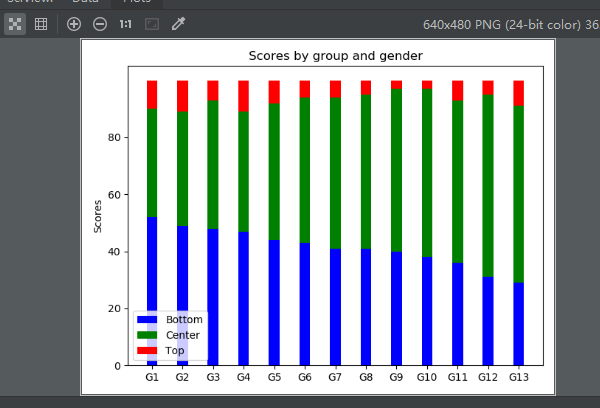
看到这个图,我个人的思路是
1 设置标题
import numpy as np

import matplotlib.pyplot as plt

plt.title('Scores by group and gender')
2 x坐标的间隔设置和文字设置
N = 13

ind = np.arange(N)  #[ 0  1  2  3  4  5  6  7  8  9 10 11 12]

plt.xticks(ind, ('G1', 'G2', 'G3', 'G4', 'G5', 'G6', 'G7', 'G8', 'G9', 'G10', 'G11', 'G12', 'G13'))
3 y坐标的文字设置和间隔设置
plt.yticks(np.arange(0, 81, 20)) #0到81 间隔20

plt.ylabel('Scores')
4 开始绘制主题条形图
Bottom = (52, 49, 48, 47, 44, 43, 41, 41, 40, 38, 36, 31, 29)

Center = (38, 40, 45, 42, 48, 51, 53, 54, 57, 59, 57, 64, 62)

Top = (10, 11, 7, 11, 8, 6, 6, 5, 3, 3, 7, 5, 9)

d = []

for i in range(0, len(Bottom)):

    sum = Bottom[i] + Center[i]

    d.append(sum)

width = 0.35  # 设置条形图一个长条的宽度

p1 = plt.bar(ind, Bottom, width, color='blue')

p2 = plt.bar(ind, Center, width, bottom=Bottom,color='green')  #在p1的基础上绘制,底部数据就是p1的数据

p3 = plt.bar(ind, Top, width, bottom=d,color='red')    #在p1和p2的基础上绘制,底部数据就是p1和p2
5 设置legend区分三部分数据
plt.legend((p1[0], p2[0], p3[0]), ('Bottom', 'Center', 'Top'),loc = 3) #loc=3 表示lower left 也就是底部最左
loc的设置参数
'best'         : 0, (only implemented for axes legends)(自适应方式)

'upper right'  : 1,

'upper left'   : 2,

'lower left'   : 3,

'lower right'  : 4,

'right'        : 5,

'center left'  : 6,

'center right' : 7,

'lower center' : 8,

'upper center' : 9,

'center'       : 10,
6 绘制出图形
plt.show()
7 最终代码为:
import numpy as np

import matplotlib.pyplot as plt

plt.title('Scores by group and gender')

N = 13

ind = np.arange(N)  #[ 0  1  2  3  4  5  6  7  8  9 10 11 12]

plt.xticks(ind, ('G1', 'G2', 'G3', 'G4', 'G5', 'G6', 'G7', 'G8', 'G9', 'G10', 'G11', 'G12', 'G13'))

plt.ylabel('Scores')

plt.yticks(np.arange(0, 81, 20))

Bottom = (52, 49, 48, 47, 44, 43, 41, 41, 40, 38, 36, 31, 29)

Center = (38, 40, 45, 42, 48, 51, 53, 54, 57, 59, 57, 64, 62)

Top = (10, 11, 7, 11, 8, 6, 6, 5, 3, 3, 7, 5, 9)

d = []

for i in range(0, len(Bottom)):

    sum = Bottom[i] + Center[i]

    d.append(sum)

width = 0.35  # 设置条形图一个长条的宽度

p1 = plt.bar(ind, Bottom, width, color='blue')

p2 = plt.bar(ind, Center, width, bottom=Bottom,color='green')

p3 = plt.bar(ind, Top, width, bottom=d,color='red')

plt.legend((p1[0], p2[0], p3[0]), ('Bottom', 'Center', 'Top'),loc = 3)

plt.show()
python之 matplotlib模块之绘制堆叠柱状图的更多相关文章
- Python使用matplotlib模块绘制多条折线图、散点图
用matplotlib模块 #!usr/bin/env python #encoding:utf-8 ''' __Author__:沂水寒城 功能:折线图.散点图测试 ''' import rando ...
- python之 matplotlib模块之基本三图形(直线,曲线,直方图,饼图)
matplotlib模块是python中一个强大的绘图模块 安装 pip install matplotlib 首先我们来画一个简单的图来感受它的神奇 import numpy as np impo ...
- 为python安装matplotlib模块
matplotlib是python中强大的画图模块. 首先确保已经安装python,然后用pip来安装matplotlib模块. 进入到cmd窗口下,执行python -m pip install - ...
- Python中matplotlib模块解析
用Matplotlib绘制二维图像的最简单方法是: 1. 导入模块 导入matplotlib的子模块 import matplotlib.pyplot as plt import numpy as ...
- Python之matplotlib模块安装
numpy 1.下载安装 源代码 http://sourceforge.net/projects/numpy/files/NumPy/ 安装 python2.7 setup.py install 2. ...
- python: 使用matplotlib的pyplot绘制图表
工作中需要观察数据的变化趋势,用python写了一段小程序来用显示简单图表,分享出来方便有同样需求的人,matplotlib是个很不错的库. #!encode=utf8 from matplotlib ...
- Python的matplotlib模块的使用-Github仓库
import matplotlib.pyplot as plt import numpy as np import requests url='https://api.github.com/searc ...
- Python 使用matplotlib模块模拟掷骰子
掷骰子 骰子类 # die.py 骰子类模块 from random import randint class Die(): """骰子类""&quo ...
- python导入matplotlib模块出错
我的系统是linux mint.用新立得软件包安装了numpy和matplotlib.在导入matplotlib.pyplot时出错.说是没有python3-tk包. 于是就在shell中装了一下. ...
随机推荐
- MySql常用语句总结更新
1.Mysql修改字段的默认值: alter table tablename alter column drop default; (若本身存在默认值,则先删除) alter table tablen ...
- selenium设定请求头
如果只是需要设定User-Agent可以用如下所示方式 dcap = dict(DesiredCapabilities.PHANTOMJS)dcap["phantomjs.page.sett ...
- Spring Boot 获取 java resources 下文件
Spring Boot 获取 java resources 下文件 Spring Boot 获取 resources 目录下的目录(例:获取 resources 目录下的 template 目录): ...
- webpack-使用html-webpack-plugin和ejs-loader将侧栏、头部、底部公共html做成模板,并生成合并后的html页面
在学习前端自动化之前一直使用 PHP,JSP 将在每个页面将头部.侧栏.底部等部分引入,现在前端 "娱乐圈" 一直噼里啪啦的每天出新东西,自从接触了前端自动化我就觉得这种工作可以交 ...
- 使用 wx.navigateBack返回页面并携带参数的处理方式
getAddressList (){ let that = this; util.request(api.AddressList).then(function (res) { if (res.errn ...
- Vagrant 手册之 Vagrantfile - 最低版本
原文地址 可以在 Vagrantfile 中指定一组 Vagrant 的版本,以强制人们使用带有 Vagrantfile 的特定版本的 Vagrant.这可以帮助解决使用带有 Vagrantfile ...
- sourcetree for mac 使用
1.sourceTree clone 仓库 打开sourceTree, 点击 新仓库(1) -> 从url克隆(2), 如下图 如下图所示, 粘贴源url路径, 自动补全或者手动选择目标路径和名 ...
- 读取交货单拣配数量PIKMG(转)
原文链接:https://www.591sap.com/thread-953-1-1.html SAP交货单交货数量在lips中直接读取,但是拣配数量lfimg,只存在vbfa中,且如果基本计量单位和 ...
- input限制小数点的位数
在做限制input小数点的时候,我本来想通过vue里面的的watch监听来实现, ---实现逻辑是,通过监听输入的内容,当出现"."(点)的时候,记录通过indexOf获取点的位置 ...
- 【转载】sizeof()、strlen()、length()、size()详解和区别
c/c++中获取字符串长度.有以下函数:size().sizeof() .strlen().str.length();一.数组或字符串的长度:sizeof().strlen()1.sizeof():返 ...