
GreenPlum 大数据平台--基础使用(一)
一,操作语法
01,创建数据库
[gpadmin@greenplum01 ~]$ createdb testDB -E utf-8

--创建用户--

[gpadmin@greenplum01 ~]$ export PGDATABASE=testDB

--指定数据库名字

[gpadmin@greenplum01 ~]$  psql

--连接本地数据库

psql (8.3.23)

Type "help" for help.

testDB=# SELECT version();

                                                                                               version

-------------------------------------------------------------------------------------------------------------------------------

-----------------------------------------------------------------------

 PostgreSQL 8.3.23 (Greenplum Database 5.16.0 build commit:23cec7df0406d69d6552a4bbb77035dba4d7dd44) on x86_64-pc-linux-gnu, co

mpiled by GCC gcc (GCC) 6.2.0, 64-bit compiled on Jan 16 2019 02:32:15

(1 row)
02,使用说明
postgres=# \h create view;

Command:     CREATE VIEW

Description: define a new view

Syntax:

CREATE [ OR REPLACE ] [ TEMP | TEMPORARY ] VIEW name [ ( column_name [, ...] ) ]

    AS query

postgres=# \h create

Command:     CREATE AGGREGATE

Description: define a new aggregate function

Syntax:

CREATE AGGREGATE name ( input_data_type [ , ... ] ) (

.....

---\h 为语句的使用说明书
03,建表语句
--语法查询

\h create table

--创建表

create table test001(id int,name varchar(128)); --id 为分布键

create table test002(id int,name varchar(128)) distributed by (id); --同上

create table test003(id int,name varchar(128)) distributed by (id,name) --多个分布键

create table test004(id int,name varchar(128)) distributed randomly; --随机分布键

create table test005(id int primary,name varchar(128));

create table test006(id int unique,name varchar(128));

create table test007(id int unique,name varchar(128)) distributed by (id,name);

---创建一模一样的 表

create table test_like (like test001);
04,插入语句
执行insert语句注意分布键不要为空,否则分布键默认变成null',数据都被保存到一个节点上会导致分布不均
insert into test001 values (100,'tom'),(101,'lily'),(102,'jack'),(103,'linda');

insert into test002 values (200,'tom'),(101,'lily'),(202,'jack'),(103,'linda');
05,更新语句
不能批量对分布键执行update,因为分布键执行update需要将数据重分布.
update test002 set id=203 where id=202;
06,删除语句delete--truncate
delete 删除整张表比较慢,所以建议使用truncate
truncate test001;
07,查询语句
postgres=# select * from test2;

 id  | name

-----+------

 102 | zxc

 203 | rty

 105 | bnm

 101 | qwe

 201 | asd

 204 | dfg

(6 rows)
08,执行计划
postgres=# select * from test1 x,test2 y where x.id=y.id;

 id  | name | id  | name

-----+------+-----+------

 101 | lily | 101 | qwe

 102 | jack | 102 | zxc

(2 rows)

postgres=# explain select * from test1 x,test2 y where x.id=y.id;

                                              QUERY PLAN

------------------------------------------------------------------------------------------------------

 Gather Motion 8:1  (slice2; segments: 8)  (cost=0.00..862.00 rows=4 width=17)

   ->  Hash Join  (cost=0.00..862.00 rows=1 width=17)

         Hash Cond: test1.id = test2.id

         ->  Table Scan on test1  (cost=0.00..431.00 rows=1 width=9)

         ->  Hash  (cost=431.00..431.00 rows=1 width=8)

               ->  Redistribute Motion 8:8  (slice1; segments: 8)  (cost=0.00..431.00 rows=1 width=8)

                     Hash Key: test2.id

                     ->  Table Scan on test2  (cost=0.00..431.00 rows=1 width=8)

 Optimizer status: PQO version 3.21.0

(9 rows)
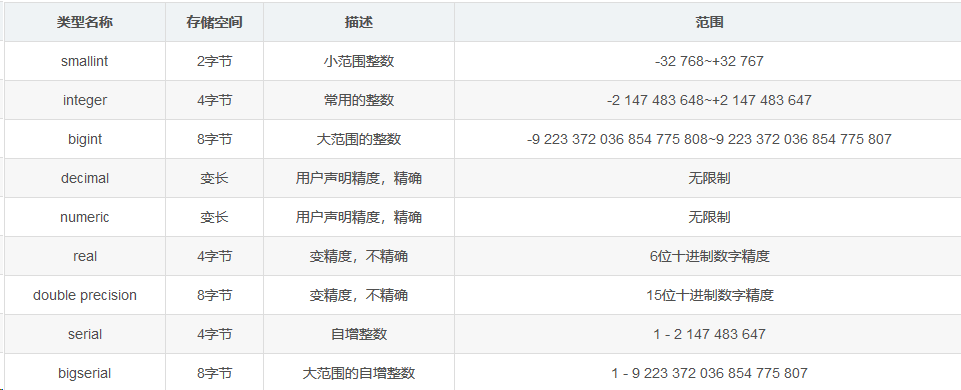
二,常用数据类型
1.数值类型
02,字符类型

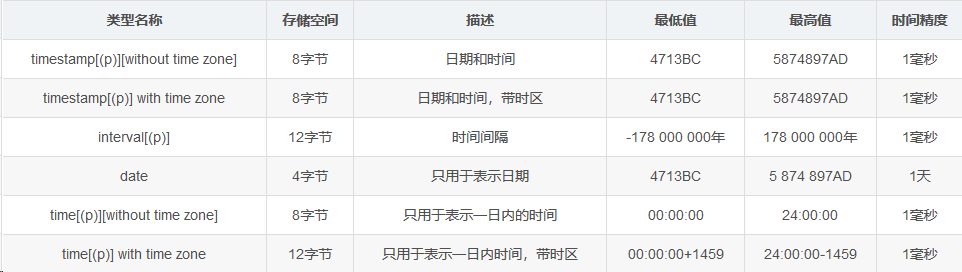
03,时间类型
三,常用函数
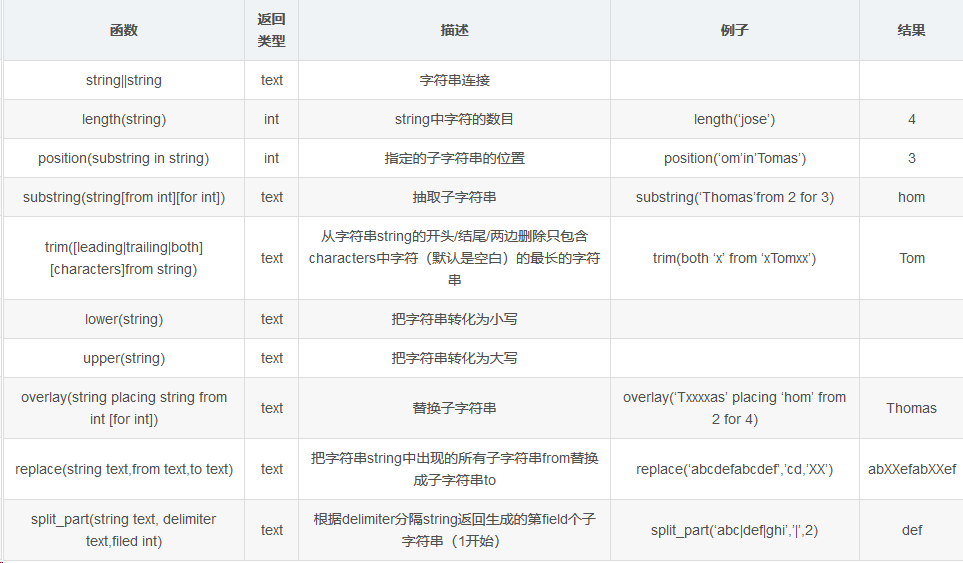
1,字符串函数
--

postgres=# VALUES ('hello|world!'),('greenplum|database');

      column1

--------------------

 hello|world!

 greenplum|database

(2 rows)

--

postgres=# SELECT substr('hello world!',2,3);

 substr

--------

 ell

(1 row)

--

postgres=# SELECT position('world' in 'hello world!');

 position

----------

        7

(1 row)
2,时间函数
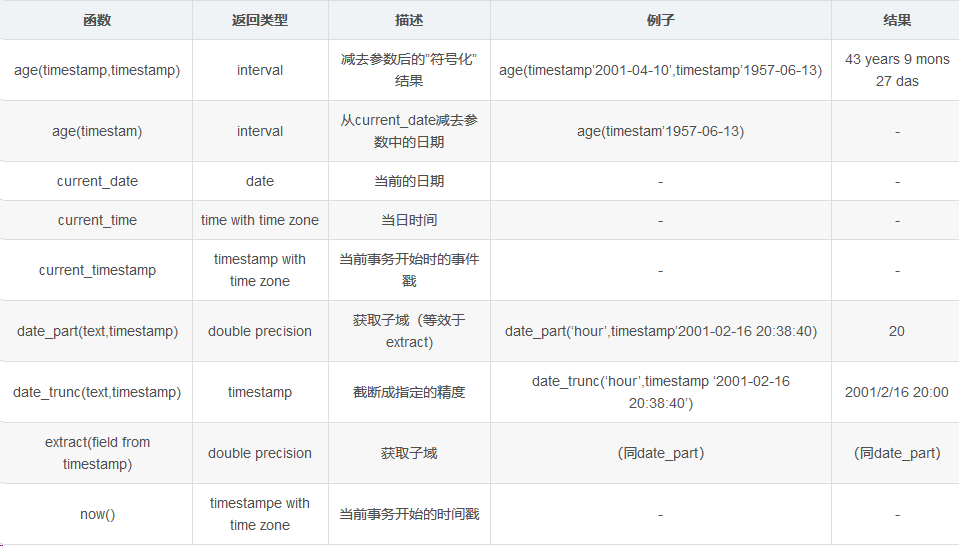
postgres=# SELECT now(),current_date,current_time,current_timestamp;

              now              |    date    |       timetz       |              now

-------------------------------+------------+--------------------+-------------------------------

 2019-03-17 22:26:58.330843-04 | 2019-03-17 | 22:26:58.330843-04 | 2019-03-17 22:26:58.330843-04

(1 row)
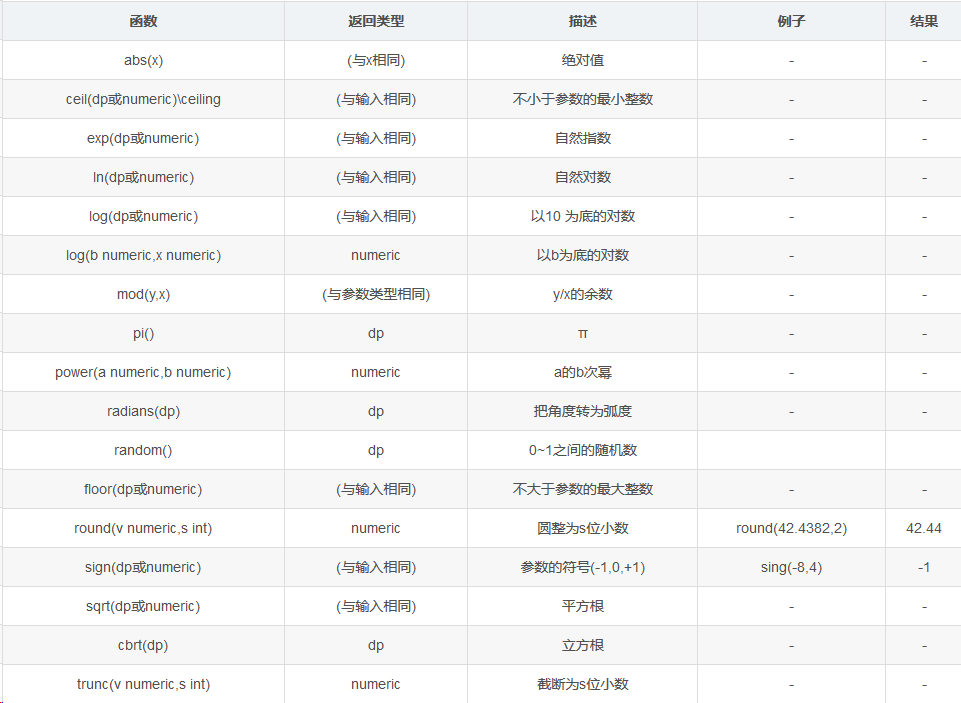
3,数值计算
四,其他函数
1,序列号生成函数——generate_series
postgres=# SELECT * from generate_series(6,10);

 generate_series

-----------------

               6

               7

               8

               9

              10

(5 rows)
语法: generate_series(x,y,t)

生成多行数据从x到另外y,步长为t,默认是1
2,字符串列转行——string_agg
string_agg(str,symbol [order by str])

(按照某字段排序)将str列转行,以symbol分隔
3,字符串行转列——regexp_split_to_table
把转成行的数据变成列数据
4,hash函数——md5,hashbpchar
md5的hash算法精度为128位,返回一个字符串
Hashbpchar的精度是32位,返回一个integer类型
postgres=# SELECT md5('admin')

postgres-# ;

               md5

----------------------------------

 21232f297a57a5a743894a0e4a801fc3

(1 row)

postgres=# SELECT hashbpchar('admin');

 hashbpchar

-------------

 -2087781708

(1 row)
GreenPlum 大数据平台--基础使用(一)的更多相关文章
- GreenPlum 大数据平台--基础使用(二)
连接参数 连接参数 描述 环境变量 应用名称 连接到数据库的应用名称,保存在application_name连接参数中.默认值是psql. $PGAPPNAME 数据库名 用户想要连接的数据库名称.对 ...
- GreenPlum 大数据平台--介绍
一,GreenPlum 01,介绍: Greenplum是一种基于PostgreSQL的分布式数据库,其采用shared-nothing架构,主机.操作系统.内存.存储都是自我控制的,不存在共享. 官 ...
- GreenPlum 大数据平台--监控
数据库状态监控活动 活动 过程 纠正措施 列出当前状态为down的Segment.如果有任何行被返回,就会生成一个警告或者告警. 推荐频率:每5到10分钟 重要度: IMPORTANT 在postgr ...
- GreenPlum 大数据平台--外部表(三)
一,外部表介绍 Greenplum 在数据加载上有一个明显的优势,就是支持数据的并发加载,gpfdisk是并发加载的工具,数据库中对应的就是外部表 所谓外部表,就是在数据库中只有表定义.没有数据,数据 ...
- GreenPlum 大数据平台--非并行备份(六)
一,非并行备份(pg_dump) 1) GP依然支持常规的PostgreSQL备份命令pg_dump和pg_dumpall 2) 备份将在Master主机上创建一个包含所有Segment数据的大的备份 ...
- GreenPlum 大数据平台--运维(三)
一,操作命令 01,启动gpstart 参数说明 COMMAND NAME: gpstart Starts a Greenplum Database system. ***************** ...
- GreenPlum 大数据平台--备份-邮件配置-gpcrondump & gpdbrestore(五)
01,备份 生成备份数据库 [gpadmin@greenplum01 ~]$ gpcrondump -l /gpbackup/back2/gpcorndump.log -x postgres -v [ ...
- GreenPlum 大数据平台--并行备份(四)
01,并行备份(gp_dump) 1) GP同时备份Master和所有活动的Segment实例 2) 备份消耗的时间与系统中实例的数量没有关系 3) 在Master主机上备份所有DDL文件和GP相关的 ...
- GreenPlum 大数据平台--安装
1. 环境准备 01, 安装包准备: Greenplum : >>>>链接地址 Pgadmin客户端 : >>>链接地址 greenplum-cc-web ...
随机推荐
- POJ2253 Frogger(spfa变形)
Description Freddy Frog is sitting on a stone in the middle of a lake. Suddenly he notices Fiona Fro ...
- AD对象DirectoryEntry本地开发
DirectoryEntry类如果需要在本地计算机开发需要满足以下条件: 1.本地计算机dns解析必须和AD域控制器的dns保持一致,如图: 2.必须模拟身份验证,才能操作查询AD用户 /// < ...
- 平台播放声音(ext.js)
首先把需要的两个js文件放在public/core路径下 (文件已经上传到博客了) 音频文件放在文件一级目录 代码:JxCustom.loadAudio("wav/NG.wav") ...
- Java Script 脚本的几种基本格式:
1. <script> document.Write("Hello wrrld!!!"); </script> 2. <scrip ...
- angular 模板表单
- Delphi XE8中开发DataSnap程序常见问题和解决方法 (-)启动创建好的DBExpress工程时候报错了!
当我们成功创建了使用DBExpress的DataSnap的服务器和客户端程序后,我们关闭了当前工程,当我们再次打开时候,有可能会出现这样的问题: 问题原因:这个问题是因为当前工程组默认启动的是客户端工 ...
- 1233: 传球游戏 [DP]
1233: 传球游戏 [DP] 时间限制: 1 Sec 内存限制: 128 MB 提交: 4 解决: 3 统计 题目描述 上体育课的时候,小蛮的老师经常带着同学们一起做游戏.这次,老师带着同学们一起做 ...
- 【bzoj4720】[Noip2016]换教室 期望dp+最短路
Description 对于刚上大学的牛牛来说,他面临的第一个问题是如何根据实际情况申请合适的课程.在可以选择的课程中,有2n节 课程安排在n个时间段上.在第i(1≤i≤n)个时间段上,两节内容相同的 ...
- cf555e
cf555e(缩点) 给一个 n 个点 m 条边的图,以及 q 对点 (s,t),让你给 m 条边定向.问是否存在一种方案,使每对点的 s 能走到 t. \(n,m,q≤ 2×10^5\). 首先,在 ...
- [NOI2010]能量采集 BZOJ2005 数学(反演)&&欧拉函数,分块除法
题目描述 栋栋有一块长方形的地,他在地上种了一种能量植物,这种植物可以采集太阳光的能量.在这些植物采集能量后,栋栋再使用一个能量汇集机器把这些植物采集到的能量汇集到一起. 栋栋的植物种得非常整齐,一共 ...