
PCL提取圆柱系数
网上看了很多教程,没看到圆柱提取后的系数解释。
源码如下:
#include <pcl/ModelCoefficients.h>

#include <pcl/io/pcd_io.h>

#include <pcl/point_types.h>

#include <pcl/filters/extract_indices.h>

#include <pcl/filters/passthrough.h>

#include <pcl/features/normal_3d.h>

#include <pcl/sample_consensus/method_types.h>

#include <pcl/sample_consensus/model_types.h>

#include <pcl/segmentation/sac_segmentation.h>

#include <pcl/visualization/pcl_visualizer.h>

#include <boost/thread/thread.hpp>

#include <pcl/filters/radius_outlier_removal.h>

typedef pcl::PointXYZ PointT;

// All the objects needed

pcl::PCDReader reader;

pcl::PassThrough<PointT> pass;

pcl::NormalEstimation<PointT, pcl::Normal> ne;

pcl::SACSegmentationFromNormals<PointT, pcl::Normal> seg;

pcl::PCDWriter writer;

pcl::ExtractIndices<PointT> extract;

pcl::search::KdTree<PointT>::Ptr tree(new pcl::search::KdTree<PointT>());

// Datasets

pcl::PointCloud<PointT>::Ptr cloud(new pcl::PointCloud<PointT>);

pcl::PointCloud<pcl::Normal>::Ptr cloud_normals(new pcl::PointCloud<pcl::Normal>);

pcl::ModelCoefficients::Ptr coefficients_plane(new pcl::ModelCoefficients), coefficients_cylinder(new pcl::ModelCoefficients);

pcl::PointIndices::Ptr inliers_plane(new pcl::PointIndices), inliers_cylinder(new pcl::PointIndices);

boost::shared_ptr<pcl::visualization::PCLVisualizer> viewer(new pcl::visualization::PCLVisualizer("viewer"));

pcl::PointCloud<pcl::PointXYZ>::Ptr clicked_points_3d(new pcl::PointCloud<pcl::PointXYZ>);

int num = ;

void pp_callback(const pcl::visualization::AreaPickingEvent& event, void* args)

{

    clicked_points_3d->points.clear();

    pcl::PointCloud<pcl::PointXYZ>::Ptr final(new pcl::PointCloud<pcl::PointXYZ>);

    std::vector< int > indices;

    if (event.getPointsIndices(indices) == -)

        return;

    for (int i = ; i < indices.size(); ++i)

    {

        clicked_points_3d->points.push_back(cloud->points.at(indices[i]));

    }

    //clicked_points_3d->width = 1;

    //clicked_points_3d->height = clicked_points_3d->size();

    //if (!clicked_points_3d->points.empty())

    //{

    //    writer.write("Selected.pcd", *clicked_points_3d, false);

    //}

    // Estimate point normals

    ne.setSearchMethod(tree);

    ne.setInputCloud(clicked_points_3d);

    ne.setKSearch();

    ne.compute(*cloud_normals);

    // Create the segmentation object for cylinder segmentation and set all the parameters

    seg.setOptimizeCoefficients(true);

    seg.setModelType(pcl::SACMODEL_CYLINDER);

    seg.setMethodType(pcl::SAC_RANSAC);

    seg.setNormalDistanceWeight(0.1);

    seg.setMaxIterations();

    double threshold;

    std::cout << "threshold: ";

    std::cin >> threshold;

    seg.setDistanceThreshold(threshold); //单位米

    double radius;

    std::cout << "radius: ";

    std::cin >> radius;

    seg.setRadiusLimits(, radius); //单位米

    seg.setInputCloud(clicked_points_3d);

    seg.setInputNormals(cloud_normals);

    // Obtain the cylinder inliers and coefficients

    seg.segment(*inliers_cylinder, *coefficients_cylinder);

    std::cerr << "Cylinder coefficients: " << *coefficients_cylinder << std::endl;

    // Write the cylinder inliers to disk

    extract.setInputCloud(clicked_points_3d);

    extract.setIndices(inliers_cylinder);

    extract.setNegative(false);

    pcl::PointCloud<PointT>::Ptr cloud_cylinder(new pcl::PointCloud<PointT>());

    extract.filter(*cloud_cylinder);

    if (cloud_cylinder->points.empty())

        std::cerr << "Can't find the cylindrical component." << std::endl;

    else

    {

        std::cerr << "PointCloud representing the cylindrical component: " << cloud_cylinder->points.size() << " data points." << std::endl;

        cloud_cylinder->width = ;

        cloud_cylinder->height = cloud_cylinder->size();

        writer.write("table_scene_mug_stereo_textured_cylinder.pcd", *cloud_cylinder, false);

    }

    system("pause");

    std::stringstream ss;

    std::string cloudName;

    ss << num++;

    ss >> cloudName;

    cloudName += "_cloudName";

    pcl::visualization::PointCloudColorHandlerCustom<pcl::PointXYZ> red(clicked_points_3d, , , );

    viewer->addPointCloud(clicked_points_3d, red, cloudName);

    viewer->setPointCloudRenderingProperties(pcl::visualization::PCL_VISUALIZER_POINT_SIZE, , cloudName);

    //std::stringstream ss;

    //std::string cloudName;

    ss << num++;

    ss >> cloudName;

    cloudName += "_cloudName";

    pcl::visualization::PointCloudColorHandlerCustom<pcl::PointXYZ> blue(cloud_cylinder, , , );

    viewer->addPointCloud(cloud_cylinder, blue, cloudName);

    viewer->setPointCloudRenderingProperties(pcl::visualization::PCL_VISUALIZER_POINT_SIZE, , cloudName);

}

int main (int argc, char** argv)

{

  //std::string location;

  //std::getline(std::cin, location);

  //if (location[0] == '"')

  //{

     // location = location.substr(1, location.length() - 2);

  //}

  //if (pcl::io::loadPCDFile<pcl::PointXYZ>(location, *cloud) == -1)

  //{

     // PCL_ERROR("Couldn't read file \n");

     // system("pause");

  //}

  //std::cout << "Reading Success" << std::endl;

//生成圆柱点云

  for (float z(-); z <= ; z += 0.5)

  {

      for (float angle(0.0); angle <= 360.0; angle += 5.0)

      {

          pcl::PointXYZ basic_point;

          basic_point.x = +3.5*cos(angle /  * M_PI);

          basic_point.y = +3.5*sin(angle /  * M_PI);

          basic_point.z = z;

          cloud->points.push_back(basic_point);

      }

  }

  //// Read in the cloud data

  //reader.read ("table_scene_mug_stereo_textured.pcd", *cloud);

  //std::cerr << "PointCloud has: " << cloud->points.size () << " data points." << std::endl;

  // Build a passthrough filter to remove spurious NaNs

  //pass.setInputCloud (cloud);

  //pass.setFilterFieldName ("z");

  //pass.setFilterLimits (0, 1.5);

  //pass.filter (*#);

  //std::cerr << "PointCloud after filtering has: " << cloud_filtered->points.size () << " data points." << std::endl;

  viewer->addPointCloud(cloud, "bunny");

  viewer->setCameraPosition(, , -, , -, , );

  viewer->registerAreaPickingCallback(pp_callback, (void*)&cloud);

  while (!viewer->wasStopped())

  {

      viewer->spinOnce();

      boost::this_thread::sleep(boost::posix_time::microseconds());

  }

  return ();

}
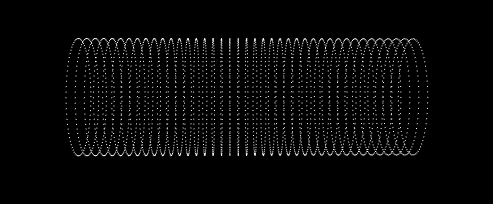
程序运行后看不见点云按R键
接着按下X键选中点云,再按下X键
设置偏差阈值为1
圆柱的半径大于3.5
就可以得到如下结果
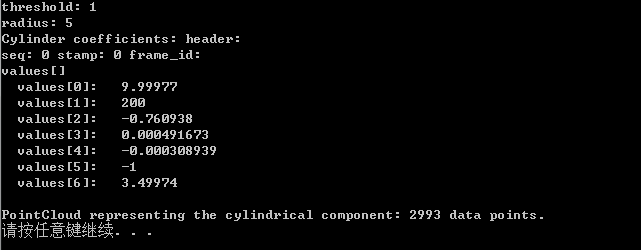
系数0、1、2代表圆柱轴线上的原点,3、4、5代表这条轴线的方向向量,系数6就是圆柱的半径。
PCL提取圆柱系数的更多相关文章
- 基于DCT系数的实时监控中运动目标检测
本文的主要内容来自2009 Advanced Video and Signal Based Surveillance会议的一篇论文“Real-Time Moving Object Detection ...
- MSCN(Mean Subtracted Contrast Normalized)系数的直方图
MSCN系数是无参考的空间域图像质量评估算法BRISQUE(No-Reference Image Quality Assessment in the Spatial Domain)中提出的,MSCN系 ...
- 基于GPU的高分一号影像正射校正的设计与实现
一 RPC正射校正的原理 影像正射校正的方法有很多,主要包含两大类:一类是严格的几何纠正模型,另一类是近似几何纠正模型.当遥感影像的成像模型和有关参数已知时,可以根据严格的成像模型来校正图像,这种方法 ...
- 基于FPGA的音频信号的FIR滤波(Matlab+Modelsim验证)
1 设计内容 本设计是基于FPGA的音频信号FIR低通滤波,根据要求,采用Matlab对WAV音频文件进行读取和添加噪声信号.FFT分析.FIR滤波处理,并分析滤波的效果.通过Matlab的分析验证滤 ...
- 基于HTK语音工具包进行孤立词识别的使用教程
选自:http://my.oschina.net/jamesju/blog/116151 1前言 最近一直在研究HTK语音识别工具包,前几天完成了工具包的安装编译和测试,这几天又按耐不住好奇,决定自己 ...
- ECG信号读出,检测QRS,P,T 波(小波去噪,并根据检测),基于BP辨识的神经网络
这学期的课程选择神经网络.最后的作业处理ECG信号,并利用神经网络识别. 1 ECG引进和阅读ECG信号 1)ECG介绍 详细ECG背景应用就不介绍了,大家能够參考百度 谷歌.仅仅是简单说下ECG ...
- OO第一单元总结
OO第一单元作业总结 一.前言 开学四周,不知不觉已经做了三次OO作业.事实上,每一次作业对我来说都是很大的挑战,需要花费大量的时间和精力来学习. 虽然学得很艰苦,但最后还是连滚带爬地完成了.(好惨一 ...
- Nature重磅:Hinton、LeCun、Bengio三巨头权威科普深度学习
http://wallstreetcn.com/node/248376 借助深度学习,多处理层组成的计算模型可通过多层抽象来学习数据表征( representations).这些方法显著推动了语音识别 ...
- [译]用R语言做挖掘数据《七》
时间序列与数据挖掘 一.实验说明 1. 环境登录 无需密码自动登录,系统用户名shiyanlou,密码shiyanlou 2. 环境介绍 本实验环境采用带桌面的Ubuntu Linux环境,实验中会用 ...
随机推荐
- OpenFOAM计算结果转换到CFD-Post当中处理
我们编写如下的Python代码 源代码:
- 学习opencv(1)
目录 CV_8UC3 Scalar--颜色赋值 using namespace cv找不到命名空间 waitKey() getTickCount() 引用 CV_8UC3 a) 存放单通道图像中像素: ...
- 第09组 Beta冲刺(3/4)
队名:软工9组 组长博客:https://www.cnblogs.com/cmlei/ 作业博客:https://edu.cnblogs.com/campus/fzu/SoftwareEngineer ...
- Mac使用秘钥登录Linux服务器
简介 在 Mac 上配置 SSH 密钥登录远程的 Linux 相关配置 1.创建本地的 SSH 密钥 本地 生成秘钥对 ssh-keygen -t rsa -C 'youxiang@aliyun.co ...
- 自动化远程部署shell脚本
历史原因,有一段时间,项目开发采用一种模式:项目开发及代码版本管理在外网,而主要测试在内网.所以为了同步开发进度,每天会将所有服务在外网jenkins上打包好,然后将服务jar包拷进内网,由于内网服务 ...
- 杀死Linux中的defunct进程(僵尸进程)的方法指南
杀死Linux中的defunct进程(僵尸进程)的方法指南_LINUX_操作系统_脚本之家https://www.jb51.net/LINUXjishu/457748.html 这样能看到僵尸进程.
- docker 部署jar包
docker volume create j1ls /var/lib/docker/volumes/j1/_data 上传jardocker run -it -d --name j1 -v j1:/h ...
- python 上下文管理器contextlib.ContextManager
1 模块简介 在数年前,Python 2.5 加入了一个非常特殊的关键字,就是with.with语句允许开发者创建上下文管理器.什么是上下文管理器?上下文管理器就是允许你可以自动地开始和结束一些事情. ...
- Python3基础 二、八、十、十六进制数的定义
Python : 3.7.3 OS : Ubuntu 18.04.2 LTS IDE : pycharm-community-2019.1.3 ...
- [译]Pandas列数据展示不全解决方法?
Pandas数据展示列太多会显示...不显示具体数据. 设置参数可以显示全部数据: pd.set_option('display.expand_frame_repr', False)