
CodeSmith7代码生成器针对PostgreSQL数据库无法使用的Bug修复全过程
前言
最近公司需要将原来使用的MSSQL数据库整体迁移至pgsql,需要使用CodeSmith生成IBatisNet的配置文件。按照提示安装了Npgsql.dll后依然无法使用。引发了本次通过反编译修复相关的Bug。主要修复了一下错误:
1、未能加载文件或程序集“Npgsql, Version=2.2.0.0, Culture=neutral, PublicKeyToken=5d8b90d52f46fda7”
2、无法查看列信息
3、缺少表、列自描述
一、使用ILSpy反编译SchemaExplorer.PostgreSQLSchemaProvider.dll
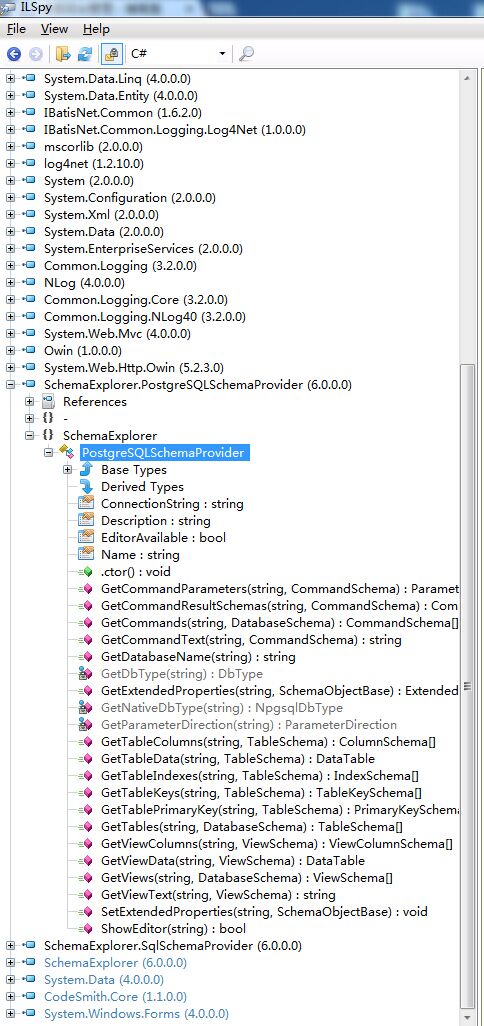
打开ILSpy,将SchemaExplorer.PostgreSQLSchemaProvider.dll附加至ILSpy,如下图所示:
二、针对反编译的代码进行错误修复(详细修复过程略过)。
三、主要修复函数。
GetTables、GetTableColumns、GetTablePrimaryKey、GetTableKeys。因为我所使用的功能仅限于这几个函数所以只针对该相关的方法错误进行了修复。
1、修复表架构缺少描述的Bug
GetTables反编译的关键源码
public TableSchema[] GetTables(string connectionString, DatabaseSchema database)

{

    List<TableSchema> list = new List<TableSchema>();

    using (NpgsqlConnection npgsqlConnection = new NpgsqlConnection(connectionString))

    {

        npgsqlConnection.Open();

        using (NpgsqlCommand npgsqlCommand = new NpgsqlCommand("select tablename, tableowner from pg_catalog.pg_tables where schemaname = 'public' order by tablename", npgsqlConnection))

        {

            using (NpgsqlDataReader npgsqlDataReader = npgsqlCommand.ExecuteReader(CommandBehavior.CloseConnection))

            {

                while (npgsqlDataReader.Read())

                {

                    if (npgsqlDataReader.GetString().ToUpper() != "CODESMITH_EXTENDED_PROPERTIES")

                    {

                        list.Add(new TableSchema(database, npgsqlDataReader.GetString(), npgsqlDataReader.GetString(), DateTime.MinValue));

                    }

                }

                if (!npgsqlDataReader.IsClosed)

                {

                    npgsqlDataReader.Close();

                }

            }

        }

        if (npgsqlConnection.State != ConnectionState.Closed)

        {

            npgsqlConnection.Close();

        }

    }

    return list.ToArray();

}
修复的源码
public TableSchema[] GetTables(string connectionString, DatabaseSchema database)

        {

            List<TableSchema> list = new List<TableSchema>();

            using (NpgsqlConnection npgsqlConnection = new NpgsqlConnection(connectionString))

            {

                npgsqlConnection.Open();

                using (NpgsqlCommand npgsqlCommand = new NpgsqlCommand("select tablename, tableowner,obj_description(relfilenode,'pg_class') as pg_description from pg_catalog.pg_tables as t left join pg_catalog.pg_class as c on t.tablename = c.relname where t.schemaname = 'public' order by t.tablename", npgsqlConnection))

                {

                    using (NpgsqlDataReader npgsqlDataReader = npgsqlCommand.ExecuteReader(CommandBehavior.CloseConnection))

                    {

                        while (npgsqlDataReader.Read())

                        {

                            if (npgsqlDataReader.GetString().ToUpper() != "CODESMITH_EXTENDED_PROPERTIES")

                            {

                                list.Add(new TableSchema(database, npgsqlDataReader.GetString(), npgsqlDataReader.GetString(), DateTime.MinValue,new ExtendedProperty[]{

                                new ExtendedProperty("CS_Description", npgsqlDataReader.GetString() ?? string.Empty, DbType.String, PropertyStateEnum.ReadOnly)

                                }));

                            }

                        }

                    }

                }

            }

            return list.ToArray();

        }
修改前的源码与修改后的源码主要有2个区别:增加了查询表描述的字段、添加扩展属性CS_Description这个属性是关键将可以通过TableSchema.Description读取表描述信息,这里存在一个问题,第二个参数不能为null,如果为null需要转换为空串。
2、修复读取列信息的bug
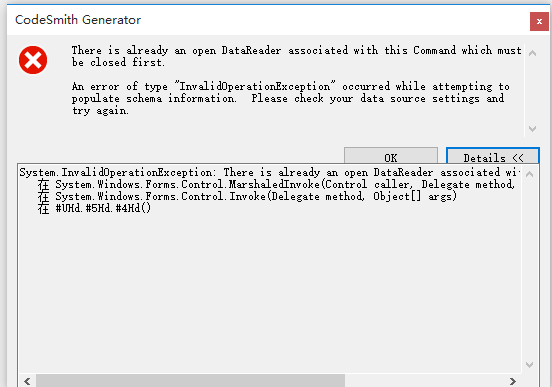
修改前的代码
public ColumnSchema[] GetTableColumns(string connectionString, TableSchema table)

{

    List<ColumnSchema> list = new List<ColumnSchema>();

    using (NpgsqlConnection npgsqlConnection = new NpgsqlConnection(connectionString))

    {

        npgsqlConnection.Open();

        string text = string.Format("select column_name, is_nullable, character_maximum_length, numeric_precision, numeric_scale, data_type, udt_name from information_schema.columns where table_schema = 'public' and table_name='{0}'", table.Name);

        using (NpgsqlCommand npgsqlCommand = new NpgsqlCommand(text, npgsqlConnection))

        {

            using (NpgsqlDataReader npgsqlDataReader = npgsqlCommand.ExecuteReader(CommandBehavior.CloseConnection))

            {

                while (npgsqlDataReader.Read())

                {

                    bool allowDBNull = npgsqlDataReader.IsDBNull() || npgsqlDataReader.GetString() == "YES";

                    byte precision = (byte)(npgsqlDataReader.IsDBNull() ?  : npgsqlDataReader.GetInt32());

                    int size = npgsqlDataReader.IsDBNull() ?  : npgsqlDataReader.GetInt32();

                    int scale = npgsqlDataReader.IsDBNull() ?  : npgsqlDataReader.GetInt32();

                    string name = npgsqlDataReader.IsDBNull() ? string.Empty : npgsqlDataReader.GetString();

                    string text2 = npgsqlDataReader.IsDBNull() ? string.Empty : npgsqlDataReader.GetString();

                    string type = npgsqlDataReader.IsDBNull() ? string.Empty : npgsqlDataReader.GetString();

                    list.Add(new ColumnSchema(table, name, PostgreSQLSchemaProvider.GetDbType(type), text2, size, precision, scale, allowDBNull, new ExtendedProperty[]

                    {

                        new ExtendedProperty("NpgsqlDbType", PostgreSQLSchemaProvider.GetNativeDbType(text2), DbType.String)

                    }));

                }

                if (!npgsqlDataReader.IsClosed)

                {

                    npgsqlDataReader.Close();

                }

            }

        }

        if (npgsqlConnection.State != ConnectionState.Closed)

        {

            npgsqlConnection.Close();

        }

    }

    return list.ToArray();

}
修改后的代码
public ColumnSchema[] GetTableColumns(string connectionString, TableSchema table)

        {

            List<ColumnSchema> list = new List<ColumnSchema>();

            using (NpgsqlConnection npgsqlConnection = new NpgsqlConnection(connectionString))

            {

                npgsqlConnection.Open();

                string text = string.Format("select column_name, is_nullable, character_maximum_length, numeric_precision, numeric_scale, data_type, udt_name,col_description(b.attrelid,b.attnum) as pg_description from information_schema.columns as a join pg_attribute as b on a.column_name=b.attname join pg_class as c on a.table_name=c.relname and b.attrelid = c.oid where b.attnum>0 and a.table_schema = 'public' and a.table_name='{0}'", table.Name);

                using (NpgsqlCommand npgsqlCommand = new NpgsqlCommand(text, npgsqlConnection))

                {

                    using (NpgsqlDataReader npgsqlDataReader = npgsqlCommand.ExecuteReader(CommandBehavior.CloseConnection))

                    {

                        while (npgsqlDataReader.Read())

                        {

                            bool allowDBNull = npgsqlDataReader.IsDBNull() || npgsqlDataReader.GetString() == "YES";

                            byte precision = (byte)(npgsqlDataReader.IsDBNull() ?  : npgsqlDataReader.GetInt32());

                            int size = npgsqlDataReader.IsDBNull() ?  : npgsqlDataReader.GetInt32();

                            int scale = npgsqlDataReader.IsDBNull() ?  : npgsqlDataReader.GetInt32();

                            string name = npgsqlDataReader.IsDBNull() ? string.Empty : npgsqlDataReader.GetString();

                            string text2 = npgsqlDataReader.IsDBNull() ? string.Empty : npgsqlDataReader.GetString();

                            string type = npgsqlDataReader.IsDBNull() ? string.Empty : npgsqlDataReader.GetString();

                            list.Add(new ColumnSchema(table, name, PostgreSQLSchemaProvider.GetDbType(type), text2, size, precision, scale, allowDBNull, new ExtendedProperty[]

                    {

                        new ExtendedProperty("NpgsqlDbType", PostgreSQLSchemaProvider.GetNativeDbType(text2), DbType.String),

                        new ExtendedProperty("CS_Description",npgsqlDataReader.GetString()?? string.Empty, DbType.String)

                    }));

                        }

                        if (!npgsqlDataReader.IsClosed)

                        {

                            npgsqlDataReader.Close();

                        }

                    }

                }

            }

            return list.ToArray();

        }
修改前的源码与修改后的源码主要有2个区别:增加了查询表描述的字段、添加扩展属性CS_Description这个属性是关键将可以通过ColumnSchema.Description读取表描述信息,这里存在一个问题,第二个参数不能为null,如果为null需要转换为空串。
三、修复主键信息
因为在页面加载列时,同时会根据表属性去加载列的主键,外键属性。
        public TableKeySchema[] GetTableKeys(string connectionString, TableSchema table)

        {

            List<TableKeySchema> list = new List<TableKeySchema>();

            using (NpgsqlConnection npgsqlConnection = new NpgsqlConnection(connectionString))

            {

                npgsqlConnection.Open();

                string text = string.Format("SELECT constraint_name as constrname FROM information_schema.table_constraints WHERE table_name = '{0}' AND constraint_type = 'FOREIGN KEY' AND constraint_schema='public'", table.Name);

                using (NpgsqlCommand npgsqlCommand = new NpgsqlCommand(text, npgsqlConnection))

                {

                    string text2 = string.Format("SELECT px.conname as constrname, att.attname as colname, fore.relname as reftabname, fatt.attname as refcolname, CASE px.confupdtype WHEN 'a' THEN 'NO ACTION' WHEN 'r' THEN 'RESTRICT' WHEN 'c' THEN 'CASCADE' WHEN 'n' THEN 'SET NULL' WHEN 'd' THEN 'SET DEFAULT' END AS on_update, CASE px.confdeltype WHEN 'a' THEN 'NO ACTION' WHEN 'r' THEN 'RESTRICT' WHEN 'c' THEN 'CASCADE' WHEN 'n' THEN 'SET NULL' WHEN 'd' THEN 'SET DEFAULT' END AS on_delete, CASE px.contype WHEN 'p' THEN true WHEN 'f' THEN false END as IsPrimaryKey from pg_constraint px left join pg_class home on (home.oid = px.conrelid) left join pg_class fore on (fore.oid = px.confrelid) left join pg_attribute att on (att.attrelid = px.conrelid AND att.attnum = ANY(px.conkey)) left join pg_attribute fatt on (fatt.attrelid = px.confrelid AND fatt.attnum = ANY(px.confkey)) where (home.relname = '{0}') and px.contype = 'f' order by constrname", table.Name);

                    using (NpgsqlCommand npgsqlCommand2 = new NpgsqlCommand(text2, npgsqlConnection))

                    {

                        NpgsqlDataAdapter npgsqlDataAdapter = new NpgsqlDataAdapter(npgsqlCommand);

                        DataSet dataSet = new DataSet();

                        npgsqlDataAdapter.Fill(dataSet, "constraint");

                        npgsqlDataAdapter.SelectCommand = npgsqlCommand2;

                        npgsqlDataAdapter.Fill(dataSet, "keys");

                        if (dataSet.Tables[].Rows.Count > )

                        {

                            dataSet.Relations.Add("Contraint_to_Keys", dataSet.Tables[].Columns["constrname"], dataSet.Tables[].Columns["constrname"]);

                            foreach (DataRow dataRow in dataSet.Tables[].Rows)

                            {

                                string name = dataRow["constrname"].ToString();

                                DataRow[] childRows = dataRow.GetChildRows("Contraint_to_Keys");

                                string[] array = new string[childRows.Length];

                                string[] array2 = new string[childRows.Length];

                                string name2 = table.Name;

                                string primaryKeyTable = childRows[]["reftabname"].ToString();

                                for (int i = ; i < childRows.Length; i++)

                                {

                                    array2[i] = childRows[i]["colname"].ToString();

                                    array[i] = childRows[i]["refcolname"].ToString();

                                }

                                list.Add(new TableKeySchema(table.Database, name, array2, name2, array, primaryKeyTable));

                            }

                        }

                    }

                }

                string text3 = string.Format("SELECT px.conname as constrname FROM pg_constraint px left join pg_class fore on fore.oid = px.confrelid where fore.relname = '{0}'", table.Name);

                using (NpgsqlCommand npgsqlCommand3 = new NpgsqlCommand(text3, npgsqlConnection))

                {

                    string text4 = string.Format("SELECT px.conname as constrname, fatt.attname as colname, home.relname as reftabname, att.attname as refcolname, CASE px.confupdtype WHEN 'a' THEN 'NO ACTION' WHEN 'r' THEN 'RESTRICT' WHEN 'c' THEN 'CASCADE' WHEN 'n' THEN 'SET NULL' WHEN 'd' THEN 'SET DEFAULT' END AS on_update, CASE px.confdeltype WHEN 'a' THEN 'NO ACTION' WHEN 'r' THEN 'RESTRICT' WHEN 'c' THEN 'CASCADE' WHEN 'n' THEN 'SET NULL' WHEN 'd' THEN 'SET DEFAULT' END AS on_delete, CASE px.contype WHEN 'p' THEN true WHEN 'f' THEN false END as IsPrimaryKey from pg_constraint px left join pg_class home on (home.oid = px.conrelid) left join pg_class fore on (fore.oid = px.confrelid) left join pg_attribute att on (att.attrelid = px.conrelid AND att.attnum = ANY(px.conkey)) left join pg_attribute fatt on (fatt.attrelid = px.confrelid AND fatt.attnum = ANY(px.confkey)) where (fore.relname = '{0}') order by constrname", table.Name);

                    using (NpgsqlCommand npgsqlCommand4 = new NpgsqlCommand(text4, npgsqlConnection))

                    {

                        NpgsqlDataAdapter npgsqlDataAdapter2 = new NpgsqlDataAdapter();

                        DataSet dataSet2 = new DataSet();

                        npgsqlDataAdapter2.SelectCommand = npgsqlCommand3;

                        npgsqlDataAdapter2.Fill(dataSet2, "constraint");

                        npgsqlDataAdapter2.SelectCommand = npgsqlCommand4;

                        npgsqlDataAdapter2.Fill(dataSet2, "keys");

                        if (dataSet2.Tables[].Rows.Count > )

                        {

                            dataSet2.Relations.Add("Contraint_to_Keys", dataSet2.Tables[].Columns["constrname"], dataSet2.Tables[].Columns["constrname"]);

                            foreach (DataRow dataRow2 in dataSet2.Tables[].Rows)

                            {

                                string name3 = dataRow2["constrname"].ToString();

                                DataRow[] childRows2 = dataRow2.GetChildRows("Contraint_to_Keys");

                                string[] array3 = new string[childRows2.Length];

                                string[] array4 = new string[childRows2.Length];

                                string foreignKeyTable = childRows2[]["reftabname"].ToString();

                                string name4 = table.Name;

                                for (int j = ; j < childRows2.Length; j++)

                                {

                                    array4[j] = childRows2[j]["refcolname"].ToString();

                                    array3[j] = childRows2[j]["colname"].ToString();

                                }

                                list.Add(new TableKeySchema(table.Database, name3, array4, foreignKeyTable, array3, name4));

                            }

                        }

                    }

                }

            }

            return list.ToArray();

        }

        public PrimaryKeySchema GetTablePrimaryKey(string connectionString, TableSchema table)

        {

            PrimaryKeySchema result = null;

            DataSet ds = new DataSet();

            using (NpgsqlConnection npgsqlConnection = new NpgsqlConnection(connectionString))

            {

                npgsqlConnection.Open();

                string text = string.Format("select constraint_name from information_schema.table_constraints where constraint_schema='public' and table_name='{0}' and constraint_type='PRIMARY KEY'", table.Name);

                using (NpgsqlCommand npgsqlCommand = new NpgsqlCommand(text, npgsqlConnection))

                {

                    using (NpgsqlDataAdapter nda = new NpgsqlDataAdapter(npgsqlCommand))

                    {

                        nda.Fill(ds, "table_constraints");

                    }

                }

                string text2 = string.Format("select px.conname as ConstraintName, att.attname as ColumnName from pg_constraint px inner join pg_class home on (home.oid = px.conrelid) left join pg_attribute att on (att.attrelid = px.conrelid AND att.attnum = ANY(px.conkey)) where (home.relname = '{0}') and px.contype = 'p'", table.Name);

                using (NpgsqlCommand npgsqlCommand2 = new NpgsqlCommand(text2, npgsqlConnection))

                {

                    using (NpgsqlDataAdapter nda = new NpgsqlDataAdapter(npgsqlCommand2))

                    {

                        nda.Fill(ds, "pg_constraint");

                    }

                }

                foreach (DataRow item in ds.Tables["table_constraints"].Rows)

                {

                    List<string> list = new List<string>();

                    foreach (DataRow item2 in ds.Tables["pg_constraint"].Rows)

                    {

                        list.Add(item2.Field<string>("ColumnName"));

                    }

                    result = new PrimaryKeySchema(table, item.Field<string>("constraint_name"), list.ToArray());

                }

            }

            return result;

        }
将程序重新编译,替换原来的DLL。完成
四、补丁包及源码下载:
CodeSmith7代码生成器针对PostgreSQL数据库无法使用的Bug修复全过程的更多相关文章
- Java代码生成器加入postgresql数据库、HikariCP连接池、swagger2支持!
目录 前言 PostgreSql VS MySql HikariCP VS Druid Swagger2 自定义参数配置一览 结语 前言 最近几天又抽时间给代码生成器增加了几个新功能(预计今晚发布 ...
- postgresql数据库primary key约束/not null约束/unique约束及default值的添加与删除、列的新增/删除/重命名/数据类型的更改
如果在建表时没有加primary key约束.not null约束.unique约束.default值,而是创建完表之后在某个字段添加的话 1.primary key约束的添加与删除 给red_pac ...
- TPC-H生成.tbl文件导入postgresql数据库的坑
数据库project好好的不用主流的MySQL和Microsoft server而要求用听都没听过的postgresql (当然,可能你三个都没听过) 这里的坑主要是把生成的那八张.tbl的表导入pg ...
- ubuntu 下搭建一个python3的虚拟环境(用于django配合postgresql数据库开发)
#安装python pip (在物理环境中安装) sudo apt-get install python-pip sudo apt-get install python3-pipsud ...
- 关于PDF.NET开发框架对Mysql Sqlite PostgreSQL数据库分页支持的个人看法
关于PDF.NET开发框架的名字由来 在设计www.pwmis.com站点的时候,考虑到架构的兼容性和将来升级的可能性,最重要的是没有足够的时间去为网站添加和维护很多复杂的程序,所以在借鉴前人成功经 ...
- 从运维的角度分析使用阿里云数据库RDS的必要性--你不应该在阿里云上使用自建的MySQL/SQL Server/Oracle/PostgreSQL数据库
开宗明义,你不应该在阿里云上使用自建的MySQL or SQL Server数据库,对了,还有Oracle or PostgreSQL数据库. 云数据库 RDS(Relational Database ...
- PostgreSQL数据库资料(转)
PostgreSQL数据库资料 转自:http://blog.csdn.net/postgrechina/article/details/49132791 推荐书籍: 概念书籍: <Postgr ...
- 扩展我们的分析处理服务(Smartly.io):使用 Citus 对 PostgreSQL 数据库进行分片
原文:Scaling Our Analytical Processing Service: Sharding a PostgreSQL Database with Citus 在线广告商正在根据绩效数 ...
- MySQL&SQL server&Oracle&Access&PostgreSQL数据库sql注入详解
判断数据库的类型 当我们通过一些测试,发现存在SQL注入之后,首先要做的就是判断数据库的类型. 常用的数据库有MySQL.Access.SQLServer.Oracle.PostgreSQL.虽然绝大 ...
随机推荐
- LEETCODE —— Binary Tree的3 题 —— 3种非Recursive遍历
Binary Tree Preorder Traversal Given a binary tree, return the preorder traversal of its nodes' valu ...
- C语言实现最基本的回射服务器与客户端(服务器用TCP协议回射客户发来的消息)
话不多说,直接上干货,下面两个程序都是linux程序. server.c完整代码: #include <stdio.h>#include <string.h>#include ...
- Angular2学习之开发环境构建
一.主要资料 http://blog.csdn.net/cz_jjq/article/details/50425206 http://www.tuicool.com/articles/mi6rmuB ...
- TOMCAT 无法安装P7B格式的证书
背景:通过按以下链接的方式生成了CSR文件,并申请到P7B格式的证书 现象:TOMCAT安装该证书时,要求输入Keystore key, 但是P7B证书自身并不携带私钥.导致无法通过TOMCAT安装该 ...
- 转载:python中的StringIO模块
注意:python3中应使用io.StringIO StringIO经常被用来作为字符串的缓存,应为StringIO有个好处,他的有些接口和文件操作是一致的,也就是说用同样的代码,可以同时当成文件操作 ...
- putty+xming远程登录Ubuntu16.04图形界面
前面我写过一篇<Ubuntu16.04 安装ftp服务器传输文件>的文章.文章当中已经可以远程访问linux服务器并且传输文件,然而要在putty中使用开启图形界面的命令到目前为止还是不够 ...
- HTMLParser使用
htmlparser[1] 是一个纯的java写的html(标准通用标记语言下的一个应用)解析的库,它不依赖于其它的java库文件,主要用于改造或提取html.它能超高速解析html,而且不会出错.现 ...
- Javascript模式(第五章对象创建模式)------读书笔记
一 命名空间模式 1 命名空间模式的代码格式 var MYAPP={ name:"", version:"1.0", init:function(){ } }; ...
- HttpClientUtil [使用apache httpclient模拟http请求]
基于httpclient-4.5.2 模拟http请求 以get/post方式发送json请求,并获取服务器返回的json -------------------------------------- ...
- UIScrollView的使用
UIScrollView表示可滚动的视图,它最主要的使用场景是让用户可以通过拖拽显示布置一屏的数据. 常用的属性或者方法有: frame:NSRect显示范围,小于屏幕尺寸的矩形区域: content ...