
Foreach遍历
前天在项目中遇到一个问题,foreach遍历过程中修改responses中的对象,其中responses的类型:IEnumerable<Order>,代码如下:
foreach (Order item in responses)

            {

                if (string.IsNullOrEmpty(item.Creator))

                    item.Creator = item.Creator2;

            }
结果可想而知,response的对象并没有被改变。这是为什么?
弄清楚问题之前需要明白什么是foreach。foreach语句为数组或者对象集合的每一个元素重复一个嵌入语句组,foreach语句用于循环访问集合以获取所需信息,但不应更改集合信息以避免不可预知的负作用。(百度百科)Foreach可以循环访问集合以获取所需信息,为什么foreach不能更改集合信息,什么样的对象能够foreach?这就涉及到IEnumerable和IEnumerator.
IEnumerable和IEnumerator是两个用来实现枚举的接口,相互协助来完成一个具有枚举功能能使用foreach的集合。IEnumerable是一个声明性接口,一个集合对象要foreach,必须实现IEnumerable接口,也既是必须以某种方式返回IEnumerator object。IEnumerator是一个实现式接口,它定义了具体的实现方法。下面首先介绍其定义:
定义IEnumerator接口:
public interface IEnumerator

    {

        object Current{ get; }

        bool MoveNext();

        void Reset();

    }
定义IEnumerable接口:
public interface IEnumerable

    {

        IEnumerator GetEnumerator();

    }
了解定义后,下面实例具体实现IEnumerable和IEnumerator:
public class MyIEnumerator : IEnumerator

    {

        private string[] strList;

        private int position;

        public MyIEnumerator(string[] strList)

        {

            this.strList = strList;

            position = -;

        }

        public object Current

        {

            get { return strList[position]; }

        }

        public bool MoveNext()

        {

            position ++;

            if (position < strList.Length) return true;

            return false;

        }

        public void Reset()

        {

            position = -;

        }

    }
public class MyIEnumerable : IEnumerable

    {

        private string[] strList;

        public MyIEnumerable(string[] strList)

        {

            this.strList = strList;

        }

        public IEnumerator GetEnumerator()

        {

            return new MyIEnumerator(strList);

        }

    }
进行调用:
string[] strList = {"", "", "", ""};

            MyIEnumerable my = new MyIEnumerable(strList);

            var tt = my.GetEnumerator();

            while (tt.MoveNext())

            {

                Console.Write("{0} ", tt.Current);

            }
结果如下:

那么在项目中,如何自定义一个类实现foreach,继承IEnumerable即可,如下实例:
定义实体类:
public class Student

    {

        public int Id;

        public string Name;

        public Student(int id, string name)

        {

            Id = id;

            Name = name;

        }

    }
定义student的集合类School,继承IEnumerable集合:
public class School : IEnumerable

    {

        public Student[] stu = new Student[];

        public School()

        {

            Create();

        }

        public void Create()

        {

            stu[] = new Student(, "tom");

            stu[] = new Student(, "john");

            stu[] = new Student(, "mali");

        }

        public IEnumerator GetEnumerator()

        {

            return this.stu.GetEnumerator();

        }

    }
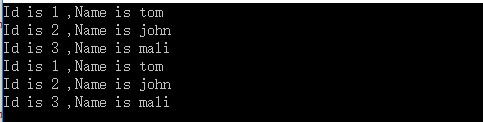
使用foreach遍历school:
School school = new School();

            foreach (Student item in school.stu)

            {

                Console.WriteLine("Id is {0} ,Name is {1}", item.Id, item.Name);

            }

            foreach (Student item in school)

            {

                Console.WriteLine("Id is {0} ,Name is {1}", item.Id, item.Name);

            }
结果如下:
此时一个概念“迭代器”应该进入大家的视野。
迭代器是一种对象,它能够用来遍历标准模板库容器的部分或者全部元素,每个迭代器对象代表容器中的确定地址。
迭代器使开发人员能够在类或者结构中支持foreach迭代,而不必整个实现IEnumerable和IEnumerator接口。只需要提供一个迭代器,即可遍历类中的数据结构。当编译器检测到迭代器时,将自动生成IEnumerable和IEnumerator接口中的相应方法。
另外一个概念yield:yield关键字向编译器指示它所在的方法是迭代器。编译器生成一个类来实现迭代器块中表示的行为。在迭代器块中,yield关键字与return关键字结合使用,向枚举器对象提供值。yield关键字也可与break结合使用,表示迭代结束。
引用:
IEnumerable 使用foreach 详解
IEnumerator和IEnumerable的关系
先说IEnumerable,我们每天用的foreach你真的懂它吗?
Foreach遍历的更多相关文章
- 用<forEach>遍历list集合时,提示我找不到对象的属性
<c:forEach items="${list}" var="item"> <tr> <td>${item.UserId} ...
- 使用yield关键字让自定义集合实现foreach遍历
一般来说当我们创建自定义集合的时候为了让其能支持foreach遍历,就只能让其实现IEnumerable接口(可能还要实现IEnumerator接口) 但是我们也可以通过使用yield关键字构建的迭代 ...
- js中三个对数组操作的函数 indexOf()方法 filter筛选 forEach遍历 map遍历
indexOf()方法 indexOf()方法返回在该数组中第一个找到的元素位置,如果它不存在则返回-1. 不使用indexOf时 var arr = ['apple','orange','pea ...
- mybatis map foreach遍历
mybatis map foreach遍历 转至http://www.cnblogs.com/yg_zhang/p/4314602.html mybatis 遍历map实例 map 数据如下 Map& ...
- foreach遍历遇到的一个细节问题
1.Invalid argument supplied for foreach()警告错误解决办法:foreach遍历之前添加is_array()判断
- IEnumerable 接口 实现foreach 遍历 实例
额 为啥写着东西? 有次面试去,因为用到的时候特别少 所以没记住, 这个单词 怎么写! 经典的面试题: 能用foreach遍历访问的对象的要求? 答: 该类实现IEnumetable 接口 声明 ...
- 实现Foreach遍历
实现Foreach遍历的集合类,需要实现IEnumerable接口,泛型集合则需要实现IEnumerable<T>接口 using System; using System.Collect ...
- foreach遍历扩展(二)
一.前言 假设存在一个数组,其遍历模式是根据索引进行遍历的:又假设存在一个HashTable,其遍历模式是根据键值进行遍历的:无论哪种集合,如果它们的遍历没有一个共同的接口,那么在客户端进行调用的时候 ...
- c#--foreach遍历的用法与split的用法
一. foreach循环用于列举出集合中所有的元素,foreach语句中的表达式由关键字in隔开的两个项组成.in右边的项是集合名,in左边的项是变量名,用来存放该集合中的每个元素. 该循环 ...
随机推荐
- 基于AgileEAS.NET SOA 平台SAAS架构技术的开源分销ERP系统-SmartERP.NET下载配置说明
一.前言 AgileEAS.NET SOA 中间件平台是一款基于基于敏捷并行开发思想和Microsoft .Net构件(组件)开发技术而构建的一个快速开发应用平台.用于帮助中小型软件企业建立一条适合市 ...
- zoj 3820(2014牡丹江现场赛B题)
题目链接:http://acm.zju.edu.cn/onlinejudge/showProblem.do?problemId=5374 思路:题目的意思是求树上的两点,使得树上其余的点到其中一个点的 ...
- 验证启用了不安全的HTTP方法
安全风险: 可能会在Web 服务器上上载.修改或删除Web 页面.脚本和文件. 可能原因: Web 服务器或应用程序服务器是以不安全的方式配置的. 修订建议: 如果 ...
- 关于HTML5的拖拽
不介绍具体情况,先看API,注意看后面括号的说明 dragstart:拖拽开始(应用于被拖拽对象) drag:拖拽中(应用于被拖拽对象) dragenter:拖拽到指定位置(应用于拖拽目标) drag ...
- Subsonic简单的语法整理
.查询方面 (查询所有数据记录[dataset读取方法]) Myuser.Query().ExecuteDataSet().Tables[]; Myuser.Query().ExecuteDataSe ...
- Codeforces Round #352 (Div. 2)
模拟 A - Summer Camp #include <bits/stdc++.h> int a[1100]; int b[100]; int len; void init() { in ...
- ORACLE操作列
一.下面介绍oracle数据库操作列的CURD操作 --学生表 STUDENT CREATE TABLE STUDENT( ID NUMBER(18) NOT NULL, NAME VARCHAR2( ...
- DOTA 2 Match History WebAPI(翻译)
关于DOTA 2 Match History WebAPI 的 源网页地址: http://dev.dota2.com/showthread.php?t=47115 由于源网页全英文,这边做下翻译方便 ...
- 区间dp总结篇
前言:这两天没有写什么题目,把前两周做的有些意思的背包题和最长递增.公共子序列写了个总结.反过去写总结,总能让自己有一番收获......就区间dp来说,一开始我完全不明白它是怎么应用的,甚至于看解题报 ...
- jquery ui dialog autofocus 去掉默认第一个元素获取焦点
经常在dialog窗口中第一个元素为日期控件时,打开窗口则会自动显示日期下拉框. 解决办法:在dialog的open事件中,设置父对象获得焦点. p1_dialog_seniorSearch.dial ...