
Entity Framework+SQLite+DataBaseFirst
Entity Framework+Sqlite+DataBaseFirst
本篇主要是说明在vs中配置Sqlite,及使用Entity Framework DataBaseFirst模式。
如果没有下载vs对应的sqlite工具,在vs里的数据连接里是找不到sqlite数据源这一项的。
图:
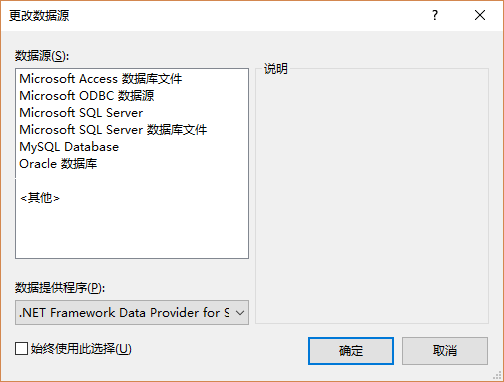
VS配置Sqlite
在官网中找到sqlite对应的VS下载文件,选择含有“ bundle-x86”字符的文件下载。如vs2015,就下载“sqlite-netFx46-setup-bundle-x86-2015-1.0.104.0.exe
(16.91 MiB) ”文件。重启VS,在‘服务资源管理器’,右键单击‘添加链接’,选择‘更改数据源’,在弹出的窗体可以发现多了一项sqlite数据源。
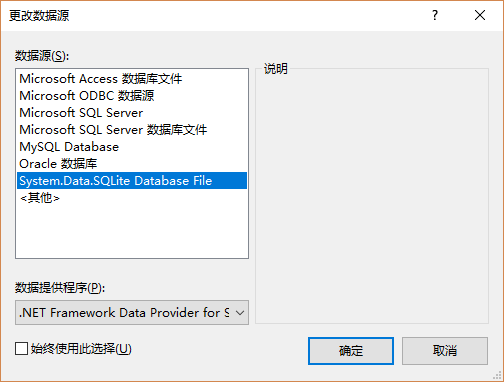
VS链接Sqlite
添加Sqlite包
VS里新建控制台引用程序。项目名称上右键选择‘管理nuget包’。选择‘浏览’,搜索sqlite,找到对应System.Data.Sqlite安装包(这是Sqlite官方维护的包)。
完成安装该项目会添加如下几项引用
- System.Data.SQLite
- EntityFramework
- EntityFramework.SqlsSrver
- System.Data.SQLite.EF6
- System.Data.SQLite.Linq
后面几个是System.Data.SQLite依赖的安装包,添加System.Data.SQLite会自动添加该几项
同时也自动生成了App.Config文件(配置信息也自动配置完成,很方便)。
DataBaseFirst
首先创建数据库,设计表和字段。
图: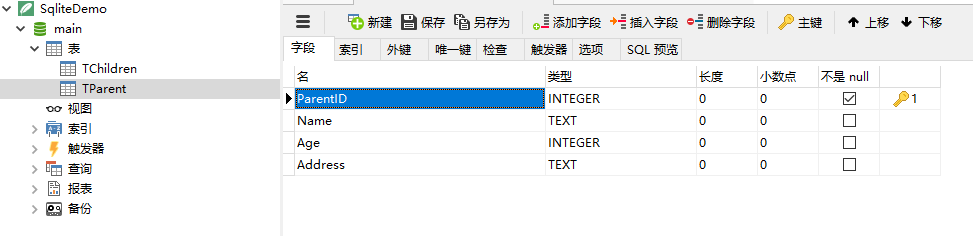
图: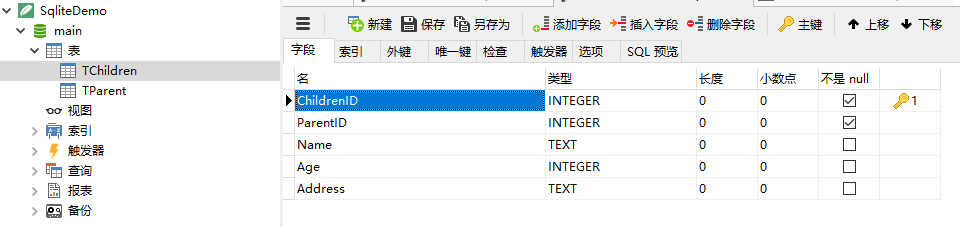
在项目上右键‘添加’,‘新建项’,选择‘ADO.NET 实体数据模型’
图: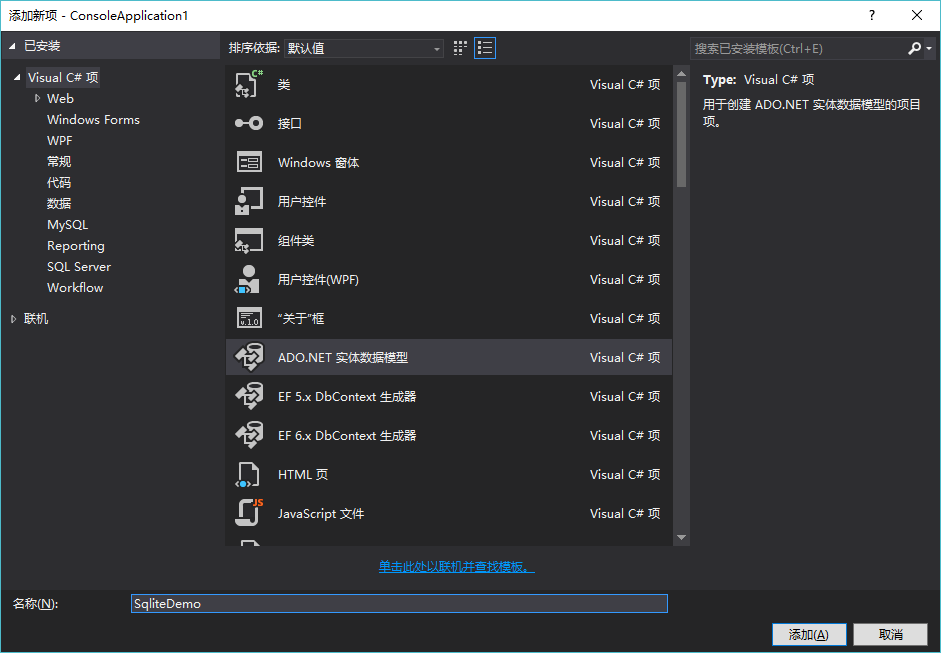
选择‘来自数据库的EF设计器’,单击‘下一步’。
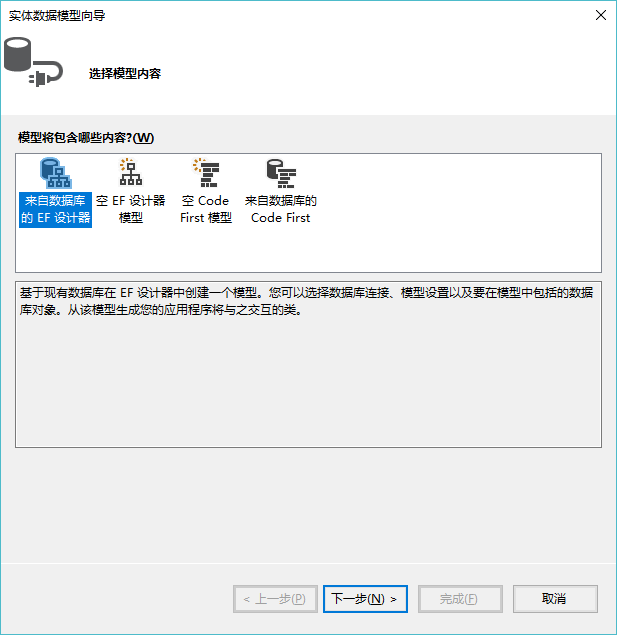

选择‘新建链接’,更改数据源为 System.Data.SQLite DataBase File

Browse找到对应数据库。
单击‘测试链接’-检测是否链接成功。
单击‘确定’。
选择如图所示标红项

单击‘完成’。
vs里自动生成如下项:
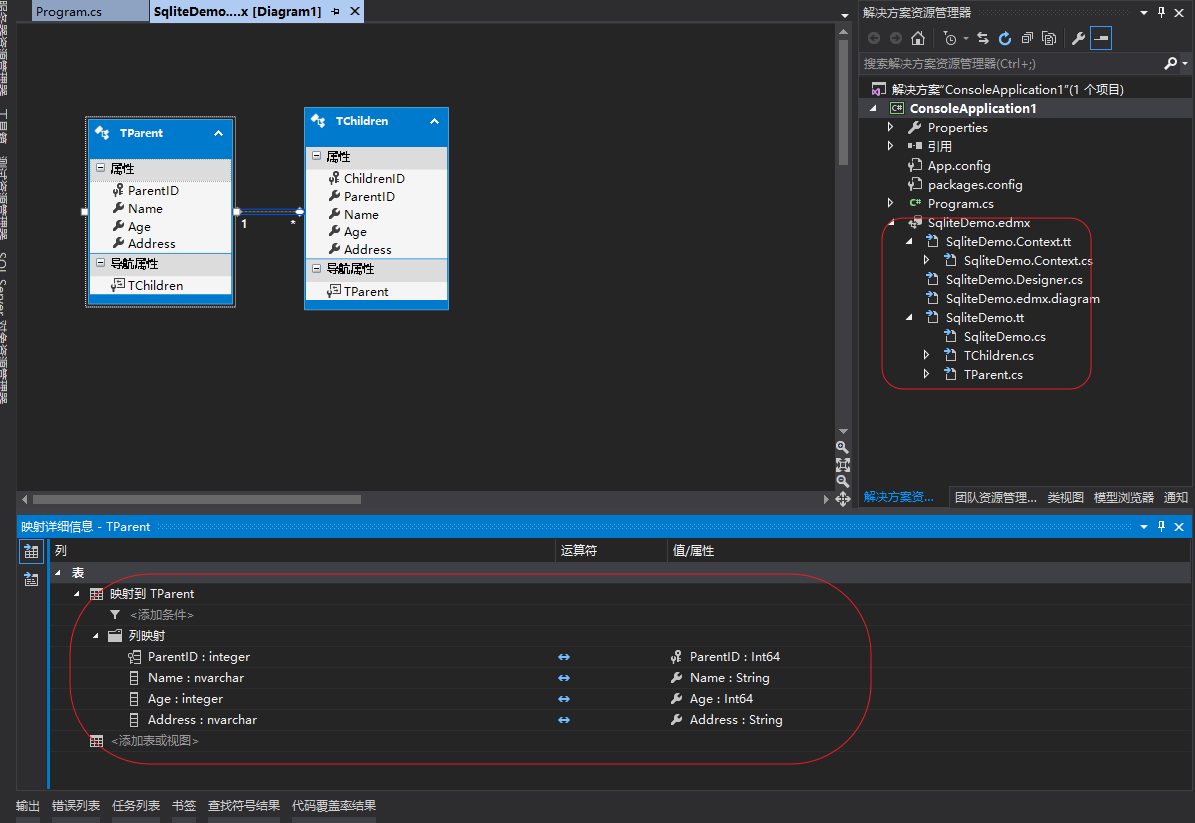
数据库的操作类和连接方法,及和表对应的类,也自动生成。
图: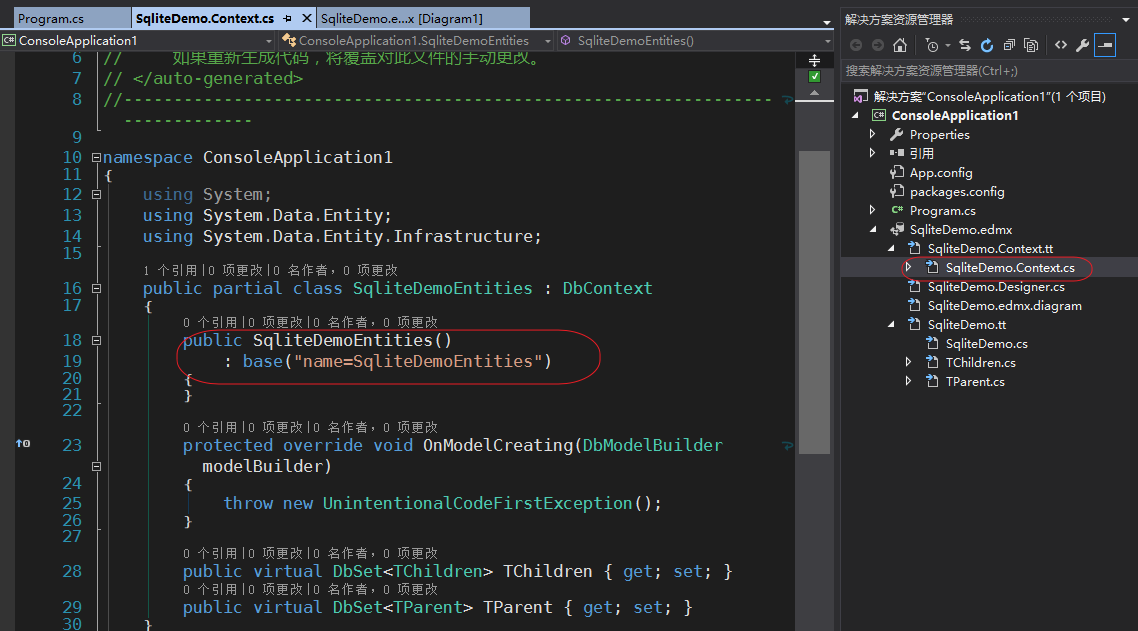
构造函数的参数就是数据库的连接字符串,和App.config中的连接字符串相对应。
图: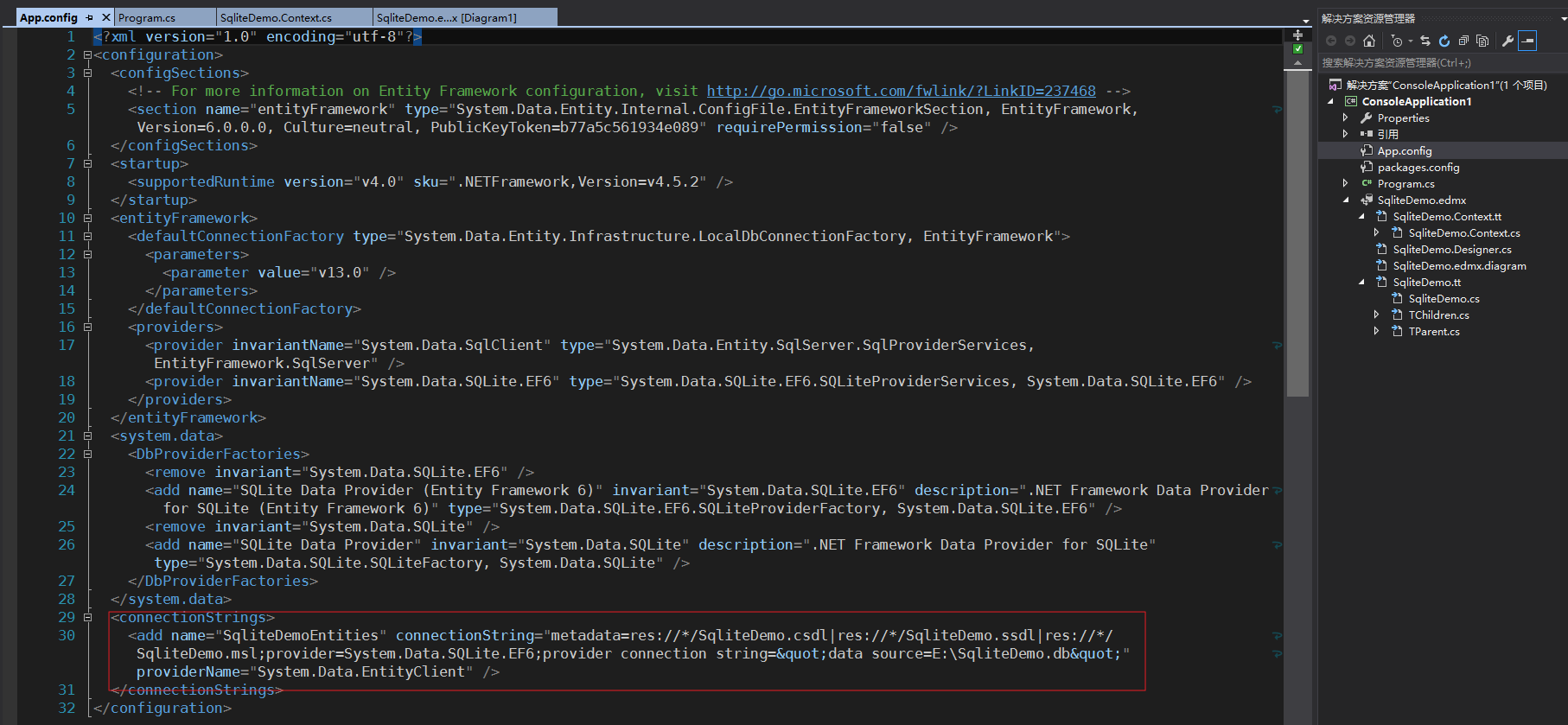
图: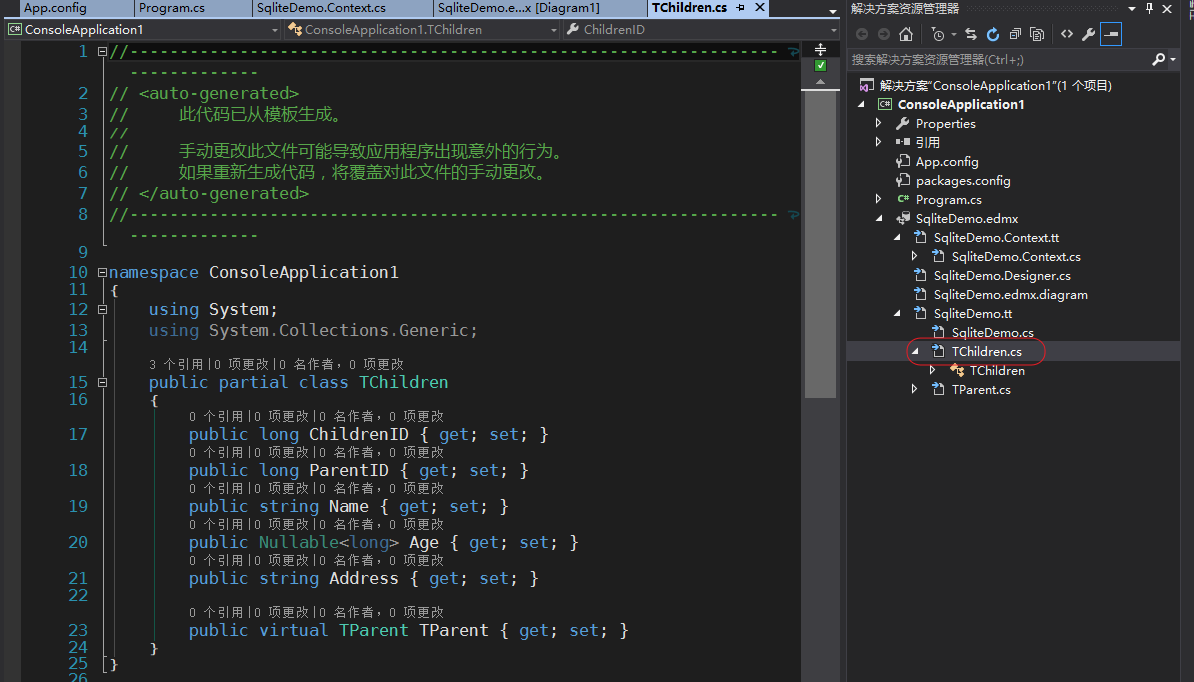
App.Config配置文件如下:
<?xml version="1.0" encoding="utf-8"?>
<configuration>
<configSections>
<!-- For more information on Entity Framework configuration, visit http://go.microsoft.com/fwlink/?LinkID=237468 -->
<section name="entityFramework" type="System.Data.Entity.Internal.ConfigFile.EntityFrameworkSection, EntityFramework, Version=6.0.0.0, Culture=neutral, PublicKeyToken=b77a5c561934e089" requirePermission="false" />
</configSections>
<startup>
<supportedRuntime version="v4.0" sku=".NETFramework,Version=v4.5.2" />
</startup>
<entityFramework>
<defaultConnectionFactory type="System.Data.Entity.Infrastructure.LocalDbConnectionFactory, EntityFramework">
<parameters>
<parameter value="v13.0" />
</parameters>
</defaultConnectionFactory>
<providers>
<provider invariantName="System.Data.SqlClient" type="System.Data.Entity.SqlServer.SqlProviderServices, EntityFramework.SqlServer" />
<provider invariantName="System.Data.SQLite.EF6" type="System.Data.SQLite.EF6.SQLiteProviderServices, System.Data.SQLite.EF6" />
</providers>
</entityFramework>
<system.data>
<DbProviderFactories>
<remove invariant="System.Data.SQLite.EF6" />
<add name="SQLite Data Provider (Entity Framework 6)" invariant="System.Data.SQLite.EF6" description=".NET Framework Data Provider for SQLite (Entity Framework 6)" type="System.Data.SQLite.EF6.SQLiteProviderFactory, System.Data.SQLite.EF6" />
<remove invariant="System.Data.SQLite" />
<add name="SQLite Data Provider" invariant="System.Data.SQLite" description=".NET Framework Data Provider for SQLite" type="System.Data.SQLite.SQLiteFactory, System.Data.SQLite" />
</DbProviderFactories>
</system.data>
<connectionStrings>
<add name="SqliteDemoEntities" connectionString="metadata=res://*/SqliteDemo.csdl|res://*/SqliteDemo.ssdl|res://*/SqliteDemo.msl;provider=System.Data.SQLite.EF6;provider connection string="data source=E:\SqliteDemo.db"" providerName="System.Data.EntityClient" />
</connectionStrings>
</configuration>
至此,连接完成。
操作Sqlite
如:
    class Program

    {

        static void Main(string[] args)

        {

            using (SqliteDemoEntities entity = new SqliteDemoEntities())

            {

                TParent parent = new TParent

                {

                    Name = "God",

                    Age = 88,

                    Address = "China"

                };

                entity.TParent.Add(parent);

                TChildren child = new TChildren

                {

                    Address = "China",

                    Age = 10,

                    Name = "XiaoMing",

                    TParent = parent

            };

            entity.TChildren.Add(child);

            entity.SaveChanges();

            Console.WriteLine("Parents");

            foreach (var p in entity.TParent)

            {

                Console.Write("name: " + p.Name + " ID " + p.ParentID + " Age " + p.Age + " address " + p.Address);

            }

            Console.WriteLine("Children");

            foreach (var c in entity.TChildren)

            {

                Console.Write("name: " + c.Name + " ID " + c.ParentID + " Age " + c.Age + " address " + c.Address);

            }

        }

    }

}
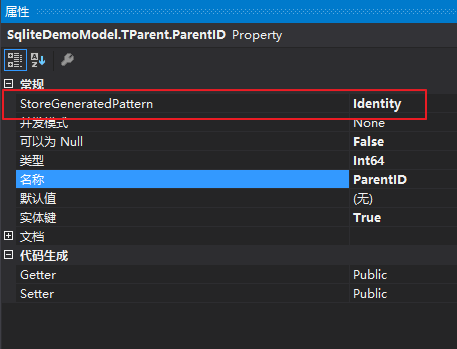
如果数据库中的字段设置为自增的话,那么在代码里需要更改该字段的属性。
图:
如果数据库在一个单独dll中,那么在用到数据库的dll也要添加sqlite包,最重要的是要把数据库dll的配置文件(App.Config)信息拷贝到应用的dll中
注意:
- 这里Sqlite数据连接字符串使用的是绝对路径
- App.Config使用的都是默认的配置
- 数据库中的主键为自增
Entity Framework+SQLite+DataBaseFirst的更多相关文章
- Entity Framework 6 Database-first连接Oracle11g
Entity Framework 6 Database-first连接Oracle11g(图文细说) 本文发布地址:http://www.cnblogs.com/likeli/p/5577264.ht ...
- Entity Framework 6, database-first with Oracle
Entity Framework 6, database-first with Oracle 转载自http://csharp.today/entity-framework-6-database-fi ...
- 使用 Entity Framework 7 进行 SQLite 的 CURD 操作
原文地址:http://www.oschina.net/translate/sqlite-crud-operation-using-entity-framework 介绍 我善于使用传统的SQL查询风 ...
- Entity Framework 6.0 Tutorials(11):Download Sample Project
Download Sample Project: Download a sample project for Entity Framework 6 Database-First model below ...
- UWP开发之ORM实践:如何使用Entity Framework Core做SQLite数据持久层?
选择SQLite的理由 在做UWP开发的时候我们首选的本地数据库一般都是Sqlite,我以前也不知道为啥?后来仔细研究了一下也是有原因的: 1,微软做的UWP应用大部分也是用Sqlite.或者说是微软 ...
- Entity Framework 6连接Postgresql、SQLite、LocalDB的注意事项和配置文件
Postgresql Postgresql支持Code First的方式自动生成表,不过默认的模式是dbo而不是public,而且还可以自动生成自增主键. <?xml version=" ...
- 让EF飞一会儿:如何用Entity Framework 6 连接Sqlite数据库
获取Sqlite 1.可以用NuGet程序包来获取,它也会自动下载EF6 2.在Sqlite官网上下载对应的版本:http://system.data.sqlite.org/index.html/do ...
- Entity Framework使用Sqlite时的一些配置
前段时间试着用Entity Framework for Sqlite环境,发现了一些坑坑洼洼,记录一下. 同时试了一下配置多种数据库,包括Sqlite.Sql Server.Sql Server Lo ...
- 如何用Entity Framework 6 连接Sqlite数据库[转]
获取Sqlite 1.可以用NuGet程序包来获取,它也会自动下载EF6 2.在Sqlite官网上下载对应的版本:http://system.data.sqlite.org/index.html/do ...
随机推荐
- Ubuntu Linux下设置IP的配置命令
Ubuntu Linux下设置IP的配置命令 今天装了Ubuntu,但是发现不能上网,开始排查问题: 1.首先确定网络连接是否正确,所用的网线是否可以正常工作 2.查看网卡是否能正常工作,检测的方法如 ...
- Spring与Struts框架整合
Spring与Struts框架整合 Struts,用Action处理请求 Hibernate,操作数据库 Spring,负责对象创建 Spring与Struts框架整合的关键点在与:让Struts框架 ...
- Java数据结构整理(一)
ava数据结构内容整理关键字: 数据结构 Collection:List.SetMap:HashMap.HashTable如何在它们之间选择一.Array , ArraysJava所有“存储及随机访问 ...
- Python twisted article
学习python twisted 的好文章 An Introduction to Asynchronous Programming and Twisted Reference: http://kron ...
- APK的反编译
有秘密的地方就有见不得光的东西,我讨厌这些,所以对于某一个XX圈APP极其反感,感觉就像一个色情网站 一.ApkTool的使用 看了几个教程,自己下载的好像总是不完整,下载包解压后一个没有aapt.e ...
- SVN和Git的一些用法总结
(A)SVN (1)查看日志提交的时候一般会写上注释,如果要查看提交日志,用以下命令: 1 svn log -l 4 其中,-l 4表示只查看最近4条日志(也可以没有这样的参数,就表示查看所有日志). ...
- 利用JS做到隐藏div和显示div
div的visibility可以控制div的显示和隐藏,但是隐藏后页面显示空白 style="visibility: none;" document.getElementById( ...
- 【HDU 5808】 Price List Strike Back (整体二分+动态规划)
Price List Strike Back There are nn shops numbered with successive integers from 11 to nn in Bytelan ...
- 腾讯面试题:10G 个整数,乱序排列,要求找出中位数。内存限制为 2G。
腾讯面试题:10G 个整数,乱序排列,要求找出中位数.内存限制为 2G. 题目和基本思路都来源网上,本人加以整理. 题目:在一个文件中有 10G 个整数,乱序排列,要求找出中位数.内存限制为 2G.只 ...
- sitemap.xml 的 几个东西
https://github.com/PureKrome/SimpleSitemap/wiki/Sitemap-Index-example 简单类实现 支持sitemapindex 有说明向导 ht ...