
ios基础篇(二十)—— UIBezierPath绘制
UIBezierPath类可以创建基于矢量的路径,可以定义简单的形状,如椭圆或者矩形,或者有多个直线和曲线段组成的形状。
一、UIBezierPath使用:
1、创建path;
2、添加路径到path;
3、将path绘制出来;
 //创建path

     path = [UIBezierPath bezierPath];

     //添加路径

     [path moveToPoint:(CGPoint){,}];

     [path addLineToPoint:(CGPoint){,}];

     //将path绘制出来

     [path stroke];
二、实例
1、绘制多边形
注意:这个类要继承自UIView。
 #import "Draw.h"

 @interface Draw (){

 UIBezierPath *path;

 }

 @end

 - (void)drawRect:(CGRect)rect {

     //线条颜色

     UIColor *color = [UIColor orangeColor];

     [color set];

     //创建path

     path = [UIBezierPath bezierPath];

     //设置线宽

     path.lineWidth = ;

     //线条拐角

     path.lineCapStyle = kCGLineCapRound;

     //终点处理

     path.lineJoinStyle = kCGLineJoinRound;

     [path moveToPoint:(CGPoint){,}];

     [path addLineToPoint:(CGPoint){,}];

     [path addLineToPoint:(CGPoint){,}];

     [path addLineToPoint:(CGPoint){,}];

     [path addLineToPoint:(CGPoint){,}];

     [path addLineToPoint:(CGPoint){,}];

     [path closePath];

     //根据坐标点连线

     [path stroke];

 }
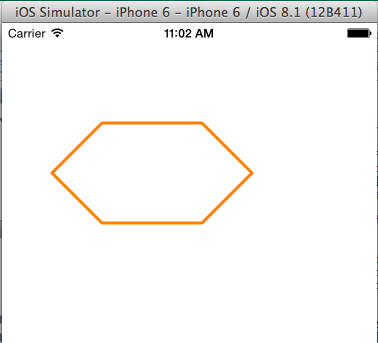
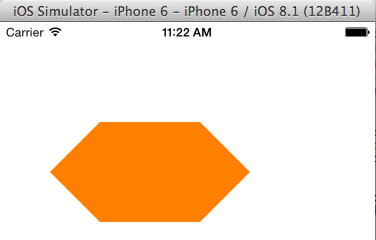
如果修改最后一句代码将[path stroke]改成[path fill];
下面来看看区别,
2、绘制矩形
+ (UIBezierPath *)bezierPathWithRect:(CGRect)rect;
 - (void)drawRect:(CGRect)rect {

     //线条颜色

     UIColor *color = [UIColor orangeColor];

     [color set];

     //创建path

     //rect四个值分别为(x、y、矩形长,矩形宽)

     path = [UIBezierPath bezierPathWithRect:(CGRect){,,,}];

     //设置线宽

     path.lineWidth = ;

     //线条拐角

     path.lineCapStyle = kCGLineCapRound;

     //终点处理

     path.lineJoinStyle = kCGLineJoinRound;

     //根据坐标点连线

     [path stroke];

 }

3、绘制圆形或椭圆形
绘制圆形或椭圆形,我们我用
+ (UIBezierPath *)bezierPathWithOvalInRect:(CGRect)rect;
 - (void)drawRect:(CGRect)rect {

     //线条颜色

     UIColor *color = [UIColor orangeColor];

     [color set];

     //添加路径

     path = [UIBezierPath bezierPathWithOvalInRect:(CGRect){,,,}];

     path.lineWidth = ;

     //线条拐角

     path.lineCapStyle = kCGLineCapRound;

     //终点处理

     path.lineJoinStyle = kCGLineJoinRound;

     //根据坐标点连线

     [path stroke];

 }
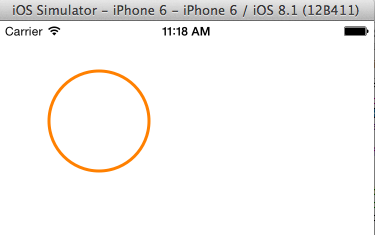
下面改变rect值,
path = [UIBezierPath bezierPathWithOvalInRect:(CGRect){50,50,100,50}];

4、绘制弧线
绘制弧线用方法:
+ (UIBezierPath *)bezierPathWithArcCenter:(CGPoint)center
radius:(CGFloat)radius
startAngle:(CGFloat)startAngle
endAngle:(CGFloat)endAngle
clockwise:(BOOL)clockwise;
其中 Center:圆弧的中心;
radius:半径;
startAngle:开始角度;
endAngle:结束角度;
clockwise:是否顺时针方向;
#import "Draw.h"

//定义PI值

#define PI 3.14159265359

@interface Draw (){

UIBezierPath *path;

}

- (void)drawRect:(CGRect)rect {

    //线条颜色

    UIColor *color = [UIColor orangeColor];

    [color set];

    //添加路径

    path = [UIBezierPath bezierPathWithArcCenter:(CGPoint){,}

                                          radius:

                                      startAngle:

                                        endAngle:PI*0.5

                                       clockwise:YES

            ];

    path.lineWidth = ;

    //线条拐角

    path.lineCapStyle = kCGLineCapRound;

    //终点处理

    path.lineJoinStyle = kCGLineJoinRound;

    //根据坐标点连线

    [path stroke];

}

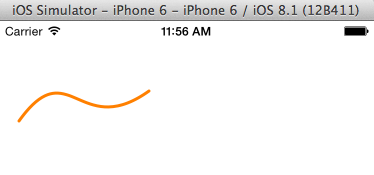
5、二次贝塞尔曲线和三次贝塞尔曲线的绘制
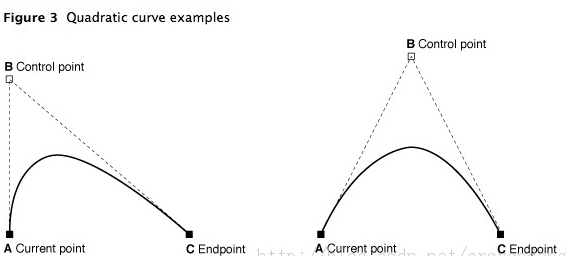
曲线段在当前点开始,在指定的点结束;曲线的形状有开始点,结束点,一个或者多个控制点的切线定义。
下图显示了两种曲线类型的相似,以及控制点和curve形状的关系。
(1) 绘制二次贝塞尔曲线
方法:- (void)addQuadCurveToPoint:(CGPoint)endPoint controlPoint:(CGPoint)controlPoint;
 - (void)drawRect:(CGRect)rect {

     //线条颜色

     UIColor *color = [UIColor orangeColor];

     [color set];

     //添加路径

     path = [UIBezierPath bezierPath];

     path.lineWidth = ;

     //线条拐角

     path.lineCapStyle = kCGLineCapRound;

     //终点处理

     path.lineJoinStyle = kCGLineJoinRound;

     [path moveToPoint:(CGPoint){,}];

     [path addQuadCurveToPoint:(CGPoint){,} controlPoint:(CGPoint){,}];

     //根据坐标点连线

     [path stroke];

 }

(2) 绘制三次贝塞尔曲线
方法:- (void)addCurveToPoint:(CGPoint)endPoint controlPoint1:(CGPoint)controlPoint1 controlPoint2:(CGPoint)controlPoint2;

 - (void)drawRect:(CGRect)rect {

     //线条颜色

     UIColor *color = [UIColor orangeColor];

     [color set];

     //添加路径

     path = [UIBezierPath bezierPath];

     path.lineWidth = ;

     //线条拐角

     path.lineCapStyle = kCGLineCapRound;

     //终点处理

     path.lineJoinStyle = kCGLineJoinRound;

     [path moveToPoint:(CGPoint){,}];

     [path addCurveToPoint:(CGPoint){,} controlPoint1:(CGPoint){,} controlPoint2:(CGPoint){,}];

     //根据坐标点连线

     [path stroke];

 }
ios基础篇(二十)—— UIBezierPath绘制的更多相关文章
- ios基础篇(十四)——UITableView(二)属性及基本用法
上一篇说了UITableView的重用机制,让我们对UITableView有了简单了解,下面说说UITableView的属性及常见方法. 一.属性 1.frame:设置控件的尺寸和大小 2.backg ...
- ios基础篇(十二)——UINavgationController的使用(三)ToolBar
UIToolBar存在于UINavigationController导航栏控制器中,而且默认被隐藏:设置UINavigationController的toolbarHidden属性可显示UIToolB ...
- ios基础篇(十六)——UIWebView的基本使用
UIWebView是内置的浏览器控件,可以用它来浏览网页.打开文档等.UIWebView是一个混合体,具体的功能控件内置的,实现一些基本的功能.UIWebView可以查看Html网页,pdf文件,do ...
- ioS基础篇(十九)——UIResponder简析
UIResponder类定义了对象相应和控制事件的接口,他是UIApplication.UIView的超类,这类的实例通常被称为应答对象. 一.Responder对象 在iOS系统中,能够响应并处理事 ...
- ios基础篇(十八)——Delegate 、NSNotification 和 KVO用法及其区别
一.Delegate Delegate本质是一种程序设计模型,iOS中使用Delegate主要用于两个页面之间的数据传递.iphone中常用@protocol和delegate的机制来实现接口的功能. ...
- iOS基础篇(十五)——UIScrollView的基本用法
滚动视图(UIScrollView)通常用于显示内容尺寸大于屏幕尺寸的视图. 一.基本属性 1.CGSize contentSize :设置UIScrollView的滚动范围 2.CGPoint co ...
- ios基础篇(十)——UINavgationController的使用(一)UIBarButtonItem的添加
UINavigationController又被成为导航控制器,继承自UIViewController,以栈的方式管理所控制的视图控制器,下面就详细说一下UINavigationController的 ...
- php基础篇-二维数组排序 array_multisort
原文:php基础篇-二维数组排序 array_multisort 对2维数组或者多维数组排序是常见的问题,在php中我们有个专门的多维数组排序函数,下面简单介绍下: array_multisort(a ...
- C#学习基础概念二十五问
C#学习基础概念二十五问 1.静态变量和非静态变量的区别?2.const 和 static readonly 区别?3.extern 是什么意思?4.abstract 是什么意思?5.internal ...
- ios基础篇(二十五)—— Animation动画(UIView、CoreAnimation)
Animation主要分为两类: 1.UIView属性动画 2.CoreAnimation动画 一.UIView属性动画 UIKit直接将动画集成到UIView类中,实现简单动画的创建过程.UIVie ...
随机推荐
- Eclipse下编写的web项目部署到tomcat下
之前都是用myeclipse编写web项目,编写好然后在myclipse上配置的tomcat下的webapps文件想项目复制到其他tomcat下就能运行了. 最近学习jquery,将eclipse编写 ...
- 一步一步实现MVC5+EF6+Bootstarp+Autofac+NoSql实现OADemo 之登陆(一) 验证码 Captcha 之大插件小用
不知何年何月才能完成OADemo啊,总之还是一步一步来吧,这段时间开始着手了,先做登陆. 前段时间研究了一下在CentOS7下安装Mysql和Memcached服务,并测试了用C#操作,结果还行. ...
- jQuery表单验证插件——jquery.validate.js
官网地址:http://bassistance.de/jquery-plugins/jquery-plugin-validation 一.导入js库 <script src="../j ...
- Linux中/proc目录下文件详解
转载于:http://blog.chinaunix.net/uid-10449864-id-2956854.html Linux中/proc目录下文件详解(一)/proc文件系统下的多种文件提供的系统 ...
- python之redis
Redis简单介绍 如果简单地比较Redis与Memcached的区别,大多数都会得到以下观点:1 Redis不仅仅支持简单的k/v类型的数据,同时还提供list,set,zset,hash等数据结构 ...
- selenium杀掉浏览器进程方法
* 杀掉浏览器进程 */ public static void operateWindowsProcess(){ WindowsUtils.tryToKillByNa ...
- spring+mybatis+druid+mysql+maven事务配置
1.首先pom.xml文件里面需要用到的jar配置: <!-- spring事务,包含了@Transactional标注 --> <dependency> <groupI ...
- [问题2014A11] 解答
[问题2014A11] 解答 我们需要利用以下关于幂等阵判定的结论,它是复旦高代书第 142 页的例 3.6.4: 结论 设 \(A\) 为 \(n\) 阶方阵, 则 \(A^2=A\) 当且仅当 ...
- tar等
tar格式,会打包成一个文件,可以对多个目录,或者多个文件进行打包tar命令只是打包,不会压缩,打包前后大小是一样的 tar命令 -c //打包-x //解压-f //指定文件-t //查看 tar ...
- python model对象转为dict数据
在接口通讯里经常遇到这种需求,需要将对象的字段名和值均传至接口,user = User.objects.get(id=1)笨方法1,没错,我这样写过:di = {}di['username'] = u ...