
Asp.Net Core + Dapper + Repository 模式 + TDD 学习笔记
0x00 前言
之前一直使用的是 EF ,做了一个简单的小项目后发现 EF 的表现并不是很好,就比如联表查询,因为现在的 EF Core 也没有啥好用的分析工具,所以也不知道该怎么写 Linq 生成出来的 Sql 效率比较高,于是这次的期末大作业决定使用性能强劲、轻便小巧的 ORM —— Dapper。
0x01 Repository 模式
Repository 模式几乎出现在所有的 asp.net 样例中,主要的作用是给业务层提供数据访问的能力,与 DAL 的区别就在于:
Repository模式:
Repository 是DDD中的概念,强调 Repository 是受 Domain 驱动的, Repository 中定义的功能要体现 Domain 的意图和约束,而 Dal 更纯粹的就是提供数据访问的功能,并不严格受限于 Business 层。使用 Repository ,隐含着一种意图倾向,就是 Domain 需要什么我才提供什么,不该提供的功能就不要提供,一切都是以 Domain 的需求为核心。
而使用Dal,其意图倾向在于我 Dal 层能使用的数据库访问操作提供给 Business 层,你 Business 要用哪个自己选.换一个 Business 也可以用我这个 Dal,一切是以我 Dal 能提供什么操作为核心.
0x02 TDD(测试驱动开发)
TDD 的基本思路就是通过测试来推动整个开发的进行。而测试驱动开发技术并不只是单纯的测试工作。
在我看来,TDD 的实施可以带来以下的好处:
- 在一个接口尚未完全确定的时候,通过编写测试用例,可以帮助我们更好的描述接口的行为,帮助我们更好的了解抽象的需求。
- 编写测试用例的过程能够促使我们将功能分解开,做出“高内聚,低耦合”的设计,因此,TDD 也是我们设计高可复用性的代码的过程。
- 编写测试用例也是对接口调用方法最详细的描述,Documation is cheap, show me the examples。测试用例代码比详尽的文档不知道高到哪里去了。
- 测试用例还能够尽早的帮助我们发现代码的错误,每当代码发生了修改,可以方便的帮助我们验证所做的修改对已经有效的功能是否有影响,从而使我们能够更快的发现并定位 bug。
0x03 建模
在期末作业的系统中,需要实现一个站内通知的功能,首先,让我们来简单的建个模: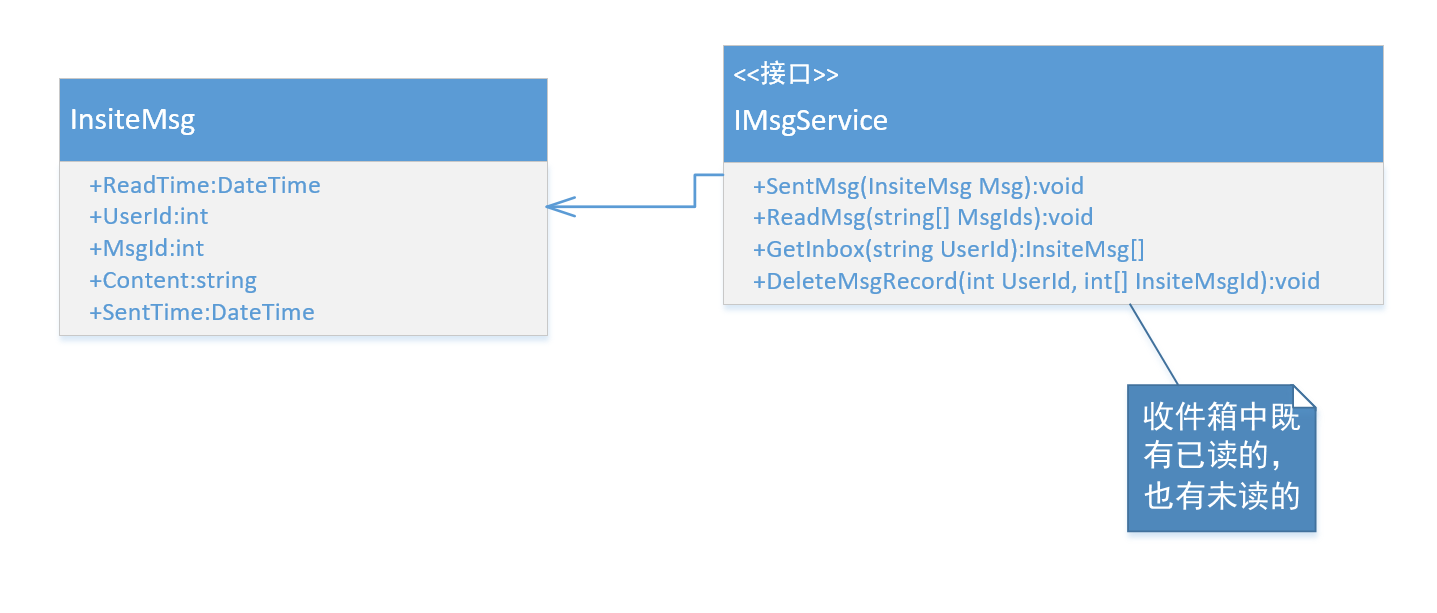
然后,依照这个模型,我创建好了对应的实体与接口:
 public interface IInsiteMsgService

 {

     /// <summary>

     /// 给一组用户发送指定的站内消息

     /// </summary>

     /// <param name="msgs">站内消息数组</param>

     Task SentMsgsAsync(IEnumerable<InsiteMsg> msgs);

     /// <summary>

     /// 发送一条消息给指定的用户

     /// </summary>

     /// <param name="msg">站内消息</param>

     void SentMsg(InsiteMsg msg);

     /// <summary>

     /// 将指定的消息设置为已读

     /// </summary>

     /// <param name="msgIdRecordIds">用户消息记录的 Id</param>

     void ReadMsg(IEnumerable<int> msgIdRecordIds);

     /// <summary>

     /// 获取指定用户的所有的站内消息,包括已读与未读

     /// </summary>

     /// <param name="userId">用户 Id</param>

     /// <returns></returns>

     IEnumerable<InsiteMsg> GetInbox(int userId);

     /// <summary>

     /// 删除指定用户的一些消息记录

     /// </summary>

     /// <param name="userId">用户 Id</param>

     /// <param name="insiteMsgIds">用户消息记录 Id</param>

     void DeleteMsgRecord(int userId, IEnumerable<int> insiteMsgIds);

     }
InsiteMessage 实体:
 public class InsiteMsg

 {

     public int InsiteMsgId { get; set; }

     /// <summary>

     /// 消息发送时间

     /// </summary>

     public DateTime SentTime { get; set; }

     /// <summary>

     /// 消息阅读时间,null 说明消息未读

     /// </summary>

     public DateTime? ReadTime { get; set; }

     public int UserId { get; set; }

     /// <summary>

     /// 消息内容

     /// </summary>

     [MaxLength()]

     public string Content { get; set; }

     public bool Status { get; set; }

 }
建立测试
接下来,建立测试用例,来描述 Service 每个方法的行为,这里以 SentMsgsAsync 举例:
- 消息的状态如果是 false ,则引发
ArgumentException,且不会被持久化 - 消息的内容如果是空的,则引发
ArgumentException,且不会被持久化
根据上面的约束,测试用例代码也就出来了
 public class InsiteMsgServiceTests

 {

     /// <summary>

     /// 消息发送成功,添加到数据库

     /// </summary>

     [Fact]

     public void SentMsgTest()

     {

         //Mock repository

         List<InsiteMsg> dataSet = new List<InsiteMsg>();

         var msgRepoMock = new Mock<IInsiteMsgRepository>();

         msgRepoMock.Setup(r => r.InsertAsync(It.IsAny<IEnumerable<InsiteMsg>>())).Callback<IEnumerable<InsiteMsg>>((m) =>

         {

             dataSet.AddRange(m);

         });

         //Arrange

         IInsiteMsgService msgService = new InsiteMsgService(msgRepoMock.Object);

         var msgs = new List<InsiteMsg>

         {

             new InsiteMsg { Content="fuck", Status=true, UserId= },

             new InsiteMsg { Content="fuck", Status=true, UserId= },

             new InsiteMsg { Content="fuck", Status=true, UserId= },

             new InsiteMsg { Content="fuck", Status=true, UserId= },

         };

         //action

         msgService.SentMsgsAsync(msgs);

         dataSet.Should().BeEquivalentTo(msgs);

     }

     /// <summary>

     /// 消息的状态如果是 false ,则引发 <see cref="ArgumentException"/>,且不会被持久化

     /// </summary>

     [Fact]

     public void SentMsgWithFalseStatusTest()

     {

         //Mock repository

         List<InsiteMsg> dataSet = new List<InsiteMsg>();

         var msgRepoMock = new Mock<IInsiteMsgRepository>();

         msgRepoMock.Setup(r => r.InsertAsync(It.IsAny<IEnumerable<InsiteMsg>>())).Callback<IEnumerable<InsiteMsg>>((m) =>

         {

             dataSet.AddRange(m);

         });

         IInsiteMsgService msgService = new InsiteMsgService(msgRepoMock.Object);

         List<InsiteMsg> msgs = new List<InsiteMsg>

         {

             new InsiteMsg { Status = false, Content = "fuck" },

             new InsiteMsg { Status = true, Content = "fuck" }

         };

         var exception = Record.ExceptionAsync(async () => await msgService.SentMsgsAsync(msgs));

         exception?.Result.Should().NotBeNull();

         Assert.IsType<ArgumentException>(exception.Result);

         dataSet.Count.Should().Equals();

     }

     /// <summary>

     /// 消息的内容如果是空的,则引发 <see cref="ArgumentException"/>,且不会被持久化

     /// </summary>

     [Fact]

     public void SentMsgWithEmptyContentTest()

     {

         //Mock repository

         List<InsiteMsg> dataSet = new List<InsiteMsg>();

         var msgRepoMock = new Mock<IInsiteMsgRepository>();

         msgRepoMock.Setup(r => r.InsertAsync(It.IsAny<IEnumerable<InsiteMsg>>())).Callback<IEnumerable<InsiteMsg>>((m) =>

         {

             dataSet.AddRange(m);

         });

         IInsiteMsgService msgService = new InsiteMsgService(msgRepoMock.Object);

         List<InsiteMsg> msgs = new List<InsiteMsg>

         {

             new InsiteMsg { Status = true, Content = "" }// empty

         };

         var exception = Record.ExceptionAsync(async () => await msgService.SentMsgsAsync(msgs));

         exception?.Result.Should().NotBeNull(because: "消息内容是空字符串");

         Assert.IsType<ArgumentException>(exception.Result);

         dataSet.Count.Should().Equals();

         msgs = new List<InsiteMsg>

         {

             new InsiteMsg { Status = true, Content = " " }// space only

         };

         exception = Record.ExceptionAsync(async () => await msgService.SentMsgsAsync(msgs));

         exception?.Result.Should().NotBeNull(because: "消息内容只包含空格");

         Assert.IsType<ArgumentException>(exception.Result);

         dataSet.Count.Should().Equals();

         msgs = new List<InsiteMsg>

         {

             new InsiteMsg { Status = true, Content = null }// null

         };

         exception = Record.ExceptionAsync(async () => await msgService.SentMsgsAsync(msgs));

         exception?.Result.Should().NotBeNull(because: "消息内容是 null");

         Assert.IsType<ArgumentException>(exception.Result);

         dataSet.Count.Should().Equals();

     }

 }
实现接口以通过测试
 namespace Hive.Domain.Services.Concretes

 {

     public class InsiteMsgService : IInsiteMsgService

     {

         private readonly IInsiteMsgRepository _msgRepo;

         public InsiteMsgService(IInsiteMsgRepository msgRepo)

         {

             _msgRepo = msgRepo;

         }

         public async Task SentMsgsAsync(IEnumerable<InsiteMsg> msgs)

         {

             foreach (InsiteMsg msg in msgs)

             {

                 if (!msg.Status || string.IsNullOrWhiteSpace(msg.Content))

                 {

                     throw new ArgumentException("不能将无效的消息插入", nameof(msgs));

                 }

                 msg.SentTime = DateTime.Now;

                 msg.ReadTime = null;

             }

             await _msgRepo.InsertAsync(msgs);

         }

         public void SentMsg(InsiteMsg msg)

         {

             if (!msg.Status || string.IsNullOrWhiteSpace(msg.Content))

             {

                 throw new ArgumentException("不能将无效的消息插入", nameof(msg));

             }

             msg.SentTime = DateTime.Now;

             msg.ReadTime = null;

             _msgRepo.Insert(msg);

         }

         public void ReadMsg(IEnumerable<int> msgs, int userId)

         {

             var ids = msgs.Distinct();

             _msgRepo.UpdateReadTime(ids, userId);

         }

         public async Task<IEnumerable<InsiteMsg>> GetInboxAsync(int userId)

         {

             return await _msgRepo.GetByUserIdAsync(userId);

         }

         public void DeleteMsgRecord(int userId, IEnumerable<int> insiteMsgIds)

         {

             _msgRepo.DeleteMsgRecoreds(userId, insiteMsgIds.Distinct());

         }

     }

 }
上面的一些代码很明了,就懒得逐块注释了,函数注释足矣~
验证测试
测试当然全部通过啦,这里就不放图了
为了将数据访问与逻辑代码分离,这里我使用了 Repository
模式—— IInsiteMsgRepository ,下面给出这个接口的定义:
 namespace Hive.Domain.Repositories.Abstracts

 {

     public interface IInsiteMsgRepository

     {

         /// <summary>

         /// 插入一条消息

         /// </summary>

         /// <param name="msg">消息实体</param>

         void Insert(InsiteMsg msg);

         Task InsertAsync(IEnumerable<InsiteMsg> msgs);

         /// <summary>

         /// 根据消息 id 获取消息内容,不包含阅读状态

         /// </summary>

         /// <param name="id">消息 Id</param>

         /// <returns></returns>

         InsiteMsg GetById(int id);

         /// <summary>

         /// 更新消息的阅读时间为当前时间

         /// </summary>

         /// <param name="msgIds">消息的 Id</param>

         /// <param name="userId">用户 Id</param>

         void UpdateReadTime(IEnumerable<int> msgIds,int userId);

         /// <summary>

         /// 获取跟指定用户相关的所有消息

         /// </summary>

         /// <param name="id">用户 id</param>

         /// <returns></returns>

         Task<IEnumerable<InsiteMsg>> GetByUserIdAsync(int id);

         /// <summary>

         /// 删除指定的用户的消息记录

         /// </summary>

         /// <param name="userId">用户 Id</param>

         /// <param name="msgRIds">消息 Id</param>

         void DeleteMsgRecoreds(int userId, IEnumerable<int> msgRIds);

     }

 }
但是在测试阶段,我并不想把仓库实现掉,所以这里就用上了 Moq.Mock。
 List<InsiteMsg> dataSet = new List<InsiteMsg>();

         var msgRepoMock = new Mock<IInsiteMsgRepository>();

         msgRepoMock.Setup(r => r.InsertAsync(It.IsAny<IEnumerable<InsiteMsg>>())).Callback<IEnumerable<InsiteMsg>>((m) =>

         {

             dataSet.AddRange(m);

         });
上面的代码模拟了一个 IInsiteMsgRepository 对象,在我们调用这个对象的 InsertAsync 方法的时候,这个对象就把传入的参数添加到一个集合中去。
模拟出来的对象可以通过 msgMock.Object 访问。
0x04 实现 Repository
使用事务
在创建并发送新的站内消息到用户的时候,需要先插入消息本体,然后再把消息跟目标用户之间在关联表中建立联系,所以我们需要考虑到下面两个问题:
- 数据的一致性
- 在建立联系前必须获取到消息的 Id
为了解决第一个问题,我们需要使用事务(Transaction),就跟在 ADO.NET 中使用事务一样,可以使用一个简单的套路:
 _conn.Open();

 try

 {

     using (var transaction = _conn.BeginTransaction())

     {

         // execute some sql

         transaction.Commit();

     }

 }

 finally

 {

     _conn.Close();

 }
在事务中,一旦部分操作失败了,我们就可以回滚(Rollback)到初始状态,这样要么所有的操作全部成功执行,要么一条操作都不会执行,数据完整性、一致性得到了保证。
在上面的代码中,using 块内,Commit()之前的语句一旦执行出错(抛出异常),程序就会自动 Rollback。
在数据库中,Id 是一个自增字段,为了获取刚刚插入的实体的 Id 可以使用 last_insert_id() 这个函数(For MySql),这个函数返回当前连接过程中,最后插入的行的自增的主键的值。
最终实现
 using Hive.Domain.Repositories.Abstracts;

 using System;

 using System.Collections.Generic;

 using System.Linq;

 using System.Threading.Tasks;

 using Hive.Domain.Entities;

 using System.Data.Common;

 using Dapper;

 namespace Hive.Domain.Repositories.Concretes

 {

     public class InsiteMsgRepository : IInsiteMsgRepository

     {

         private readonly DbConnection _conn;

         public InsiteMsgRepository(DbConnection conn)

         {

             _conn = conn;

         }

         public void DeleteMsgRecoreds(int userId, IEnumerable<int> msgIds)

         {

             var param = new

             {

                 UserId = userId,

                 MsgIds = msgIds

             };

             string sql = $@"

                 UPDATE insite_msg_record

                 SET Status = 0

                 WHERE UserId = @{nameof(param.UserId)}

                     AND Status = 1

                     AND InsiteMsgId IN @{nameof(param.MsgIds)}";

             try

             {

                 _conn.Open();

                 using (var transaction = _conn.BeginTransaction())

                 {

                     _conn.Execute(sql, param, transaction);

                     transaction.Commit();

                 }

             }

             finally

             {

                 _conn.Close();

             }

         }

         public InsiteMsg GetById(int id)

         {

             throw new NotImplementedException();

         }

         public async Task<IEnumerable<InsiteMsg>> GetByUserIdAsync(int id)

         {

             string sql = $@"

                 SELECT

                     ReadTime,

                     SentTime,

                     insite_msg.InsiteMsgId,

                     Content,

                     UserId

                 FROM insite_msg_record, insite_msg

                 WHERE UserId = @{nameof(id)}

                     AND insite_msg.InsiteMsgId = insite_msg_record.InsiteMsgId

                     AND insite_msg.Status = TRUE

                     AND insite_msg_record.Status = 1";

             var inboxMsgs = await _conn.QueryAsync<InsiteMsg>(sql, new { id });

             inboxMsgs = inboxMsgs.OrderBy(m => m.ReadTime);

             return inboxMsgs;

         }

         public async Task InsertAsync(IEnumerable<InsiteMsg> msgs)

         {

             var msgContents = msgs.Select(m => new { m.Content, m.SentTime });

             string insertSql = $@"

                 INSERT INTO insite_msg (SentTime, Content)

                 VALUES (@SentTime, @Content)";

             _conn.Open();

             // 开启一个事务,保证数据插入的完整性

             try

             {

                 using (var transaction = _conn.BeginTransaction())

                 {

                     // 首先插入消息实体

                     var insertMsgTask = _conn.ExecuteAsync(insertSql, msgContents, transaction);

                     // 等待消息实体插入完成

                     await insertMsgTask;

                     var msgRecords = msgs.Select(m => new { m.UserId, m.InsiteMsgId });

                     // 获取消息的 Id

                     int firstId = (int)(_conn.QuerySingle("SELECT last_insert_id() AS FirstId").FirstId);

                     firstId = firstId - msgs.Count() + ;

                     foreach (var m in msgs)

                     {

                         m.InsiteMsgId = firstId;

                         firstId++;

                     }

                     // 插入消息记录

                     insertSql = $@"

                         INSERT INTO insite_msg_record (UserId, InsiteMsgId)

                         VALUES (@UserId, @InsiteMsgId)";

                     await _conn.ExecuteAsync(insertSql, msgRecords);

                     transaction.Commit();

                 }

             }

             catch (Exception)

             {

                 _conn.Close();

                 throw;

             }

         }

         public void Insert(InsiteMsg msg)

         {

             string sql = $@"

                 INSERT INTO insite_msg (SentTime, Content)

                 VALUE (@{nameof(msg.SentTime)}, @{nameof(msg.Content)})";

             _conn.Execute(sql, new { msg.SentTime, msg.Content });

             string recordSql = $@"

                 INSERT INTO insite_msg_record (UserId, InsiteMsgId)

                 VALUE (@{nameof(msg.UserId)}, @{nameof(msg.InsiteMsgId)})";

             _conn.Execute(recordSql, new { msg.UserId, msg.InsiteMsgId });

         }

         public void UpdateReadTime(IEnumerable<int> msgsIds, int userId)

         {

             var param = new

             {

                 UserId = userId,

                 Msgs = msgsIds

             };

             // 只更新发送给指定用户的指定消息

             string sql = $@"

                 UPDATE insite_msg_record

                 SET ReadTime = now()

                 WHERE UserId = @{nameof(param.UserId)}

                     AND Status = 1

                     AND InsiteMsgId IN @{nameof(param.Msgs)}";

             try

             {

                 _conn.Open();

                 using (var transaction = _conn.BeginTransaction())

                 {

                     _conn.Execute(sql, param, transaction);

                     transaction.Commit();

                 }

             }

             finally

             {

                 _conn.Close();

             }

         }

     }

 }
0x05 测试 Repository
测试 Repository 这部分还是挺难的,没办法编写单元测试,EF 的话还可以用 内存数据库,但是 Dapper 的话,就没办法了。所以我就直接
写了测试用的 API,通过 API 直接调用 Repository 的方法,然后往测试数据库里面读写数据。
转载:http://www.cnblogs.com/JacZhu/p/6112033.html
Asp.Net Core + Dapper + Repository 模式 + TDD 学习笔记的更多相关文章
- Asp.net core Identity + identity server + angular 学习笔记 (第三篇)
register -> login 讲了 我们来讲讲 forgot password -> reset password 和 change password 吧 先来 forgot pa ...
- Asp.net core Identity + identity server + angular 学习笔记 (第二篇)
先纠正一下第一篇的的错误. 在 Login.cshtml 和 Login.cshtml.cs 里, 本来应该是 Register 我却写成 Login . cshtml 修改部分 <form a ...
- Asp.net core Identity + identity server + angular 学习笔记 (第一篇)
用了很长一段时间了, 但是一直没有做过任何笔记,感觉 identity 太多东西要写了, 提不起劲. 但是时间一久很多东西都记不清了. 还是写一轮吧. 加深记忆. 这是 0-1 的笔记, 会写好多篇. ...
- ASP.NET Core微服务 on K8S学习笔记(第一章:详解基本对象及服务发现)
课程链接:http://video.jessetalk.cn/course/explore 良心课程,大家一起来学习哈! 任务1:课程介绍 任务2:Labels and Selectors 所有资源对 ...
- Asp.net core Identity + identity server + angular 学习笔记 (第五篇)
ABAC (Attribute Based Access Control) 基于属性得权限管理. 属性就是 key and value 表达力非常得强. 我们可以用 key = role value ...
- Asp.net core Identity + identity server + angular 学习笔记 (第四篇)
来说说 RBAC (role based access control) 这是目前全世界最通用的权限管理机制, 当然使用率高并不是说它最好. 它也有很多局限的. 我们来讲讲最简单的 role base ...
- Asp.net Webform 使用Repository模式实现CRUD操作代码生成工具
Asp.net Webform 使用Repository模式实现CRUD操作代码生成工具 介绍 该工具是通过一个github上的开源项目修改的原始作者https://github.com/Supere ...
- 《ASP.NET4从入门到精通》学习笔记2
版权声明:本文为博主原创文章,未经博主同意不得转载. https://blog.csdn.net/dongdongdongJL/article/details/37610807 <ASP.N ...
- UML和模式应用学习笔记-1(面向对象分析和设计)
UML和模式应用学习笔记-1(面向对象分析和设计) 而只是对情节的记录:此处的用例场景为:游戏者请求掷骰子.系统展示结果:如果骰子的总点数是7,则游戏者赢得游戏,否则为输 (2)定义领域模型:在领域模 ...
随机推荐
- 配置android sdk 环境
1:下载adnroid sdk安装包 官方下载地址无法打开,没有vpn,使用下面这个地址下载,地址:http://www.android-studio.org/
- Javascript 的执行环境(execution context)和作用域(scope)及垃圾回收
执行环境有全局执行环境和函数执行环境之分,每次进入一个新执行环境,都会创建一个搜索变量和函数的作用域链.函数的局部环境不仅有权访问函数作用于中的变量,而且可以访问其外部环境,直到全局环境.全局执行环境 ...
- wepack+sass+vue 入门教程(二)
六.新建webpack配置文件 webpack.config.js 文件整体框架内容如下,后续会详细说明每个配置项的配置 webpack.config.js直接放在项目demo目录下 module.e ...
- jQuery学习之路(4)- 动画
▓▓▓▓▓▓ 大致介绍 通过jQuery中基本的动画方法,能够轻松地为网页添加非常精彩的视觉效果,给用户一种全新的体验 ▓▓▓▓▓▓ jQuery中的动画 ▓▓▓▓▓▓ show()和hide()方法 ...
- .net erp(办公oa)开发平台架构概要说明之表单设计器
背景:搭建一个适合公司erp业务的开发平台. 架构概要图: 表单设计开发部署示例图 表单设计开发部署示例说明1)每个开发人员可以自己部署表单设计至本地一份(当然也可以共用一套开发环境,但是如 ...
- 微信小程序体验(1):携程酒店机票火车票
在 12 月 28 日微信公开课上,张小龙对微信小程序的形态进行了阐释,小程序有四个特定:无需安装.触手可及.用完即走.无需卸载. 由于携程这种订酒店.火车票和机票等工具性质非常强的服务,非常符合张小 ...
- Win10提示没有权限使用网络资源问题解决
借鉴链接:http://www.cr173.com/html/67361_1.html Win10提示没有权限使用网络资源解决方法 1.打开控制面板; 2.在所有控制面板项中找到凭据管理器; 3.添加 ...
- git如何切换远程仓库
场景 工作时可能由于git仓库的变动,需要我们将已有代码切换仓库.比如我们先用的gitlab,现在要切换到github上. 迁移命令 代码迁移其实也很简单. 先保证本地代码是最新代码 $ git pu ...
- 在Ubuntu下安装ovs-dpdk
在Ubuntu下安装ovs-dpdk 参考资料:https://software.intel.com/zh-cn/articles/using-open-vswitch-with-dpdk-on-ub ...
- 第14章 Linux启动管理(1)_系统运行级别
1. CentOS 6.x 启动管理 (1)系统运行级别 ①运行级别 运行级别 含义 0 关机 1 单用户模式,可以想象为Windows的安全模式,主要用于系统修复.(但不是Linux的安全模式) 2 ...