
(三十五)c#Winform自定义控件-Tab页
官网
前提
入行已经7,8年了,一直想做一套漂亮点的自定义控件,于是就有了本系列文章。
GitHub:https://github.com/kwwwvagaa/NetWinformControl
码云:https://gitee.com/kwwwvagaa/net_winform_custom_control.git
如果觉得写的还行,请点个 star 支持一下吧
欢迎前来交流探讨: 企鹅群568015492 idkey=6e08741ef16fe53bf0314c1c9e336c4f626047943a8b76bac062361bab6b4f8d">
目录
https://www.cnblogs.com/bfyx/p/11364884.html
准备工作
此控件在https://www.cnblogs.com/belx/articles/9188577.html基础上调整修改,特此感谢
开始
添加一个用户组件,命名TabControlExt,继承自TabControl
几个重写属性
  private Color _backColor = Color.White;

         [Browsable(true)]

         [EditorBrowsable(EditorBrowsableState.Always)]

         [DefaultValue(typeof(Color), "White")]

         public override Color BackColor

         {

             get { return _backColor; }

             set

             {

                 _backColor = value;

                 base.Invalidate(true);

             }

         }

         private Color _borderColor = Color.FromArgb(, , );

         [DefaultValue(typeof(Color), "232, 232, 232")]

         [Description("TabContorl边框色")]

         public Color BorderColor

         {

             get { return _borderColor; }

             set

             {

                 _borderColor = value;

                 base.Invalidate(true);

             }

         }

         private Color _headSelectedBackColor = Color.FromArgb(, , );

         [DefaultValue(typeof(Color), "255, 85, 51")]

         [Description("TabPage头部选中后的背景颜色")]

         public Color HeadSelectedBackColor

         {

             get { return _headSelectedBackColor; }

             set { _headSelectedBackColor = value; }

         }

         private Color _headSelectedBorderColor = Color.FromArgb(, , );

         [DefaultValue(typeof(Color), "232, 232, 232")]

         [Description("TabPage头部选中后的边框颜色")]

         public Color HeadSelectedBorderColor

         {

             get { return _headSelectedBorderColor; }

             set { _headSelectedBorderColor = value; }

         }

         private Color _headerBackColor = Color.White;

         [DefaultValue(typeof(Color), "White")]

         [Description("TabPage头部默认背景颜色")]

         public Color HeaderBackColor

         {

             get { return _headerBackColor; }

             set { _headerBackColor = value; }

         }
重写背景
 protected override void OnPaintBackground(PaintEventArgs pevent)

         {

             if (this.DesignMode == true)

             {

                 LinearGradientBrush backBrush = new LinearGradientBrush(

                             this.Bounds,

                             SystemColors.ControlLightLight,

                             SystemColors.ControlLight,

                             LinearGradientMode.Vertical);

                 pevent.Graphics.FillRectangle(backBrush, this.Bounds);

                 backBrush.Dispose();

             }

             else

             {

                 this.PaintTransparentBackground(pevent.Graphics, this.ClientRectangle);

             }

         }

  /// <summary>

         ///  TabContorl 背景色设置

         /// </summary>

         /// <param name="g"></param>

         /// <param name="clipRect"></param>

         protected void PaintTransparentBackground(Graphics g, Rectangle clipRect)

         {

             if ((this.Parent != null))

             {

                 clipRect.Offset(this.Location);

                 PaintEventArgs e = new PaintEventArgs(g, clipRect);

                 GraphicsState state = g.Save();

                 g.SmoothingMode = SmoothingMode.HighSpeed;

                 try

                 {

                     g.TranslateTransform((float)-this.Location.X, (float)-this.Location.Y);

                     this.InvokePaintBackground(this.Parent, e);

                     this.InvokePaint(this.Parent, e);

                 }

                 finally

                 {

                     g.Restore(state);

                     clipRect.Offset(-this.Location.X, -this.Location.Y);

                     //新加片段,待测试

                     using (SolidBrush brush = new SolidBrush(_backColor))

                     {

                         clipRect.Inflate(, );

                         g.FillRectangle(brush, clipRect);

                     }

                 }

             }

             else

             {

                 System.Drawing.Drawing2D.LinearGradientBrush backBrush = new System.Drawing.Drawing2D.LinearGradientBrush(this.Bounds, SystemColors.ControlLightLight, SystemColors.ControlLight, System.Drawing.Drawing2D.LinearGradientMode.Vertical);

                 g.FillRectangle(backBrush, this.Bounds);

                 backBrush.Dispose();

             }

         }
重绘
  protected override void OnPaint(PaintEventArgs e)

         {

             // Paint the Background

             base.OnPaint(e);

             this.PaintTransparentBackground(e.Graphics, this.ClientRectangle);

             this.PaintAllTheTabs(e);

             this.PaintTheTabPageBorder(e);

             this.PaintTheSelectedTab(e);

         }
辅助函数
 private void PaintAllTheTabs(System.Windows.Forms.PaintEventArgs e)

         {

             if (this.TabCount > )

             {

                 for (int index = ; index < this.TabCount; index++)

                 {

                     this.PaintTab(e, index);

                 }

             }

         }

         private void PaintTab(System.Windows.Forms.PaintEventArgs e, int index)

         {

             GraphicsPath path = this.GetTabPath(index);

             this.PaintTabBackground(e.Graphics, index, path);

             this.PaintTabBorder(e.Graphics, index, path);

             this.PaintTabText(e.Graphics, index);

             this.PaintTabImage(e.Graphics, index);

         }

         /// <summary>

         /// 设置选项卡头部颜色

         /// </summary>

         /// <param name="graph"></param>

         /// <param name="index"></param>

         /// <param name="path"></param>

         private void PaintTabBackground(System.Drawing.Graphics graph, int index, System.Drawing.Drawing2D.GraphicsPath path)

         {

             Rectangle rect = this.GetTabRect(index);

             System.Drawing.Brush buttonBrush = new System.Drawing.Drawing2D.LinearGradientBrush(rect, _headerBackColor, _headerBackColor, LinearGradientMode.Vertical);  //非选中时候的 TabPage 页头部背景色

             graph.FillPath(buttonBrush, path);

             //if (index == this.SelectedIndex)

             //{

             //    //buttonBrush = new System.Drawing.SolidBrush(_headSelectedBackColor);

             //    graph.DrawLine(new Pen(_headerBackColor), rect.Right+2, rect.Bottom, rect.Left + 1, rect.Bottom);

             //}

             buttonBrush.Dispose();

         }

         /// <summary>

         /// 设置选项卡头部边框色

         /// </summary>

         /// <param name="graph"></param>

         /// <param name="index"></param>

         /// <param name="path"></param>

         private void PaintTabBorder(System.Drawing.Graphics graph, int index, System.Drawing.Drawing2D.GraphicsPath path)

         {

             Pen borderPen = new Pen(_borderColor);// TabPage 非选中时候的 TabPage 头部边框色

             if (index == this.SelectedIndex)

             {

                 borderPen = new Pen(_headSelectedBorderColor); // TabPage 选中后的 TabPage 头部边框色

             }

             graph.DrawPath(borderPen, path);

             borderPen.Dispose();

         }

         private void PaintTabImage(System.Drawing.Graphics g, int index)

         {

             Image tabImage = null;

             if (this.TabPages[index].ImageIndex > - && this.ImageList != null)

             {

                 tabImage = this.ImageList.Images[this.TabPages[index].ImageIndex];

             }

             else if (this.TabPages[index].ImageKey.Trim().Length >  && this.ImageList != null)

             {

                 tabImage = this.ImageList.Images[this.TabPages[index].ImageKey];

             }

             if (tabImage != null)

             {

                 Rectangle rect = this.GetTabRect(index);

                 g.DrawImage(tabImage, rect.Right - rect.Height - , , rect.Height - , rect.Height - );

             }

         }

         private void PaintTabText(System.Drawing.Graphics graph, int index)

         {

             string tabtext = this.TabPages[index].Text;

             System.Drawing.StringFormat format = new System.Drawing.StringFormat();

             format.Alignment = StringAlignment.Near;

             format.LineAlignment = StringAlignment.Center;

             format.Trimming = StringTrimming.EllipsisCharacter;

             Brush forebrush = null;

             if (this.TabPages[index].Enabled == false)

             {

                 forebrush = SystemBrushes.ControlDark;

             }

             else

             {

                 forebrush = SystemBrushes.ControlText;

             }

             Font tabFont = this.Font;

             if (index == this.SelectedIndex)

             {

                 if (this.TabPages[index].Enabled != false)

                 {

                     forebrush = new SolidBrush(_headSelectedBackColor);

                 }

             }

             Rectangle rect = this.GetTabRect(index);

             var txtSize = ControlHelper.GetStringWidth(tabtext, graph, tabFont);

             Rectangle rect2 = new Rectangle(rect.Left + (rect.Width - txtSize) /  - , rect.Top, rect.Width, rect.Height);

             graph.DrawString(tabtext, tabFont, forebrush, rect2, format);

         }

         /// <summary>

         /// 设置 TabPage 内容页边框色

         /// </summary>

         /// <param name="e"></param>

         private void PaintTheTabPageBorder(System.Windows.Forms.PaintEventArgs e)

         {

             if (this.TabCount > )

             {

                 Rectangle borderRect = this.TabPages[].Bounds;

                 //borderRect.Inflate(1, 1);

                 Rectangle rect = new Rectangle(borderRect.X - , borderRect.Y-, borderRect.Width + , borderRect.Height+);

                 ControlPaint.DrawBorder(e.Graphics, rect, this.BorderColor, ButtonBorderStyle.Solid);

             }

         }

         /// <summary>

         /// // TabPage 页头部间隔色

         /// </summary>

         /// <param name="e"></param>

         private void PaintTheSelectedTab(System.Windows.Forms.PaintEventArgs e)

         {

             if (this.SelectedIndex == -)

                 return;

             Rectangle selrect;

             int selrectRight = ;

             selrect = this.GetTabRect(this.SelectedIndex);

             selrectRight = selrect.Right;

             e.Graphics.DrawLine(new Pen(_headSelectedBackColor), selrect.Left, selrect.Bottom + , selrectRight, selrect.Bottom + );

         }

         private GraphicsPath GetTabPath(int index)

         {

             System.Drawing.Drawing2D.GraphicsPath path = new System.Drawing.Drawing2D.GraphicsPath();

             path.Reset();

             Rectangle rect = this.GetTabRect(index);

             switch (Alignment)

             {

                 case TabAlignment.Top:

                     break;

                 case TabAlignment.Bottom:

                     break;

                 case TabAlignment.Left:

                     break;

                 case TabAlignment.Right:

                     break;

             }

             path.AddLine(rect.Left, rect.Top, rect.Left, rect.Bottom + );

             path.AddLine(rect.Left, rect.Top, rect.Right , rect.Top);

             path.AddLine(rect.Right , rect.Top, rect.Right , rect.Bottom + );

             path.AddLine(rect.Right , rect.Bottom + , rect.Left, rect.Bottom + );

             return path;

         }
2个重写函数处理字体相关
  [DllImport("user32.dll")]

         private static extern IntPtr SendMessage(IntPtr hWnd, int Msg, IntPtr wParam, IntPtr lParam);

         private const int WM_SETFONT = 0x30;

         private const int WM_FONTCHANGE = 0x1d;

         protected override void OnCreateControl()

         {

             base.OnCreateControl();

             this.OnFontChanged(EventArgs.Empty);

         }

         protected override void OnFontChanged(EventArgs e)

         {

             base.OnFontChanged(e);

             IntPtr hFont = this.Font.ToHfont();

             SendMessage(this.Handle, WM_SETFONT, hFont, (IntPtr)(-));

             SendMessage(this.Handle, WM_FONTCHANGE, IntPtr.Zero, IntPtr.Zero);

             this.UpdateStyles();

         }
完整代码
 using System;

 using System.Collections.Generic;

 using System.ComponentModel;

 using System.Diagnostics;

 using System.Drawing;

 using System.Drawing.Drawing2D;

 using System.Linq;

 using System.Runtime.InteropServices;

 using System.Text;

 using System.Windows.Forms;

 namespace HZH_Controls.Controls

 {

     public class TabControlExt : TabControl

     {

         public TabControlExt()

             : base()

         {

             SetStyles();

             this.Multiline = true;

             this.ItemSize = new Size(this.ItemSize.Width, );

         }

         private void SetStyles()

         {

             base.SetStyle(

                 ControlStyles.UserPaint |

                 ControlStyles.DoubleBuffer |

                 ControlStyles.OptimizedDoubleBuffer |

                 ControlStyles.AllPaintingInWmPaint |

                 ControlStyles.ResizeRedraw |

                 ControlStyles.SupportsTransparentBackColor, true);

             base.UpdateStyles();

         }

         private Color _backColor = Color.White;

         [Browsable(true)]

         [EditorBrowsable(EditorBrowsableState.Always)]

         [DefaultValue(typeof(Color), "White")]

         public override Color BackColor

         {

             get { return _backColor; }

             set

             {

                 _backColor = value;

                 base.Invalidate(true);

             }

         }

         private Color _borderColor = Color.FromArgb(, , );

         [DefaultValue(typeof(Color), "232, 232, 232")]

         [Description("TabContorl边框色")]

         public Color BorderColor

         {

             get { return _borderColor; }

             set

             {

                 _borderColor = value;

                 base.Invalidate(true);

             }

         }

         private Color _headSelectedBackColor = Color.FromArgb(, , );

         [DefaultValue(typeof(Color), "255, 85, 51")]

         [Description("TabPage头部选中后的背景颜色")]

         public Color HeadSelectedBackColor

         {

             get { return _headSelectedBackColor; }

             set { _headSelectedBackColor = value; }

         }

         private Color _headSelectedBorderColor = Color.FromArgb(, , );

         [DefaultValue(typeof(Color), "232, 232, 232")]

         [Description("TabPage头部选中后的边框颜色")]

         public Color HeadSelectedBorderColor

         {

             get { return _headSelectedBorderColor; }

             set { _headSelectedBorderColor = value; }

         }

         private Color _headerBackColor = Color.White;

         [DefaultValue(typeof(Color), "White")]

         [Description("TabPage头部默认背景颜色")]

         public Color HeaderBackColor

         {

             get { return _headerBackColor; }

             set { _headerBackColor = value; }

         }

         protected override void OnPaintBackground(PaintEventArgs pevent)

         {

             if (this.DesignMode == true)

             {

                 LinearGradientBrush backBrush = new LinearGradientBrush(

                             this.Bounds,

                             SystemColors.ControlLightLight,

                             SystemColors.ControlLight,

                             LinearGradientMode.Vertical);

                 pevent.Graphics.FillRectangle(backBrush, this.Bounds);

                 backBrush.Dispose();

             }

             else

             {

                 this.PaintTransparentBackground(pevent.Graphics, this.ClientRectangle);

             }

         }

         /// <summary>

         ///  TabContorl 背景色设置

         /// </summary>

         /// <param name="g"></param>

         /// <param name="clipRect"></param>

         protected void PaintTransparentBackground(Graphics g, Rectangle clipRect)

         {

             if ((this.Parent != null))

             {

                 clipRect.Offset(this.Location);

                 PaintEventArgs e = new PaintEventArgs(g, clipRect);

                 GraphicsState state = g.Save();

                 g.SmoothingMode = SmoothingMode.HighSpeed;

                 try

                 {

                     g.TranslateTransform((float)-this.Location.X, (float)-this.Location.Y);

                     this.InvokePaintBackground(this.Parent, e);

                     this.InvokePaint(this.Parent, e);

                 }

                 finally

                 {

                     g.Restore(state);

                     clipRect.Offset(-this.Location.X, -this.Location.Y);

                     //新加片段,待测试

                     using (SolidBrush brush = new SolidBrush(_backColor))

                     {

                         clipRect.Inflate(, );

                         g.FillRectangle(brush, clipRect);

                     }

                 }

             }

             else

             {

                 System.Drawing.Drawing2D.LinearGradientBrush backBrush = new System.Drawing.Drawing2D.LinearGradientBrush(this.Bounds, SystemColors.ControlLightLight, SystemColors.ControlLight, System.Drawing.Drawing2D.LinearGradientMode.Vertical);

                 g.FillRectangle(backBrush, this.Bounds);

                 backBrush.Dispose();

             }

         }

         protected override void OnPaint(PaintEventArgs e)

         {

             // Paint the Background

             base.OnPaint(e);

             this.PaintTransparentBackground(e.Graphics, this.ClientRectangle);

             this.PaintAllTheTabs(e);

             this.PaintTheTabPageBorder(e);

             this.PaintTheSelectedTab(e);

         }

         private void PaintAllTheTabs(System.Windows.Forms.PaintEventArgs e)

         {

             if (this.TabCount > )

             {

                 for (int index = ; index < this.TabCount; index++)

                 {

                     this.PaintTab(e, index);

                 }

             }

         }

         private void PaintTab(System.Windows.Forms.PaintEventArgs e, int index)

         {

             GraphicsPath path = this.GetTabPath(index);

             this.PaintTabBackground(e.Graphics, index, path);

             this.PaintTabBorder(e.Graphics, index, path);

             this.PaintTabText(e.Graphics, index);

             this.PaintTabImage(e.Graphics, index);

         }

         /// <summary>

         /// 设置选项卡头部颜色

         /// </summary>

         /// <param name="graph"></param>

         /// <param name="index"></param>

         /// <param name="path"></param>

         private void PaintTabBackground(System.Drawing.Graphics graph, int index, System.Drawing.Drawing2D.GraphicsPath path)

         {

             Rectangle rect = this.GetTabRect(index);

             System.Drawing.Brush buttonBrush = new System.Drawing.Drawing2D.LinearGradientBrush(rect, _headerBackColor, _headerBackColor, LinearGradientMode.Vertical);  //非选中时候的 TabPage 页头部背景色

             graph.FillPath(buttonBrush, path);

             //if (index == this.SelectedIndex)

             //{

             //    //buttonBrush = new System.Drawing.SolidBrush(_headSelectedBackColor);

             //    graph.DrawLine(new Pen(_headerBackColor), rect.Right+2, rect.Bottom, rect.Left + 1, rect.Bottom);

             //}

             buttonBrush.Dispose();

         }

         /// <summary>

         /// 设置选项卡头部边框色

         /// </summary>

         /// <param name="graph"></param>

         /// <param name="index"></param>

         /// <param name="path"></param>

         private void PaintTabBorder(System.Drawing.Graphics graph, int index, System.Drawing.Drawing2D.GraphicsPath path)

         {

             Pen borderPen = new Pen(_borderColor);// TabPage 非选中时候的 TabPage 头部边框色

             if (index == this.SelectedIndex)

             {

                 borderPen = new Pen(_headSelectedBorderColor); // TabPage 选中后的 TabPage 头部边框色

             }

             graph.DrawPath(borderPen, path);

             borderPen.Dispose();

         }

         private void PaintTabImage(System.Drawing.Graphics g, int index)

         {

             Image tabImage = null;

             if (this.TabPages[index].ImageIndex > - && this.ImageList != null)

             {

                 tabImage = this.ImageList.Images[this.TabPages[index].ImageIndex];

             }

             else if (this.TabPages[index].ImageKey.Trim().Length >  && this.ImageList != null)

             {

                 tabImage = this.ImageList.Images[this.TabPages[index].ImageKey];

             }

             if (tabImage != null)

             {

                 Rectangle rect = this.GetTabRect(index);

                 g.DrawImage(tabImage, rect.Right - rect.Height - , , rect.Height - , rect.Height - );

             }

         }

         private void PaintTabText(System.Drawing.Graphics graph, int index)

         {

             string tabtext = this.TabPages[index].Text;

             System.Drawing.StringFormat format = new System.Drawing.StringFormat();

             format.Alignment = StringAlignment.Near;

             format.LineAlignment = StringAlignment.Center;

             format.Trimming = StringTrimming.EllipsisCharacter;

             Brush forebrush = null;

             if (this.TabPages[index].Enabled == false)

             {

                 forebrush = SystemBrushes.ControlDark;

             }

             else

             {

                 forebrush = SystemBrushes.ControlText;

             }

             Font tabFont = this.Font;

             if (index == this.SelectedIndex)

             {

                 if (this.TabPages[index].Enabled != false)

                 {

                     forebrush = new SolidBrush(_headSelectedBackColor);

                 }

             }

             Rectangle rect = this.GetTabRect(index);

             var txtSize = ControlHelper.GetStringWidth(tabtext, graph, tabFont);

             Rectangle rect2 = new Rectangle(rect.Left + (rect.Width - txtSize) /  - , rect.Top, rect.Width, rect.Height);

             graph.DrawString(tabtext, tabFont, forebrush, rect2, format);

         }

         /// <summary>

         /// 设置 TabPage 内容页边框色

         /// </summary>

         /// <param name="e"></param>

         private void PaintTheTabPageBorder(System.Windows.Forms.PaintEventArgs e)

         {

             if (this.TabCount > )

             {

                 Rectangle borderRect = this.TabPages[].Bounds;

                 //borderRect.Inflate(1, 1);

                 Rectangle rect = new Rectangle(borderRect.X - , borderRect.Y - , borderRect.Width + , borderRect.Height + );

                 ControlPaint.DrawBorder(e.Graphics, rect, this.BorderColor, ButtonBorderStyle.Solid);

             }

         }

         /// <summary>

         /// // TabPage 页头部间隔色

         /// </summary>

         /// <param name="e"></param>

         private void PaintTheSelectedTab(System.Windows.Forms.PaintEventArgs e)

         {

             if (this.SelectedIndex == -)

                 return;

             Rectangle selrect;

             int selrectRight = ;

             selrect = this.GetTabRect(this.SelectedIndex);

             selrectRight = selrect.Right;

             e.Graphics.DrawLine(new Pen(_headSelectedBackColor), selrect.Left, selrect.Bottom + , selrectRight, selrect.Bottom + );

         }

         private GraphicsPath GetTabPath(int index)

         {

             System.Drawing.Drawing2D.GraphicsPath path = new System.Drawing.Drawing2D.GraphicsPath();

             path.Reset();

             Rectangle rect = this.GetTabRect(index);

             switch (Alignment)

             {

                 case TabAlignment.Top:

                     break;

                 case TabAlignment.Bottom:

                     break;

                 case TabAlignment.Left:

                     break;

                 case TabAlignment.Right:

                     break;

             }

             path.AddLine(rect.Left, rect.Top, rect.Left, rect.Bottom + );

             path.AddLine(rect.Left, rect.Top, rect.Right, rect.Top);

             path.AddLine(rect.Right, rect.Top, rect.Right, rect.Bottom + );

             path.AddLine(rect.Right, rect.Bottom + , rect.Left, rect.Bottom + );

             return path;

         }

         [DllImport("user32.dll")]

         private static extern IntPtr SendMessage(IntPtr hWnd, int Msg, IntPtr wParam, IntPtr lParam);

         private const int WM_SETFONT = 0x30;

         private const int WM_FONTCHANGE = 0x1d;

         protected override void OnCreateControl()

         {

             base.OnCreateControl();

             this.OnFontChanged(EventArgs.Empty);

         }

         protected override void OnFontChanged(EventArgs e)

         {

             base.OnFontChanged(e);

             IntPtr hFont = this.Font.ToHfont();

             SendMessage(this.Handle, WM_SETFONT, hFont, (IntPtr)(-));

             SendMessage(this.Handle, WM_FONTCHANGE, IntPtr.Zero, IntPtr.Zero);

             this.UpdateStyles();

         }

     }

 }
用处及效果
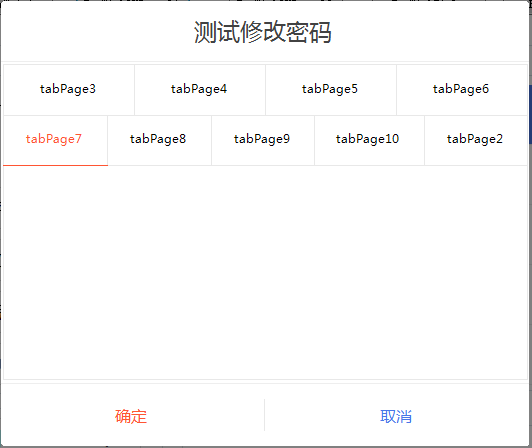
最后的话
如果你喜欢的话,请到 https://gitee.com/kwwwvagaa/net_winform_custom_control 点个星 星吧
(三十五)c#Winform自定义控件-Tab页的更多相关文章
- (三十)c#Winform自定义控件-文本框(三)
前提 入行已经7,8年了,一直想做一套漂亮点的自定义控件,于是就有了本系列文章. 开源地址:https://gitee.com/kwwwvagaa/net_winform_custom_control ...
- (三十五)c#Winform自定义控件-下拉框
前提 入行已经7,8年了,一直想做一套漂亮点的自定义控件,于是就有了本系列文章. GitHub:https://github.com/kwwwvagaa/NetWinformControl 码云:ht ...
- 《手把手教你》系列技巧篇(三十五)-java+ selenium自动化测试-单选和多选按钮操作-下篇(详解教程)
1.简介 今天这一篇宏哥主要是讲解一下,如何使用list容器来遍历多选按钮.大致两部分内容:一部分是宏哥在本地弄的一个小demo,另一部分,宏哥是利用JQueryUI网站里的多选按钮进行实战. 2.d ...
- NeHe OpenGL教程 第三十五课:播放AVI
转自[翻译]NeHe OpenGL 教程 前言 声明,此 NeHe OpenGL教程系列文章由51博客yarin翻译(2010-08-19),本博客为转载并稍加整理与修改.对NeHe的OpenGL管线 ...
- JAVA之旅(三十五)——完结篇,终于把JAVA写完了,真感概呐!
JAVA之旅(三十五)--完结篇,终于把JAVA写完了,真感概呐! 这篇博文只是用来水经验的,写这个系列是因为我自己的java本身也不是特别好,所以重温了一下,但是手比较痒于是就写出了这三十多篇博客了 ...
- Java进阶(三十五)java int与integer的区别
Java进阶(三十五)java int与Integer的区别 前言 int与Integer的区别从大的方面来说就是基本数据类型与其包装类的区别: int 是基本类型,直接存数值,而Integer是对象 ...
- Gradle 1.12用户指南翻译——第三十五章. Sonar 插件
本文由CSDN博客万一博主翻译,其他章节的翻译请参见: http://blog.csdn.net/column/details/gradle-translation.html 翻译项目请关注Githu ...
- SQL注入之Sqli-labs系列第三十四关(基于宽字符逃逸POST注入)和三十五关
开始挑战第三十四关和第三十五关(Bypass add addslashes) 0x1查看源码 本关是post型的注入漏洞,同样的也是将post过来的内容进行了 ' \ 的处理. if(isset($_ ...
- “全栈2019”Java多线程第三十五章:如何获取线程被等待的时间?
难度 初级 学习时间 10分钟 适合人群 零基础 开发语言 Java 开发环境 JDK v11 IntelliJ IDEA v2018.3 文章原文链接 "全栈2019"Java多 ...
随机推荐
- linux字符设备驱动--基本知识介绍
一.设备驱动的分类 1.字符设备 字符设备是指那些能一个字节一个字节读取数据的设备,如LED灯.键盘.鼠标等.字符设备一般需要在驱动层实现open().close().read().write().i ...
- Spring MVC源码(四) ----- 统一异常处理原理解析
SpringMVC除了对请求URL的路由处理特别方便外,还支持对异常的统一处理机制,可以对业务操作时抛出的异常,unchecked异常以及状态码的异常进行统一处理.SpringMVC既提供简单的配置类 ...
- 微信小程序开发--页面结构
一.微信小程序开发--页面文件组成 [page.name].js 页面逻辑文件,用于创建页面对象,以及处理页面生命周期控制和数据处理 [page.name].wxml wxml指的是Wei Xin M ...
- 【题解】P2916 [USACO08NOV]安慰奶牛Cheering up the Cow-C++
原题传送门 这道题用最小生成树来完成,我选用的是kruskal(克鲁斯卡尔)来完成.这道题目在克鲁斯卡尔模板的基础上,有变动的地方只有2处:1.因为必须从一个点出发,而最小生成树最后会让所有点都连通, ...
- 【深搜(DFS)-例题-踏青】-C++
描述 小白和他的朋友周末相约去召唤师峡谷踏青.他们发现召唤师峡谷的地图是由一块一块格子组成的,有的格子上是草丛,有的是空地.草丛通过上下左右 4 个方向扩展其他草丛形成一片草地,任何一片草地中的格子都 ...
- WMI_COM_API
Win32_Processor // CPU 处理器 Win32_PhysicalMemory // 物理内存 Win32_Keyboard // 键盘 Win32_PointingDevice // ...
- 为什么选择 Spring 作为 Java 框架
1. 概述 在本文中,我们将讨论 Spring 作为最流行的 Java 框架之一的主要价值体现. 最重要的是,我们将尝试理解 Spring 成为我们选择框架的原因.Spring 的详细信息及其组成部分 ...
- 我狠起来连自己都打---如何简单实现Azure resource自动打标签
你是否还在为花费大量Azure Resource打标签而烦恼呢?你是否还在因为这样低效的重复劳动而痛苦呢? 在很长一段时间内,笔者既要做云架构调整,又要做日常系统维护,还要参与各种各样的项目,在这种情 ...
- Envoy 源码分析--LDS
Envoy 源码分析--LDS LDS 是 Envoy 用来自动获取 listener 的 API. Envoy 通过 API 可以增加.修改或删除 listener. 先来总结下 listener ...
- Git学习笔记 (二)
Git学习笔记(二) 突然发现,学习新知识新技能,都得经常温故使用,这样才能日益精进.最近学习的Git是因为加入了课题组,在学习做一些后台,由于后台开发会牵扯到多人开发,所以学会Git这一代码管理工具 ...