
C++ IO操作API及注意事项(包含一个日志类的实现)
C++是一个抽象程度比C高很多的语言,在使用C++时,编译器做了很多工作,如果我们不对C++的某些特性的实现机制进行了解,那么编程时也许会有很多疑惑,我们也许知道怎样做才是正确的,但不知道为什么要这样做,所以,学习C++时,尽量多了解下底层实现机制,多看看操作系统相关方面的知识,对我们无论是学习某个编程语言,还是弄懂程序的运行原理都是非常有益的。IO操作是属于操作系统的,并不是属于C++的,C++只是提供了一个IO操作的编程接口的标准,不同的操作系统可能有着不同的IO操作接口,但是都可以根据这些操作提供一个符合C++ IO标准的库,这样就可以在不同的操作系统上,使用C++ 统一的IO操作。
C++ IO类之间的关系
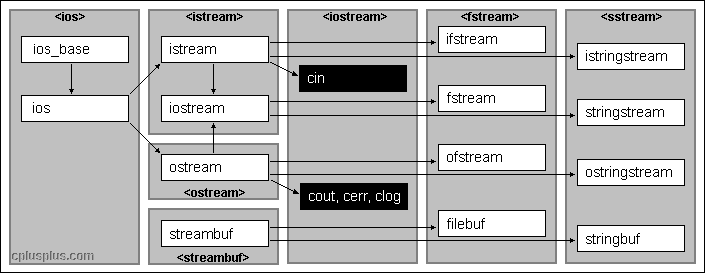
头文件 类型
iostream istream,wistream 从流中读取数据,w开头的针对wchar_t类型的
iostream ostream,wostream 向流写入数据
iostream iostream,wiostream 读写流
fstream ifstream,wifstream
fstream ofstream,wofstream
fstream fstream,wfstream
sstream istringstream,wistringstream
sstream ostringstream,wostringstream
sstream stringstream,wstringstream
输入流均继承自istream,输出流均继承自ostream,
IO对象无拷贝或赋值
ofstream out1,out2,
out1=out2; //错误,不能对IO对象赋值
ofstream out3(out2); //错误,不能用IO对象初始化IO对象
IO对象有条件状态
badbit 代表流已崩溃
failbit 代表IO操作失败
eofbit 代表流达到文件尾
goodbit 代表流未出错
s.eof() 若eofbit置位则返回true
s.fail()
s.bad()
s.good()
s.clear() 将流中所有条件状态位复位,使流有效,返回值为void
s.clear(flags) 根据flags将条件状态位置位 cin.clear(cin.rdstate() & ~cin.faibit & ~cin.badbit) 将failbit和badbit复位
s.setstate(flags) 设置流的状态
s.rdstate() 返 回流的当前状态 返回类型为strm::iostate
IO操作
#include <iostream>
#include <fstream>
using namespace std;
int main()
{
    ofstream myfile;
    myfile.open("example.txt");
    myfile<<"this is a statement!\n";
    myfile.close();
    return 0;
}
open (filename,mode)
文件模式
ios::in 以读的方式打开
ios::out 以写的方式打开
ios::app 以追加的方式打开,每次写操作均定位到文件末尾
ios::ate 打开文件后,立即定位到文件末尾
ios::trunc 截断文件
ios::binary 以二进制方式进行IO
out模式只能对ofstream或fstream设定
in模式只能对ifstream或fstream设定
默认情况下以out模式打开的文件同时包含trunc模式,即输出流若没指定app模式,文件中的内容会被清空。
app和ate模式有很大的区别,具体区别看这里
is_open() 可以用来判断打开文件是否成功,成功返回true;
设置流指针的位置
获得位置
streampos tellg(); //g代表该函数的操作对象是输入流,
streampos tellp(); //p代表该函数的操作对象是输出流设置位置
seekg(position);
seekp(position);
seekg(offset,direction); //相对于direction方向的偏移量,可以为:ios::end, ios::beg, ios::cur
seekp(offset,direction);
ios::beg offset counted from the beginning of the stream
ios::cur offset counted from the current position
ios::end offset counted from the end of the stream
#include <iostream>
#include <fstream>
using namespace std;

int main () {
  streampos begin,end;
  ifstream myfile ("example.bin", ios::binary);
  begin = myfile.tellg();
  myfile.seekg (0, ios::end);
  end = myfile.tellg();
  myfile.close();
  cout << "size is: " << (end-begin) << " bytes.\n";
  return 0;
}
read和write
read(memblock,size);
write(memblock,size);
#include <iostream>
#include <fstream>
using namespace std;

int main () {
  streampos size;
  char * memblock;

  ifstream file ("example.bin", ios::in|ios::binary|ios::ate);
  if (file.is_open())
  {
    size = file.tellg();
    memblock = new char [size];
    file.seekg (0, ios::beg);
    file.read (memblock, size);
    file.close();

    cout << "the entire file content is in memory";

    delete[] memblock;
  }
  else cout << "Unable to open file";
  return 0;
}
getline()
  输入流对象调用的函数
  #include <fstream>
  istream& getline( char* buffer, streamsize num );
  istream& getline( char* buffer, streamsize num, char delim );

  #include <string>
  istream& getline( istream& is, string& s, char delimiter = '\n' );
#include <iostream>
#define MAX 100
using namespace std;
int main()
{
    char cstr[MAX];
    string str;
    cin.getline(cstr,MAX);
    cout<<cstr<<endl;
    getline(cin,str);
    cout<<str<<endl;
    return 0;
}
自己实现一个日志类
#include <iostream>
#include <fstream>
#include <memory>
#include <ctime>
using namespace std;

class EasyLog{
public:
    static EasyLog* getInstance(){
        if(_instance==NULL){
            _instance=new EasyLog();
        }
        return _instance;
    }
    void Log(const string &str,const string& filepath);
private:
    EasyLog(){}
    virtual ~EasyLog(){delete _instance;}
    static EasyLog* _instance;
};

EasyLog* EasyLog::_instance;
void EasyLog::Log(const string& str,const string& filepath){
    time_t t;
    t=time(0);
    char tmp[100];
    strftime(tmp,sizeof(tmp),"[%Y.%m.%d %X %A]",localtime(&t));
    ofstream out(filepath,ios::app);
    out<<tmp<<" : "<<str<<endl;
    out.close();
    return ;
}

int main(){
    EasyLog::getInstance()->Log("This is a test statement","log.txt");
    return 0;
}
C++ IO操作API及注意事项(包含一个日志类的实现)的更多相关文章
- 一个Java文件至多包含一个公共类
编写一个java源文件时,该源文件又称为编译单元.一个java文件可以包含多个类,但至多包含一个公共类,作为编译时该java文件的公用接口,公共类的名字和源文件的名字要相同,源文件名字的格式为[公共类 ...
- 关于Django中的数据库操作API之distinct去重的一个误传
转载自http://www.360doc.com/content/18/0731/18/58287567_774731201.shtml django提供的数据库操作API中的distinct()函数 ...
- .NET中的IO操作基础介绍
关于IO简介 .NET中的IO操作,经常需要调用一下几个类. clipboard[] .FileStream类 文件流类,负责大文件的拷贝,读写. .Path类 Path类中方法,基本都是对字符串(文 ...
- Linux学习记录--文件IO操作相关系统编程
文件IO操作相关系统编程 这里主要说两套IO操作接口,各自是: POSIX标准 read|write接口.函数定义在#include<unistd.h> ISO C标准 fread|fwr ...
- springboot学习-jdbc操作数据库--yml注意事项--controller接受参数以及参数校验--异常统一管理以及aop的使用---整合mybatis---swagger2构建api文档---jpa访问数据库及page进行分页---整合redis---定时任务
springboot学习-jdbc操作数据库--yml注意事项--controller接受参数以及参数校验-- 异常统一管理以及aop的使用---整合mybatis---swagger2构建api文档 ...
- Pandas系列(十一)-文件IO操作
数据分析过程中经常需要进行读写操作,Pandas实现了很多 IO 操作的API,这里简单做了一个列举. 格式类型 数据描述 Reader Writer text CSV read_ csv to_cs ...
- 23_java之IO操作
01输入和输出 * A:输入和输出 * a: 参照物 * 到底是输入还是输出,都是以Java程序为参照 * b: Output * 把内存中的数据存储到持久化设备上这个动作称为输出(写)Output操 ...
- python之协程与IO操作
协程 协程,又称微线程,纤程.英文名Coroutine. 协程的概念很早就提出来了,但直到最近几年才在某些语言(如Lua)中得到广泛应用. 子程序,或者称为函数,在所有语言中都是层级调用,比如A调用B ...
- AI学习---数据IO操作&神经网络基础
数据IO操作 TF支持3种文件读取: 1.直接把数据保存到变量中 2.占位符配合feed_dict使用 3. QueueRunner(TF中特有的) 文件读取流程 文件读取流程(多线 ...
随机推荐
- Windows下的lua-5.3.4安装过程
Windows下的lua-5.3.4安装过程 Mingw平台下的编译过程: $ make echo$ make mingw$ make local $ make echo PLAT= none CC= ...
- Winsock网络编程笔记(1)----入门
今天第一次接触winsock网络编程,看的资料是Windows网络编程第二版.通过博客记住自己的看书笔记.. 在这里贴出第一个程序,虽然程序什么都没做,但以此作为入门,熟悉其网络编程风格.. #inc ...
- Hadoop部署配置文件
为了方便大家修,我把要修改的地方标红了,找到对应文件,复制粘贴过去就可以了 注:这个是我安装的Hadoop的配置,要根据我之前发的文章配置才行, 里面有一些东西比如文件夹名称,路径不一样,稍加修改也可 ...
- js foreach、map函数
语法:forEach和map都支持2个参数:一个是回调函数(item,index,input)和上下文: •forEach:用来遍历数组中的每一项:这个方法执行是没有返回值的,对原来数组也没有影响: ...
- word的标题行前面数字变成黑框 解决方案
如图 图1如下 图2如下 图3如下 如下解决 1. Put your cursor on the heading just right of the black box.将光标定位到标题中,紧邻黑框的 ...
- 基础进阶(一)之HashMap实现原理分析
HashMap实现原理分析 1. HashMap的数据结构 数据结构中有数组和链表来实现对数据的存储,但这两者基本上是两个极端. 数组 数组存储区间是连续的,占用内存严重,故空间复杂的很大.但数组的二 ...
- 接受第三方app分享的数据
前段时间公司项目需要一个需求: 把第三方的app分享的数据接受到自己的apk中, 涉及到的第三方app是: Youtube/Amazon/NetFlix, 这些app通过分享功能把当前的信息分享出去. ...
- Python字符串之StringIO和struct
StringIO: 提供类文件接口的字符串缓冲区,可选用性能更好的cStringIO版本: http://docs.python.org/2.7/library/stringio.html#modul ...
- Android 使用GangSDK创建第三方家族公会系统经验分享
由于需要对之前的游戏加入一个家族系统,想到这块儿可能会有大量的工作需要自己做,就偷了个懒去网上搜罗了一波,有没有类似现成的系统?结果让我惊奇的发现,目前市面上居然真的有类似的服务,虽然是小公司开发的, ...
- iOS学习——如何在mac上获取开发使用的模拟器的资源以及模拟器中每个应用的应用沙盒
如题,本文主要研究如何在mac上获取开发使用的模拟器的资源以及模拟器中每个应用的应用沙盒.做过安卓开发的小伙伴肯定很方便就能像打开资源管理器一样查看我们写到手机本地或应用中的各种资源,但是在iOS开发 ...