
webpack实用配置
前面的话
上文介绍了webpack入门,本文将详细介绍webpack实用配置
版本号
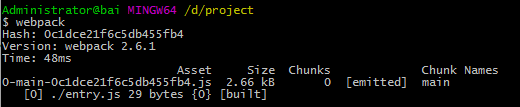
以entry.js打包为bundle.js为例,出口的filename可以设置为[id]、[name]、[hash]、[chunkhash]等替换形式,如下所示
var webpack = require('webpack');

module.exports = {

  entry: './entry.js', //入口文件

  output: {

    path: __dirname,//出口路径

    filename: '[id]-[name]-[hash].js'//出口名称

  }

}
则出口文件为0-main-0c1dce21f6c5db455fb4.js
如果index.html要引用打包后的js文件,由于文件名称不确定,并不好解决。这时,就需要使用html-webpack-plugin插件。该插件并不是内置插件,所以需要安装
npm install html-webpack-plugin
HtmlWebpackPlugin简化了HTML文件的创建,以便为webpack包提供服务。这对于在文件名中包含每次会随着变异会发生变化的哈希的webpack bundle尤其有用
var webpack = require('webpack');

var HtmlWebpackPlugin = require('html-webpack-plugin');

module.exports = {

  entry: './entry.js', //入口文件

  output: {

    path: __dirname,//出口路径

    filename: '[id]-[name]-[hash].js'//出口名称

  },

  plugins: [

    new HtmlWebpackPlugin({

      title: 'match',//生成的html文件的标题为'match'

      filename: 'index.html'//生成的html文件名称为'index.html'

    })

  ]

}
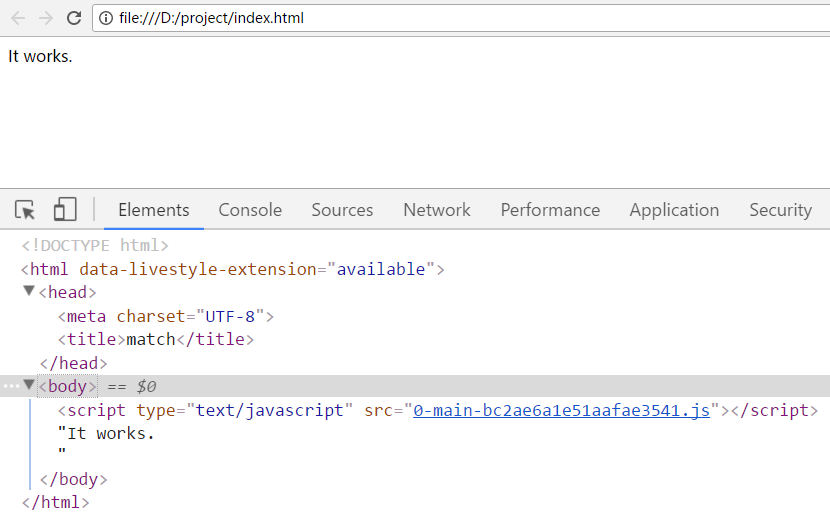
通过以上的配置,如果在当前路径,index.html不存在,则生成;如果存在,则替换
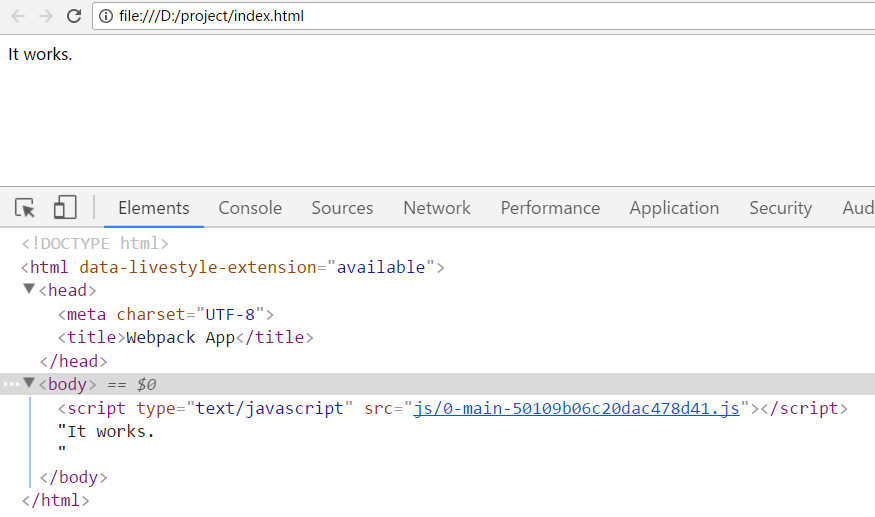
[注意]如果htmlwebpackplugin不进行配置,参数为空, plugins: [new HtmlWebpackPlugin()]。默认地,生成的html文件名称为'index.html',标题为'Webpack APP'
【标签位置】
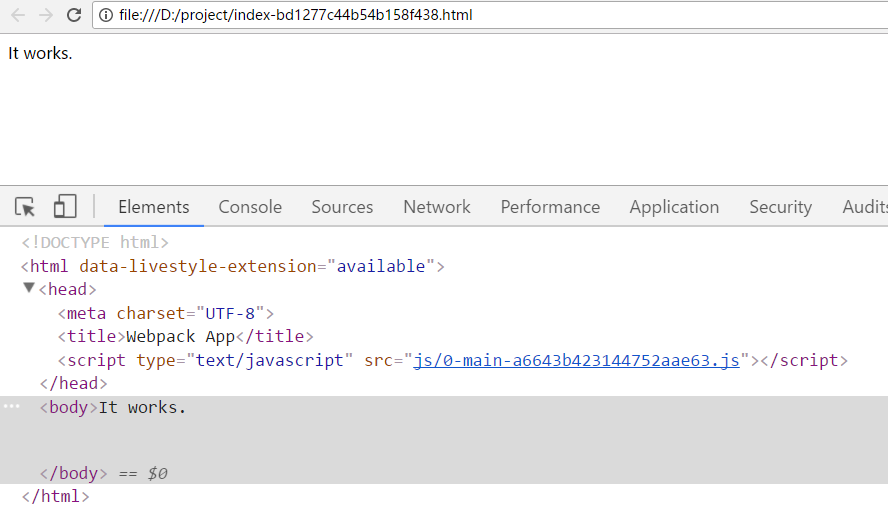
htmlwebpackplugin插件的常用设置是设置script标签插入的位置,默认插入到body标签中,但可以使用inject:'head',设置插入到head标签中
var webpack = require('webpack');

var HtmlWebpackPlugin = require('html-webpack-plugin');

module.exports = {

  entry: './entry.js', //入口文件

  output: {

    path: __dirname,//出口路径

    filename: 'js/[id]-[name]-[hash].js'//出口名称

  },

  plugins: [

    new HtmlWebpackPlugin({

      inject:'head',//将script标签插入到head标签中

      filename: 'index-[hash].html',//生成的html文件名称为'index.html'

    })

  ]

}
【图标设置】
设置favicon属性,可以设置网页的小图标
var webpack = require('webpack');

var HtmlWebpackPlugin = require('html-webpack-plugin');

module.exports = {

  entry: './entry.js', //入口文件

  output: {

    path: __dirname,//出口路径

    filename: 'js/[id]-[name]-[hash].js'//出口名称

  },

  plugins: [

    new HtmlWebpackPlugin({

      favicon:'./icon.ico'

    })

  ]

}

【压缩】
设置minify属性,可以压缩html文件,默认为false,即不压缩
var webpack = require('webpack');

var HtmlWebpackPlugin = require('html-webpack-plugin');

module.exports = {

  entry: './entry.js', //入口文件

  output: {

    path: __dirname,//出口路径

    filename: 'js/[id]-[name]-[hash].js'//出口名称

  },

  plugins: [

    new HtmlWebpackPlugin({

      minify:{

          removeComments: true,//删除注释

          collapseWhitespace:true//删除空格

      }

    })

  ]

}
使用webpack打包后的index.html代码如下
<!DOCTYPE html><html><head><meta charset="UTF-8"><title>Webpack App</title></head><body><script type="text/javascript" src="js/0-main-8128c0c26a4449da7a05.js"></script></body></html>
模板文件
HtmlWebpackPlugin除了提供模块版本号的功能,还可以使用模板文件
例如,模板文件为template.html,内容如下
<!DOCTYPE html>

<html lang="en">

<head>

    <meta charset="UTF-8">

    <title>template</title>

</head>

<body>

<script src="test.js"></script>

<div>test</div>

</body>

</html>
webpack配置文件如下
var webpack = require('webpack');

var HtmlWebpackPlugin = require('html-webpack-plugin');

module.exports = {

  entry: './entry.js', //入口文件

  output: {

    path: __dirname,//出口路径

    filename: 'js/[id]-[name]-[hash].js'//出口名称

  },

  plugins: [

    new HtmlWebpackPlugin({

      filename: 'index-[hash].html',//生成的html文件名称为'index.html'

      template:'template/template.html'//模板文件为'template.html'

    })

  ]

}
生成的index-[hash].html以'template.html'文件为模板

[注意]如果在htmlwebpackplugin中使用了模板,则指定title不会生效,因为要以模板的title为准
var webpack = require('webpack');

var HtmlWebpackPlugin = require('html-webpack-plugin');

module.exports = {

  entry: './entry.js', //入口文件

  output: {

    path: __dirname,//出口路径

    filename: 'js/[id]-[name]-[hash].js'//出口名称

  },

  plugins: [

    new HtmlWebpackPlugin({

      title:'test',

      filename: 'index-[hash].html',//生成的html文件名称为'index.html'

      template:'template/template.html'//模板文件为'template.html'

    })

  ]

}

【传参】
模块文件当然是可以传参的,一般地,使用ejs语法。例如,在模板文件中,使用<%= htmlWebpackPlugin.options.title %>,即可读取htmlWebpackPlugin插件中'title'属性的值
[注意]模板文件中的'htmlWebpackPlugin'是固定的,不能随意更改。与webpack.config.js文件中,require()该插件的命名无关
//webpack.config.js

var webpack = require('webpack');

var HtmlWebpackPlugin = require('html-webpack-plugin');

module.exports = {

  entry: './entry.js', //入口文件

  output: {

    path: __dirname,//出口路径

    filename: 'js/[id]-[name]-[hash].js'//出口名称

  },

  plugins: [

    new HtmlWebpackPlugin({

      title:'test',

      template:'template/template.html',//模板文件为'template.html'

      dateData: new Date()

    })

  ]

}

//template.html

<!DOCTYPE html>

<html lang="en">

<head>

    <meta charset="UTF-8">

    <title><%= htmlWebpackPlugin.options.title  %></title>

</head>

<body>

<div><%=htmlWebpackPlugin.options.dateData %></div>

</body>

</html>
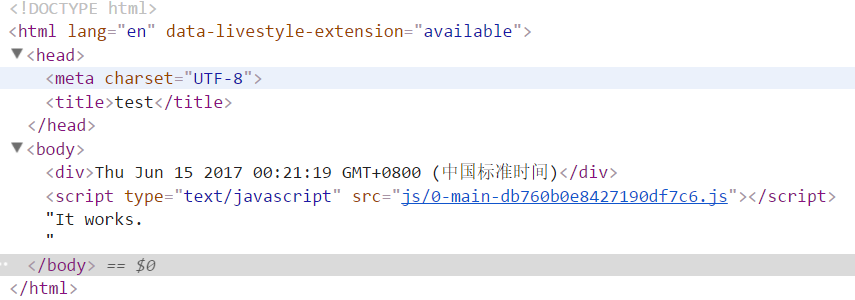
【模板组件】
下面利用模板组件组合成一个html文件,以ejs模板语言为例
//webpack.config.js

var webpack = require('webpack');

var HtmlWebpackPlugin = require('html-webpack-plugin');

module.exports = {

  entry: './entry.js', //入口文件

  output: {

    path: __dirname,//出口路径

    filename: 'js/[id]-[name]-[hash].js'//出口名称

  },

  plugins: [

    new HtmlWebpackPlugin({

      template:'template/template.html'})

  ]

}

//template.html

<!DOCTYPE html>

<html lang="en">

<head>

    <meta charset="UTF-8">

    <title>Document</title>

</head>

<body>

<div>

    <% include  template/header.html %>

</div>

<ul>

    <% var arr = [1,2,3,4,5] %>

    <% for(var i = 0; i < arr.length; i++){ %>

        <li><%=arr[i] %></li>

    <% } %>

</ul>

<div>

    <% include  template/footer.html %>

</div>

</body>

</html>

//header.html

<div>我是头部</div>

//footer.html

<div>我是尾部</div>
运行结果报错,提示子模板加载失败
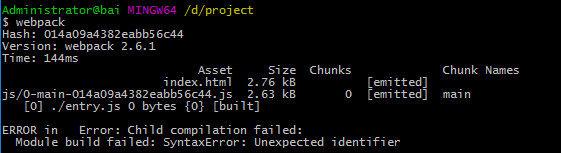
这是因为HtmlWebpackPlugin插件并不具备ejs模板语言所有的功能,其中一个就是不能识别<%include %>语句,这时需要安装一个ejs-compiled-loader
npm install ejs-compiled-loader
安装完成后,修改配置文件如下,表示使用ejs-compiled-loader来编译template.html
[注意]该插件中的include路径相对于webpack配置文件的位置,而不是模板文件template.html的位置
var webpack = require('webpack');

var HtmlWebpackPlugin = require('html-webpack-plugin');

module.exports = {

  entry: './entry.js', //入口文件

  output: {

    path: __dirname,//出口路径

    filename: 'js/[id]-[name]-[hash].js'//出口名称

  },

  plugins: [

    new HtmlWebpackPlugin({

      template:'ejs-compiled-loader!template/template.html'})

  ]

}
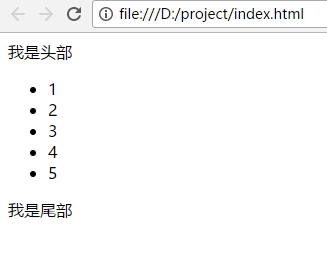
结果如下
多页面
对于多页面来说,一般地,有多个入口文件。不同的html页面输出对应不同的入口文件。 插件plugins()是一个数组,每new一个HtmlWebpackPlugin(),就可以输出一个html页面。这里有两个重要的属性:chunks和excludeChunks,chunks表示所包含的入口文件,excludeChunks表示要排除的入口文件
//webpack.config.js

var webpack = require('webpack');

var HtmlWebpackPlugin = require('html-webpack-plugin');

module.exports = {

  entry: {

      a:'./src/js/a.js',

      b:'./src/js/b.js',

      c:'./src/js/c.js'

  },

  output: {

    path: __dirname,//出口路径

    filename: 'js/[id]-[name]-[hash].js'//出口名称

  },

  plugins: [

    new HtmlWebpackPlugin({

          filename:'a.html',

          template:'src/template/template.html',

          title:'this is a',

          chunks:['a']

    }),

    new HtmlWebpackPlugin({

          filename:'b.html',

          template:'src/template/template.html',

          title:'this is b',

          chunks:['b']

    }),

    new HtmlWebpackPlugin({

          filename:'c.html',

          template:'src/template/template.html',

          title:'this is c',

          excludeChunks:['a','b']

    }),

  ]

}
结果如下
//a.html

<!DOCTYPE html>

<html lang="en">

<head>

    <meta charset="UTF-8">

    <title>this is a</title>

</head>

<body>

<div></div>

<script type="text/javascript" src="js/2-a-9828ea84bd8c12c19b5f.js"></script></body>

</html>

//b.html

<!DOCTYPE html>

<html lang="en">

<head>

    <meta charset="UTF-8">

    <title>this is b</title>

</head>

<body>

<div></div>

<script type="text/javascript" src="js/1-b-9828ea84bd8c12c19b5f.js"></script></body>

</html>

//c.html

<!DOCTYPE html>

<html lang="en">

<head>

    <meta charset="UTF-8">

    <title>this is c</title>

</head>

<body>

<div></div>

<script type="text/javascript" src="js/0-c-9828ea84bd8c12c19b5f.js"></script></body>

</html>
内联
在前面的例子中,都是以链接的形式引入入口文件的。有时,为了追求性能,会将其处理为内联的形式。这里就需要安装一个扩展插件html-webpack-inline-source-plugin,专门用来处理入口文件内联的
$ npm install --save-dev html-webpack-inline-source-plugin
该插件的使用很简单,使用require()语句引入后,在插件plugins()新建一个html-webpack-inline-source-plugin对象,然后在html-webpack-plugin对象中添加inlineSource属性即可
inlineSource: '.(js|css)$' // embed all javascript and css inline
//webpack.config.js

var webpack = require('webpack');

var HtmlWebpackPlugin = require('html-webpack-plugin');

var HtmlWebpackInlineSourcePlugin = require('html-webpack-inline-source-plugin');

module.exports = {

  entry: './entry.js',

  output:{

    path: __dirname,//出口路径

    filename: 'js/[id]-[name]-[hash].js'//出口名称

  },

  plugins: [

    new HtmlWebpackPlugin({

        inlineSource: '.(js|css)$'

    }),

    new HtmlWebpackInlineSourcePlugin()

  ]

}
结果如下
<!DOCTYPE html>

<html>

  <head>

    <meta charset="UTF-8">

    <title>Webpack App</title>

  </head>

  <body>

  <script type="text/javascript">/******/ (function(modules) { // webpackBootstrap

/******/     // The module cache

/******/     var installedModules = {};

/******/

/******/     // The require function

/******/     function __webpack_require__(moduleId) {

/******/

/******/         // Check if module is in cache

/******/         if(installedModules[moduleId]) {

/******/             return installedModules[moduleId].exports;

/******/         }

/******/         // Create a new module (and put it into the cache)

/******/         var module = installedModules[moduleId] = {

/******/             i: moduleId,

/******/             l: false,

/******/             exports: {}

/******/         };

/******/

/******/         // Execute the module function

/******/         modules[moduleId].call(module.exports, module, module.exports, __webpack_require__);

/******/

/******/         // Flag the module as loaded

/******/         module.l = true;

/******/

/******/         // Return the exports of the module

/******/         return module.exports;

/******/     }

/******/

/******/

/******/     // expose the modules object (__webpack_modules__)

/******/     __webpack_require__.m = modules;

/******/

/******/     // expose the module cache

/******/     __webpack_require__.c = installedModules;

/******/

/******/     // identity function for calling harmony imports with the correct context

/******/     __webpack_require__.i = function(value) { return value; };

/******/

/******/     // define getter function for harmony exports

/******/     __webpack_require__.d = function(exports, name, getter) {

/******/         if(!__webpack_require__.o(exports, name)) {

/******/             Object.defineProperty(exports, name, {

/******/                 configurable: false,

/******/                 enumerable: true,

/******/                 get: getter

/******/             });

/******/         }

/******/     };

/******/

/******/     // getDefaultExport function for compatibility with non-harmony modules

/******/     __webpack_require__.n = function(module) {

/******/         var getter = module && module.__esModule ?

/******/             function getDefault() { return module['default']; } :

/******/             function getModuleExports() { return module; };

/******/         __webpack_require__.d(getter, 'a', getter);

/******/         return getter;

/******/     };

/******/

/******/     // Object.prototype.hasOwnProperty.call

/******/     __webpack_require__.o = function(object, property) { return Object.prototype.hasOwnProperty.call(object, property); };

/******/

/******/     // __webpack_public_path__

/******/     __webpack_require__.p = "";

/******/

/******/     // Load entry module and return exports

/******/     return __webpack_require__(__webpack_require__.s = 0);

/******/ })

/************************************************************************/

/******/ ([

/* 0 */

/***/ (function(module, exports) {

document.write('It works.')

/***/ })

/******/ ]);</script></body>

</html>
babel
下面使用babel来进行es最新标准的代码向es5代码的转换,首先需要安装babel核心程序,及babel-loader
npm install babel-loader babel-core
在使用babel-loader进行代码转换之前,要先了解到ecmascript标准变化很快,且浏览器支持情况不同。所以,出现了'es2015'、'es2016'、'es2017'、'latest'、'env(new)'等多个不同的标准。这时,要需要来选择从哪个标准进行转换,需要安装插件babel-preset-env
npm install babel-preset-env
在 webpack 配置对象中,需要添加 babel-loader 到 module 的 loaders 列表中。webpack的配置文件如下所示
const path = require('path');
module.exports = {

  entry:{

    app:'./src/app.js',

  },

  output:{

    path:path.resolve(__dirname,'src'),

    filename: '[name].bundle.js'

  },

  module: {

    rules: [{

      test: /\.js$/,

      use: {

        loader: 'babel-loader',

        options: { presets: ['env'] }

      }

    }]

  },

}
关于path有两种写法,除了上面的配置文件的写法外,另一种写法如下所示。但是,尽量不要使用__dirname + '/src'的写法,在某些参数中,该写法无法生效
path: __dirname + "/src"
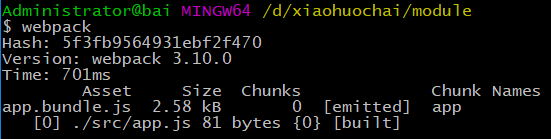
在命令行中运行webpack命令进行打包,打包过程如下
打包前的文件为app.js,内容如下
() => {

  return a + b;

};

Array.from('1,2,3');

new Set;
打包后的文件为app.bundle.js,主要内容如下
/******/ ([

/* 0 */

/***/ (function(module, exports, __webpack_require__) {

"use strict";

(function () {

  return a + b;

});

Array.from('1,2,3');

new Set();

/***/ })

/******/ ]);
经过babel转换后的js文件存在两个问题:
1、打包速度较慢
2、部分ES2017的新语法没有转换为ES5的代码
下面对这两个问题分别进行处理
【打包速度】
loader的test属性表示该loader必须满足的条件,上面代码中使用/\.js$/ 来匹配,也许会去编译 node_modules 目录或者其他不需要的源代码。这样会大大增加webpack的编译时间
要排除 node_modules,就要使用 loaders 配置的 exclude 选项,表示哪些除外,exclude:/node_modules/
module.exports = {

  entry:{

    app:'./src/app.js',

  },

  output:{

    path:__dirname+'/src/',

    filename: '[name].bundle.js'

  },

  module: {

    rules: [{

      test: /\.js$/,

      exclude: /node_modules/,

      use: {

        loader: 'babel-loader',

        options: { presets: ['env'] }

      }

    }]

  },

}
[注意]exclude除了支持正则表达式外,还支持字符串形式,写法如下。如果用__dirname +'/node_modules'的形式则不会生效
const path = require('path');

exclude:path.resolve(__dirname, "node_modules")
打包过程如下
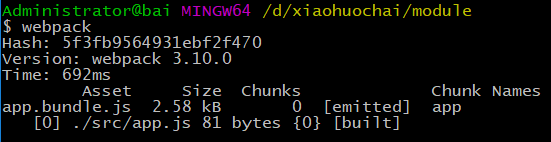
当node-modules文件部分较大时,速度提升会更明显
除了exclude选项,还可以使用include选项,能够明确被打包的文件时,使用include将使打包速度更快
module.exports = {

  entry:{

    app:'./src/app.js',

  },

  output:{

    path:__dirname+'/src/',

    filename: '[name].bundle.js'

  },

  module: {

    rules: [{

      test: /\.js$/,

      include: /src/,

      use: {

        loader: 'babel-loader',

        options: { presets: ['env'] }

      }

    }]

  },

}
[注意]include的另一种写法如下所示
const path = require('path');

include: path.resolve(__dirname, 'src')
打包过程如下
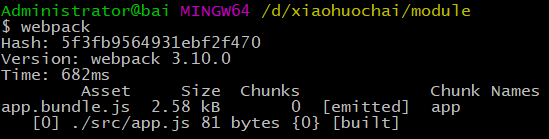
耗费时间有所减小
cacheDirectory选项值默认为false,当为true时,指定的目录将用来缓存 loader 的执行结果。之后的 webpack 构建,将会尝试读取缓存,来避免在每次执行时,可能产生的、高性能消耗的 Babel 重新编译过程
const path = require('path');

module.exports = {

  entry: {

    app: './src/app.js',

  },

  output: {

    path: path.resolve(__dirname, 'src'),

    filename: '[name].bundle.js'

  },

  module: {

    rules: [{

      test: /\.js$/,

      include: path.resolve(__dirname, 'src'),

      use: {

        loader: 'babel-loader',

        options: {

          presets: ['env'],

          cacheDirectory:true

        }

      }

    }]

  },

}
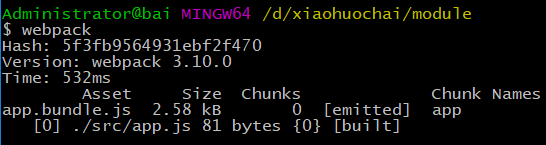
耗费时间减少了100ms,效果很好
解决了babel编译速度后,下面来解决ES新语法不被转换的问题
【babel-polyfill】
Babel默认只转换新的JavaScript句法(syntax),而不转换新的API,比如Iterator、Generator、Set、Maps、Proxy、Reflect、Symbol、Promise等全局对象,以及一些定义在全局对象上的方法(比如Object.assign)都不会转码。
举例来说,ES6在Array对象上新增了Array.from方法。Babel就不会转码这个方法。如果想让这个方法运行,必须使用babel-polyfill。babel-polyfill是一个全局垫片,为开发应用准备的
npm install babel-polyfill
在脚本头部加入下面代码即可使用
import 'babel-polyfill';
app.js的文件内容如下
import 'babel-polyfill';

() => {

  return a + b;

};

Array.from('1,2,3');

new Set;
由下图所示,转换后的文件大小超过了200kb
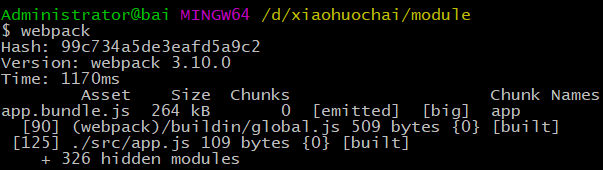
【babel-plugin-transform-runtime】
相当于babel-polyfill来说,babel-plugin-transform-runtime更加适用,它是一个局部垫片,为开发框架准备
npm install babel-plugin-transform-runtime babel-runtime
app.js文件如下所示
() => {

  return a + b;

};

Array.from('1,2,3');

new Set;
配置文件如下所示
const path = require('path');

module.exports = {

  entry: {

    app: './src/app.js',

  },

  output: {

    path: path.resolve(__dirname, 'src'),

    filename: '[name].bundle.js'

  },

  module: {

    rules: [{

      test: /\.js$/,

      include: path.resolve(__dirname, 'src'),

      use: {

        loader: 'babel-loader',

        options: {

          presets: ['env'],

          cacheDirectory:true,

          plugins: ['transform-runtime']

        }

      }

    }]

  },

}
转换过程如下所示
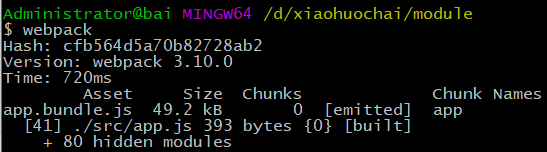
转换后的文件app.bundle.js主要内容如下所示
(function () {

  return a + b;

});

(0, _from2.default)('1,2,3');

new _set2.default();
CSS
在webpack入门博文中由介绍过CSS插件的简单使用,接下来将详细介绍
首先,要安装css-loader和style-loader,css-loader用于读取并加载css文件,style-loader将它插入到页面中
[特别注意]在处理css时,最好不要使用include、exclude等属性。include、exclude属性是加快babel转换速度的,和css没什么关系,而且会添乱
npm install css-loader style-loader
//app.js

require('./css/common.css');

//common.css

body{margin: 0;background-color: red}

//webpack.config.js

var webpack = require('webpack');

var HtmlWebpackPlugin = require('html-webpack-plugin');

module.exports = {

  entry: './src/app.js',

  output:{

    path: __dirname,//出口路径

    filename: 'js/[name].bundle.js'//出口名称

  },

  module:{

      rules:[

          {

              test:/\.css$/,

              use:[ 'style-loader', 'css-loader' ]

          }

      ]

  },

  plugins: [

    new HtmlWebpackPlugin({})

  ]

}
效果如下

【自动前缀】
页面加载CSS往往并不像上面的情况这么简单,需要处理很多问题,其中一个就是浏览器前缀问题。对于某些属性来说,比如transform,不同浏览器的版本对其支持程度不同,浏览器前缀也不同。这时,就需要能够根据实际情况,自动增加前缀,而postcss-loader就是这样的工具,而且功能要强大的多
首先,先安装postcss-loader
npm install postcss-loader
然后,安装postcss的自动前缀的插件autoprefixer
npm install autoprefixer
配置如下
//common.css

body{transform: scale(0);background-color: red}

//app.js

require('./css/common.css');

//webpack.config.js

var webpack = require('webpack');

var HtmlWebpackPlugin = require('html-webpack-plugin');

module.exports = {

  entry: './src/app.js',

  output:{

    path: __dirname,//出口路径

    filename: 'js/[name].bundle.js'//出口名称

  },

  module:{

      rules:[

          {

              test:/\.css$/,

              use:[ 'style-loader',

                    'css-loader',

                    {

                        loader: 'postcss-loader',

                        options: {plugins: [require('autoprefixer')]}

                    }

                 ]

          }

      ]

  },

  plugins: [

    new HtmlWebpackPlugin({})

  ]

}
结果如下
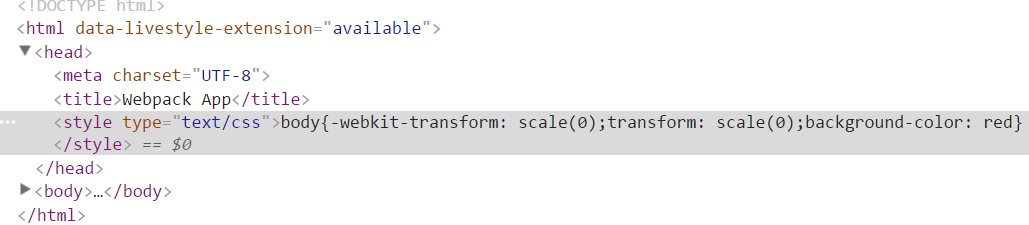
如果css文件中出现@import,则有两种处理方式,一种是将postcss文件单独写成配置文件postcss.config.js
//common.css

@import './flex.css';

body{transform: scale(0);background-color: red}

//flex.css

body{display:flex;}

//app.js

require('./css/common.css');

//webpack.config.js

var webpack = require('webpack');

var HtmlWebpackPlugin = require('html-webpack-plugin');

module.exports = {

  entry: './src/app.js',

  output:{

    path: __dirname,//出口路径

    filename: 'js/[name].bundle.js'//出口名称

  },

  module:{

      rules:[

          {

              test:/\.css$/,

              use:[ 'style-loader',

                  { loader: 'css-loader',

                    options: {importLoaders: 1}

                  },

                'postcss-loader'

                ]

          }

      ]

  },

  plugins: [

    new HtmlWebpackPlugin({})

  ]

}

//postcss.config.js

module.exports = {

 plugins:[require('autoprefixer')]

}
结果如下
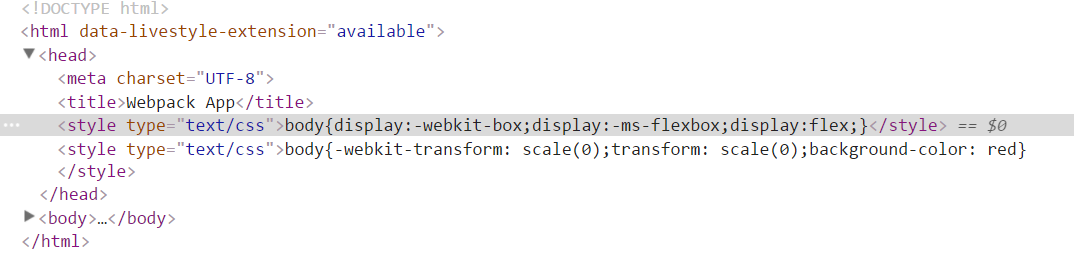
另一种需要安装postcss-import插件
npm install postcss-import
//common.css

@import './flex.css';

body{transform: scale(0);background-color: red}

//flex.css

body{display:flex;}

//app.js

require('./css/common.css');

//webpack.config.js

var webpack = require('webpack');

var HtmlWebpackPlugin = require('html-webpack-plugin');

module.exports = {

  entry: './src/app.js',

  output:{

    path: __dirname,//出口路径

    filename: 'js/[name].bundle.js'//出口名称

  },

  module:{

      rules:[

          {

              test:/\.css$/,

              use:[ 'style-loader',

                  { loader: 'css-loader',

                    options: {importLoaders: 1 }

                  },

                  {

                    loader: 'postcss-loader',

                    options: {plugins: [

                          require('postcss-import'),

                          require('autoprefixer')

                        ]

                    }

                  }

                ]

          }

      ]

  },

  plugins: [

    new HtmlWebpackPlugin({})

  ]

}
结果如下
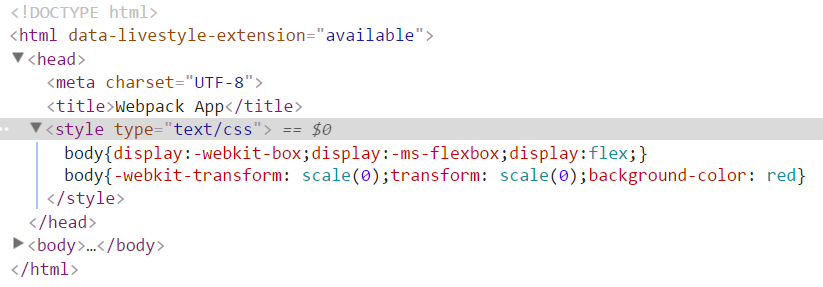
【sass】
首先,需要安装sass-loader及node-sass
[注意]关于node-sass安装的问题移步至此
npm install sass-loader node-sass
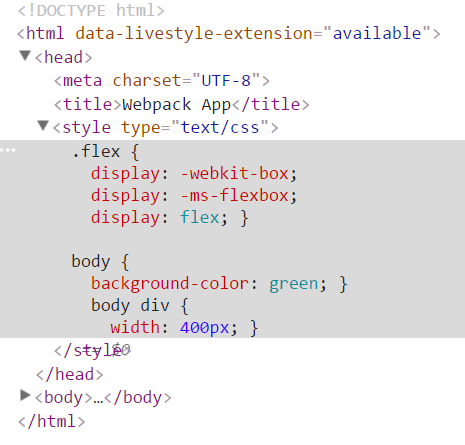
由于sass-loader中已经自带了关于@import处理的问题。所以,不需要css-loader及postcss-loader的额外处理
//layer.scss

@import './flex.scss';

body{

    background-color:green;

    div{

        width: 400px;

    }

}

//flex.scss

.flex{display:flex;}

//app.js

require('./components/layer/layer.scss');

//webpack.config.js

var webpack = require('webpack');

var HtmlWebpackPlugin = require('html-webpack-plugin');

module.exports = {

  entry: './src/app.js',

  output:{

    path: __dirname,//出口路径

    filename: 'js/[name].bundle.js'//出口名称

  },

  module:{

      rules:[

          {

              test:/\.scss$/,

              use:[    'style-loader',

                      'css-loader',

                    {

                        loader: 'postcss-loader',

                        options: {plugins: [require('autoprefixer')]}

                    },

                    'sass-loader'

                 ]

          }

      ]

  },

  plugins: [

    new HtmlWebpackPlugin({})

  ]

}
结果如下
【分离CSS】
默认地,CSS作为模块资源被打包到入口js文件中。有时,需要把CSS文件分离出来,这时就需要用到extract-text-webpack-plugin插件
npm install extract-text-webpack-plugin
该插件的配置如下
var webpack = require('webpack');

var HtmlWebpackPlugin = require('html-webpack-plugin');

var ExtractTextPlugin = require('extract-text-webpack-plugin');

module.exports = {

  entry: './src/app.js',

  output:{

    path: __dirname,//出口路径

    filename: 'js/[name].bundle.js'//出口名称

  },

  module:{

      rules:[

          {

                  test:/\.scss$/,

                use: ExtractTextPlugin.extract({

                  fallback: 'style-loader',

                  use:[ 'css-loader',

                        {

                            loader: 'postcss-loader',

                            options: {plugins: [require('autoprefixer')]}

                        },

                        'sass-loader'

                     ]

                })

          }

      ]

  },

  plugins: [

    new HtmlWebpackPlugin({}),

    new ExtractTextPlugin("styles.css")

  ]

}
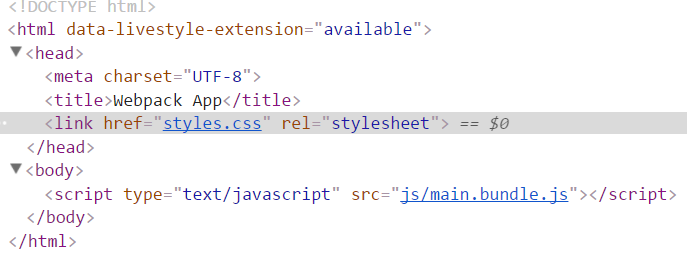
结果如下,该插件将入口文件中引用的 *.css,移动到独立分离的 CSS 文件。因此,你的样式将不再内嵌到 JS bundle 中,而是会放到一个单独的 CSS 文件(即 styles.css)当中。 如果样式文件大小较大,这会做更快提前加载,因为 CSS bundle 会跟 JS bundle 并行加载
图片资源
webpack在处理图片、音乐、电影等资源文件时,需要使用file-loader
npm install file-loader
默认情况下,使用file-loader生成的文件的文件名就是文件内容的MD5哈希值并保留原始扩展名
file-loader的配置项如下所示
name  [hash].[ext] 为文件配置自定义文件名模板

context this.options.context 配置自定义文件 context,默认为 webpack.config.js context

publicPath  __webpack_public_path__ 为文件配置自定义 public 发布目录

outputPath 'undefined' 为文件配置自定义 output 输出目录

useRelativePath false 如果希望为每个文件生成一个相对 url 的 context 时,应该将其设置为 true

emitFile true 默认情况下会生成文件,可以通过将此项设置为 false 来禁止(例如,使用了服务端的 packages)
以引入图片资源例,有以下几种情况
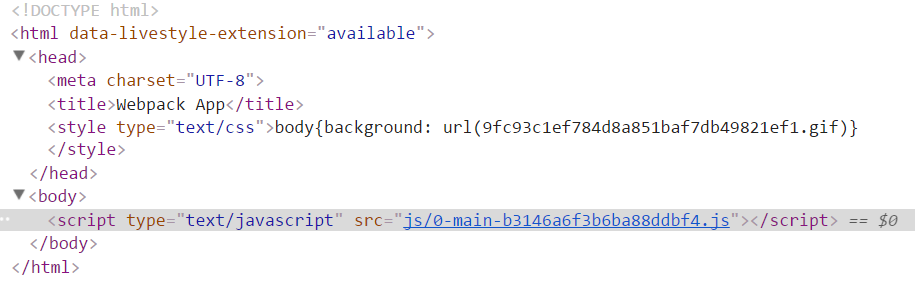
1、通过css文件的background属性引入
//webpack.config.js

var webpack = require('webpack');

var HtmlWebpackPlugin = require('html-webpack-plugin');

module.exports = {

  entry: './entry.js', //入口文件

  output: {

    path: __dirname,//出口路径

    filename: 'js/[id]-[name]-[hash].js'//出口名称

  },

  module:{

      rules:[

          {

              test:/\.css$/,

              use:[ 'style-loader', 'css-loader' ]

          },

          {

              test:/\.(png|jpg|gif|svg)$/i,

              use:'file-loader'

          }

      ]

  },

  plugins: [

    new HtmlWebpackPlugin()

  ]

}

//entry.js

require('./src/css/common.css');

//common.css

body{background: url('../img/eg_bulbon.gif')}
结果如下
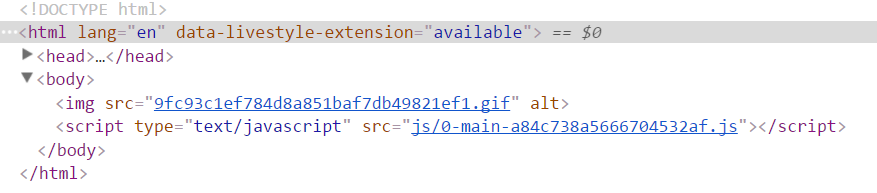
2、通过模板html文件img标签引入,这时需要使用${require('')}将相对路径包裹一次
//webpack.config.js

var webpack = require('webpack');

var HtmlWebpackPlugin = require('html-webpack-plugin');

module.exports = {

  entry: './entry.js', //入口文件

  output: {

    path: __dirname,//出口路径

    filename: 'js/[id]-[name]-[hash].js'//出口名称

  },

  module:{

      rules:[

          {

              test:/\.css$/,

              use:[ 'style-loader', 'css-loader' ]

          },

          {

              test:/\.(png|jpg|gif|svg)$/i,

              use:'file-loader'

          }

      ]

  },

  plugins: [

    new HtmlWebpackPlugin({

        template:'template/template.html'

    })

  ]

}

//template.html

<!DOCTYPE html>

<html lang="en">

<head>

    <meta charset="UTF-8">

    <title>Document</title>

</head>

<body>

<img src="${require('../src/img/eg_bulbon.gif')}" alt="">

</body>

</html>
结果如下
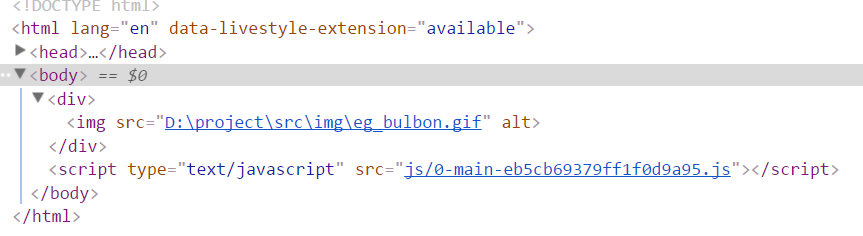
3、若模板使用ejs-compiled-loader插件,则无法使用${require('')}语句,需要使用HtmlWebpackPlugin传参来构造绝对路径
//webpack.config.js

var webpack = require('webpack');

var HtmlWebpackPlugin = require('html-webpack-plugin');

module.exports = {

  entry: './entry.js', //入口文件

  output: {

    path: __dirname + '/dist',//出口路径

    filename: 'js/[id]-[name]-[hash].js'//出口名称

  },

  module:{

      rules:[

          {

              test:/\.css$/,

              use:[ 'style-loader', 'css-loader' ]

          },

          {

              test:/\.(png|jpg|gif|svg)$/i,

              use:'file-loader'

          }

      ]

  },

  plugins: [

    new HtmlWebpackPlugin({

        template:'ejs-compiled-loader!template/template.html',

        file:__dirname

    })

  ]

}

//template.html

<!DOCTYPE html>

<html lang="en">

<head>

    <meta charset="UTF-8">

    <title>Document</title>

</head>

<body>

<div>

    <% include  template/header.html %>

</div>

</body>

</html>

//header.html

<img src="<%=htmlWebpackPlugin.options.file%>\src\img\eg_bulbon.gif" alt="">
结果如下
【file-loader参数】
文件名模板占位符有如下几种
[ext] 资源扩展名

[name] 资源的基本名称

[path] 资源相对于 context 查询参数或者配置的路径

[hash] 内容的哈希值,默认为十六进制编码的 md5

[<hashType>:hash:<digestType>:<length>] 可选配置

  其他的 hashType, 即 sha1, md5, sha256, sha512

  其他的 digestType, 即 hex, base26, base32, base36, base49, base52, base58, base62, base64

  length 字符的长度

[N] 当前文件名按照查询参数 regExp 匹配后获得到第 N 个匹配结果
{

  test:/\.(png|jpg|gif|svg)$/i,

  use:[{

              loader:'file-loader',

            options: {

                name:'[name]-[hash:5].[ext]'

            }

        }]

}
或者
{

  test:/\.(png|jpg|gif|svg)$/i,

  use:['file-loader?name=[name]-[hash:5].[ext]']

}
结果如下

【url-loader】
url-loader功能类似于file-loader,但是在文件大小(单位byte)低于指定的限制时,可以返回一个dataURL
可以通过传递查询参数(query parameter)来指定限制(默认为不限制)
如果文件大小超过限制,将转为使用 file-loader,所有的查询参数也会传过去
npm install url-loader
图片的大小为1.1kb,下面将限制设置为2000,则图片将以base64格式传递
{

  test:/\.(png|jpg|gif|svg)$/i,

  use:['url-loader?limit=2000']

}
结果如下
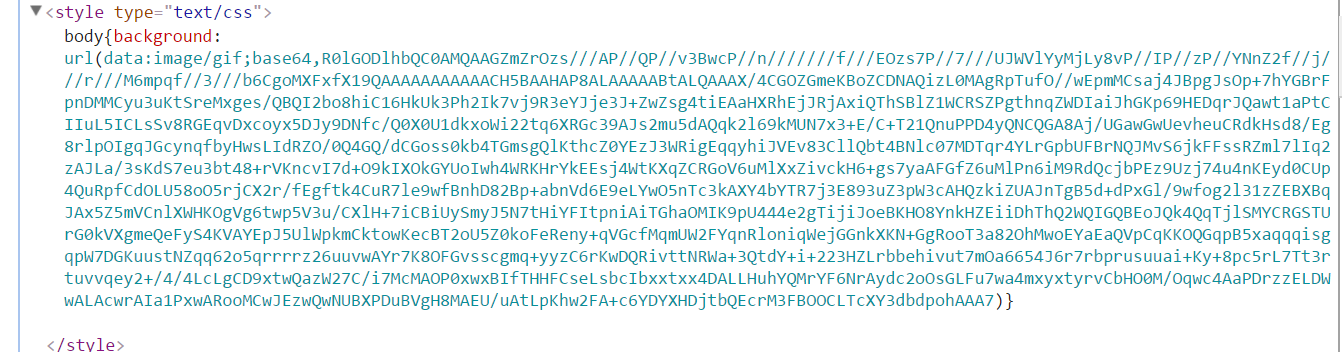
如果将限制大小设置为1000,图片以src的形式传递
{

  test:/\.(png|jpg|gif|svg)$/i,

  use:[{

              loader:'url-loader',

            options: {

                limit:1000,

                name:'[name]-[hash:5].[ext]'

            }

        }]

}

【image-webpack-loader】
使用image-webpack-loader来压缩图片
npm install image-webpack-loader
image-webpack-loader的配置项如下
 options: {

        mozjpeg: {

          progressive: true,

          quality: 65

        },

        optipng: {

          enabled: false,

        },

        pngquant: {

          quality: 80,

          speed: 4

        },

        gifsicle: {

          interlaced: false,

        },

        webp: {

          quality: 75

        }

      }
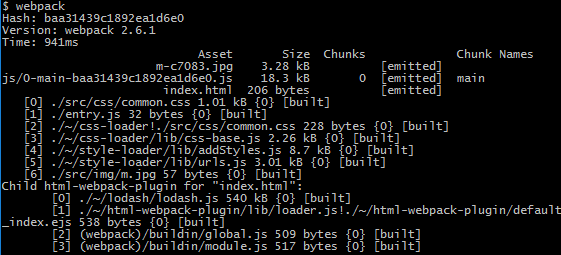
插件一张大小为4.1kb的名称为'm.jpg'的图片,配置如下
{

  test:/\.(png|jpg|gif|svg)$/i,

  use:[

    'url-loader?limit=1000&name=[name]-[hash:5].[ext]',

    'image-webpack-loader'

  ]

}
结果如下所示,生成大小为3.28kb,名称为'm-c7083.jpg'的图片
【雪碧图】
在webpack中自动生成雪碧图,需要使用postcss-sprits插件
npm install postcss-sprites
配置非常简单
  "plugins": {

    "postcss-sprites": {

       spritePath: 'dist/assets/imgs/sprites/'

    }

  }

}
加载第三方库
如果是加载的远程CDN库,则在HTML文件内直接使用script标签引入即可
<script src="https://cdn.bootcss.com/jquery/3.3.1/core.js"></script>
这样,在文件中可以直接使用jQuery
如果jQuery是通过npm保存到本地,则需要使用ProvidePlugin插件来自动加载模块,而不必到处 import 或 require
new webpack.ProvidePlugin({

  $: 'jquery',

  jQuery: 'jquery'

})
然后在我们任意源码中:
// in a module

$('#item'); // <= 起作用

jQuery('#item'); // <= 起作用

// $ 自动被设置为 "jquery" 输出的内容
如果jQuery是保存在一个自定义的目录中的,则需要还需要设置别名
resolve:{

  alias:{

    jquery$:path.resolve(__dirname,'src/libs/jquery.min.js')

  }

}
除了使用providePlugin,还可以使用imports-loader
module: {

  rules: [

    {

      test: path.resolve(__dirname,"src/app.js"),

      use: [

    loader: 'imports-loader',

        options: {$:'jquery'}

   ]

    }

  ]

}
代理远程接口
使用webpack-dev-server的proxy功能,可以代理远程接口。实际上,它使用的是http-proxy-middleware插件
常用参数如下
target:代理指向的地址

changeOrigin:改变源URL(默认false)

headers:设置http请求头

pathRewrite:重定向接口请求
logLevel:控制台显示信息
在 localhost:3000 上有后端服务的话,可以这样启用代理:
proxy: {

  "/api": "http://localhost:3000"

}
如果服务器给出500错误,则需要添加changeOrigin
proxy: {

  "/api": {

    target: "http://localhost:3000",

    changeOrigin: true

  }

}
实用配置
下面将使用webpack搭建一个实用的开发环境
var webpack = require('webpack');

var HtmlWebpackPlugin = require('html-webpack-plugin');

var ExtractTextPlugin = require('extract-text-webpack-plugin');

module.exports = {

    entry: './src/app.js',//入口文件

    output:{

        path: __dirname,//出口路径

        filename: 'js/[name].bundle.js'//出口名称

    },

    module:{

        rules:[

            {

                test:/\.scss$/,

                use: ExtractTextPlugin.extract({

                    fallback: 'style-loader',

                     use:[

                             'css-loader',

                            {

                                loader: 'postcss-loader',

                                //自动添加前缀

                                options: {plugins: [require('autoprefixer')]}

                            },

                            'sass-loader'

                        ]

                })

            },

            {

                test:/\.js$/,

                include:/\.\/src/,

                use:{

                        loader: 'babel-loader',

                        //将最新标准的js代码翻译为es5代码

                        options:{presets: ['env']}

                    }

            },

            {

                test:/\.(png|jpg|gif|svg)$/i,

                use:[

                        //当图片大小大于1000byte时,以[name]-[hash:5].[ext]的形式输出

                        //当图片大小小于1000byte时,以baseURL的形式输出

                        'url-loader?limit=1000&name=[name]-[hash:5].[ext]',

                        //压缩图片

                        'image-webpack-loader'

                    ]

            }

          ]

    },

    plugins: [

          //使用模板生成html文件

        new HtmlWebpackPlugin({template:'ejs-compiled-loader!template/template.html'}),

        //分离出css到style.css

        new ExtractTextPlugin("style.css")

    ]

}
webpack实用配置的更多相关文章
- webpack 实用配置总结
1.webpack.config.js配置文件为: //处理共用.通用的js var webpack = require('webpack'); //处理html模板 var htmlWebpackP ...
- webpack实用配置总结
1.webpack.config.js配置文件为: //处理共用.通用的js var webpack = require('webpack'); //处理html模板 var htmlWebpackP ...
- webpack常用配置总结
1. webpack简介 webpack 是一个模块打包工具.它使得模块相互依赖并且可构建等价于这些模块的静态资源.相比于已经存在的模块打包器(module bundler),webpack的开发动机 ...
- webpack安装配置使用教程详解
webpack安装配置使用教程详解 www.111cn.net 更新:2015-09-01 编辑:swteen 来源:转载 本文章来为各位详细的介绍一下关于webpack安装配置使用教程吧,这篇文章对 ...
- 在找一份相对完整的Webpack项目配置指南么?这里有
Webpack已经出来很久了,相关的文章也有很多,然而比较完整的例子却不是很多,让很多新手不知如何下脚,下脚了又遍地坑 说实话,官方文档是蛮乱的,而且有些还是错的错的..很多配置问题只有爬过坑才知道 ...
- webpack安装配置
webpack安装 1.安装之前你必须要安装node.js,如果你没安装可以在node.js网去下载node.js 2.全局安装webpack,打开cmd输入npm install webpack - ...
- vue-cli+webpack打包配置
vue-cli+webpack打包配置 一: 目录结构: ├── README.md ├── build │ ├── build.js │ ├── check-versions.js │ ├── ut ...
- Webpack的配置与使用
一.什么是Webpack? WebPack可以看做是模块打包机.用于分析项目结构,找到JavaScript模块以及其它的一些浏览器不能直接运行的拓展语言(Scss,TypeScript等),将 ...
- 深入浅出的webpack构建工具---webpack基本配置(一)
深入浅出的webpack构建工具---webpack基本配置(一) 阅读目录 一:webpack入门构建: 1. 安装webpack到全局 2. 安装webpack到本项目. 3. 如何使用webpa ...
随机推荐
- 为何PS出的RSS总和大于实际物理内存
使用ps aux 查看系统进程时,第六列即 RSS列显示的就是进程使用的物理内存. 可是把系统所有进程的该列相加时,得到的总和又远远高于系统实际的物理内存?这到底是怎么回事呢? 看一看linux是 ...
- 忘记了root密码,如何进入系统?
Issue 问题 忘记了root密码不能进入系统 如何进入系统? 环境 红帽企业版Linux所有版本 解决方法 可以进入单用户模式或者援救模式来改变root密码,如何进入单用户模式取决引导加载程序. ...
- eclipse 创建maven模块
先创建一个聚合模块. 勾选Create a simple project 点击finish . 看到已经创建好了这个聚合. 接下来我们创建子模块.pay-hk pay-web 两个字模块,前面一个是 ...
- java中难度大一点的面试题
1.请大概描述一下Vector和ArrayList的区别,Hashtable和HashMap的区别.(5) (1)Vector和ArrayList的异同 实现原理,功能相同,可以互用 主要区别: Ve ...
- 在QT中创建文件
最近在做QT东西时遇到在指定路径下创建文件,发现qt中没有直接用的. 主要通过自定义一个createFile()函数来实现,其中需要用到<QFile> <QDir> <Q ...
- eclipse中集成hadoop插件
1.下载并安装eclipse2.https://github.com/winghc/hadoop2x-eclipse-plugin3.下载插件到eclipse的插件目录 4.配置hadoop安装目录 ...
- Power Pivot表属性无法切换回表预览模式的问题
近期Office365用户升级后解决了在Power Pivot中输入中文的问题,但是同时也带来了一个新的问题就是表属性窗口默认为“查询编辑器”模式,且无法切换回“表预览”模式. 本文和您分享在这种情况 ...
- 利用DNS AAAA记录和IPv6地址传输后门
0x00 前言 在本文中,我想解释如何在DNS流量中利用IPv6地址(AAAA)记录传输Payload.在我之前的文章中,我解释了如何利用DNS和PTR记录,现在我们将讨论AAAA记录. 本文分为两部 ...
- 【19道XSS题目】不服来战!
记得第一次接触xss这个概念是在高中,那个时候和一个好基友通过黑客X档案和黑客手册.第一次接触到了除了游戏以外的电脑知识,然后知道了,原来电脑除了玩游戏还可以搞这些,从此两人一发不可收拾的爱上了玩黑这 ...
- 《Android进阶》之第一篇 在Java中调用C库函数
在Java代码中通过JNI调用C函数的步骤如下: 第一步:编写Java代码 class HelloJNI{ native void printHello(); native void printStr ...