
Ardupilot设备驱动 IIC、SPI、USART
设备代码层次结构
Ardupilot设备驱动代码的层次结构采用 前端实现 和 后端实现 分割,前端库主要供机器代码层调用,后端库主要供前端调用。这里前端可以理解为应用层,后端理解为驱动层,前端调用后端代码,实际是驱动层提供接口供应用层使用。
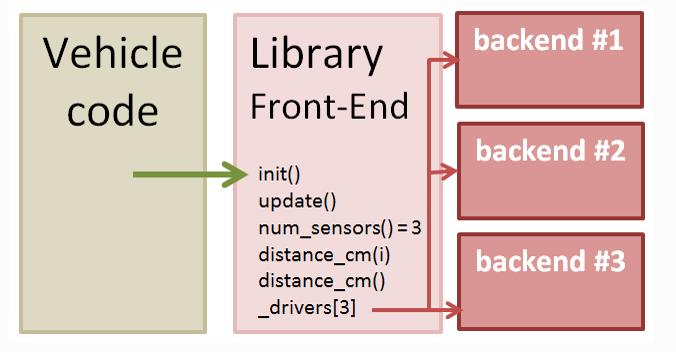

前端调用后端代码之前,系统会通过自动检测设备或者通过用户配置的参数创建并且启动一个或者多个后端对象。用户自定义参数(_TYPE),例如RNGFND_TYPE。每个后端对象都会保存在前端创建的指针数组中( _drivers[])。
设备驱动代码被调用方式
图中左边的后端设备驱动代码运行于后台线程中,主要实现从外部设备读取原始数据,转化为标准单位,并且将处理后的数据存储在缓冲区中。具体的飞行控制器代码通过调用前端代码获取最新的设备数据,并在主线程中周期处理运行(400HZ for copter)。例如从传感器的前端代码中读取加速度计、陀螺仪数据等。
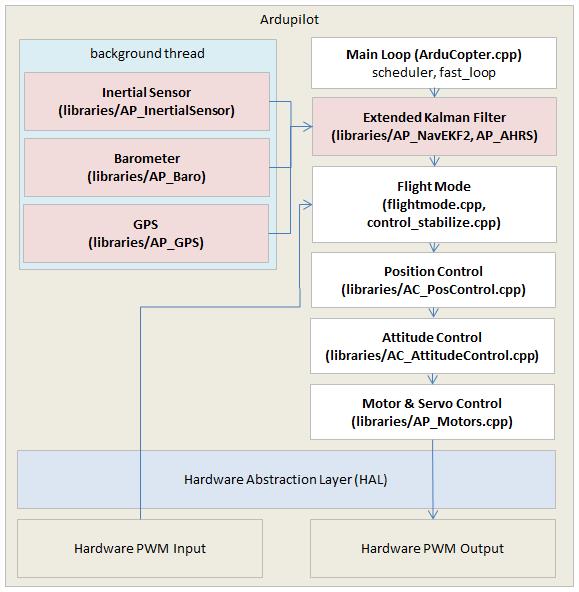
其中,为了不阻碍主线程的运行,IIC和SPI通信在后台线程中运行。但主线程中可以调用USART接口函数,因为为底层的串行驱动程序本身在后台收集数据保存在一个缓冲区中。
飞行控制上层代码调用设备前段代码示例
sensors.cpp文件中包含有调用设备驱动前端代码,例如飞控控制以20HZ的频率调用read_rangefinder()函数而读取高度数据,而该函数内部则调用了rangefinder.update() 和rangefinder.set_estimated_terrain_height()前端代码来获取数据。摘取代码如下:
/*
read the rangefinder and update height estimate
*/
void Plane::read_rangefinder(void)
{
/* notify the rangefinder of our approximate altitude above ground to allow it to power on*/
/* during low-altitude flight when configured to power down during higher-altitude flight*/
float height;
#if AP_TERRAIN_AVAILABLE
if (terrain.status() == AP_Terrain::TerrainStatusOK && terrain.height_above_terrain(height, true)) {
rangefinder.set_estimated_terrain_height(height);
} else
#endif
{
/* use the best available alt estimate via baro above home*/
if (flight_stage == AP_Vehicle::FixedWing::FLIGHT_LAND) {
/* ensure the rangefinder is powered-on when land alt is higher than home altitude.
This is done using the target alt which we know is below us and we are sinking to it*/
height = height_above_target();
} else {
/* otherwise just use the best available baro estimate above home.*/
height = relative_altitude;
}
rangefinder.set_estimated_terrain_height(height); //设置地形估计高度
}
rangefinder.update(); //通过传感器更新高度数据
if ((rangefinder.num_sensors() > 0) && should_log(MASK_LOG_SONAR)) {
Log_Write_Sonar();
}
rangefinder_height_update();
}
以下代码为rangefinder.update()函数内部实现
/*
   update the state of the sensor by usart
*/
void AP_RangeFinder_LightWareSerial::update(void)
{
//获取缓冲区中获取的原始数据,并且将处理后的数据保存至distance_cm中,数据为true,否则为false
    if (get_reading(state.distance_cm)) {
        // update range_valid state based on distance measured
        last_reading_ms = AP_HAL::millis(); //获取当前系统运行时间
        update_status();    /*判断distance_cm数据情况,高于最大测量范围或者小于最小测量范围或者数据正常*/
    } else if (AP_HAL::millis() - last_reading_ms > 200) { /* 超过200ms缓冲没有数据 */
        set_status(RangeFinder::RangeFinder_NoData);
    }
}
串口设备后端实现示例
此处以获取LightWare数据为例,首先需通过serial_manager类和用户设置的参数获取串口设备对象实例。代码如下:
/*
   The constructor also initialises the rangefinder. Note that this
   constructor is not called until detect() returns true, so we
   already know that we should setup the rangefinder
*/
AP_RangeFinder_LightWareSerial::AP_RangeFinder_LightWareSerial(RangeFinder::RangeFinder_State &_state, AP_SerialManager &serial_manager) : AP_RangeFinder_Backend(_state)
{
    uart = serial_manager.find_serial(AP_SerialManager::SerialProtocol_Lidar, 0);
    if (uart != nullptr) {
 uart->begin(serial_manager.find_baudrate(AP_SerialManager::SerialProtocol_Lidar, 0));
    }
}
前端代码在读取串口数据之前,需每次调用update()方法获取串口接受缓冲区中的数据,update方法中则调用的get_reading()方法将数据读取的内存中进行数据处理。其中关于update的代码可见之前的rangefinder.update()代码的实现,另外get_reading()代码如下:
// read - return last value measured by sensor
bool AP_RangeFinder_LightWareSerial::get_reading(uint16_t &reading_cm)
{
if (uart == nullptr) {
return false;
}
// read any available lines from the lidar
float sum = 0;
uint16_t count = 0;
int16_t nbytes = uart->available(); //检测串口接收缓冲区中的数据个数
while (nbytes-- > 0) { //将缓冲区的数据读出,可能会读到多组数据
char c = uart->read(); //获取一个字符
if (c == '\r') { //一组数据以'\r'为结尾
linebuf[linebuf_len] = 0;
sum += (float)atof(linebuf); //将浮点字符串转换成字符串
count++;
linebuf_len = 0;
} else if (isdigit(c) || c == '.') { //判断数据是否有效
linebuf[linebuf_len++] = c;
if (linebuf_len == sizeof(linebuf)) {
// too long, discard the line
linebuf_len = 0;
}
}
}
// we need to write a byte to prompt another reading
uart->write('d');
if (count == 0) {
return false; //无数据返回false
}
reading_cm = 100 * sum / count; //单位换算成cm,并且求多组数据的平均值
return true; //有数据返回true
}
因系统中每个串口都有自己接收缓冲区,所以主线程中可以直接调用get_reading()方法,而不影响其性能。而IIC和SPI通信则需要通过另外的机制来获取数据。
IIC后端代码实例
前端代码通过指定IIC设备的地址而对IIC实例对象进行初始化,初始化代码位于RangeFinder.cpp文件中的RangeFinder::detect_instance(uint8_t instance)函数中:
case RangeFinder_TYPE_LWI2C:
        if (state[instance].address) {
#ifdef HAL_RANGEFINDER_LIGHTWARE_I2C_BUS
        _add_backend(AP_RangeFinder_LightWareI2C::detect(state[instance],
        hal.i2c_mgr->get_device(HAL_RANGEFINDER_LIGHTWARE_I2C_BUS, state[instance].address)));
#else
 if (!_add_backend(AP_RangeFinder_LightWareI2C::detect(state[instance],
      hal.i2c_mgr->get_device(1, state[instance].address)))) {
       _add_backend(AP_RangeFinder_LightWareI2C::detect(state[instance],
       hal.i2c_mgr->get_device(0, state[instance].address)));
 }
#endif
  }
    break;
其中代码
hal.i2c_mgr->get_device(HAL_RANGEFINDER_LIGHTWARE_I2C_BUS, state[instance].address)
通过指定IIC地址在总线上得到对应设备。指定设备之后,则可以通过调用相应的后端代码来初始化该设备与读取数据。代码如下:
void AP_RangeFinder_LightWareI2C::init()
{
// call timer() at 20Hz 以20HZ的频率执行定时器回调函数
_dev->register_periodic_callback(50000,
FUNCTOR_BIND_MEMBER(&AP_RangeFinder_LightWareI2C::timer, void));
}
// read - return last value measured by sensor
bool AP_RangeFinder_LightWareI2C::get_reading(uint16_t &reading_cm)
{
be16_t val;
if (state.address == 0) {
return false;
}
// read the high and low byte distance registers
bool ret = _dev->read((uint8_t *) &val, sizeof(val));
if (ret) {
// combine results into distance
reading_cm = be16toh(val);
}
return ret;
}
而定时回调函数中则调用了get_reading()方法获取IIC设备的数据。
SPI后端代码实例
以MPU9250 IMU后端代码介绍SPI总线后端代码的编写。获取SPI设备对象的初始化代码类似于IIC,代码位于AP_InertialSensor.cpp文件AP_InertialSensor::detect_backends(void)函数中。
_add_backend(AP_InertialSensor_Invensense::probe(*this, hal.spi->get_device(HAL_INS_MPU9250_NAME))); //获取SPI设备
此外,在后台线程中start()方法会自动调用对SPI总线上对应设备(此处为MPU9250)进行初始化和配置。程序中使用信号量区别SPI总线上的不同设备。

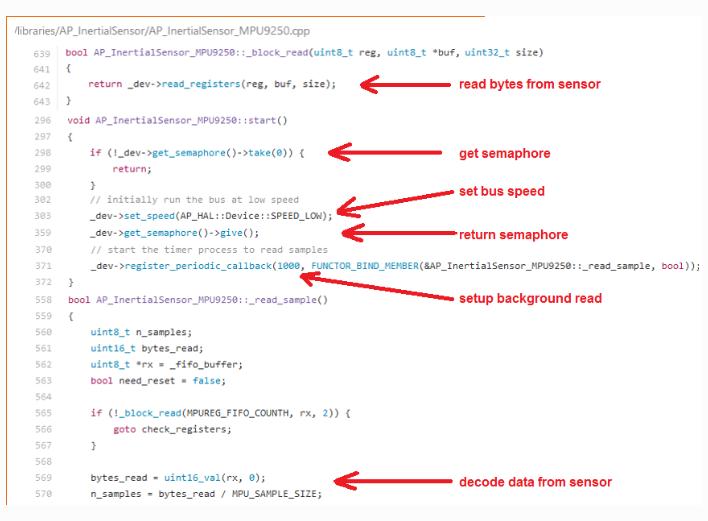
其中,_read_sample()方法被注册以1000HZ的频率被调用。__block_read()方法则主要从传感器寄存器中获取数据供上层代码处理。
注意
如果添加新的设备驱动程序代码,则在代码中绝对不能有任何的等待或者线程休眠代码,因为这样会影响其他线程所使用的总线。
如果想将新的驱动代码加入的工程中,则必须在make.inc和wscript文件中编写相应的工程代码,这两个文件位于对应的飞行器代码目录下(ArduPlane、ArduCopter...)。这样新编写的驱动才会参与工程代码的编译,最后一同生成可执行的二进制文件。后续可将该文件烧写至飞控处理器中运行。
Ardupilot设备驱动 IIC、SPI、USART的更多相关文章
- RT thread 设备驱动组件之USART设备
本文以stm32f4xx平台介绍串口驱动,主要目的是:1.RTT中如何编写中断处理程序:2.如何编写RTT设备驱动接口代码:3.了解串行设备的常见处理机制.所涉及的主要源码文件有:驱动框架文件(usa ...
- Linux设备驱动剖析之SPI(一)
写在前面 初次接触SPI是因为几年前玩单片机的时候,由于普通的51单片机没有SPI控制器,所以只好用IO口去模拟.最近一次接触SPI是大三时参加的校内选拔赛,当时需要用2440去控制nrf24L01, ...
- RT-thread 设备驱动组件之IIC总线设备
本文主要介绍RT-thread中IIC总线设备驱动,涉及到的主要文件有:驱动框架文件(i2c_core.c,i2c_dev.c,i2c-bit-ops.c,i2c_dev.h,i2c.h):底层硬件驱 ...
- 通信方案软件设计(环形动态申请内存,支持USART+IIC+SPI+CAN协议
1 <STM32进阶之串口环形缓冲区实现>中讲得比较清楚(链接) 2 amobbs中讲的方法有点复杂,以下是链接和参考源码: 通信方案软件设计(环形动态申请内存,支持USART+IIC+S ...
- Linux设备驱动剖析之IIC(二)
953行,适配器的编号大于MAX_ID_MASK是不行的,MAX_ID_MASK是一个宏,展开后的值为61. 957至968行,关于管理小整形ID数的,没怎么了解,略过. 974行,调用i2c_reg ...
- Linux设备驱动剖析之IIC(一)
写在前面 由于IIC总线只需要两根线就可以完成读写操作,而且通信协议简单,一条总线上可以挂载多个设备,因此被广泛使用.但是IIC总线有一个缺点,就是传输速率比较低.本文基于Linux-2.6.36版本 ...
- Linux设备驱动剖析之SPI(三)
572至574行,分配内存,注意对象的类型是struct spidev_data,看下它在drivers/spi/spidev.c中的定义: struct spidev_data { dev_t de ...
- Linux设备驱动剖析之SPI(二)
957至962行,一个SPI控制器用一个master来描述.这里使用SPI核心的spi_alloc_master函数请求分配master.它在drivers/spi/spi.c文件中定义: struc ...
- spi驱动框架全面分析,从master驱动到设备驱动
内核版本:linux2.6.32.2 硬件资源:s3c2440 参考: 韦东山SPI视频教程 内容概括: 1.I2C 驱动框架回顾 2.SPI 框架简单介绍 3.maste ...
随机推荐
- eclipse: eclipse创建java web项目
Eclipse创建java web工程 eclipse版本:eclipse-jee-4.5-win32-x64 tomcat版本:apache-tomcat-7.0.63-windows-x64 jd ...
- MySQL的数据备份以及pymysql的使用
一.MySQL的数据备份 语法: # mysqldump -h 服务器 -u用户名 -p密码 数据库名 > 备份文件.sql #示例: #单库备份 mysqldump -uroot -p123 ...
- 常用Java API(转)
一. java.io.BufferedReader类(用于从文件中读入一段字符:所属套件:java.io) 1. 构造函数BufferedReader(java.io.FileReader FileR ...
- 02_Ext_Panel
1,面板由以下几个部分组成, 一个顶部工具栏(tbar).一个底部工具栏(bbar).面板头部(header).面板尾部(bottom).面板主区域(body)几个部分组成. 面板类中还内置了面板展开 ...
- Apache Spark 2.2.0 中文文档 - 快速入门 | ApacheCN
快速入门 使用 Spark Shell 进行交互式分析 基础 Dataset 上的更多操作 缓存 独立的应用 快速跳转 本教程提供了如何使用 Spark 的快速入门介绍.首先通过运行 Spark 交互 ...
- Java中数组的概念
1.什么是二维数组?有几种表达方式?分别是什么? 答:多维数组即数组的数组,即数组的元素也是数组. 例:int[] [] a = {{1},{1,2},{1,2,3}}; 有三种方式 1).int [ ...
- Linux 安装 mysql 并配置
1.下载 下载地址:http://dev.mysql.com/downloads/mysql/5.6.html#downloads 下载版本:我这里选择的5.6.33,通用版,linux下64位 也可 ...
- Thinkphp3.2版本使用163邮箱发(验证码)邮件
今天忽然想写一个用户修改密码的功能,又没有短信接口,只能选择用邮箱发送验证码啦,穷啊,没办法,哈哈,以下为正文. ------------------------------------------- ...
- Angular - Templates(模板)
点击查看AngularJS系列目录 转载请注明出处:http://www.cnblogs.com/leosx/ 在Angular中,模板是一个包含了Angular特定元素和属性的HTML.Angula ...
- Javac 编译原理
写在前面 JDK & JRE JRE(Java Runtime Enviroment)是Java的运行环境.面向Java程序的使用者,而不是开发者.如果你仅下载并安装了JRE,那么你的系统只 ...