
python基础教程(九)
python异常
python用异常对象(exception object)来表示异常情况。遇到错误后,会引发异常。如果异常对象并未被处理或捕捉,程序就会用所谓的 回溯(Traceback, 一种错误信息)终止执行:

>>> 1/0

Traceback (most recent call last):

  File "<pyshell#0>", line 1, in <module>

    1/0

ZeroDivisionError: integer division or modulo by zero
raise 语句
为了引发异常,可以使用一个类(Exception的子类)或者实例参数数调用raise 语句。下面的例子使用内建的Exception异常类:
>>> raise Exception    #引发一个没有任何错误信息的普通异常

Traceback (most recent call last):

  File "<pyshell#1>", line 1, in <module>

    raise Exception

Exception

>>> raise Exception('hyperdrive overload')   # 添加了一些异常错误信息

Traceback (most recent call last):

  File "<pyshell#2>", line 1, in <module>

    raise Exception('hyperdrive overload')

Exception: hyperdrive overload
系统自带的内建异常类:
>>> import exceptions

>>> dir(exceptions)

['ArithmeticError', 'AssertionError', 'AttributeError', 'BaseException', 'BufferError', 'BytesWarning', 'DeprecationWarning', 'EOFError', 'EnvironmentError', 'Exception', 'FloatingPointError', 'FutureWarning', 'GeneratorExit', 'IOError', 'ImportError', 'ImportWarning', 'IndentationError', 'IndexError', 'KeyError', 'KeyboardInterrupt', 'LookupError', 'MemoryError', 'NameError', 'NotImplementedError', 'OSError', 'OverflowError', 'PendingDeprecationWarning', 'ReferenceError', 'RuntimeError', 'RuntimeWarning', 'StandardError', 'StopIteration', 'SyntaxError', 'SyntaxWarning', 'SystemError', 'SystemExit', 'TabError', 'TypeError', 'UnboundLocalError', 'UnicodeDecodeError', 'UnicodeEncodeError', 'UnicodeError', 'UnicodeTranslateError', 'UnicodeWarning', 'UserWarning', 'ValueError', 'Warning', 'WindowsError', 'ZeroDivisionError', '__doc__', '__name__', '__package__']
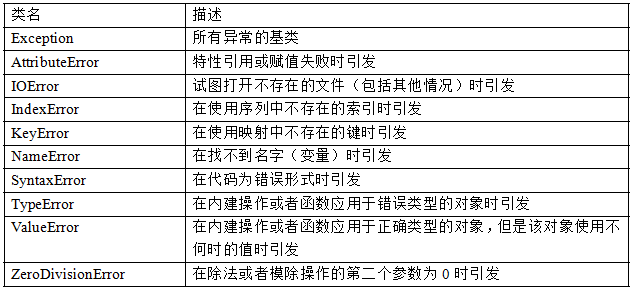
哇!好多,常用的内建异常类:
自定义异常
尽管内建的异常类已经包括了大部分的情况,而且对于很多要求都已经足够了,但有些时候还是需要创建自己的异常类。
和常见其它类一样----只是要确保从Exception类继承,不管直接继承还是间接继承。像下面这样:
>>> class someCustomExcetion(Exception):pass
当然,也可以为这个类添加一些方法。
捕捉异常
我们可以使用 try/except 来实现异常的捕捉处理。
假设创建了一个让用户输入两个数,然后进行相除的程序:
x = input('Enter the first number: ')

y = input('Enter the second number: ')

print x/y

#运行并且输入

Enter the first number: 10

Enter the second number: 0

Traceback (most recent call last):

  File "I:/Python27/yichang", line 3, in <module>

    print x/y

ZeroDivisionError: integer division or modulo by zero
为了捕捉异常并做出一些错误处理,可以这样写:
try:

    x = input('Enter the first number: ')

    y = input('Enter the second number: ')

    print x/y

except ZeroDivisionError:

  print "输入的数字不能为0!"


#再来云行

>>>

Enter the first number: 10

Enter the second number: 0

输入的数字不能为0!           #怎么样?这次已经友好的多了
假如,我们在调试的时候引发异常会好些,如果在与用户的进行交互的过程中又是不希望用户看到异常信息的。那如何开启/关闭 “屏蔽”机制?
class MuffledCalulator:

    muffled = False   #这里默认关闭屏蔽

    def calc(self,expr):

        try:

            return eval(expr)

        except ZeroDivisionError:

            if self.muffled:

                print 'Divsion by zero is illagal'

            else:

                raise

#运行程序:

>>> calculator = MuffledCalulator()

>>> calculator.calc('10/2')

5

>>> calculator.clac('10/0')

Traceback (most recent call last):

  File "<pyshell#30>", line 1, in <module>

    calculator.clac('10/0')

AttributeError: MuffledCalulator instance has no attribute 'clac'   #异常信息被输出了

>>> calculator.muffled = True   #现在打开屏蔽

>>> calculator.calc('10/0')

Divsion by zero is illagal
多个except 子句
如果运行上面的(输入两个数,求除法)程序,输入面的内容,就会产生另外一个异常:
try:

    x = input('Enter the first number: ')

    y = input('Enter the second number: ')

    print x/y

except ZeroDivisionError:

  print "输入的数字不能为0!"


#运行输入:

>>>

Enter the first number: 10

Enter the second number: 'hello.word'  #输入非数字

Traceback (most recent call last):

  File "I:\Python27\yichang", line 4, in <module>

    print x/y

TypeError: unsupported operand type(s) for /: 'int' and 'str'  #又报出了别的异常信息
好吧!我们可以再加个异常的处理来处理这种情况:
try:

    x = input('Enter the first number: ')

    y = input('Enter the second number: ')

    print x/y

except ZeroDivisionError:

    print "输入的数字不能为0!"

except TypeError:           # 对字符的异常处理

  print "请输入数字!"


#再来运行:

>>>

Enter the first number: 10

Enter the second number: 'hello,word'

请输入数字!
一个块捕捉多个异常
我们当然也可以用一个块来捕捉多个异常:
try:

    x = input('Enter the first number: ')

    y = input('Enter the second number: ')

    print x/y

except (ZeroDivisionError,TypeError,NameError):

    print "你的数字不对!"
捕捉全部异常
就算程序处理了好几种异常,比如上面的程序,运行之后,假如我输入了下面的内容呢
>>>

Enter the first number: 10

Enter the second number:   #不输入任何内容,回车

Traceback (most recent call last):

  File "I:\Python27\yichang", line 3, in <module>

    y = input('Enter the second number: ')

  File "<string>", line 0

   ^

SyntaxError: unexpected EOF while parsing
晕死~! 怎么办呢?总有被我们不小心忽略处理的情况,如果真想用一段代码捕捉所有异常,那么可在except子句中忽略所有的异常类:
try:

    x = input('Enter the first number: ')

    y = input('Enter the second number: ')

    print x/y

except:

    print '有错误发生了!'

#再来输入一些内容看看

>>>

Enter the first number: 'hello' * )0

有错误发生了!
结束
别急!再来说说最后一个情况,好吧,用户不小心输入了错误的信息,能不能再给次机会输入?我们可以加个循环,保你输对时才结束:
while True:

    try:

        x = input('Enter the first number: ')

        y = input('Enter the second number: ')

        value = x/y

        print 'x/y is',value
        break

    except:

        print '列效输入,再来一次!'

#运行

>>>

Enter the first number: 10

Enter the second number:

列效输入,再来一次!

Enter the first number: 10

Enter the second number: 'hello'

列效输入,再来一次!

Enter the first number: 10

Enter the second number: 2

x/y is 5
------------------------
温馨提示:因为是学习笔记,尽量精简了文字,所以,你要跟着做才能体会,光看是没用的(也没意思)。
python基础教程(九)的更多相关文章
- 改写《python基础教程》中的一个例子
一.前言 初学python,看<python基础教程>,第20章实现了将文本转化成html的功能.由于本人之前有DIY一个markdown转html的算法,所以对这个例子有兴趣.可仔细一看 ...
- .Net程序员之Python基础教程学习----列表和元组 [First Day]
一. 通用序列操作: 其实对于列表,元组 都属于序列化数据,可以通过下表来访问的.下面就来看看序列的基本操作吧. 1.1 索引: 序列中的所有元素的下标是从0开始递增的. 如果索引的长度的是N,那么所 ...
- python基础教程笔记—即时标记(详解)
最近一直在学习python,语法部分差不多看完了,想写一写python基础教程后面的第一个项目.因为我在网上看到的别人的博客讲解都并不是特别详细,仅仅是贴一下代码,书上内容照搬一下,对于当时刚学习py ...
- python基础教程(一)
之所以选择py交易有以下几点:1.python是胶水语言(跨平台),2.python无所不能(除了底层),3.python编写方便(notepad++等文本编辑器就能搞事情),4.渗透方面很多脚本都是 ...
- Python基础教程2上的一处打印缺陷导致的代码不完整#1
#1对代码的完善的 出现打印代码处缺陷截图: 图片上可以看到,定义的request根本没有定义它就有了.这个是未定义的,会报错的,这本书印刷问题,这个就是个坑,我也是才发现.花了点时间脱坑. 现在发完 ...
- python基础教程(第二版)
开始学习python,根据Python基础教程,把里面相关的基础章节写成对应的.py文件 下面是github上的链接 python基础第1章基础 python基础第2章序列和元组 python基础第3 ...
- python基础教程1:入门基础知识
写在系列前,一点感悟 没有梳理总结的知识毫无价值,只有系统地认真梳理了才能形成自己的知识框架,否则总是陷入断片儿似的学习-遗忘循环中. 学习方法真的比刻苦"傻学"重要多了,而最重要 ...
- Python基础教程-第3版(文字版) 超清文字-非扫描版 [免积分、免登录]
此处免费下载,无需账号,无需登录,无需积分.收集自互联网,侵权通知删除. 点击下载:Python基础教程-第3版 备用下载:Python基础教程-第3版
- Python基础教程学习笔记:第一章 基础知识
Python基础教程 第二版 学习笔记 1.python的每一个语句的后面可以添加分号也可以不添加分号:在一行有多条语句的时候,必须使用分号加以区分 2.查看Python版本号,在Dos窗口中输入“p ...
- 【Python】Python基础教程系列目录
Python是一个高层次的结合了解释性.编译性.互动性和面向对象的脚本语言. 在现在的工作及开发当中,Python的使用越来越广泛,为了方便大家的学习,Linux大学 特推出了 <Python基 ...
随机推荐
- 导入 theano 失败。“cannot import name gof”
按照网上教程安装好了 theano 之后,import theano 出现错误."cannot import name gof".网上找了很多教程,都不可行.最后找到如下教程.亲测 ...
- Python开发【笔记】:单线程下执行多个定时任务
单线程多定时任务 前言:公司业务需求,实例当中大量需要启动定时器的操作:大家都知道python中的定时器用的是threading.Timer,每当启动一个定时器时,程序内部起了一个线程,定时器触发执行 ...
- 设计模式--工厂方法模式(Factory method pattern)及应用
面向对象的好处: 通过封装,继承,多态把程序的耦合度降低. 用设计模式可以使程序更加灵活,容易修改,且易于复用. 1. 工厂方法模式 Define an interface for creating ...
- servlet之注册登录(简写)
1.注册页面 <%@ page language="java" contentType="text/html; charset=UTF-8" pageEn ...
- iOS耗电量测试
iOS耗电量测试 本文主要介绍的是使用Energy Diagnostics Instruments来进行iOS耗电量测试. 一.使用方法: 1)iOS 设置选项 ->开发者选项 ->log ...
- spring-boot整合mybatis(1)
sprig-boot是一个微服务架构,加快了spring工程快速开发,以及简便了配置.接下来开始spring-boot与mybatis的整合. 1.创建一个maven工程命名为spring-boot- ...
- 支付宝分库分表中间件--zdal简介
中间件, 如果仅仅作为一名用户的话, 主要关注一下如何使用即可, 大多数情况下也就是配置. 下面简单的介绍一下支付宝的分库分表中间件--->zdal在web项目中的配置. 1, 在网上查阅相关资 ...
- 36. leetcode 415. Add Strings
415. Add Strings Given two non-negative integers num1 and num2 represented as string, return the sum ...
- hdu 6047 Maximum Sequence(贪心)
Description Steph is extremely obsessed with "sequence problems" that are usually seen on ...
- 用户单独管理Jenkins的某些项目
管理用户: 建立用户: 安装Role-Based Strategy插件 安装插件后,进入系统设置页面,配置如下: 在系统管理页面点击Manage and Assign Roles进入角色管理页面: 1 ...