
Web UI开发速速种草—Kendo UI for jQuery网格编辑操作概述
Kendo UI目前最新提供Kendo UI for jQuery、Kendo UI for Angular、Kendo UI Support for React和Kendo UI Support for Vue四个控件。Kendo UI for jQuery是创建现代Web应用程序的最完整UI库。
编辑是Kendo UI网格的基本功能,可让您操纵其数据的显示方式。
Kendo UI Grid提供以下编辑模式:
- 批量编辑
- 内联编辑
- 弹出式编辑
- 自定义编辑
入门指南
要启用编辑:
- 熟悉Kendo UI中常见编辑概念
- 配置Grid的数据源
- 通过schema配置定义字段
- 设置editable选项
配置数据源
下面的示例演示如何为CRUD(创建、读取、更新、销毁)数据操作配置数据源。
var dataSource = new kendo.data.DataSource({

transport: {

read:   "/Products",

update: {

url: "/Products/Update",

type: "POST"

},

destroy: {

url: "/Products/Destroy",

type: "POST"

},

create: {

url: "/Products/Create",

type: "POST"

}

},

// Determines if changes will be send to the server individually or as batch.

batch: true

//...

});
通过schema定义字段
下面的示例演示如何通过DataSource schema.model声明字段定义。
注意:
- 在schema.model.id中定义数据项的id字段,这样可以确保正确添加、编辑和删除项目。
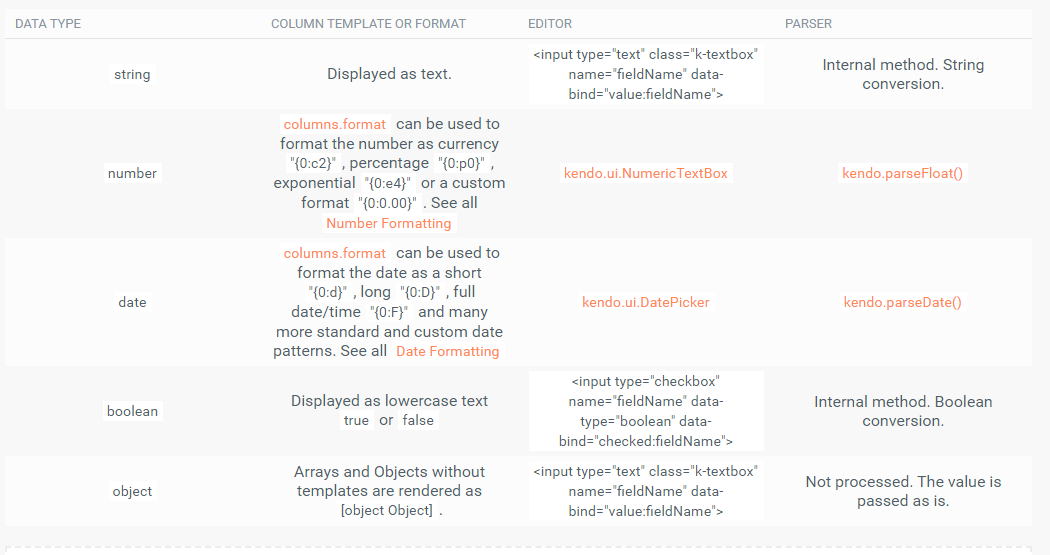
- 定义字段的数据类型来利用内置编辑器、可过滤的UI以及正确的排序、过滤和分组功能。
下图列出了可用的数据类型:
var dataSource = new kendo.data.DataSource({

schema: {

model: {

id: "id",

fields: {

id: {

editable: false,

// a defaultValue will not be assigned (default value is false)

nullable: true

},

name: {

type: "string",

validation: { required: true }

},

price: {

// A NumericTextBox editor will be initialized in edit mode.

type: "number",

// When a new model is created, this default will be used.

defaultValue: 42

},

discontinued:{

// A checkbox editor will be initialized in edit mode.

type: "boolean"

},

created: {

// A date picker editor will be initialized in edit mode.

type: "date"

},

supplier: {

type: "object" ,

defaultValue: { companyName: "Progress", companyId: 1 }

}

}

}

}

});
设置可编辑选项
默认情况下,Grid是不可编辑的。要启用编辑功能,请添加所需的编辑类型。Kendo UI jQuery Grid支持单元内、内联和弹出编辑模式。为了使编辑功能完全起作用,请添加带有Create按钮和用于更新、销毁操作的命令列工具栏。
下面的示例演示如何在incell编辑模式下为CRUD操作配置基本Grid。
// Incell editing.

  $("#grid").kendoGrid({

// To enable the insertion of new records, save or cancel changes.

toolbar: [ "create", "save", "cancel" ],

columns: [ "name",

// To trigger the in-cell destroy operation.

{ command: [ "destroy" ] }

],

dataSource: dataSource,

editable: true

});
以下示例演示如何以内联或弹出编辑模式为CRUD操作配置基本Grid。
// Inline OR Popup editing.

  $("#grid").kendoGrid({

// To enable the insertion of new records.

toolbar: [ "create" ],

columns: [ "name",

// To trigger the inline or popup edit and destroy operations.

{ command: [ "edit", "destroy" ] }

],

dataSource: dataSource,

editable: "inline" // OR editable: { mode : "popup" }

});
了解最新Kendo UI最新资讯,请关注Telerik中文网!
扫描关注慧聚IT微信公众号,及时获取最新动态及最新资讯

Web UI开发速速种草—Kendo UI for jQuery网格编辑操作概述的更多相关文章
- Web界面开发必看!Kendo UI for jQuery编辑功能指南第二弹
Kendo UI for jQuery最新试用版下载 Kendo UI目前最新提供Kendo UI for jQuery.Kendo UI for Angular.Kendo UI Support f ...
- Web界面开发必看!Kendo UI for jQuery编辑功能指南第一弹
Kendo UI for jQuery最新试用版下载 Kendo UI目前最新提供Kendo UI for jQuery.Kendo UI for Angular.Kendo UI Support f ...
- Web UI开发神器—Kendo UI for jQuery数据管理网格编辑操作
Kendo UI for jQuery最新试用版下载 Kendo UI目前最新提供Kendo UI for jQuery.Kendo UI for Angular.Kendo UI Support f ...
- [置顶] Kendo UI开发教程: Kendo UI 示例及总结
前面基本介绍完Kendo UI开发的基本概念和开发步骤,Kendo UI的示例网站为http://demos.kendoui.com/ ,包含了三个部分 Web DemoMobile DemoData ...
- Web UI开发推荐!Kendo UI for jQuery自定义小部件——使用MVVM
Kendo UI for jQuery最新试用版下载 Kendo UI目前最新提供Kendo UI for jQuery.Kendo UI for Angular.Kendo UI Support f ...
- Web UI开发推荐!Kendo UI for jQuery自定义小部件——处理事件
Kendo UI for jQuery最新试用版下载 Kendo UI目前最新提供Kendo UI for jQuery.Kendo UI for Angular.Kendo UI Support f ...
- Web UI开发神器—Kendo UI for jQuery数据管理之过滤操作
Kendo UI for jQuery最新试用版下载 Kendo UI目前最新提供Kendo UI for jQuery.Kendo UI for Angular.Kendo UI Support f ...
- Kendo UI开发教程(9): Kendo UI Validator 概述
Kendo UI Validator 支持了客户端校验的便捷方法,它基于HTML 5 的表单校验功能,支持很多内置的校验规则,同时也提供了自定义规则的便捷方法. 完整的Kendo UI 的Valida ...
- 关于Kendo UI 开发教程
Kendo UI 开发教程 jQuery UI 是一套 JavaScript 函式库,提供抽象化.可自订主题的 GUI 控制项与动画效果.基于 jQuery JavaScript 函式库,可用来建构互 ...
随机推荐
- Servlet技术之——概述、实现、细节、获取资源、ServletConfig、ServletContext
Servlet概述.实现.细节.获取资源.ServletConfig.ServletContext (一) Setvlet基本概述 (1) 什么是Servlet ? Servlet(Server Ap ...
- Longest Line of Consecutive One in Matrix
Given a 01 matrix, find the longest line of consecutive 1 in the matrix. The line could be horizonta ...
- Win10 鼠标右键新建菜单添加自定义文件
1. 引言 在鼠标右键(右单机)新建菜单中添加自定义文件,例如:写字板,markdown等. 效果图: 2. 操作步骤(以Win10为例) 1. win+R输入regedit进入注册表 2. 这里以添 ...
- 关于typecho发布文章后的错位
今天发布了一篇文章,发布后发现,what?主页错位了,安装控制变量法知道,肯定是这篇文章有什么不可告人的秘密. 所以,顺便使用一下二分法查找一下为啥,最后找到是因为使用了---------->( ...
- [eclipse]UML之AmaterasUML 插件
软件体系结构分析软件设计模式要求给出相应设计模式源码对应的UML类图,在此之前我安装过一种UML插件,可以自动生成一个源码包对应的UML类图,但是重装过系统,所以软件包括eclipse都重新下载了新的 ...
- 关于C#7 新语法糖
C#7新语法糖 1.Switch 使用 goto 使用 ; switch (kk) { : Console.WriteLine(); ; : Console.WriteLine(); ; : Con ...
- asp.net core 2.0发布到IIS报错解决方案
大体来说,是环境的问题. 第一个错误,如图: 1. 查了网上说是文件夹权限的问题,依次设置了Everyone权限和IIS_IUSER权限,能勾选的都勾选了,然而并没有什么用,看来不是这个问题导致的. ...
- Redis 测试 数据类型
- Could not retrieve transaction read-only status from server问题排查
今天发现save task的时候经常后台会报这个错,而且有的时候还会卡住等20几分钟才执行完. 2019-11-12 15:08:29.410 http-nio-9080-exec-6 ERROR o ...
- 最近发现了一篇讲解Vue的虚拟DOM,diff很棒的文章,特定记录转载一下
本文章是转载的,为了方便以后复习,特地记录一下.他人请去原地址观看!!! 文章原地址:https://blog.csdn.net/m6i37jk/article/details/78140159 作者 ...