
Docker 制作定制asp.netcore 的容器
上文Windows docker k8s asp.net core的k8swebap镜像只是一个asp.net core程序,在实际生产中我们希望容器中还有一些其他程序,比如ssh 和telegraf。
利用Dockerfile文件
只是网上比较推荐的一种方式,Dockerfile包含创建镜像所需要的全部指令,基于在Dockerfile中的指令,我们可以使用Docker build命令来创建镜像,通过减少镜像和容器的创建过程来简化部署。这里我们以 asp.net core 添加ssh服务为例:
1.编译并发布项目(这里用发布后的文件):
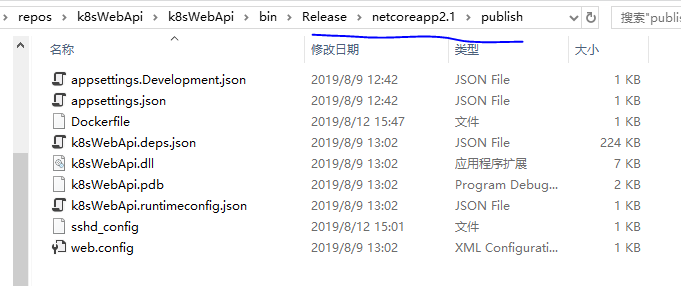

2.首先创建一个sshd_config 文件如下:
Port

#AddressFamily any

#ListenAddress 0.0.0.0

#ListenAddress ::

#HostKey /etc/ssh/ssh_host_rsa_key

#HostKey /etc/ssh/ssh_host_ecdsa_key

#HostKey /etc/ssh/ssh_host_ed25519_key

# Ciphers and keying

#RekeyLimit default none

# Logging

#SyslogFacility AUTH

#LogLevel INFO

# Authentication:

#LoginGraceTime 2m

PermitRootLogin yes

#StrictModes yes

#MaxAuthTries

#MaxSessions

#PubkeyAuthentication yes

# Expect .ssh/authorized_keys2 to be disregarded by default in future.

#AuthorizedKeysFile    .ssh/authorized_keys .ssh/authorized_keys2

#AuthorizedPrincipalsFile none

#AuthorizedKeysCommand none

#AuthorizedKeysCommandUser nobody

# For this to work you will also need host keys in /etc/ssh/ssh_known_hosts

#HostbasedAuthentication no

# Change to yes if you don't trust ~/.ssh/known_hosts for

# HostbasedAuthentication

#IgnoreUserKnownHosts no

# Don't read the user's ~/.rhosts and ~/.shosts files

#IgnoreRhosts yes

# To disable tunneled clear text passwords, change to no here!

#PasswordAuthentication yes

#PermitEmptyPasswords no

# Change to yes to enable challenge-response passwords (beware issues with

# some PAM modules and threads)

ChallengeResponseAuthentication no

# Kerberos options

#KerberosAuthentication no

#KerberosOrLocalPasswd yes

#KerberosTicketCleanup yes

#KerberosGetAFSToken no

# GSSAPI options

#GSSAPIAuthentication no

#GSSAPICleanupCredentials yes

#GSSAPIStrictAcceptorCheck yes

#GSSAPIKeyExchange no

UsePAM yes

#AllowAgentForwarding yes

#AllowTcpForwarding yes

#GatewayPorts no

X11Forwarding yes

#X11DisplayOffset

#X11UseLocalhost yes

#PermitTTY yes

PrintMotd no

#PrintLastLog yes

#TCPKeepAlive yes

#UseLogin no

#PermitUserEnvironment no

#Compression delayed

#ClientAliveInterval

#ClientAliveCountMax

#UseDNS no

#PidFile /var/run/sshd.pid

#MaxStartups ::

#PermitTunnel no

#ChrootDirectory none

#VersionAddendum none

# no default banner path

#Banner none

# Allow client to pass locale environment variables

AcceptEnv LANG LC_*

# override default of no subsystems

Subsystem    sftp    /usr/lib/openssh/sftp-server

# Example of overriding settings on a per-user basis

#Match User anoncvs

#    X11Forwarding no

#    AllowTcpForwarding no

#    PermitTTY no

#    ForceCommand cvs server
3.创建Dockerfile文件如下:
FROM microsoft/dotnet:2.1-aspnetcore-runtime

WORKDIR /app

COPY . .

EXPOSE

RUN apt-get update -y && apt-get upgrade -y && apt-get install -y \

  openssh-server \

  && rm -rf /var/lib/apt/lists/*

RUN echo 'root:Harbor12345' | chpasswd

RUN mkdir /var/run/sshd

COPY sshd_config /etc/ssh/sshd_config

ENTRYPOINT ["/bin/bash", "-c", "/usr/sbin/sshd && dotnet k8sWebApi.dll"]
4.制作镜像biang验证
docker build -t k8swebapi . #自作镜像

docker  run  --rm -p8081: -p2222: k8swebapi  #启动docker 实例

docker exec 649c hostname -I  #查看容器ip

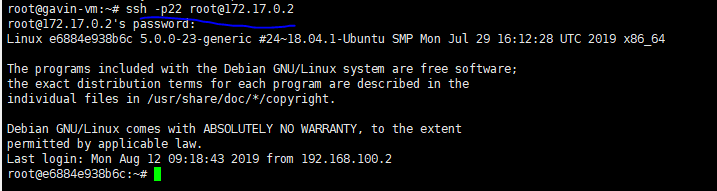
ssh root@172.17.0.2 #在宿主计算机上进入容器
在宿主进入容器如下:
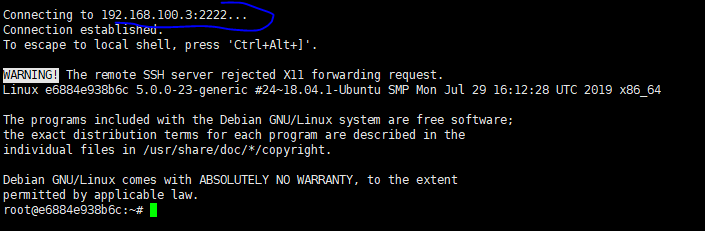
在普通的计算机上进入容器如:
手动修改容器镜像
这里 我们以asp.net core 添加 telegraf 为例。首先我们需要一个含有asp.net core的容器。这里我们修改 上面的Dockerfile文件 如下:
FROM microsoft/dotnet:2.1-aspnetcore-runtime

WORKDIR /app

EXPOSE

RUN apt-get update -y && apt-get upgrade -y && apt-get install -y \

  openssh-server \

  && rm -rf /var/lib/apt/lists/*

RUN echo 'root:Harbor12345' | chpasswd

RUN mkdir /var/run/sshd

COPY sshd_config /etc/ssh/sshd_config

CMD ["/usr/sbin/sshd", "-D"]
然后制作镜像 并启动实例
docker build -t aspnetcore2. .  #制作镜像

docker run -d -p2222: --name aspcor2.  aspnetcore2. #启动容器
进入容器后安装telagraf
apt-get update

apt-get install apt-transport-https

apt-get install curl

apt-get install sudo

apt-get install gnupg2 &&  apt-get install gnupg1

cat <<EOF | sudo tee /etc/apt/sources.list.d/influxdata.list

deb https://repos.influxdata.com/ubuntu bionic stable

EOF

sudo curl -sL https://repos.influxdata.com/influxdb.key | sudo apt-key add -

sudo apt-get update

sudo apt-get -y install telegraf
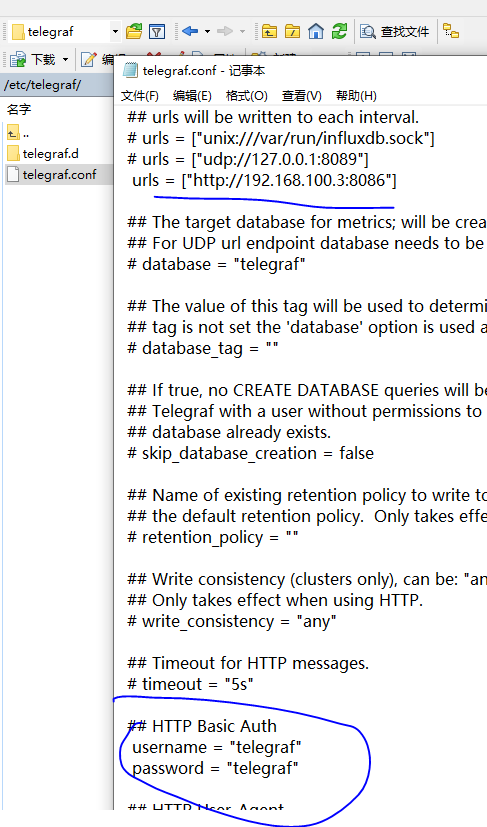
修改配置如图:
然后启动服务 制作新的镜像
sudo service telegraf start

sudo systemctl enable --now telegraf

docker commit aspcor2. 192.168.100.3:/repo-test/aspcore2.

这里我们可以在influxdb里面验证telegraf的数据, 然后关闭relegraf 服务 ,安装service和lsof

再次 提交镜像 docker commit aspcor2.1 192.168.100.3:80/repo-test/aspcore2.1 (实际先前那一次不需要提交)
最后修改程序的Dockerfile如下:(备注一下 ,如果写成 ENTRYPOINT ["/bin/bash", "-c", "/usr/sbin/sshd && /usr/bin/telegraf && dotnet k8sWebApi.dll"] 或有问题的)
FROM  192.168.100.3:/repo-test/aspcore2.

WORKDIR /app

COPY . .

EXPOSE

CMD ["/usr/bin/telegraf", "-D"]

ENTRYPOINT ["/bin/bash", "-c", "/usr/sbin/sshd && dotnet k8sWebApi.dll"]
docker build -t k8swebapi .

docker  run --rm -p8081: -p2222: k8swebapi
简单总结一下, 其实网上大家肌肤都推荐用Dockerfile来制作镜像,但是我个人比较推荐手动自作镜像,先看2个图吧
Dockerfile制作镜像(比较耗时,需要联网下载相关的软件,并且要求相对较高,验证的方式只能启动容器来验证):
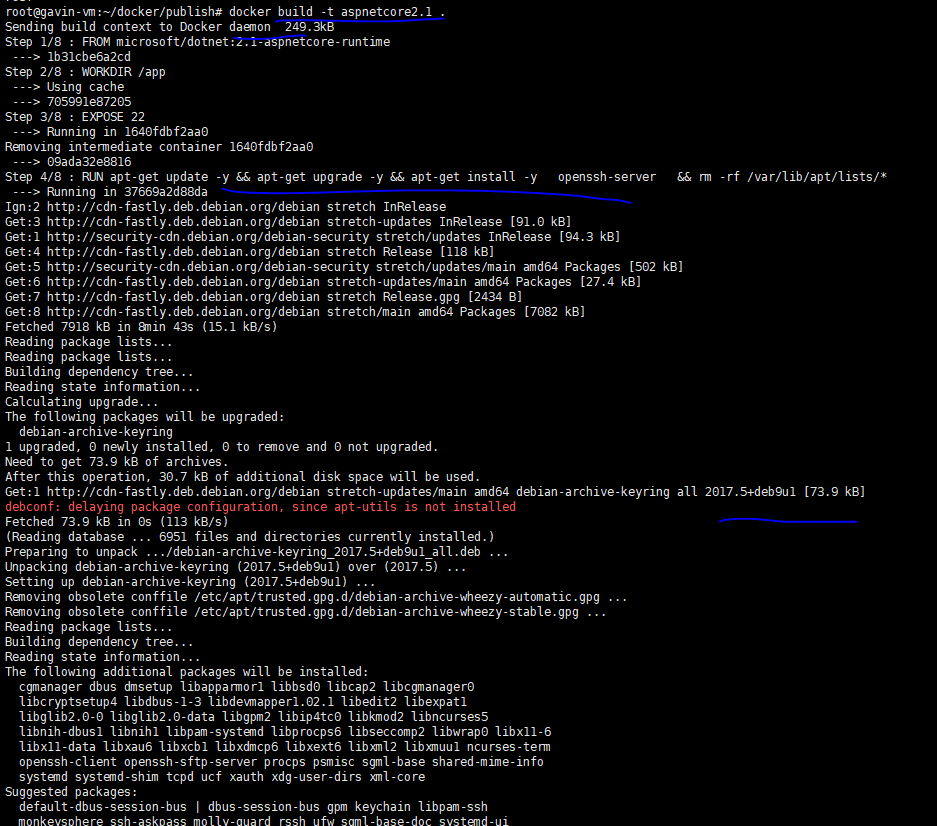
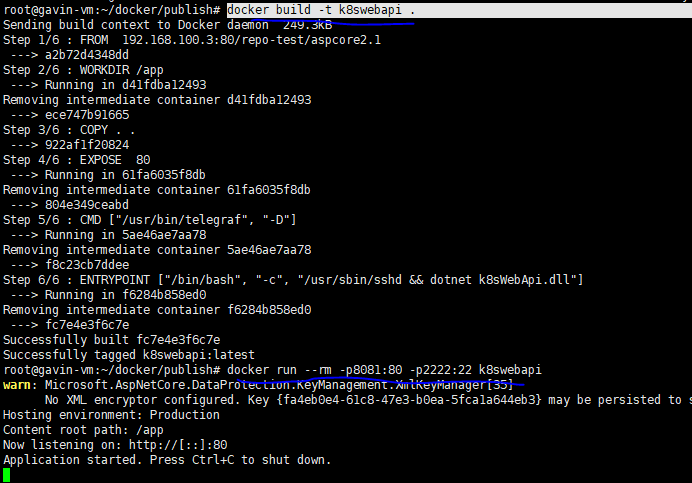
手动安装(在引入docker开发,我相信一定会有私有仓库,所以这里的镜像制作非常快,只需要从本地下载镜像就可以,不需要下载其他软件,制作初始镜像比较麻烦, 但是相对简单, 验证也很方便):
参考
ubuntu docker inflxudb(安装 使用 备份 还原 以及python编码) telegraf Grafana
Docker 制作定制asp.netcore 的容器的更多相关文章
- 壹佰文章最全总结| 《关于ASP.NETCore的分享之路》
学习路线图 (关于学习ASP.NET Core需要了解和掌握的知识点图) 一言不合就来图,各位博客园小伙伴大家好,感觉好久没有写文章了,自从春节开始,中间经历种种,慢慢的就开始微信公众号发文了,原因有 ...
- Ubuntu18.04安装Docker并部署(编译、发布、构建镜像)Asp.NetCore项目全过程笔记
环境准备:阿里云Ubuntu18.04 全新安装 一.安装Docker 1.删除旧版本并更新包索引: sudo apt-get remove docker docker-engine dock ...
- Docker镜像管理基础与基于容器的镜像制作示例
一.Docker镜像 Docker镜像是启动Docker容器的一个非常重要的组件.Docker各组件之间的关系如图: Docker镜像含有启动容器所需要的文件系统及其内容,因此Docker镜像用于创建 ...
- .NETCore 实现容器化Docker与私有镜像仓库管理
原文:.NETCore 实现容器化Docker与私有镜像仓库管理 一.Docker介绍 Docker是用Go语言编写基于Linux操作系统的一些特性开发的,其提供了操作系统级别的抽象,是一种容器管理技 ...
- 【ASP.NET Core分布式项目实战】(五)Docker制作dotnet core控制台程序镜像
Docker制作dotnet core控制台程序镜像 基于dotnet SDK 新建控制台程序 mkdir /home/console cd /home/console dotnet new cons ...
- ASP.NETCore 3.0 Autofac替换及控制器属性注入及全局容器使用
1.Autofac基础使用 参考: https://www.cnblogs.com/li150dan/p/10071079.html 2.ASP.NETCore 3.0 Autofac 容器替换 需要 ...
- asp.net core容器&mysql容器network互联 & docker compose方式编排启动多个容器
文章简介 asp.net core webapi容器与Mysql容器互联(network方式) docker compose方式编排启动多个容器 asp.net core webapi容器与Mysql ...
- 一套标准的ASP.NET Core容器化应用日志收集分析方案
讲故事 关注我公众号的朋友,应该知道我写了一些云原生应用收集和分析相关的文章,其中内容大多聚焦某个具体的组件: 超级有用的TraceId,快点用起来吧! 如何利用NLog输出结构化日志,并在Kiban ...
- Ubuntu & Docker & Consul & Fabio & ASP.NET Core 2.0 微服务跨平台实践
相关博文: Ubuntu 简单安装 Docker Mac OS.Ubuntu 安装及使用 Consul Consul 服务注册与服务发现 Fabio 安装和简单使用 阅读目录: Docker 运行 C ...
随机推荐
- 尝试在Mac/iOS上使用tcmalloc库
概述 TCMalloc 是 Google 开发的内存分配器,在不少项目中都有使用,例如在 Golang 中就使用了类似的算法进行内存分配.它具有现代化内存分配器的基本特征:对抗内存碎片. ...
- REDELK的安装和使用
0x00 前言简介 红队的SIEM有两个主要目标: 通过创建一个集中管理中心,收集和丰富来自多个 teamservers的所有相关操作日志,增强了红队人员的可用性和概述.这对于在操作中进行历史搜索以及 ...
- logger(二)logback简介及其实现原理
一.logback简介 logback是log4j创始人写的,性能比log4j要好,目前主要分为3个模块 logback-core:核心代码模块 logback-classic:log4j的一个改良版 ...
- VMware vSphere API开发(一)---vSphere 体系核心概念
1.VMware SDDC VMware 软件定义数据中心(software defined dataCenter,SDDC),包括了从最底层的VMware vSphere.软件定义存储 ...
- Mysql 主从一致校验工具------Maatkit工具包
Maatkit工具包 http://www.maatkit.org/ 简介 maatkit是一个开源的工具包,为mysql日常管理提供了帮助.目前,已被Percona公司收购并维护.其中: mk-ta ...
- 【前端_React】npm常用命令
安装模块(包): //全局安装 $ npm install 模块名 -g //本地安装 $ npm install 模块名 //一次性安装多个 $ npm install 模块1 模块2 模块n -- ...
- Linux的DNS反向解析部署
下面的部署是在Linux的DNS正向解析示例上进行修改的. 如果有什么问题或者错误,可以访问上篇帖子 下面开始有关DNS的服务部署.<DNS反向解析> 工具:虚拟机 centos7 配置: ...
- Springboot JackSon
1. SpringBoot JSON工具包默认是Jackson,只需要引入spring-boot-starter-web依赖包,自动引入相应依赖包: <dependency> <gr ...
- Slf4j 打日志的问题 Exception 没有堆栈信息
Slf4j 打日志的问题 Exception 没有堆栈信息 发现线上环境有的Exception堆栈信息没打出来,只有异常信息没有堆栈信息,难以定位 一般情况下日志这么打 log.info(" ...
- 20180610模拟赛T3——书本整理
[问题描述] 小明的书架上放了许多书,为了使书架变得整洁,小明决定整理书架,他将所有书按高度大小排列,这样排了之后虽然整齐了许多,但小明发现,书本的宽度不同,导致书架看上去还是有些凌乱.小明把这个凌乱 ...