
AutoMapper 使用实践
一. 使用意图
常常在开发过程中,碰到一个实体上的属性值,要赋值给另外一个相类似实体属性时,且属性有很多的情况。一般不利用工具的话,就要实例化被赋值实体B,然后再将实体A的字段一个个赋值给B的属性,单单写这些没有技术含量的赋值语句,就要用很大的代码篇幅。假如做得好一点的话,一般就是利用反射的方式,将A属性赋值给B,当然用反射的话,要顺利将A的属性,赋值B的属性,这样确实能够减少代码篇幅,那就要有一些约束或者限制,例如属性名称要相同,属性的数据类型要相同,这样反射起来才不费力。那如何使反射起来,更加灵活,可配置,且配置和反射过程能够分离,实现职责单一,AutoMapper 就是这样一个开源类库。
二. 认识AutoMapper
官方地址 :http://automapper.org/
GitHub 地址:https://github.com/AutoMapper/AutoMapper 包含AutoMapper 源代码与应用Simple。
开发指南:https://github.com/AutoMapper/AutoMapper/wiki/Getting-started
从我开发过程使用到一些场景
- 实体->实体
- 集合->集合
- 实体字段名称不同
- 实体数据类型不同
- 相同名称,相同数据类型无需配置
- 有Queryable Extensions ,也即支持Entity Framework
三. 最佳实践
AutoMapper开发指南,有详细的介绍,我这里就不再搬过说了,大家有空自己研究研究,我这里主要介绍一下AutoMapper比较好的实践方式,废话不多说,直接做项目给大家看。
- 项目结构
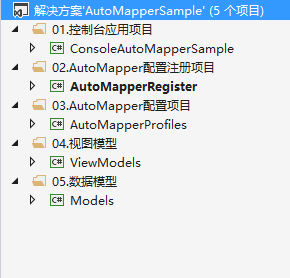
每个项目用途,解决方案文件夹基本标示清楚。
2. 以订单为例(不是真实业务,只是举个简单的例子),在Models 实体类库 新增OrderModel模型,在ViewModels 新增OrderViewModel模型,代码在下面
using System;

namespace Models

{

    public class OrderModel

    {

        public Guid OrderGuid { get; set; }

        public string OrderNo { get; set; }

        public string OrderCreator { get; set; }

        public DateTime OrderDateTime { get; set; }

        public string OrderStatus { get; set; }

        public string Description { get; set; }

        public string Creator { get; set; }

        public DateTime CreateDateTime { get; set; }

        public string LastModifier { get; set; }

        public DateTime LastModifiedDateTime { get; set; }

    }

}
using System;

namespace ViewModels

{

    public class OrderViewModel

    {

        public Guid OrderGuid { get; set; }

        public string OrderNo { get; set; }

        public string OrderCreator { get; set; }

        public DateTime OrderDateTime { get; set; }

        public string OrderStatus { get; set; }

        public string Description { get; set; }

    }

}
这里假设ViewModel,在使用过程中,不需要创建与修改相关的字段。
3. AutoMapper 配置
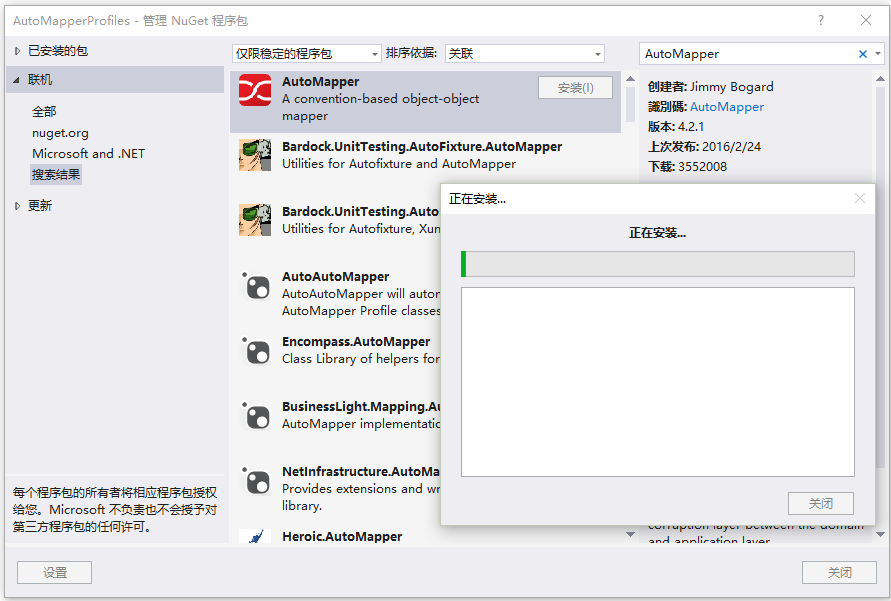
通过NuGet 程序包管理器,下载AutoMapper Dll,右键-》AutoMapperProfiles 类库-》管理NuGet程序包-》联机-》右上角搜索“AutoMapper” 下载安装
新增 ModelToViewModelProfile,ViewModelToModelProfile 两个配置类,继承AutoMapper 的 Profile 类,实现Configure重载方法,并分别引入Models & ViewModels 类库,ModelToViewModelProfile,ViewModelToModelProfile 代码如下
using AutoMapper;

using Models;

using ViewModels;

namespace AutoMapperProfiles

{

    public class ModelToViewModelProfile:Profile

    {

        protected override void Configure()

        {

            CreateMap<OrderModel, OrderViewModel>();

        }

    }

}
using AutoMapper;

using Models;

using ViewModels;

namespace AutoMapperProfiles

{

    public class ViewModelToModelProfile : Profile

    {

        protected override void Configure()

        {

            CreateMap<OrderViewModel, OrderModel>();

        }

    }

}
4.注册配置
在AutoMapperRegister 项目中,新增AutoMapperProfileRegister 类,按照 第3点,安装一下AutoMapper,同时引用AutoMapperProfiles 类库。代码如下
using AutoMapper;

using AutoMapperProfiles;

namespace AutoMapperRegister

{

    public class AutoMapperProfileRegister

    {

        public static void Register()

        {

            Mapper.Configuration.AddProfile(new ModelToViewModelProfile());

            Mapper.Configuration.AddProfile(new ViewModelToModelProfile());

        }

    }

}
5. 控制台验证是否能够顺利转换
按照 第3点,安装一下AutoMapper,引入 AutoMapperRegister ,Models,ViewModels Dll,编写测试代码,代码如下(见证奇迹的时候到了)
using System;

using System.Collections.Generic;

using System.Linq;

using System.Text;

using System.Threading.Tasks;

using AutoMapper;

using AutoMapperRegister;

using Models;

using ViewModels;

namespace ConsoleAutoMapperSample

{

    class Program

    {

        static void Main(string[] args)

        {

            AutoMapperProfileRegister.Register();

            var order = new OrderModel

                            {

                                OrderGuid = Guid.NewGuid(),

                                OrderNo = "",

                                OrderCreator = "david",

                                OrderDateTime = DateTime.Now,

                                OrderStatus = "已出库",

                                Description = "请提供个人发票"

                            };

            var orderView = Mapper.Map<OrderModel, OrderViewModel>(order);

            orderView.OrderStatus = "已完成";

            var updateOrder = Mapper.Map<OrderViewModel, OrderModel>(orderView);

        }

    }

}
经过追踪对象属性变化,全部转换成功,不方便截图,稍后我会放出源代码。
最后源代码:
AutoMapper 使用实践的更多相关文章
- AutoMapper 最佳实践
AutoMapper 是一个基于命名约定的对象->对象映射工具. 只要2个对象的属性具有相同名字(或者符合它规定的命名约定),AutoMapper就可以替我们自动在2个对象间进行属性值的映射.如 ...
- AutoMapper项目实践
本次示例,我们单独创建一个 AutoMapperService 的项目,用于放置映射配置文件,映射注册方法,映射公共方法. 1.映射配置文件 用于配置源实体到目标实体的映射 public class ...
- AutoMapper用法(转载)
申明 本文转载自http://www.qeefee.com/article/automapper 作者:齐飞 配置AutoMapper映射规则 AutoMapper是基于约定的,因此在实用映射之前,我 ...
- .NET Core中使用AutoMapper
何为AutoMapper AutoMapper是对象到对象的映射工具.在完成映射规则之后,AutoMapper可以将源对象转换为目标对象. 安装AutoMapper 这里我们在NuGet中下载安装Au ...
- AutoMapper.Mapper.CreateMap报“System.NullReferenceException: 未将对象引用设置到对象的实例。”异常复现
>>Agenda: >>Ⅰ.国庆假期问题出现 >>Ⅱ.双休日异常再次出现 >>Ⅲ.排障 >>Ⅳ.异常复盘 >>Ⅴ.修复后监测 & ...
- AutoMapper实际项目运用
AutoMapper是对象到对象的映射工具.在完成映射规则之后,AutoMapper可以将源对象转换为目标对象. 配置AutoMapper映射规则 AutoMapper是基于约定的,因此在实用映射之前 ...
- 配置AutoMapper映射规则《转》
配置AutoMapper映射规则 AutoMapper是基于约定的,因此在实用映射之前,我们需要先进行映射规则的配置. public class Source { public int SomeVal ...
- AutoMapper用法 转载https://www.cnblogs.com/youring2/p/automapper.html
AutoMapper是对象到对象的映射工具.在完成映射规则之后,AutoMapper可以将源对象转换为目标对象. 配置AutoMapper映射规则 AutoMapper是基于约定的,因此在实用映射之前 ...
- Open Source
资源来源于http://www.cnblogs.com/Leo_wl/category/246424.html RabbitMQ 安装与使用 摘要: RabbitMQ 安装与使用 前言 吃多了拉就是队 ...
随机推荐
- delegate、notification、KVO场景差别
delegate: 编译器会给出没有实现代理方法的警告 一对一 使用weak而不是assign,或者vc消失时置为nil 可以传递参数,还可以接收返回值 notification: 编译期无法排错 一 ...
- 三周,用长轮询实现Chat并迁移到Azure测试
公司的OA从零开始进行开发,继简单的单点登陆.角色与权限.消息中间件之后,轮到在线即时通信的模块需要我独立去完成.这三周除了逛网店见爱*看动漫接兼职,基本上都花在这上面了.简单地说就是用MVC4基于长 ...
- C语言 · 矩阵乘法
问题描述 输入两个矩阵,分别是m*s,s*n大小.输出两个矩阵相乘的结果. 输入格式 第一行,空格隔开的三个正整数m,s,n(均不超过200). 接下来m行,每行s个空格隔开的整数,表示矩阵A(i,j ...
- Redis 发布订阅用法
一.发布订阅模型发布订阅其作用是为了减少依赖关系,通常也叫观察者模式.主要是把耦合点单独抽离出来作为第三方,隔离易变化的发送方和接收方. 发送方:只负责向第三方发送消息.(杂志社把读者杂志交给邮局)接 ...
- Selenium WebDriver 3.0 需要注意的事项
以下所有代码基于Java 首先,要使用WebDriver 3.0 的话 请使用JAVA 8(必要) 其次,由于W3C标准化以及各大浏览器厂商的积极跟进,自WebDriver 3.0 之后,Sele ...
- 使用JAVA编写电话薄程序,具备添加,查找,删除等功能
//该程序需要连接数据库.根据word文档要求所有功能均已实现.//大部分方法基本差不多,//在查询修改的时候能输出 最大ID号 和最小ID号,并且可以对输入的ID号进行判断是否存在(具体方法请查看 ...
- [原创]直播服务器简单实现 http_flv和hls 内网直播桌面
直播都不陌生了,如今主流的协议分析的对比图,个人见解. 协议 httpflv rtmp hls dash 传输层 http流 tcp流 http http 视频格式 flv flv tag Ts文件 ...
- oc集合
本人之前学习过一年半ios开发 由于行情太过凄惨,故转前端.心在前端,苹果亦难忘!把我平时的笔记作出给大家总结! 回顾之前的知识 便利初始化函数:框架类库中的一些类有一系列的以init开头的方法,这些 ...
- SSIS Design3:并发执行
1,利用优先约束来并发处理数据,Data Flow Task 和 Data Flow Task 1 是并发执行的,而 Data Flow Task2 必须等到 Data Flow Task 和 Dat ...
- Script component 用法
在SSIS中,可以使用C#编写脚本,这是十分激动人心的事,能够使用C#代码,使得Script Component无所不能. 第一部分:组件简介Script Component 有三种类型:Source ...