
unittest多线程生成报告-----BeautifulReport
原文地址https://www.cnblogs.com/yoyoketang/p/8404204.html
前言
selenium多线程跑用例,这个前面一篇已经解决了,如何生成一个测试报告这个是难点,刚好在github上有个大神分享了BeautifulReport,完美的结合起来,就能生成报告了。
环境必备:
- python3.6 : BeautifulReport不支持2.7
- tomorrow : pip install tomorrow安装
- BeautifulReport : github下载后放到/Lib/site-packages/目录下
BeautifulReport
1.BeautifulReport下载地址:BeautifulReport
2.下载方法:
- 方法一 会使用git的直接用git下载到本地
- git clone https://github.com/TesterlifeRaymond/BeautifulReport

- 方法二 点Clone or Download按钮,Download ZIP就能下载到本地了


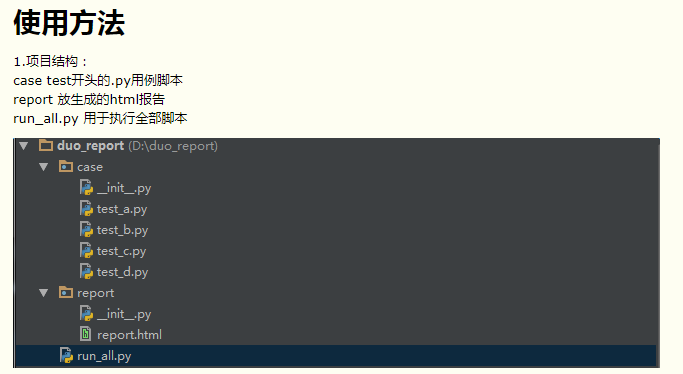
2.单个测试脚本test_a.py参考
# coding:utf-8

import unittest

from selenium import webdriver

import time

class Testaa(unittest.TestCase):

    u'''测试用例a的集合'''

    @classmethod

    def setUpClass(cls):

        cls.driver = webdriver.Firefox()

    def setUp(self):

        self.driver.get("https://www.cnblogs.com/yoyoketang/")

    def test_01(self):

        u'''用例1:用例1的操作步骤'''

        t = self.driver.title

        print(t)

        self.assertIn("悠悠", t)

    def test_02(self):

        u'''用例2:用例2的操作步骤'''

        t = self.driver.title

        print(t)

        self.assertIn("悠悠", t)

    def test_03(self):

        u'''用例3:用例3的操作步骤'''

        t = self.driver.title

        print(t)

        self.assertIn("悠悠", t)

    @classmethod

    def tearDownClass(cls):

        cls.driver.quit()

if __name__ == "__main__":

    unittest.main()
3.run_all代码
# coding=utf-8

import unittest

from BeautifulReport import BeautifulReport

import os

from tomorrow import threads

# 获取路径

curpath = os.path.dirname(os.path.realpath(__file__))

casepath = os.path.join(curpath, "case")

if not os.path.exists(casepath):

    print("测试用例需放到‘case’文件目录下")

    os.mkdir(casepath)

reportpath = os.path.join(curpath, "report")

if not os.path.exists(reportpath): os.mkdir(reportpath)

def add_case(case_path=casepath, rule="test*.py"):

    '''加载所有的测试用例'''

    discover = unittest.defaultTestLoader.discover(case_path,

                                                  pattern=rule,

                                                  top_level_dir=None)

    return discover

@threads(3)

def run(test_suit):

    result = BeautifulReport(test_suit)

    result.report(filename='report.html', description='测试deafult报告', log_path='report')

if __name__ == "__main__":

    # 用例集合

    cases = add_case()

    print(cases)

    for i in cases:

        print(i)

        run(i)
4.报告效果图
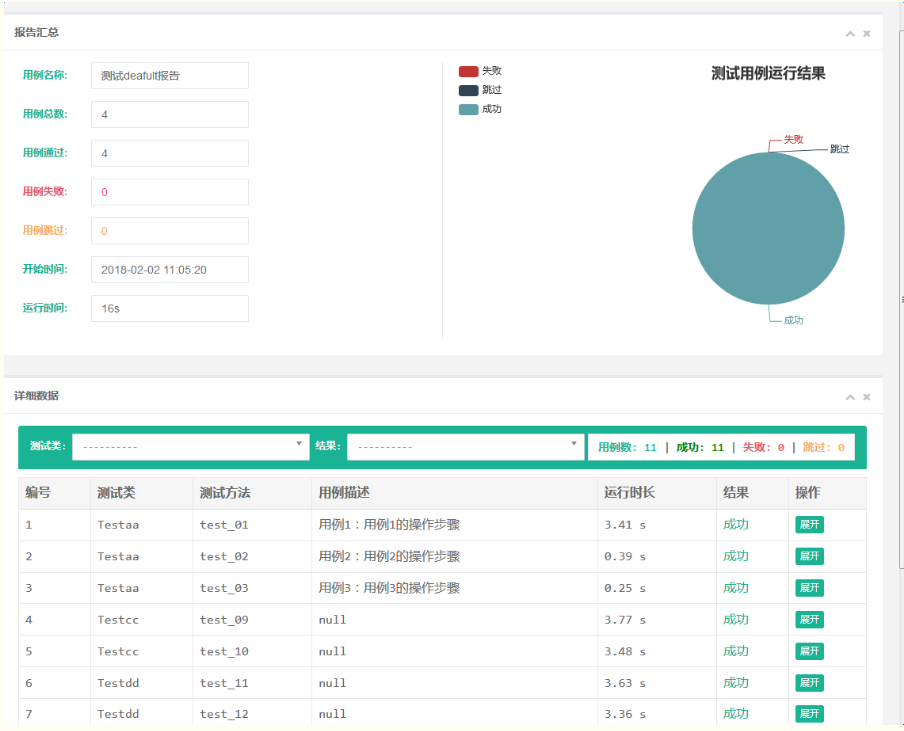
备注:BeautifulReport是某大神在github分享的框架,这里借花献佛了,更多使用方法参考地址:https://github.com/TesterlifeRaymond/BeautifulReport
BeautifulReport下载地址:
https://pan.baidu.com/disk/home#/all?vmode=list&path=%2Fpython%E6%8E%A5%E5%8F%A3%E8%87%AA%E5%8A%A8%E5%8C%96--unittest--beautifulReport
unittest多线程生成报告-----BeautifulReport的更多相关文章
- unittest多线程生成报告(BeautifulReport)
前言 selenium多线程跑用例,这个前面一篇已经解决了,如何生成一个测试报告这个是难点,刚好在github上有个大神分享了BeautifulReport,完美的结合起来,就能生成报告了. 环境必备 ...
- selenium+python自动化91-unittest多线程生成报告(BeautifulReport)
前言 selenium多线程跑用例,这个前面一篇已经解决了,如何生成一个测试报告这个是难点,刚好在github上有个大神分享了BeautifulReport,完美的结合起来,就能生成报告了. 环境必备 ...
- selenium+python-unittest多线程生成报告
前言 selenium多线程跑用例,这个前面一篇已经解决了,如何生成一个测试报告这个是难点,刚好在github上有个大神分享了BeautifulReport,完美的结合起来,就能生成报告了. 环境必备 ...
- Python-Unittest多线程生成报告
前言 selenium多线程跑用例,这个前面一篇已经解决了,如何生成一个测试报告这个是难点,刚好在github上有个大神分享了BeautifulReport,完美的结合起来,就能生成报告了. 环境必备 ...
- unittest自动化测试举例:自动读取ymal用例&调用接口并生成报告
用unittest框架写的接口自动化实现过程: 1.编写ymal格式用例: 2.导入ddt模块,该模块的主要功能是帮你读取ymal用例文件,自动获取内容并循环调用函数,具体见代码. 3.导入Beaut ...
- unittest框架,漂亮的报告BeautifulReport配置与错误截图详细解说
1.下载BeautifulReport模块 下载地址:https://github.com/TesterlifeRaymond/BeautifulReport 2.解压与存放路径 下载Beautifu ...
- 『心善渊』Selenium3.0基础 — 29、使用HTMLTestRunner生成unittest的HTML报告
目录 1.HTMLTestRunner介绍 2.HTMLTestRunner的使用 3.测试报告示例 4.封装成模块 1.HTMLTestRunner介绍 HTMLTestRunner是一个基于uni ...
- selenium,unittest——自动化执行多个py文件脚本并生成报告
将多个py文件的自动化脚本顺序运行,并生成报告,运行run_all_case后会自动运行文件内所有test开头的py文件并在指定文件夹report生成由脚本时间命名的报告 脚本执行后结果: 生成报告并 ...
- day11_单元测试_读取yaml文件中的用例,自动获取多个yaml文件内容执行生成报告
一.使用.yaml格式的文件直接可以存放字典类型数据,如下图,其中如果有-下一行有缩进代表这是个list,截图中是整体是一个list,其中有两部分,第二部分又包含另外一个list 二.单元测试:开发自 ...
随机推荐
- 洛谷P1182 数列分段【二分】【贪心】
题目:https://www.luogu.org/problemnew/show/P1182 题意: 有n个数,要分成连续的m段.将每段中的数相加,问之和的最大值的最小值是多少. 思路: 和P1316 ...
- 如何通过automator创建自动化备份任务?
Windows用户对于Task Scheduler应该不陌生,但是到了macOS因该用什么呢?那就是automator,今天因为有一个个人使用需求:备份一个移动硬盘中的文件,但是又不想完全手动.怎么办 ...
- keil 生成 bin文件
D:\Keil_v5\ARM\ARMCC\bin\fromelf.exe --bin -o $L@L.bin #L 这个就是keil的默认安装路径
- 闭区间套定理(Nested intervals theorem)讲解1
① ②这里用到了极限与不等关系 ③如果a≠b,那么便不会有$\lim _{n\rightarrow \infty }\left| I_n \right| =0$ ④如果还存在一点c在 内,那么同样也不 ...
- ASP.NET MVC 系统过滤器、自定义过滤器
一.系统过滤器使用说明 1.OutputCache过滤器 OutputCache过滤器用于缓存你查询结果,这样可以提高用户体验,也可以减少查询次数.它有以下属性: Duration:缓存的时间,以秒为 ...
- PostgreSQL+PostGIS安装以及使用
安装,参照: https://www.cnblogs.com/ytwy/p/6817179.html 创建企业级地理文件数据库时报错," You must copy the lates ...
- Multiple SSH keys for different accounts on Github or Gitlab
[inside this square brackets give a name to the followed acc.] name = github_username email = github ...
- prometheus: celery, redis-export
https://github.com/nlighten/tomcat_exporter https://github.com/prometheus/jmx_exporter https://vexxh ...
- DbGridEh 一个单元格的值改变时另一单元格的值随之改变
你可以为每个字段设置OnSetText事件,这样在输入完后回车会移动时就会触发,或者在adoquery的beforepost中或afterpost中都可以grid也提供了一些事件,也可以在某些条件下做 ...
- LeetCode 657 Robot Return to Origin 解题报告
题目要求 There is a robot starting at position (0, 0), the origin, on a 2D plane. Given a sequence of it ...