
Linux下ftp和ssh详解
学习了几天Linux下ftp和ssh的搭建和使用,故记录一下。学习ftp和ssh的主要目的是为了连接远程主机,并且进行文件传输。废话不多说,直接开讲!
ftp服务器
1. 环境搭建
本人的系统是Archlinux,我是基于vsftpd来搭建的,首先需要安装它: pacman -S vsftpd
接着对其配置文件进行编辑,打开/etc/vsftpd.conf(也可能在/etc/vsftdp/.vsftpd.conf)
以下是我的配置文件内容:
# Example config file /etc/vsftpd.conf

#

# The default compiled in settings are fairly paranoid. This sample file

# loosens things up a bit, to make the ftp daemon more usable.

# Please see vsftpd.conf. for all compiled in defaults.

#

# READ THIS: This example file is NOT an exhaustive list of vsftpd options.

# Please read the vsftpd.conf. manual page to get a full idea of vsftpd's

# capabilities.

#

# Allow anonymous FTP? (Beware - allowed by default if you comment this out).

anonymous_enable=YES

#

# Uncomment this to allow local users to log in.

#local_enable=YES

#

# Uncomment this to enable any form of FTP write command.

write_enable=YES

#

# Default umask for local users is . You may wish to change this to ,

# if your users expect that ( is used by most other ftpd's)

#local_umask=

#

# Uncomment this to allow the anonymous FTP user to upload files. This only

# has an effect if the above global write enable is activated. Also, you will

# obviously need to create a directory writable by the FTP user.

anon_upload_enable=YES

anon_other_write_enable=YES

#

# Uncomment this if you want the anonymous FTP user to be able to create

# new directories.

#anon_mkdir_write_enable=YES

#

# Activate directory messages - messages given to remote users when they

# go into a certain directory.

#dirmessage_enable=YES

#

# Activate logging of uploads/downloads.

#xferlog_enable=YES

#

# Make sure PORT transfer connections originate from port  (ftp-data).

connect_from_port_20=YES

#

# If you want, you can arrange for uploaded anonymous files to be owned by

# a different user. Note! Using "root" for uploaded files is not

# recommended!

#chown_uploads=YES

#chown_username=whoever

#

# You may override where the log file goes if you like. The default is shown

# below.

#xferlog_file=/var/log/vsftpd.log

#

# If you want, you can have your log file in standard ftpd xferlog format.

# Note that the default log file location is /var/log/xferlog in this case.

#xferlog_std_format=YES

#

# You may change the default value for timing out an idle session.

#idle_session_timeout=

#

# You may change the default value for timing out a data connection.

#data_connection_timeout=

#

# It is recommended that you define on your system a unique user which the

# ftp server can use as a totally isolated and unprivileged user.

#nopriv_user=ftpsecure

#

# Enable this and the server will recognise asynchronous ABOR requests. Not

# recommended for security (the code is non-trivial). Not enabling it,

# however, may confuse older FTP clients.

#async_abor_enable=YES

#

# By default the server will pretend to allow ASCII mode but in fact ignore

# the request. Turn on the below options to have the server actually do ASCII

# mangling on files when in ASCII mode.

# Beware that on some FTP servers, ASCII support allows a denial of service

# attack (DoS) via the command "SIZE /big/file" in ASCII mode. vsftpd

# predicted this attack and has always been safe, reporting the size of the

# raw file.

# ASCII mangling is a horrible feature of the protocol.

#ascii_upload_enable=YES

#ascii_download_enable=YES

#

# You may fully customise the login banner string:

#ftpd_banner=Welcome to blah FTP service.

#

# You may specify a file of disallowed anonymous e-mail addresses. Apparently

# useful for combatting certain DoS attacks.

#deny_email_enable=YES

# (default follows)

#banned_email_file=/etc/vsftpd.banned_emails

#

# You may specify an explicit list of local users to chroot() to their home

# directory. If chroot_local_user is YES, then this list becomes a list of

# users to NOT chroot().

# (Warning! chroot'ing can be very dangerous. If using chroot, make sure that

# the user does not have write access to the top level directory within the

# chroot)

#chroot_local_user=YES

#chroot_list_enable=YES

# (default follows)

#chroot_list_file=/etc/vsftpd.chroot_list

#

# You may activate the "-R" option to the builtin ls. This is disabled by

# default to avoid remote users being able to cause excessive I/O on large

# sites. However, some broken FTP clients such as "ncftp" and "mirror" assume

# the presence of the "-R" option, so there is a strong case for enabling it.

#ls_recurse_enable=YES

#

# When "listen" directive is enabled, vsftpd runs in standalone mode and

# listens on IPv4 sockets. This directive cannot be used in conjunction

# with the listen_ipv6 directive.

listen=YES

#

# This directive enables listening on IPv6 sockets. To listen on IPv4 and IPv6

# sockets, you must run two copies of vsftpd with two configuration files.

# Make sure, that one of the listen options is commented !!

#listen_ipv6=YES

anon_root=/var/ftp
在以上的配置文件中,我们允许匿名用户登录,并且其有删除和上传的权限,不过这些操作仅限于在权限为777的目录下进行。我们配置匿名用户默认进入的目录为/var/ftp,此外,我们要创建一个目录upload权限为777,匿名用户可以在其中任意的操作文件。这些操作如下(本机中):
mkdir -p /var/upload
chmod /var/ftp/upload
至此,我们的环境搭建完成。
2. 使用示例
首先,配置好ftp服务器之后,需要重启,Archlinux下是
system restart vsftpd
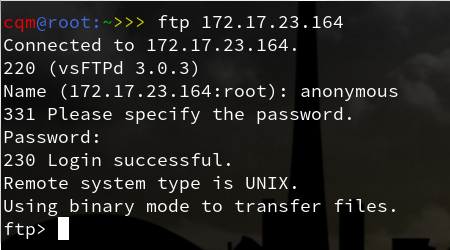
其中,172.17.23.164是要连接的ftp服务器的IP地址
接着我们匿名登录,即用户名为anonymous,密码为空即可
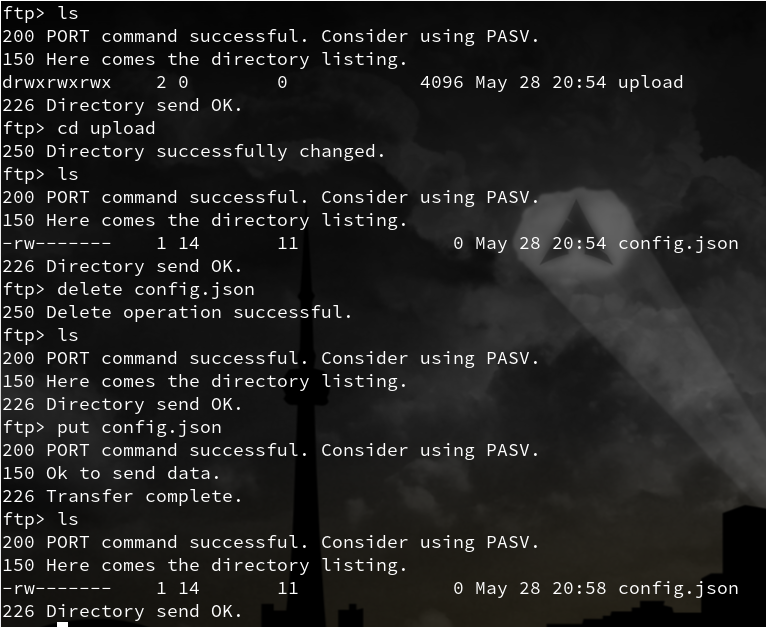
这里我们用到了一些基本的命令,ls,cd等,put、get为上传/下载命令,这些百度都能轻易得知。
上图可知,我们能够在upload目录中随意操作!
ssh服务器
1. 环境搭配
安装openssh,Archlinux下直接:
pacman -S openssh
它的配置文件为/etc/ssh/sshd_config,配置后如下:
#    $OpenBSD: sshd_config,v 1.101 // :: djm Exp $

# This is the sshd server system-wide configuration file.  See

# sshd_config() for more information.

# This sshd was compiled with PATH=/usr/bin:/bin:/usr/sbin:/sbin

# The strategy used for options in the default sshd_config shipped with

# OpenSSH is to specify options with their default value where

# possible, but leave them commented.  Uncommented options override the

# default value.

Port

#AddressFamily any

#ListenAddress 0.0.0.0

#ListenAddress ::

#HostKey /etc/ssh/ssh_host_rsa_key

#HostKey /etc/ssh/ssh_host_dsa_key

#HostKey /etc/ssh/ssh_host_ecdsa_key

#HostKey /etc/ssh/ssh_host_ed25519_key

# Ciphers and keying

#RekeyLimit default none

# Logging

#SyslogFacility AUTH

#LogLevel INFO

# Authentication:

#LoginGraceTime 2m

PermitRootLogin prohibit-password

#StrictModes yes

#MaxAuthTries

#MaxSessions

#PubkeyAuthentication yes

# The default is to check both .ssh/authorized_keys and .ssh/authorized_keys2

# but this is overridden so installations will only check .ssh/authorized_keys

AuthorizedKeysFile    .ssh/authorized_keys

#AuthorizedPrincipalsFile none

#AuthorizedKeysCommand none

#AuthorizedKeysCommandUser nobody

# For this to work you will also need host keys in /etc/ssh/ssh_known_hosts

#HostbasedAuthentication no

# Change to yes if you don't trust ~/.ssh/known_hosts for

# HostbasedAuthentication

#IgnoreUserKnownHosts no

# Don't read the user's ~/.rhosts and ~/.shosts files

#IgnoreRhosts yes

# To disable tunneled clear text passwords, change to no here!

#PasswordAuthentication yes

#PermitEmptyPasswords no

# Change to no to disable s/key passwords

ChallengeResponseAuthentication no

# Kerberos options

#KerberosAuthentication no

#KerberosOrLocalPasswd yes

#KerberosTicketCleanup yes

#KerberosGetAFSToken no

# GSSAPI options

#GSSAPIAuthentication no

#GSSAPICleanupCredentials yes

# Set this to 'yes' to enable PAM authentication, account processing,

# and session processing. If this is enabled, PAM authentication will

# be allowed through the ChallengeResponseAuthentication and

# PasswordAuthentication.  Depending on your PAM configuration,

# PAM authentication via ChallengeResponseAuthentication may bypass

# the setting of "PermitRootLogin without-password".

# If you just want the PAM account and session checks to run without

# PAM authentication, then enable this but set PasswordAuthentication

# and ChallengeResponseAuthentication to 'no'.

UsePAM yes

#AllowAgentForwarding yes

#AllowTcpForwarding yes

#GatewayPorts no

#X11Forwarding no

#X11DisplayOffset

#X11UseLocalhost yes

#PermitTTY yes

PrintMotd no # pam does that

#PrintLastLog yes

#TCPKeepAlive yes

#UseLogin no

#PermitUserEnvironment no

#Compression delayed

#ClientAliveInterval

#ClientAliveCountMax

#UseDNS no

#PidFile /run/sshd.pid

#MaxStartups ::

#PermitTunnel no

#ChrootDirectory none

#VersionAddendum none

# no default banner path

#Banner none

# override default of no subsystems

Subsystem    sftp    /usr/lib/ssh/sftp-server

# Example of overriding settings on a per-user basis

#Match User anoncvs

#    X11Forwarding no

#    AllowTcpForwarding no

#    PermitTTY no

#    ForceCommand cvs server
这里需要注意的是:
1. 打开port端口,将Port 22注释去除
2. 设置允许以root登录,将PermitRootLogin prohibit-password的注释去除
至此,最简单的配置完成了!
2. 密钥
一般而言,如果知道远程服务器的ip地址(假设是1.1.1.1)以及其某个用户(假设是root)的密码为000000,则可以直接:
ssh root@1.1.1.1
接着根据提示输入密码即可
但是每次都要输入密码未免太烦,于是可以采用ssh密钥机制
将ssh密钥理解为指纹,客户端的指纹在服务器端留下备份,访问的时候服务器查看客户端指纹,发现存在列表中,就可以免去登录了。
要做到这些,首先需要生成客户端自己的指纹:
ssh-keygen -t rsa
一路回车,会看到在.ssh目录下生成了密钥id_rsa和公钥id_rsa.pub,接着需要将公钥上传至服务器主机.ssh下authorized_keys中即可
一种做法是:
scp .ssh/id_rsa.pub root@1.1.1.1:/root/
这个命令将公钥上传到了服务器的/root目录下,接着进入服务器(输密码):
echo id_rsa.pub >> .ssh/authorized_keys
Linux下ftp和ssh详解的更多相关文章
- Linux下的文件目录结构详解
Linux下的文件目录结构详解 / Linux文件系统的上层根目录 /bin 存放用户可执行的程序 /boot 操作系统启动时所需要的文件 /dev 接口设备文件目录,例如:had表示硬盘 /etc ...
- Linux下DNS服务器搭建详解
Linux下DNS服务器搭建详解 DNS 即Domain Name System(域名系统)的缩写,它是一种将ip地址转换成对应的主机名或将主机名转换成与之相对应ip地址的一种机制.其中通过域名解析 ...
- Linux下tomcat的安装详解
Linux下tomcat的安装详解 来源: ChinaUnix博客 日期: 2007.01.21 22:59 (共有0条评论) 我要评论 一,安装前的准备:1,Linux版本:我的是企业版.(至于红帽 ...
- Linux下find命令用法详解
Linux下find命令用法详解 学神VIP烟火 学神IT教育:XueGod-IT 最负责任的线上直播教育平台 本文作者为VIP学员 烟火 第一部分:根据文件名查找 1.在当前目录 ...
- linux下sort命令使用详解---linux将文本文件内容加以排序命令
转载自:http://www.cnblogs.com/hitwtx/archive/2011/12/03/2274592.html linux下sort命令使用详解---linux将文本文件内容加以排 ...
- linux下getsockopt和setsockopt详解及测试
linux下getsockopt和setsockopt详解及测试 NAME 名字 getsockopt, setsockopt - get and set options on sockets 获取或 ...
- Linux下面的yum命令详解
yum(全称为 Yellow dog Updater, Modified)是一个在Fedora和RedHat以及SUSE中的Shell前端软件包管理器.基於RPM包管理,能够从指定的服务器自动下载RP ...
- Linux下usb设备驱动详解
USB驱动分为两块,一块是USB的bus驱动,这个东西,Linux内核已经做好了,我们可以不管,我们只需要了解它的功能.形象的说,USB的bus驱动相当于铺出一条路来,让所有的信息都可以通过这条USB ...
- linux下的tar命令详解
通过SSH访问服务器,难免会要用到压缩,解压缩,打包,解包等,这时候tar命令就是是必不可少的一个功能强大的工具.linux中最流行的tar是麻雀虽小,五脏俱全,功能强大. tar命令可以为linux ...
随机推荐
- ASP.NET Core 2.0: 二. 开发环境
macOS:Install Visual Studio for Mac 系统要求: macOS 10.12 Sierra 及更高版本 其他要求: 可能会要求安装xcode或android相关环境, 详 ...
- Python基础__字符串拼接、格式化输出与复制
上一节介绍了序列的一些基本操作类型,这一节针对字符串的拼接.格式化输出以及复制的等做做详细介绍.一. 字符串的拼接 a = 'I', b = 'love', c = 'Python'. 我们的目的是: ...
- RobotFramework下HttpLibrary库其它关键字
关键字 使用描述 DELETE 向服务器端发送http delete请求,该请求接收一个参数[ url ],请求的方式和post请求非常类似,示例: DELETE /_utils/config.htm ...
- jpgraph 折线图--解决中文乱码的问题(标题和图例)
在jpgraph根目录中: 如Jpg\jpgraph_ttf.inc.php 中开头添加 define('CHINESE_TTF_FONT','SIMYOU.TTF'); \Jpg\jpgraph_l ...
- 【BZOJ1924】【SDOI2010】所驼门王的宝藏(Tarjan,SPFA)
题目描述 在宽广的非洲荒漠中,生活着一群勤劳勇敢的羊驼家族.被族人恭称为"先知"的Alpaca L. Sotomon是这个家族的领袖,外人也称其为"所驼门王". ...
- 第三方工具 - 关于echarts下钻功能的一些总结.js
废话:好久没有写博客了,每每看着自己的'战绩'都有点愧疚,但是这段时间确实学习了不少东西,待我慢慢地一 一梳理,将之消化并分享. ---------------------------$O_O$--- ...
- 配置linux软件下载跟新地址
/etc/yum.repos.d/CentOS-Base.repo 直接到mirrors.aliyum.com下载 diff:比较
- highcharts使用-拼接数据
在写后台统计时,使用highcharts 作为数据视图化的工具 PHP端 拼接数据 1 首先分组查询出来数据 2 然后拼接出来想要的数据格式 $c_x ='';foreach ($courierGro ...
- C# QQ邮箱注册,以及数秒
一. 这是前台需要的东西 <asp:TextBox ID="Textemail" runat="server" CssClass="nonein ...
- TypeScript入门知识一(字符串特性)
一,TypeScript多行字符串 传统JavaScript字符串换行需要+进行拼接,而TypeScript不需要+拼接.看下面实例: javaScript: var content = " ...