
使用TensorFlow的卷积神经网络识别自己的单个手写数字,填坑总结
折腾了几天,爬了大大小小若干的坑,特记录如下。代码在最后面。
环境:
Python3.6.4 + TensorFlow 1.5.1 + Win7 64位 + I5 3570 CPU
方法:
先用MNIST手写数字库对CNN(卷积神经网络)进行训练,准确度达到98%以上时,再准备独家手写数字10个、画图软件编辑的数字10个共计20个,让训练好的CNN进行识别,考察其识别准确度。
调试代码:
坑1:ModuleNotFoundError: No module named 'google'
解决:pip install protobuf
不用翻墙
坑2:ModuleNotFoundError: No module named 'absl'
解决:pip install absl-py
坑3:tensorflow.python.framework.errors_impl.InvalidArgumentError: You must feed a value for placeholder tensor 'Placeholder_2' with dtype float
解决:这个问题折腾我好久,但是最终的解决方法很无语。。。
原来的代码是这样的:
output = sess.run(y_conv, feed_dict={x: ndarrayImgs}) # ndarrayImgs为自己的样本图片数据
查了不少资料,最后发现是自己少写了一个参数 /笑哭/笑哭, 写成这样就没问题了:
output = sess.run(y_conv, feed_dict={x: ndarrayImgs, keep_prob:1.0})
代码调通了之后,大坑来了:训练后的CNN识别自己的手写数字和用画图软件编辑出来的数字,正确率只有70%左右,惨不忍睹。
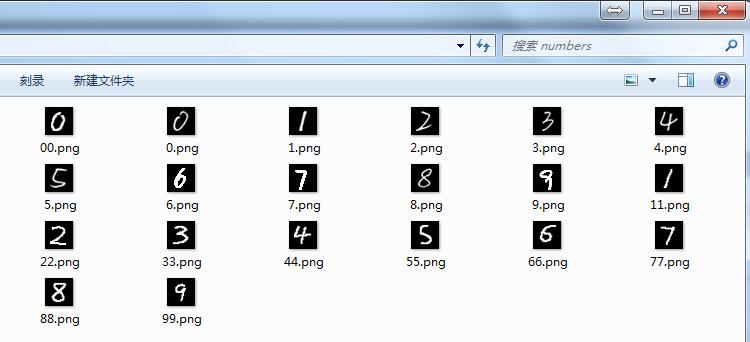
考虑到上面20个数字都是五官端正的,那么准确率低多半是其它原因。调试思路:
1)检查20个数字图片的格式:灰度图片,黑底白字,28x28像素。没问题。
2)用MNIST自带的测试数据进行测试,正确率95%左右。说明CNN训练的还算到位。
3)去网上搜索,终于在知乎里发现了一条回复:MNIST的数字都是20*20大小,图片大小28*28。把自己的图片伸缩到20*20大小,然后平移到28*28的中心就可以了。
纳尼??原来数字轮廓大小是20x20像素,这个细节我没注意到。开动PS,利用裁切和调整画布功能,对图片处理了一番。
附:MNIST数据库及其说明 http://yann.lecun.com/exdb/mnist/
再次测试,正确率在85-90%左右,有明显提升。
然而仔细分析发现,有几个数字的识别结果经常出错,分别是手写的6、7、9。将这几个数字的图片和样本库中的图片对比了一下,猜想可能是这几个图片中的数字的线条有些细,于是用PS又调整了一下,把线条变粗,结果识别正确率可以达到95-100%了(奇怪的是,数字1-5线条也细,为何能准确识别?)
调试过程记录完毕,放代码。使用时注意系统环境和相关软件版本,如开头所述。
这个代码在每次识别前都会先训练,在CPU上进行计算真是痛苦。。。以后打算将训练和预测分开,训练好的模型保存起来,预测的时候直接加载,这样能省不少时间。
代码没优化,有点凌乱,建议移步去看我的《使用TensorFlow的卷积神经网络识别手写数字》1、2、3系列。
 import matplotlib

 import matplotlib.pyplot as plt

 import matplotlib.cm as cm

 import pylab

 from tensorflow.examples.tutorials.mnist import input_data

 def showMnistImg(nBytes):

     imgBytes = nBytes.reshape((28, 28))

     print(imgBytes)

     plt.figure(figsize=(2.8,2.8))

     #plt.grid() #开启网格

     plt.imshow(imgBytes, cmap=cm.gray)

     pylab.show()

 def MaxMinNormalization(x,Max,Min):

     x = (x - Min) / (Max - Min);

     return x;

 def loadHandWritingImage(strFilePath):

     im=Image.open(strFilePath, 'r')

     ndarrayImg = np.array(im.convert("L"), dtype='float64')

     return ndarrayImg

 def normalizeImage(ndarrayImg, maxVal = 255, minVal = 0):

     w, h = ndarrayImg.shape[0], ndarrayImg.shape[1]

     for i in range(w):

       for j in range(h):

         ndarrayImg[i,j] = MaxMinNormalization(ndarrayImg[i,j], maxVal, minVal) #???

     return ndarrayImg

 mnist = input_data.read_data_sets('MNIST_data', one_hot=True)

 # 单个手写数字的784个字节的灰度值,浮点数,范围[0,1)

 print('type(mnist.train.images): ', type(mnist.train.images))  # <class 'numpy.ndarray'>

 print('mnist.train.images.shape: ', mnist.train.images.shape)

 ##print(mnist.train.images[0])

 ##showMnistImg(mnist.train.images[0])

 # 单个手写数字的标签

 # 一个one-hot向量除了某一位的数字是1以外其余各维度数字都是0

 # 数字n将表示成一个只有在第n维度(从0开始)数字为1的10维向量。

 #print('type(mnist.train.labels[0]): ', type(mnist.train.labels[0]))# <class 'numpy.ndarray'>

 #print(mnist.train.labels[19])      # [0. 0. 0. 0. 0. 0. 0. 1. 0. 0.]

 #构造自己的手写图片集合,作为test。  cnblogs.com/hatemath

 from PIL import *

 import numpy as np

 import tensorflow as tf

 # 构建测试样本集合

 files = ['0.png', '1.png', '2.png', '3.png', '4.png', '5.png', '6.png', '7.png', '8.png', '9.png',

          '00.png', '11.png', '22.png', '33.png', '44.png', '55.png', '66.png', '77.png', '88.png', '99.png']

 ndarrayImgs = np.zeros((len(files), 784)) # x行784列

 #print('type(ndarrayImgs): ', type(ndarrayImgs))

 #print('ndarrayImgs.shape: ', ndarrayImgs.shape)

 index = 0

 for file in files:

     # 加载图片

     ndarrayImg = loadHandWritingImage('numbers/' + file)

     #print('type(ndarrayImg): ', type(ndarrayImg))

     #print(ndarrayImg)

     # 归一化

     normalizeImage(ndarrayImg)

     # 转为1x784的数组

     ndarrayImg = ndarrayImg.reshape((1, 784))

     #print('type(ndarrayImg): ', type(ndarrayImg))

     #print('ndarrayImg.shape: ', ndarrayImg.shape)

     # 放到测试样本集中

     ndarrayImgs[index] = ndarrayImg

     index = index + 1

 # 构建测试样本的实际值集合,用于计算正确率

 ndarrayLabels = np.array([   [1., 0., 0., 0., 0., 0., 0., 0., 0., 0.],

                              [0., 1., 0., 0., 0., 0., 0., 0., 0., 0.],

                              [0., 0., 1., 0., 0., 0., 0., 0., 0., 0.],

                              [0., 0., 0., 1., 0., 0., 0., 0., 0., 0.],

                              [0., 0., 0., 0., 1., 0., 0., 0., 0., 0.],

                              [0., 0., 0., 0., 0., 1., 0., 0., 0., 0.],

                              [0., 0., 0., 0., 0., 0., 1., 0., 0., 0.],

                              [0., 0., 0., 0., 0., 0., 0., 1., 0., 0.],

                              [0., 0., 0., 0., 0., 0., 0., 0., 1., 0.],

                              [0., 0., 0., 0., 0., 0., 0., 0., 0., 1.],

                              [1., 0., 0., 0., 0., 0., 0., 0., 0., 0.],

                              [0., 1., 0., 0., 0., 0., 0., 0., 0., 0.],

                              [0., 0., 1., 0., 0., 0., 0., 0., 0., 0.],

                              [0., 0., 0., 1., 0., 0., 0., 0., 0., 0.],

                              [0., 0., 0., 0., 1., 0., 0., 0., 0., 0.],

                              [0., 0., 0., 0., 0., 1., 0., 0., 0., 0.],

                              [0., 0., 0., 0., 0., 0., 1., 0., 0., 0.],

                              [0., 0., 0., 0., 0., 0., 0., 1., 0., 0.],

                              [0., 0., 0., 0., 0., 0., 0., 0., 1., 0.],

                              [0., 0., 0., 0., 0., 0., 0., 0., 0., 1.]

                              ])

 print('type(ndarrayLabels): ', type(ndarrayLabels))

 #print(ndarrayImgs[3])

 ##showMnistImg(ndarrayImgs[3])

 #print(ndarrayLabels[3])

 # 下面开始CNN相关

 def conv2d(x, W):

   return tf.nn.conv2d(x, W, strides=[1, 1, 1, 1], padding='SAME')

 def max_pool_2x2(x):

   return tf.nn.max_pool(x, ksize=[1, 2, 2, 1],

                         strides=[1, 2, 2, 1], padding='SAME')

 def weight_variable(shape):

   initial = tf.truncated_normal(shape, stddev=0.1)

   return tf.Variable(initial)

 def bias_variable(shape):

   initial = tf.constant(0.1, shape=shape)

   return tf.Variable(initial)

 x = tf.placeholder(tf.float32, shape=[None, 784])

 y_ = tf.placeholder(tf.float32, shape=[None, 10])

 W_conv1 = weight_variable([5, 5, 1, 32])

 b_conv1 = bias_variable([32])

 x_image = tf.reshape(x, [-1, 28, 28, 1])

 h_conv1 = tf.nn.relu(conv2d(x_image, W_conv1) + b_conv1)

 h_pool1 = max_pool_2x2(h_conv1)

 W_conv2 = weight_variable([5, 5, 32, 64])

 b_conv2 = bias_variable([64])

 h_conv2 = tf.nn.relu(conv2d(h_pool1, W_conv2) + b_conv2)

 h_pool2 = max_pool_2x2(h_conv2)

 W_fc1 = weight_variable([7 * 7 * 64, 1024])

 b_fc1 = bias_variable([1024])

 h_pool2_flat = tf.reshape(h_pool2, [-1, 7*7*64])

 h_fc1 = tf.nn.relu(tf.matmul(h_pool2_flat, W_fc1) + b_fc1)

 keep_prob = tf.placeholder(tf.float32)

 h_fc1_drop = tf.nn.dropout(h_fc1, keep_prob)

 W_fc2 = weight_variable([1024, 10])

 b_fc2 = bias_variable([10])

 y_conv = tf.matmul(h_fc1_drop, W_fc2) + b_fc2

 #print(y_conv)

 cross_entropy = tf.reduce_mean(

     tf.nn.softmax_cross_entropy_with_logits_v2(labels=y_, logits=y_conv))

 train_step = tf.train.AdamOptimizer(1e-4).minimize(cross_entropy)

 correct_prediction = tf.equal(tf.argmax(y_conv, 1), tf.argmax(y_, 1))

 accuracy = tf.reduce_mean(tf.cast(correct_prediction, tf.float32))

 with tf.Session() as sess:

   sess.run(tf.global_variables_initializer())

   for i in range(1000):

     batch = mnist.train.next_batch(50)

     if i % 100 == 0:

       train_accuracy = accuracy.eval(feed_dict={

           x: batch[0], y_: batch[1], keep_prob: 1.0})

       print('step %d, training accuracy %g' % (i, train_accuracy))

       if(train_accuracy>0.98):

           break

     train_step.run(feed_dict={x: batch[0], y_: batch[1], keep_prob: 0.5})

   print('测试Mnist test数据集 准确率 %g' % accuracy.eval(feed_dict={

       x: mnist.test.images, y_: mnist.test.labels, keep_prob: 1.0}))

   # 测试耗时

   import time

   start = time.time()

   accu = accuracy.eval(feed_dict={x: ndarrayImgs, y_: ndarrayLabels, keep_prob: 1.0})

   end = time.time()

   print('识别zzh手写数据%d个, 准确率为 %g, 每个耗时%g秒' % (len(ndarrayImgs), accu, (end-start)/len(ndarrayImgs)))

   output = sess.run(y_conv, feed_dict={x: ndarrayImgs, keep_prob:1.0})

   print('预测值:', output.argmax(axis=1)) # axis:0表示按列,1表示按行

   print('实际值:', ndarrayLabels.argmax(axis=1))
贴2次运行结果,供参考:
Extracting MNIST_data\train-images-idx3-ubyte.gz

Extracting MNIST_data\train-labels-idx1-ubyte.gz

Extracting MNIST_data\t10k-images-idx3-ubyte.gz

Extracting MNIST_data\t10k-labels-idx1-ubyte.gz

type(mnist.train.images):  <class 'numpy.ndarray'>

mnist.train.images.shape:  (55000, 784)

type(ndarrayLabels):  <class 'numpy.ndarray'>

step 0, training accuracy 0.14

step 100, training accuracy 0.86

step 200, training accuracy 0.82

step 300, training accuracy 0.98

测试Mnist test数据集 准确率 0.9213

识别zzh手写数据20个, 准确率为 0.9, 每个耗时0.000750029秒

预测值: [0 1 2 3 4 5 6 1 8 9 0 1 2 3 4 5 6 2 8 9]

实际值: [0 1 2 3 4 5 6 7 8 9 0 1 2 3 4 5 6 7 8 9]

>>>
Extracting MNIST_data\train-images-idx3-ubyte.gz

Extracting MNIST_data\train-labels-idx1-ubyte.gz

Extracting MNIST_data\t10k-images-idx3-ubyte.gz

Extracting MNIST_data\t10k-labels-idx1-ubyte.gz

type(mnist.train.images):  <class 'numpy.ndarray'>

mnist.train.images.shape:  (55000, 784)

type(ndarrayLabels):  <class 'numpy.ndarray'>

step 0, training accuracy 0.14

step 100, training accuracy 0.84

step 200, training accuracy 0.92

step 300, training accuracy 0.88

step 400, training accuracy 0.96

step 500, training accuracy 0.98

测试Mnist test数据集 准确率 0.9445

识别zzh手写数据20个, 准确率为 1, 每个耗时0.000779998秒

预测值: [0 1 2 3 4 5 6 7 8 9 0 1 2 3 4 5 6 7 8 9]

实际值: [0 1 2 3 4 5 6 7 8 9 0 1 2 3 4 5 6 7 8 9]

>>>
总结:
1) CNN虽然是个神器,但是要想提高手写数字识别率,除了CNN的训练外,还要在手写图片上做足前戏,啊呸,做足预处理,要把手写图片按照MNIST规范进行调整,毕竟训练的样本就是按照那些规范来的。
2) 再次重申一下图片规范:灰度图片,黑底白字,数字的外围轮廓大小是20x20像素,图片总体的大小是28x28像素。自动化的预处理可以用opencv来做。
3) 用CPU做训练,非常慢。我的机器上,训练500次耗时1分钟,每次调试都这么等,太浪费时间了。考虑保存/加载模型的方案,或者搞一块N卡,用CUDA计算应该会快很多。
使用TensorFlow的卷积神经网络识别自己的单个手写数字,填坑总结的更多相关文章
- tensorflow学习之(十)使用卷积神经网络(CNN)分类手写数字0-9
#卷积神经网络cnn import tensorflow as tf from tensorflow.examples.tutorials.mnist import input_data #数据包,如 ...
- 吴裕雄 python 神经网络——TensorFlow 使用卷积神经网络训练和预测MNIST手写数据集
import tensorflow as tf import numpy as np from tensorflow.examples.tutorials.mnist import input_dat ...
- 使用TensorFlow的卷积神经网络识别手写数字(2)-训练篇
import numpy as np import tensorflow as tf import matplotlib import matplotlib.pyplot as plt import ...
- 利用神经网络算法的C#手写数字识别(一)
利用神经网络算法的C#手写数字识别 转发来自云加社区,用于学习机器学习与神经网络 欢迎大家前往云+社区,获取更多腾讯海量技术实践干货哦~ 下载Demo - 2.77 MB (原始地址):handwri ...
- 利用神经网络算法的C#手写数字识别(二)
利用神经网络算法的C#手写数字识别(二) 本篇主要内容: 让项目编译通过,并能打开图片进行识别. 1. 从上一篇<利用神经网络算法的C#手写数字识别>中的源码地址下载源码与资源, ...
- Tensorflow搭建卷积神经网络识别手写英语字母
更新记录: 2018年2月5日 初始文章版本 近几天需要进行英语手写体识别,查阅了很多资料,但是大多数资料都是针对MNIST数据集的,并且主要识别手写数字.为了满足实际的英文手写识别需求,需要从训练集 ...
- 利用神经网络算法的C#手写数字识别
欢迎大家前往云+社区,获取更多腾讯海量技术实践干货哦~ 下载Demo - 2.77 MB (原始地址):handwritten_character_recognition.zip 下载源码 - 70. ...
- 使用TensorFlow的卷积神经网络识别手写数字(3)-识别篇
from PIL import Image import numpy as np import tensorflow as tf import time bShowAccuracy = True # ...
- 使用TensorFlow的卷积神经网络识别手写数字(1)-预处理篇
功能: 将文件夹下的20*20像素黑白图片,根据重心位置绘制到28*28图片上,然后保存.经过预处理的图片有利于数字的准确识别.参见MNIST对图片的要求. 此处可下载已处理好的图片: https:/ ...
随机推荐
- json_encode详解
<?php $json = Array ( "a" => "php" , "b" => "mysql" ...
- JAVA中生成、解析二维码图片的方法
JAVA中生成.解析二维码的方法并不复杂,使用google的zxing包就可以实现.下面的方法包含了生成二维码.在中间附加logo.添加文字功能,并有解析二维码的方法. 一.下载zxing的架包,并导 ...
- android EditText设置
EditText输入的文字为电话号码 Android:phoneNumber=”true” //输入电话号码 //自动弹出键盘 ((InputMethodManager)getSystemServi ...
- awk 指定{}内x的替换
替换{}中的x为; 原字符串 oxo{axbxc}oxo{dxexf}oxo 结果 oxo{a;b;c}oxo{d;e;f}oxo awk '{for(i=1;i<=NF;i++){ ...
- Part 4:表单和类视图--Django从入门到精通系列教程
该系列教程系个人原创,并完整发布在个人官网刘江的博客和教程 所有转载本文者,需在顶部显著位置注明原作者及www.liujiangblog.com官网地址. Python及Django学习QQ群:453 ...
- Lambda表达式详解 (转)
前言 1.天真热,程序员活着不易,星期天,也要顶着火辣辣的太阳,总结这些东西. 2.夸夸lambda吧:简化了匿名委托的使用,让你让代码更加简洁,优雅.据说它是微软自C#1.0后新增的最重要的功能之一 ...
- Ajax异步信息抓取方式
淘女郎模特信息抓取教程 源码地址: cnsimo/mmtao 网址:https://0x9.me/xrh6z 判断一个页面是不是Ajax加载的方法: 查看网页源代码,查找网页中加载的数据信息,如果 ...
- 01_什么是数据结构以及C语言指针回顾
一.数据结构是什么 如何把现实中大量而复杂的问题,以特定的数据类型和特定的数据存储结构保存到计算机的存储器中. 数据存储包括两方面:个体存储的集合.个体与个体之间的关系的存储 程序 = 算法 + 数据 ...
- mysql安装(CentOS 7.1 (64-bit system) MySQL 5.6.24)
环境:CentOS 7.1 (64-bit system) MySQL 5.6.24yum install libaio //安装依赖的包wget http://dev.mysql.com/get/m ...
- 在控制台进行依赖注入(DI in Console)
首先我们准备两个服务接口 public interface IServiceA { void showConsole(); int GetValue(int val); } public interf ...