
MVC 用基架创建Controller,通过数据库初始化器生成并播种数据库
1 创建MVC应用程序
2 在Model里面创建实体类
using System;
using System.Collections.Generic;
using System.Linq;
using System.Web;
namespace MyMusicStore.Models
{
public class Album
{
public virtual int AlbumId { get; set; }
public virtual int GenreId { get; set; }
public virtual int ArtistId { get; set; }
public virtual string Title { get; set; }
public virtual decimal Price { get; set; }
public virtual string AlbumArtUrl { get; set; }
public virtual Genre Genre { get; set; }
public virtual Artist Artist { get; set; }
}
}
using System;
using System.Collections.Generic;
using System.Linq;
using System.Web;
namespace MvcMusicStore.Models
{
public class Artist
{
public virtual int ArtistId { get; set; }
public virtual string Name { get; set; }
}
}
using System;
using System.Collections.Generic;
using System.Linq;
using System.Web;
namespace MyMusicStore.Models
{
public class Genre
{
public virtual int GenreId { get; set; }
public virtual string Name { get; set; }
public virtual string Description { get; set; }
public virtual List<Album> Albums { get; set; }
}
}
3 添加数据库连接字符串
<add name="MusicStoreDB" connectionString="database=MusicStore;uid=sa;pwd=Server2012" providerName="System.Data.SqlClient"/>
4 创建数据操作类
using System;
using System.Collections.Generic;
using System.Data.Entity;
using System.Linq;
using System.Web;
namespace MyMusicStore.Models
{
public class MusicStoreDB:DbContext
{
public MusicStoreDB() : base("name=MusicStoreDB")
{
}
public DbSet<Album> Albums { get; set; }
public DbSet<Artist> Artists { get; set; }
public DbSet<Genre> Genres { get; set; }
}
}
5 创建数据库初始化器
using System;
using System.Collections.Generic;
using System.Linq;
using System.Web;
namespace MyMusicStore.Models
{
public class MusicStoreDbInitializer:System.Data.Entity.DropCreateDatabaseAlways<MusicStoreDB>
{
protected override void Seed(MusicStoreDB context)
{
context.Artists.Add(new Artist { Name = "Al Di Meola" });
context.Genres.Add(new Genre { Name = "Jazz" });
context.Albums.Add(new Album
{
Genre = new Genre { Name = "Rock" },
Artist = new Artist { Name = "Rush" },
Price = 9.99m,
Title = "Caravan"
});
base.Seed(context);
}
}
}
6 设置数据库初始化器
using MyMusicStore.Models;
using System;
using System.Collections.Generic;
using System.Data.Entity;
using System.Linq;
using System.Web;
using System.Web.Mvc;
using System.Web.Optimization;
using System.Web.Routing;
namespace MyMusicStore
{
public class MvcApplication : System.Web.HttpApplication
{
protected void Application_Start()
{
Database.SetInitializer(new MusicStoreDbInitializer());
AreaRegistration.RegisterAllAreas();
FilterConfig.RegisterGlobalFilters(GlobalFilters.Filters);
RouteConfig.RegisterRoutes(RouteTable.Routes);
BundleConfig.RegisterBundles(BundleTable.Bundles);
}
}
}
7 根据基架创建Controller(包含视图的MVC5控制器使用EF)
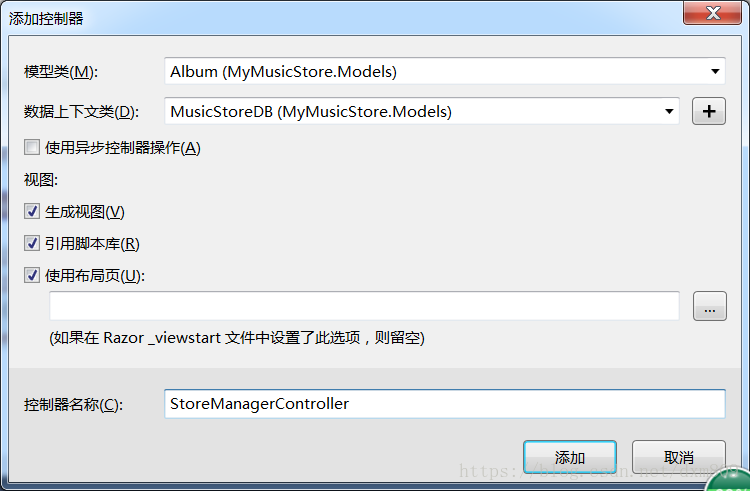
using System;
using System.Collections.Generic;
using System.Data;
using System.Data.Entity;
using System.Linq;
using System.Net;
using System.Web;
using System.Web.Mvc;
using MyMusicStore.Models;
namespace MyMusicStore.Controllers
{
public class StoreManagerController : Controller
{
private MusicStoreDB db = new MusicStoreDB();
// GET: StoreManager
public ActionResult Index()
{
var albums = db.Albums.Include(a => a.Artist).Include(a => a.Genre);
return View(albums.ToList());
}
// GET: StoreManager/Details/5
public ActionResult Details(int? id)
{
if (id == null)
{
return new HttpStatusCodeResult(HttpStatusCode.BadRequest);
}
Album album = db.Albums.Find(id);
if (album == null)
{
return HttpNotFound();
}
return View(album);
}
// GET: StoreManager/Create
public ActionResult Create()
{
ViewBag.ArtistId = new SelectList(db.Artists, "ArtistId", "Name");
ViewBag.GenreId = new SelectList(db.Genres, "GenreId", "Name");
return View();
}
// POST: StoreManager/Create
// 为了防止“过多发布”攻击,请启用要绑定到的特定属性,有关
// 详细信息,请参阅 http://go.microsoft.com/fwlink/?LinkId=317598。
[HttpPost]
[ValidateAntiForgeryToken]
public ActionResult Create([Bind(Include = "AlbumId,GenreId,ArtistId,Title,Price,AlbumArtUrl")] Album album)
{
if (ModelState.IsValid)
{
db.Albums.Add(album);
db.SaveChanges();
return RedirectToAction("Index");
}
ViewBag.ArtistId = new SelectList(db.Artists, "ArtistId", "Name", album.ArtistId);
ViewBag.GenreId = new SelectList(db.Genres, "GenreId", "Name", album.GenreId);
return View(album);
}
// GET: StoreManager/Edit/5
public ActionResult Edit(int? id)
{
if (id == null)
{
return new HttpStatusCodeResult(HttpStatusCode.BadRequest);
}
Album album = db.Albums.Find(id);
if (album == null)
{
return HttpNotFound();
}
ViewBag.ArtistId = new SelectList(db.Artists, "ArtistId", "Name", album.ArtistId);
ViewBag.GenreId = new SelectList(db.Genres, "GenreId", "Name", album.GenreId);
return View(album);
}
// POST: StoreManager/Edit/5
// 为了防止“过多发布”攻击,请启用要绑定到的特定属性,有关
// 详细信息,请参阅 http://go.microsoft.com/fwlink/?LinkId=317598。
[HttpPost]
[ValidateAntiForgeryToken]
public ActionResult Edit([Bind(Include = "AlbumId,GenreId,ArtistId,Title,Price,AlbumArtUrl")] Album album)
{
if (ModelState.IsValid)
{
db.Entry(album).State = EntityState.Modified;
db.SaveChanges();
return RedirectToAction("Index");
}
ViewBag.ArtistId = new SelectList(db.Artists, "ArtistId", "Name", album.ArtistId);
ViewBag.GenreId = new SelectList(db.Genres, "GenreId", "Name", album.GenreId);
return View(album);
}
// GET: StoreManager/Delete/5
public ActionResult Delete(int? id)
{
if (id == null)
{
return new HttpStatusCodeResult(HttpStatusCode.BadRequest);
}
Album album = db.Albums.Find(id);
if (album == null)
{
return HttpNotFound();
}
return View(album);
}
// POST: StoreManager/Delete/5
[HttpPost, ActionName("Delete")]
[ValidateAntiForgeryToken]
public ActionResult DeleteConfirmed(int id)
{
Album album = db.Albums.Find(id);
db.Albums.Remove(album);
db.SaveChanges();
return RedirectToAction("Index");
}
protected override void Dispose(bool disposing)
{
if (disposing)
{
db.Dispose();
}
base.Dispose(disposing);
}
}
}
8 访问http://localhost:3438/StoreManager,是在访问Index() 方法里的 var albums = db.Albums.Include(a => a.Artist).Include(a => a.Genre);这句同时生成并播种数据库的
MVC 用基架创建Controller,通过数据库初始化器生成并播种数据库的更多相关文章
- Core开发-MVC 使用dotnet 命令创建Controller和View
NET Core开发-MVC 使用dotnet 命令创建Controller和View 使用dotnet 命令在ASP.NET Core MVC 中创建Controller和View,之前讲解过使 ...
- MVC之基架
参考 ASP.NET MVC5 高级编程(第5版) 定义: 通过对话框生成视图及控制器的模版,这个过程叫做“基架”. 基架可以为应用程序的创建.读取.更新和删除(CRUB)功能生成所需的样板代码.基架 ...
- ASP.NET Core开发-MVC 使用dotnet 命令创建Controller和View
使用dotnet 命令在ASP.NET Core MVC 中创建Controller和View,之前讲解过使用yo 来创建Controller和View. 下面来了解dotnet 命令来创建Contr ...
- MVC使用基架添加控制器出现的错误:无法检索XXX的元数据
环境 vs2012 框架 mvc3 数据库 sqlservercompact4.0 出现的错误如下: “ ---------------------------Microsoft Visual St ...
- 学习《ASP.NET MVC5高级编程》——基架
基架--代码生成的模板.我姑且这么去定义它,在我学习微软向编程之前从未听说过,比如php代码,大部分情况下是我用vim去手写而成,重复使用的代码需要复制粘贴,即使后来我在使用eclipse这样的IDE ...
- Asp.net Mvc 数据库上下文初始化器
在Asp.net Mvc 和Entity FrameWork程序中,如果数据库不存在,EF默认的行为是新建一个数据库.如果模型类与已有的数据库不匹配的时候,会抛出一个异常. 通过指定数据库上下文对象初 ...
- EF自动创建数据库步骤之四(启用数据库初始器)
在创建完DBIfNotExistsInitializer数据库初始化器类后,需要在程序每一次访问数据库前,告诉EF使用该初始化器进行初始化. 代码如下 : Database.SetInitialize ...
- EF自动创建数据库步骤之三(自定义数据库初始器)
EF自动创建数据库需要我们告诉数据库如何进行初始化:如创建表后是否需要插入一些基础数据,是否 需要创建存储过程.触发器等.还有就是EF有三种初始化方式(参见下面三个类): DropCreateData ...
- Entity Framework 数据库初始化的三种方法
在数据库初始化产生时进行控制,有三个方法可以控制数据库初始化时的行为.分别为CreateDatabaseIfNotExists.DropCreateDatabaseIfModelChanges.Dro ...
随机推荐
- ENVI显示GDAL创建GeoTiff文件的一个问题及其思考
作者:朱金灿 来源:http://blog.csdn.net/clever101 使用gdal创建一个100*100的红色的geotiff图像,代码如下: #include <assert.h& ...
- Android 在Service里面启动Activity
直接在代码: Intent dialogIntent = new Intent(getBaseContext(), YourActivity.class); dialogIntent.addFlags ...
- [E2E] Robot Framework introduction
We will use demo project as an example, go though QuickStart repo. Install: First you should have py ...
- RabbitMQ 服务
RabbitMQ 使用场景一 安装环境 1.下载安装 Erlang 运行时环境 2.下载安装 RabbitMQ Server 应用程序 3.启动 RabbitMQ 服务(默认启动) 4.安装管理平 ...
- React Native 四:图片
一.展示图片资源 1.在ReactNative中.图片使用Image组件进行展示,以下我们就以静态.混合和网络资源等多种方式演示图片展示. 2.将图片放在代码目录img处:
- [tmux] Enable mouse mode in tmux
We'll learn how to use mouse mode in tmux, including enable mouse control for resizing, scrolling an ...
- CF 559B(Equivalent Strings-构造法)
B. Equivalent Strings time limit per test 2 seconds memory limit per test 256 megabytes input standa ...
- 使用Toolbar + DrawerLayout快速实现高大上菜单侧滑
如果你有在关注一些遵循最新的Material Design设计规范的应用的话(如果没有,假设你有!),也许会发现有很多使用了看起来很舒服.很高大上的侧滑菜单动画效果,示例如下(via 参考2): 今天 ...
- python3 numpy API练习代码
# -*- coding: utf-8 -*- import numpy as np; a=np.array([1,2,3,4,5,6]); print("数组是:",a) #数组 ...
- 集群搭建Solr
Solr集群搭建 SolrCloud需要solr基于zookeeper部署,zookeeper是一个集群管理软件,由于SolrCloud需要由多台服务器组成.由zookeeper来进行协调管理.Zoo ...