
android开发学习——day7
线性布局
<?xml version="1.0" encoding="utf-8"?>

<LinearLayout xmlns:android="http://schemas.android.com/apk/res/android"

    xmlns:tools="http://schemas.android.com/tools"

    android:orientation="horizontal"

    android:id="@+id/activity_main"

    android:layout_width="match_parent"

    android:layout_height="match_parent"

    android:paddingBottom="@dimen/activity_vertical_margin"

    android:paddingLeft="@dimen/activity_horizontal_margin"

    android:paddingRight="@dimen/activity_horizontal_margin"

    android:paddingTop="@dimen/activity_vertical_margin"

    tools:context="test.example.com.uilayouttest.MainActivity">

    <Button

        android:id="@+id/button_1"

        android:layout_width="wrap_content"

        android:layout_height="wrap_content"

        android:layout_gravity="top"

        android:text="Button 1"/>

    <Button

        android:id="@+id/button_2"

        android:layout_width="wrap_content"

        android:layout_height="wrap_content"

        android:layout_gravity="center_vertical"

        android:text="Button 2"/>

    <Button

        android:id="@+id/button_3"

        android:layout_width="wrap_content"

        android:layout_height="wrap_content"

        android:layout_gravity="bottom"

        android:text="Button 3"/>

</LinearLayout>

相对布局
<?xml version="1.0" encoding="utf-8"?>

<RelativeLayout xmlns:android="http://schemas.android.com/apk/res/android"

xmlns:tools="http://schemas.android.com/tools"

android:orientation="horizontal"

android:id="@+id/activity_main"

android:layout_width="match_parent"

android:layout_height="match_parent"

android:paddingBottom="@dimen/activity_vertical_margin"

android:paddingLeft="@dimen/activity_horizontal_margin"

android:paddingRight="@dimen/activity_horizontal_margin"

android:paddingTop="@dimen/activity_vertical_margin"

tools:context="test.example.com.uilayouttest.MainActivity">

    <Button

    android:id="@+id/button1"

    android:layout_width="wrap_content"

    android:layout_height="wrap_content"

        android:layout_alignParentBottom="true"

        android:layout_alignParentRight="true"

    android:text="send"/>

    <Button

        android:id="@+id/button2"

        android:layout_width="wrap_content"

        android:layout_height="wrap_content"

        android:layout_above="@+id/button1"

        android:layout_toLeftOf="@+id/button1"

        android:text="button"/>

</RelativeLayout>

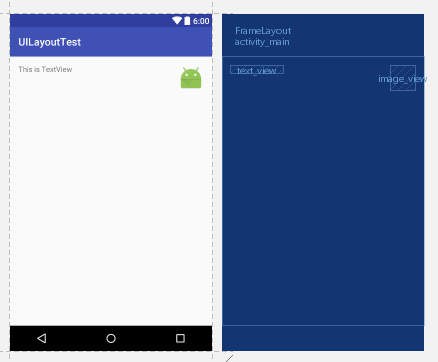
帧布局
<?xml version="1.0" encoding="utf-8"?>

<FrameLayout xmlns:android="http://schemas.android.com/apk/res/android"

xmlns:tools="http://schemas.android.com/tools"

android:id="@+id/activity_main"

android:layout_width="match_parent"

android:layout_height="match_parent"

android:paddingBottom="@dimen/activity_vertical_margin"

android:paddingLeft="@dimen/activity_horizontal_margin"

android:paddingRight="@dimen/activity_horizontal_margin"

android:paddingTop="@dimen/activity_vertical_margin"

tools:context="test.example.com.uilayouttest.MainActivity">

    <TextView

        android:id="@+id/text_view"

        android:layout_width="wrap_content"

        android:layout_height="wrap_content"

        android:layout_gravity="left"

        android:text="This is TextView"

        />

    <ImageView

        android:id="@+id/image_view"

        android:layout_width="wrap_content"

        android:layout_height="wrap_content"

        android:layout_gravity="right"

        android:src="@mipmap/ic_launcher"/>

</FrameLayout>
android开发学习——day7的更多相关文章
- Android开发学习之路-RecyclerView滑动删除和拖动排序
Android开发学习之路-RecyclerView使用初探 Android开发学习之路-RecyclerView的Item自定义动画及DefaultItemAnimator源码分析 Android开 ...
- Android开发学习路线图
Android开发学习方法: Android是一个比较庞大的体系,从底层的Linux内核到上层的应用层,各部分的内容跨度也比较大.因此,一个好的学习方法对我们学习Android开发很重要. 在此建议, ...
- android开发学习笔记000
使用书籍:<疯狂android讲义>——李刚著,2011年7月出版 虽然现在已2014,可我挑来跳去,还是以这本书开始我的android之旅吧. “疯狂源自梦想,技术成就辉煌.” 让我这个 ...
- Android开发学习总结(一)——搭建最新版本的Android开发环境
Android开发学习总结(一)——搭建最新版本的Android开发环境(转) 最近由于工作中要负责开发一款Android的App,之前都是做JavaWeb的开发,Android开发虽然有所了解,但是 ...
- Android开发学习之LauncherActivity开发启动的列表
Android开发学习之LauncherActivity开发启动的列表 创建项目:OtherActivity 项目运行结果: 建立主Activity:OtherActivity.java [jav ...
- 最实用的Android开发学习路线分享
Android开发学习路线分享.Android发展主导移动互联发展进程,在热门行业来说,Android开发堪称火爆,但是,虽然Android有着自身种种优势,但对开发者的专业性要求也是极高,这种要求随 ...
- Android开发学习必备的java知识
Android开发学习必备的java知识本讲内容:对象.标识符.关键字.变量.常量.字面值.基本数据类型.整数.浮点数.布尔型.字符型.赋值.注释 Java作为一门语言,必然有他的语法规则.学习编程语 ...
- Android开发学习之路--基于vitamio的视频播放器(二)
终于把该忙的事情都忙得差不多了,接下来又可以开始good good study,day day up了.在Android开发学习之路–基于vitamio的视频播放器(一)中,主要讲了播放器的界面的 ...
- Android开发学习之路--Android Studio cmake编译ffmpeg
最新的android studio2.2引入了cmake可以很好地实现ndk的编写.这里使用最新的方式,对于以前的android下的ndk编译什么的可以参考之前的文章:Android开发学习之路– ...
随机推荐
- 写了十年JS却不知道模块化为何物?
作者:肖光宇 野狗科技联合创始人,先后在猫扑.百度.搜狗任职,爱折腾的前端工程师. 野狗官博:https://blog.wilddog.com/ 野狗官网:https://www.wilddog.co ...
- Tensorflow RNN_LSTM实例
RNN的一种类型模型被称为长短期记忆网络(LSTM).我觉得这是一个有趣的名字.它听起来也意味着:短期模式长期不会被遗忘. LSTM的精确实现细节不在本文的范围之内.相信我,如果只学习LSTM模型会分 ...
- referraluserid推广ID号跟踪JS处理A标签
网站推广ID号跟踪 xxx.html?referraluserid=123 referraluserid.js JS源文件 referraluserid的参数会自动绑定页面A标签 有时是Post 表单 ...
- C#控件之:进度条(ProgressBar)
一.重绘进度条 public class CustomProgressBar:ProgressBar { public CustomProgressBar() { this.SetStyle(Cont ...
- winSocket编程(九)重叠IO
重叠模型的优点 重叠模型的基本原理 关于重叠模型的基础知识 重叠模型的实现步骤 多客户端情况的注意事项 一.重叠模型的优点 1.可以运行在支持Winsock2的所有Windows平台 ,而不像完成端口 ...
- Java 时间、字符串
Date类 类似C#的DateTime类 String类 类似C#的Srting类.大多方法相同,其中valueOF()是C#中实例版本的toString() StringBu ...
- (记忆化搜索) FatMouse and Cheese(hdu 1078)
题目大意: 给n*n地图,老鼠初始位置在(0,0),它每次行走要么横着走要么竖着走,每次最多可以走出k个单位长度,且落脚点的权值必须比上一个落脚点的权值大,求最终可以获得的最大权值 (题目很容 ...
- JavaScript相关基础知识点
JavaScript简介: JavaScript是脚本语言,是一种轻量级的编程语言,是可插入 HTML 页面的编程代码,插入 HTML 页面后,可由所有的现代浏览器执行. JavaScript使用: ...
- noip第28课作业
分段数列 [问题描述] 对于给定的一个长度为N的正整数数列A[i],现要将其分成连续的若干段,并且每段和不超过M(可以等于M),问最少能将其分成多少段使得满足要求. 输入格式: 输入第1行包含两个正整 ...
- POJ2536 Gopher II(二分图最大匹配)
Gopher II Time Limit: 2000MS Memory Limit: 65536K Total Submissions: 9005 Accepted: 3724 Descrip ...