
接口开发-集成数据库操作(mybatis)
关于数据存储,最常用的方式就是存到数据库,此篇以MySQL数据库为例,以mybatis框架完成数据库的操作。
一、添加对应依赖
        <!-- 数据库:MySQL -->

        <dependency>

            <groupId>mysql</groupId>

            <artifactId>mysql-connector-java</artifactId>

            <version>5.1.21</version>

        </dependency>

        <!-- 数据库操作:mybatis -->

        <dependency>

            <groupId>org.mybatis.spring.boot</groupId>

            <artifactId>mybatis-spring-boot-starter</artifactId>

            <version>${mybatis-spring-boot}</version>

        </dependency>
(等待依赖库下载完成以后,再继续)
二、properties文件、数据库表
(1)properties文件
## 数据源配置

spring.datasource.url=jdbc:mysql://127.0.0.1:3306/apidemo?useUnicode=true&characterEncoding=utf8

spring.datasource.username=root

spring.datasource.password=your db password

spring.datasource.driver-class-name=com.mysql.jdbc.Driver

## Mybatis 配置

mybatis.typeAliasesPackage=com.univalsoft.api.springbootapimaster.entity

mybatis.mapperLocations=classpath:mapper/*.xml
(记住,在properties文件中添加了相应的配置以后,mybatis会自动读取并完成初始化)
(2)数据库表
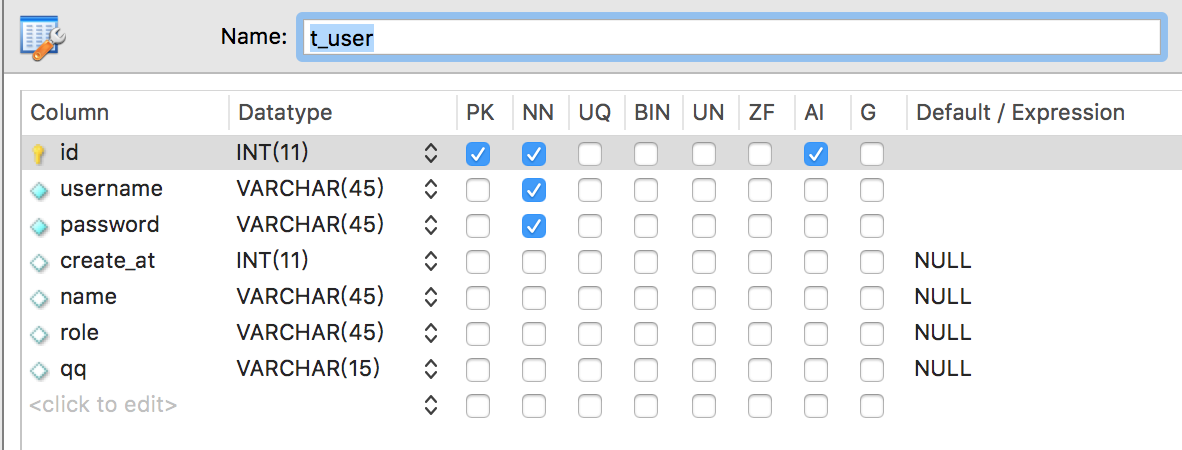
三、编写对应的service/serviceImpl/dao/mapper文件
(1)service(com.univalsoft.springbootapimaster.api.service.AccontService)
package com.univalsoft.springbootapimaster.api.service;

import java.util.HashMap;

/**

 * 账号业务逻辑接口类

 * <p>

 * Created by bysocket on 07/02/2017.

 */

public interface AccountService {

    /**

     * 根据用户名查询

     *

     * @param username 用户名

     * @param password 密码

     */

    HashMap<String, Object> findUser(String username, String password);

}
(2)serviceImpl(com.univalsoft.springbootapimaster.api.service.impl.AccountServiceImpl)
package com.univalsoft.springbootapimaster.api.service.impl;

import com.univalsoft.springbootapimaster.api.dao.AccountDao;

import com.univalsoft.springbootapimaster.api.service.AccountService;

import org.springframework.beans.factory.annotation.Autowired;

import org.springframework.stereotype.Service;

import java.util.HashMap;

@Service

public class AccountServiceImpl implements AccountService {

    @Autowired

    private AccountDao accountDao;

    @Override

    public HashMap<String, Object> findUser(String username, String password) {

        return accountDao.findUserByAccount(username, password);

    }

}
(3)dao(com.univalsoft.springbootapimaster.api.dao.AccountDao)
package com.univalsoft.springbootapimaster.api.dao;

import org.apache.ibatis.annotations.Param;

import java.util.HashMap;

/**

 * 账号 DAO 接口类

 */

public interface AccountDao {

    /**

     * 查询用户

     *

     * @param username 用户名

     * @param password 密码

     */

    HashMap<String, Object> findUserByAccount(@Param("username") String username,

                                              @Param("password") String password);

}
(4)mapper(src/main/resources/mapper/AccountMapper.xml)
<?xml version="1.0" encoding="UTF-8" ?>

<!DOCTYPE mapper PUBLIC "-//mybatis.org//DTD Mapper 3.0//EN" "http://mybatis.org/dtd/mybatis-3-mapper.dtd" >

<mapper namespace="com.univalsoft.springbootapimaster.api.dao.AccountDao">

	<!-- 通过用户名、密码查找用户 -->

	<select id="findUserByAccount" resultType="hashmap">

		select * from t_user

		where 1=1

		<if test="username != null and username != ''">

			and username = #{username}

		</if>

		<if test="password != null and password != ''">

			and password = #{password}

		</if>

		limit 1

	</select>

</mapper>
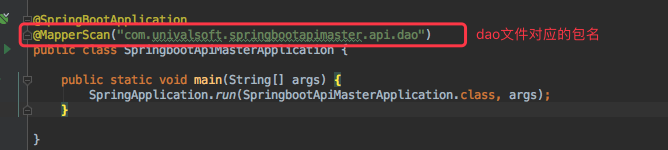
(注意:红色标注出来的,对应的dao文件,路径一定要正确)
四、在SpringbootApiMasterApplication.java添加@MapperScan注解
五、修改Controller文件
    @RequestMapping(value = "/api/test/login", method = RequestMethod.POST)

    public APIResponse login(

            @RequestParam(value = "username") String username /* 账号 */,

            @RequestParam(value = "password") String password /* 密码 */

    ) {

        // 当前版本,username为手机号,

        if (username.length() < 11) {

            return this.fail("请输入正确的手机号");

        }

        try {

            // password往往会加密,这里不做加密处理

            HashMap user =  accountService.findUser(username, password);

            if (user != null) {

                return this.success(user);

            } else {

                return this.fail("账号、密码错误");

            }

        } catch (Exception e) {

            return this.fail("");

        }

    }
还是那句话,看不懂的,自觉找个地方面壁去!!!
六、Postman测试一下
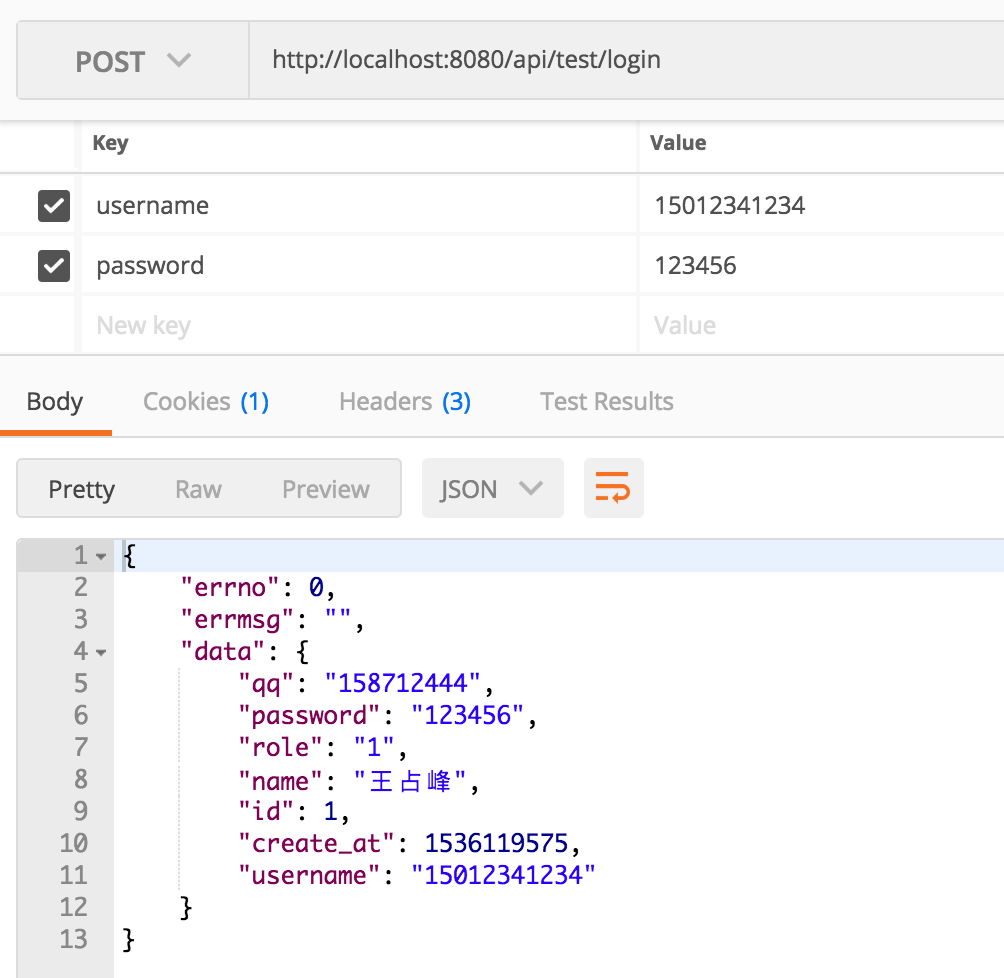
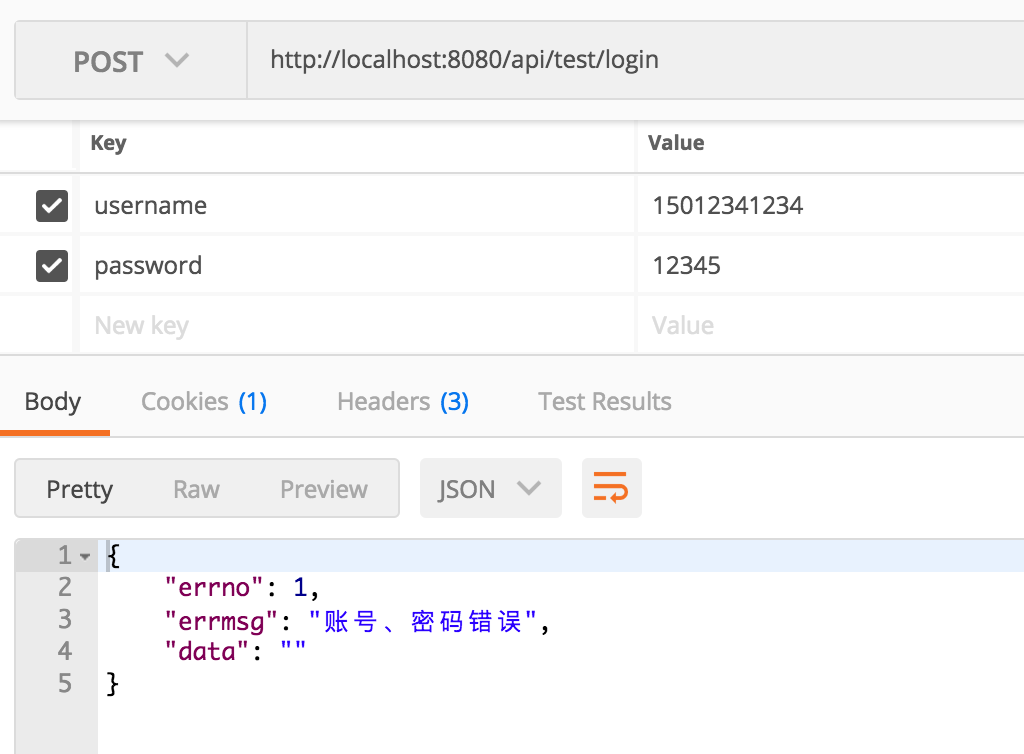
通过Mybatis连接MySQL数据库的部分,到此结束了。
最后补充一个“招式”,通过IDEA的DB功能,加快SQL语句的书写
(1)配置DataBase
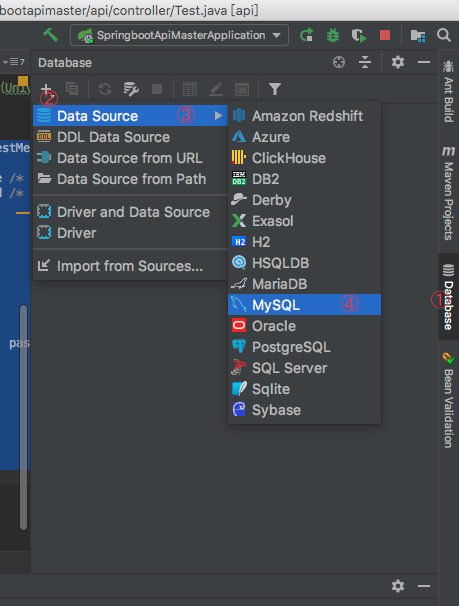
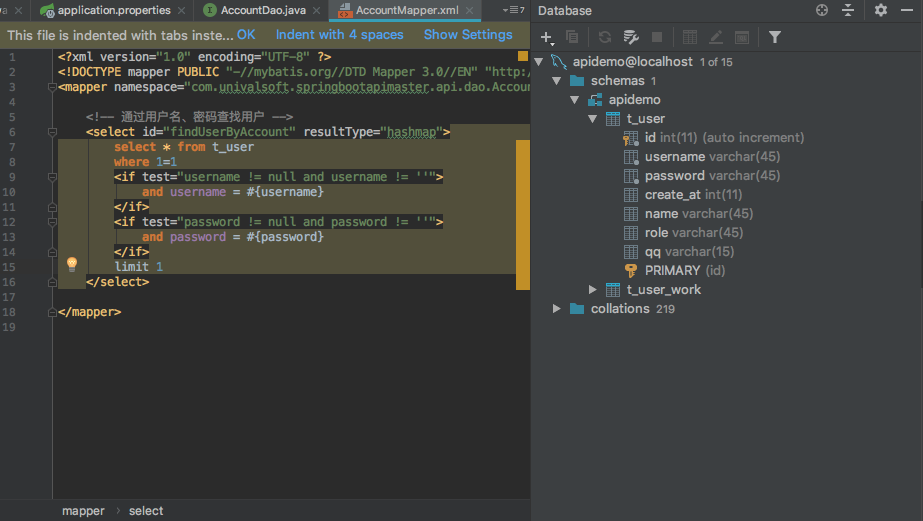
这样配置好以后,当在Mapper.xml中写SQL的时候,IDEA会给出很多友好的提示,nice~~~
接口开发-集成数据库操作(mybatis)的更多相关文章
- windows phone 8.1开发SQlite数据库操作详解
原文出自:http://www.bcmeng.com/windows-phone-sqlite1/ 本文小梦将和大家分享WP8.1中SQlite数据库的基本操作:(最后有整个示例的源码)(希望能通过本 ...
- spring boot web 开发及数据库操作
推荐网站http://springboot.fun/ 1.json 接口开发 2.自定义 filter 3.自定义 property 4.log 配置 5.数据库操作 6.测试
- 接口开发-集成接口文档(swagger)
在正式进入主题之前,先说说实际工作中遇到的问题.不算是传统的原生APP开发,还是眼下的H5混合开发,只要是需要前后端通过接口配合的,往往都存在几个普遍的问题 (1)接口文档谁来写,尤其是跨部门,并且, ...
- springboot集成jpa操作mybatis数据库
数据库如下 CREATE TABLE `jpa`.`Untitled` ( `cust_id` bigint() NOT NULL AUTO_INCREMENT, `cust_address` var ...
- python - 接口自动化测试 - MysqlUtil - 数据库操作封装
# -*- coding:utf-8 -*- ''' @project: ApiAutoTest @author: Jimmy @file: mysql_util.py @ide: PyCharm C ...
- Spring Boot快速入门(四):使用jpa进行数据库操作
原文地址:https://lierabbit.cn/articles/5 添加依赖 新建项目选择web,JPA,MySQL三个依赖 对于已存在的项目可以在bulid.gradle加入,spring b ...
- tornado 数据库操作
tornado是python的web框架,web程序开发中数据库操作是必须的. 安装: tornado的官方文档中提供的说明比较少,而且提供的模块中未找到数据库方面的模块,难道没有针对数据库操作进行封 ...
- Mybatis高级:Mybatis注解开发单表操作,Mybatis注解开发多表操作,构建sql语句,综合案例学生管理系统使用接口注解方式优化
知识点梳理 课堂讲义 一.Mybatis注解开发单表操作 *** 1.1 MyBatis的常用注解 之前我们在Mapper映射文件中编写的sql语句已经各种配置,其实是比较麻烦的 而这几年来注解开发越 ...
- 操作redis数据库 & 操作Excel & 开发接口
操作redis数据库: string类型 1. 增 set,传俩个参数 key value(只要是字符串就行)2. 删 delete 传一个参数 key3. 修改 set 在目标key重新传参 key ...
随机推荐
- Spring 学习02
一.上节内容回顾 1 spring的概念 (1)核心:ioc和aop (2)spring一站式框架 2 spring的bean管理(xml) (1)bean实例化 (2)注入属性 (3)注入对象属性 ...
- 使用渐进式JPEG来提升用户体验
今天才认识到原来JPEG文件有两种保存方式他们分别是Baseline JPEG(标准型)和Progressive JPEG(渐进式).两种格式有相同尺寸以及图像数据,他们的扩展名也是相同的,唯一的区别 ...
- AngulaJs -- 隔离作用域
具有隔离作用域的指令最主要的使用场景是创建可复用的组件 创建具有隔离作用域的指令需要将scope属性设置为一个空对象{}.如果这样做了,指令的 模板就无法访问外部作用域了: <div ng-co ...
- CS229 笔记06
CS229 笔记06 朴素贝叶斯 事件模型 事件模型与普通的朴素贝叶斯算法不同的是,在事件模型中,假设文本词典一共有 \(k\) 个词,训练集一共有 \(m\) 封邮件,第 \(i\) 封邮件的词的个 ...
- ZYNQ. GPIO
GPIO General Purpose I/O ,网上能找到很多关于znyq gpio 的文章. 分类:EMIO .MIO .AXI_GPIO 硬件系统 MIO和EMIO是在zynq核中配置的,MI ...
- 常用的C#编译命令
使用 csc.exe 实现命令行生成 作为一个半路出家的非计算机专业出身的前端码农,最近对C#很感兴趣,原因如下: 1.希望通过学习C#能熟悉一下windows系统和一些概念,例如:windows服务 ...
- Javascript - Vue - 请求
本地增删查的一个例子 <div id="box"> <div class="panel panel-primary"> ...
- 百度编辑器ueditor 字符限制
百度编辑器ueditor 字符限制 默认只能输入10000个字符 修改 ueditor.config.js // ,wordCount:true //是否开启字数统计 // ,maximumWords ...
- WCF使用Net.tcp绑定时候出现错误:元数据包含无法解析的引用
在WCF服务编程中,客户端添加引用服务时,出现如下错误: 元数据包含无法解析的引用:“net.tcp://192.168.1.105:1314/LoginService”. 套接字连接已中止.这可能是 ...
- python日常
1.远程访问远程访问Jupyter Notebook,本地浏览器不能打开,先查了防火墙的状态,然后将设置的端口进行allow,网址,仍然拒绝链接,而后通过远程访问Jupyter Notebook,然后 ...