
使用 IntraWeb (20) - 基本控件之 TIWGrid
TIWGrid 最终通过 Html Table 呈现; 其每个 Cell 都是一个 TIWGridCell 对象, Cell 对象的 Control 属性非常好, 可以非常方便地嵌入其他控件.
TIWGrid 所在单元及继承链:
IWCompGrids.TIWGrid
主要成员:
property Cell[const ARow: Integer, const AColumn: Integer]: TIWGridCell //读取单元格对象

property RowCount: Integer    //行数

property ColumnCount: Integer //列数

property ShowInvisibleRows: Boolean  //是否隐藏空行

property HiddenColumns: TStringList  //隐藏指定列, 譬如: IWGrid1.HiddenColumns.CommaText := '0,2'; 是隐藏第 1、3 列

property ShowEmptyCells: Boolean     //是否显示空的单元格; 好像存在点问题

property BGColor: TIWColor           //

property BorderColors: TIWGridBorderColors //边框色分为: 主色、暗色、亮色(Color、Dark、Light)

property BorderSize: Integer               //线宽, 对应 Table 的 Border 属性

property BorderStyle: TIWGridBorderStyle   //它对应 Table 的 frame 属性(边框相关); 使用具体的属性值需要 uses IWCompGridCommon

property Caption: TCaption     //

property CellPadding: Integer  //单元格内边距

property CellSpacing: Integer  //单元格间距

property Font: TIWFont         //如果各单元格字体一直, 可以在这里一起指定

property FrameBuffer: Integer  //?

property Lines: TIWGridLines   //对应 Table 的 Rules 属性: tlAll、tlNone、tlRows、tlCols

property Summary: string       //对应 Table 的 summary 属性

property UseFrame: Boolean     //是否使用框架, 在需要时它会给出滚动条

property UseSize: Boolean      //是否使用设计时的大小; 好像只对宽度有用

property CurrentRow: Integer         //如果 ScrollToCurrentRow = True, 可通过 CurrentRow 让指定行立即可见

property ScrollToCurrentRow: Boolean //参见 CurrentRow

property CellRenderOptions: TIWCellRenderOptions //集合选项, 决定哪些 Cell 相关的设置会被使用: [crAlign, crBGcolor, crCellPadding, crStyle, crValign]

property OnCellClick: TIWOnCellClick   //如果 TIWGridCell.Clickable = True; 单元格中的文本就会变成链接, 以响应该事件

property OnRenderCell: TIWOnRenderCell //同 TStringGrid 中的 OnDrawCell, 可以在此事件中个性化单元格

property OnGetCellRenderOptions: TIWGetCellRenderOptionsEvent //可以从这里设置某些单元格的 CellRenderOptions 属性

procedure Clear //

function CellExists(const ARow: Integer; const AColumn: Integer): Boolean //判断参数指定的单元格是否有效(譬如超界了)

procedure DeleteColumn(const AColumn: Integer)  //删除列

procedure DeleteRow(const ARow: Integer)        //删除行
TIWGridCell:
{IWCompGrids.TIWGridCell
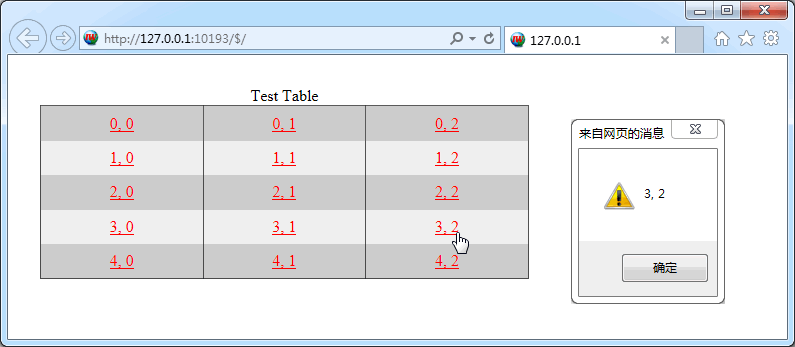
测试:
procedure TIWForm1.IWAppFormCreate(Sender: TObject);
var
i,j: Integer;
begin
IWGrid1.RowCount := 5;
IWGrid1.ColumnCount := 3;
IWGrid1.Caption := 'Test Table';
IWGrid1.BGColor := $d0d0d0;
IWGrid1.CellPadding := 8;
IWGrid1.Font.Size := 12;
IWGrid1.Lines := tlCols;
for i := 0 to IWGrid1.RowCount - 1 do
for j := 0 to IWGrid1.ColumnCount - 1 do
begin
IWGrid1.Cell[i,j].Text := Format('%d, %d', [i, j]);
IWGrid1.Cell[i,j].Alignment := taCenter;
// IWGrid1.Cell[i,j].VAlign := vaMiddle;
IWGrid1.Cell[i,j].Clickable := True;
if Odd(i) then IWGrid1.Cell[i,j].BGColor := $f0f0f0;
end;
LinkColor := $0000FF;
IWGrid1.UseSize := True;
end;
{OnCellClick}
procedure TIWForm1.IWGrid1CellClick(ASender: TObject; const ARow, AColumn: Integer);
begin
WebApplication.ShowMessage(IWGrid1.Cell[ARow, AColumn].Text);
end;
效果图:
使用 IntraWeb (20) - 基本控件之 TIWGrid的更多相关文章
- 使用 IntraWeb (22) - 基本控件之 TIWCalendar
TIWCalendar: 日历控件, 继承于 TIWCustomGrid, 所以它和 TIWGrid 共同属性特多. 它的 Cell 是 TIWCalendarCell 对象, 直接从 TIWGrid ...
- 使用 IntraWeb (24) - 基本控件之 TIWFileUploader、TIWFile
TIWFileUploader 是基于 Ajax 的上传控件, 最初是 Andrew Valums 开发, 从 IntraWeb XIV 纳入并替换 TIWFile. 虽然从组件面板上还能看到 TIW ...
- 使用 IntraWeb (29) - 基本控件之 TIWAutherList、TIWAutherINI、TIWAutherEvent
TIWAutherList //通过一组户名与密码验证登陆 TIWAutherINI //通过记录户名与密码信息的 #Auth.ini 文件验证登陆 TIWAutherEvent //通过其 OnCh ...
- 使用 IntraWeb (28) - 基本控件之 TIWTemplateProcessorHTML、TIWLayoutMgrHTML、TIWLayoutMgrForm
TIWTemplateProcessorHTML //使用外部的 html 文件做模板 TIWLayoutMgrHTML //直接输入 Html 文本做模板 TIWLayoutMgrForm //这应 ...
- 使用 IntraWeb (26) - 基本控件之 TIWMenu
TIWMenu 的任务是让原来的 TMainMenu 呈现在网页上, 通过其 AttachedMenu 属性关联一个 TMainMenu 是必需的. TIWMenu 所在单元及继承链: IWCompM ...
- 使用 IntraWeb (25) - 基本控件之 TIWRegion
这应该是 IW 中最重要的容器了, 和它同父的还有 TIWTabControl TIWRegion 所在单元及继承链: IWRegion.TIWRegion 主要成员: property Align: ...
- 使用 IntraWeb (23) - 基本控件之 TIWTimer、TIWProgressBar、TIWProgressIndicator、TIWTimeEdit
TIWTimer //和 TTimer 没多大区别, 它的默认事件现在是异步的(OnAsyncTimer), 在网络上使用 OnTimer 肯定是非常糟糕的 TIWProgressBar //进度条 ...
- 使用 IntraWeb (19) - 基本控件之 TIWTreeView
这是个饱受非议的控件; 我通过尝试, 理解了非议, 也能理解作者. 总之向作者的思路靠拢吧, 还是不错的. TIWTreeView 所在单元及继承链: IWCompTreeview.TIWTreeVi ...
- 使用 IntraWeb (16) - 基本控件之 TIWList、TIWListbox、TIWComboBox、TIWOrderedListbox
TIWList //列表; 它对应 Html 中的 OL.LI(某些选项下会用表格模拟); TIWListbox 和 TIWComboBox 则对应 Html 在的 Option TIWListbox ...
随机推荐
- 详谈ASP.NET的DataReader对象
最近频繁用到了DataReader这个对象,其实对于DataReader,之前也用到过,说实话我个人觉得很不好懂.相比之下觉得DataSet对象好用的多,但是有时取出的数据不需要很多的时候,DataR ...
- AngularJs-$parsers自我理解-解析
$parsers 首先先了解下它具体的作用,当用户与控制器进行交互的时候.ngModelController中的$setViewValue()方法就会被调用,$parsers的数组中函数就会以流水线的 ...
- 20155237 2016-2017-2 《Java程序设计》第7周学习总结
20155237 2016-2017-2 <Java程序设计>第7周学习总结 教材学习内容总结 认识Lambda语法 Lambda 教材的引入循序渐近.深入浅出 Lambda去重复,回忆D ...
- shape-outside 矩形之外的另一种思路
http://docs.webplatform.org/wiki/css/properties/shape-outside
- Vue 使用 prerender-spa-plugin 添加loading
主要配置代码: new PrerenderSPAPlugin({ staticDir: path.join(__dirname, 'dist'), routes: ['/', '/introducti ...
- House Robber I & II & III
House Robber You are a professional robber planning to rob houses along a street. Each house has a c ...
- Google Protocol Buffer的安装与.proto文件的定义(转)
转自(https://www.cnblogs.com/yinheyi/p/6080244.html) 什么是protocol Buffer呢? Google Protocol Buffer( 简称 P ...
- pip 18.1: pipenv graph results in ImportError: cannot import name 'get_installed_distributions'
I'm currently using python3 -m pip install pip==10.0.1python3 -m pip install pipenv==2018.5.18 Once ...
- 移动端调试利器之vconsole
说明 由于移动端项目在手机中调试时不能使用chrome的控制台,而vconsole是对pc端console的改写 使用方法 使用 npm 安装: npm install vconsole 使用webp ...
- tab切换webuploader失效的解决方法
<script type="text/javascript"> $(document).ready(function () { $('#tt').tabs({ bord ...