
Bootstrap表单验证插件bootstrapValidator使用方法整理
插件介绍
先上一个图:

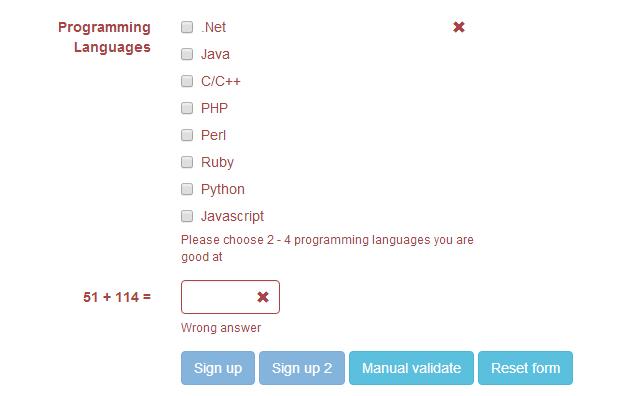
下载地址:https://github.com/nghuuphuoc/bootstrapvalidator
使用方法:http://www.cnblogs.com/huangcong/p/5335376.html
使用提示
中文化:
下载插件后,将\js\bootstrapValidator\language\zh_CN.js 引入文件,即实现中文化
提交前验证表单:
更丰富一点的表单验证例子:http://www.jq22.com/yanshi522,直接上代码:
<!DOCTYPE html>
<html>
<head>
<title>BootstrapValidator demo</title> <link rel="stylesheet" href="vendor/bootstrap/css/bootstrap.css"/>
<link rel="stylesheet" href="dist/css/bootstrapValidator.css"/> <!-- Include the FontAwesome CSS if you want to use feedback icons provided by FontAwesome -->
<!--<link rel="stylesheet" href="http://netdna.bootstrapcdn.com/font-awesome/4.0.3/css/font-awesome.css" />--> <script type="text/javascript" src="vendor/jquery/jquery-1.10.2.min.js"></script>
<script type="text/javascript" src="vendor/bootstrap/js/bootstrap.min.js"></script>
<script type="text/javascript" src="dist/js/bootstrapValidator.js"></script>
</head>
<body>
<div class="container">
<div class="row">
<!-- form: -->
<section>
<div class="col-lg-8 col-lg-offset-2">
<div class="page-header">
<h2>Sign up</h2>
</div> <form id="defaultForm" method="post" class="form-horizontal" action="target.php">
<div class="form-group">
<label class="col-lg-3 control-label">Full name</label>
<div class="col-lg-4">
<input type="text" class="form-control" name="firstName" placeholder="First name" />
</div>
<div class="col-lg-4">
<input type="text" class="form-control" name="lastName" placeholder="Last name" />
</div>
</div> <div class="form-group">
<label class="col-lg-3 control-label">Username</label>
<div class="col-lg-5">
<input type="text" class="form-control" name="username" />
</div>
</div> <div class="form-group">
<label class="col-lg-3 control-label">Email address</label>
<div class="col-lg-5">
<input type="text" class="form-control" name="email" />
</div>
</div> <div class="form-group">
<label class="col-lg-3 control-label">Password</label>
<div class="col-lg-5">
<input type="password" class="form-control" name="password" />
</div>
</div> <div class="form-group">
<label class="col-lg-3 control-label">Retype password</label>
<div class="col-lg-5">
<input type="password" class="form-control" name="confirmPassword" />
</div>
</div> <div class="form-group">
<label class="col-lg-3 control-label">Gender</label>
<div class="col-lg-5">
<div class="radio">
<label>
<input type="radio" name="gender" value="male" /> Male
</label>
</div>
<div class="radio">
<label>
<input type="radio" name="gender" value="female" /> Female
</label>
</div>
<div class="radio">
<label>
<input type="radio" name="gender" value="other" /> Other
</label>
</div>
</div>
</div> <div class="form-group">
<label class="col-lg-3 control-label">Birthday</label>
<div class="col-lg-5">
<input type="text" class="form-control" name="birthday" /> (YYYY/MM/DD)
</div>
</div> <div class="form-group">
<label class="col-lg-3 control-label">Languages</label>
<div class="col-lg-5">
<div class="checkbox">
<label>
<input type="checkbox" name="languages[]" value="english" /> English
</label>
</div>
<div class="checkbox">
<label>
<input type="checkbox" name="languages[]" value="french" /> French
</label>
</div>
<div class="checkbox">
<label>
<input type="checkbox" name="languages[]" value="german" /> German
</label>
</div>
<div class="checkbox">
<label>
<input type="checkbox" name="languages[]" value="russian" /> Russian
</label>
</div>
<div class="checkbox">
<label>
<input type="checkbox" name="languages[]" value="other" /> Other
</label>
</div>
</div>
</div> <div class="form-group">
<label class="col-lg-3 control-label">Programming Languages</label>
<div class="col-lg-5">
<div class="checkbox">
<label>
<input type="checkbox" name="programs[]" value="net" /> .Net
</label>
</div>
<div class="checkbox">
<label>
<input type="checkbox" name="programs[]" value="java" /> Java
</label>
</div>
<div class="checkbox">
<label>
<input type="checkbox" name="programs[]" value="c" /> C/C++
</label>
</div>
<div class="checkbox">
<label>
<input type="checkbox" name="programs[]" value="php" /> PHP
</label>
</div>
<div class="checkbox">
<label>
<input type="checkbox" name="programs[]" value="perl" /> Perl
</label>
</div>
<div class="checkbox">
<label>
<input type="checkbox" name="programs[]" value="ruby" /> Ruby
</label>
</div>
<div class="checkbox">
<label>
<input type="checkbox" name="programs[]" value="python" /> Python
</label>
</div>
<div class="checkbox">
<label>
<input type="checkbox" name="programs[]" value="javascript" /> Javascript
</label>
</div>
</div>
</div> <div class="form-group">
<label class="col-lg-3 control-label" id="captchaOperation"></label>
<div class="col-lg-2">
<input type="text" class="form-control" name="captcha" />
</div>
</div> <div class="form-group">
<div class="col-lg-9 col-lg-offset-3">
<button type="submit" class="btn btn-primary" name="signup" value="Sign up">Sign up</button>
<button type="submit" class="btn btn-primary" name="signup2" value="Sign up 2">Sign up 2</button>
<button type="button" class="btn btn-info" id="validateBtn">Manual validate</button>
<button type="button" class="btn btn-info" id="resetBtn">Reset form</button>
</div>
</div>
</form>
</div>
</section>
<!-- :form -->
</div>
</div> <script type="text/javascript">
$(document).ready(function() {
// Generate a simple captcha
function randomNumber(min, max) {
return Math.floor(Math.random() * (max - min + 1) + min);
};
$('#captchaOperation').html([randomNumber(1, 100), '+', randomNumber(1, 200), '='].join(' ')); $('#defaultForm').bootstrapValidator({
// live: 'disabled',
message: 'This value is not valid',
feedbackIcons: {
valid: 'glyphicon glyphicon-ok',
invalid: 'glyphicon glyphicon-remove',
validating: 'glyphicon glyphicon-refresh'
},
fields: {
firstName: {
validators: {
notEmpty: {
message: 'The first name is required and cannot be empty'
}
}
},
lastName: {
validators: {
notEmpty: {
message: 'The last name is required and cannot be empty'
}
}
},
username: {
message: 'The username is not valid',
validators: {
notEmpty: {
message: 'The username is required and cannot be empty'
},
stringLength: {
min: 6,
max: 30,
message: 'The username must be more than 6 and less than 30 characters long'
},
regexp: {
regexp: /^[a-zA-Z0-9_\.]+$/,
message: 'The username can only consist of alphabetical, number, dot and underscore'
},
remote: {
url: 'remote.php',
message: 'The username is not available'
},
different: {
field: 'password',
message: 'The username and password cannot be the same as each other'
}
}
},
email: {
validators: {
emailAddress: {
message: 'The input is not a valid email address'
}
}
},
password: {
validators: {
notEmpty: {
message: 'The password is required and cannot be empty'
},
identical: {
field: 'confirmPassword',
message: 'The password and its confirm are not the same'
},
different: {
field: 'username',
message: 'The password cannot be the same as username'
}
}
},
confirmPassword: {
validators: {
notEmpty: {
message: 'The confirm password is required and cannot be empty'
},
identical: {
field: 'password',
message: 'The password and its confirm are not the same'
},
different: {
field: 'username',
message: 'The password cannot be the same as username'
}
}
},
birthday: {
validators: {
date: {
format: 'YYYY/MM/DD',
message: 'The birthday is not valid'
}
}
},
gender: {
validators: {
notEmpty: {
message: 'The gender is required'
}
}
},
'languages[]': {
validators: {
notEmpty: {
message: 'Please specify at least one language you can speak'
}
}
},
'programs[]': {
validators: {
choice: {
min: 2,
max: 4,
message: 'Please choose 2 - 4 programming languages you are good at'
}
}
},
captcha: {
validators: {
callback: {
message: 'Wrong answer',
callback: function(value, validator) {
var items = $('#captchaOperation').html().split(' '), sum = parseInt(items[0]) + parseInt(items[2]);
return value == sum;
}
}
}
}
}
}); // Validate the form manually
$('#validateBtn').click(function() {
$('#defaultForm').bootstrapValidator('validate');
}); $('#resetBtn').click(function() {
$('#defaultForm').data('bootstrapValidator').resetForm(true);
});
});
</script>
</body>
</html>
看331行,点击提交时,用
$('#defaultForm').bootstrapValidator('validate');
触发表单验证
下面是碰到的一个坑:
bootstrapValidator默认逻辑是当表单验证失败时,把按钮给变灰色。
但是项目中,button并不在form内部,是通过事件绑定来ajax提交的。那么问题来了:
项目需要当form验证失败时,不执行所绑定的后续事件。百度半天找不到相关资料,最后还是要靠google:
$("#yourform").submit(function(ev){ev.preventDefault();});

$("#submit").on("click", function(){

   var bootstrapValidator = $("#yourform").data('bootstrapValidator');

   bootstrapValidator.validate();

   if(bootstrapValidator.isValid())

     $("#yourform").submit();

   else return;

});
酱紫就可以判断表单验证是否通过了。
Bootstrap表单验证插件bootstrapValidator使用方法整理的更多相关文章
- bootstrapValidator.js,最好用的bootstrap表单验证插件 简单实用方法
实用方法 1.引入 在有jquery和bootstrap的页面里引入bootstrapValidator.js和bootstrapValidator.css文件 2. 按照bootstrap的表单组件 ...
- bootstrapValidator.js,最好用的bootstrap表单验证插件
前言:做Web开发的我们,表单验证是再常见不过的需求了.友好的错误提示能增加用户体验.博主搜索bootstrap表单验证,搜到的结果大部分都是文中的主题:bootstrapvalidator.今天就来 ...
- bootStrap表单验证插件的使用
bootStrapValidator插件的使用 1.插件的下载和引用 首先要引入bootstrapValidator插件.链接的地址:https://www.bootcdn.cn/jquery.boo ...
- bootstrapValidator表单验证插件
bootstrapValidator——一个很好用的表单验证插件,再也不用手写验证规则啦! bootstrapValidator官方文档:http://bootstrapvalidator.votin ...
- BootStrapValidator表单验证插件的学习和使用
BootStrapValidator表单验证插件的学习和使用 引入标签 <script type="text/javascript" src="https://cd ...
- jQuery Validate 表单验证插件----自定义一个验证方法
一.下载依赖包 网盘下载:https://yunpan.cn/cryvgGGAQ3DSW 访问密码 f224 二.引入依赖包 <script src="../../scripts/j ...
- 表单验证插件jquery.validate的使用方法演示
jQueryValidate表单验证效果 jquery.validate验证错误信息的样式控制 <!--validate验证插件的基础样式--> input.error{border: 1 ...
- jquery validate表单验证插件的基本使用方法及功能拓展
1 表单验证的准备工作 在开启长篇大论之前,首先将表单验证的效果展示给大家. 1.点击表单项,显示帮助提示 2.鼠标离开表单项时,开始校验元素 3.鼠标离开后的正确.错误提示及鼠标移入时的帮助提 ...
- 表单验证插件--formvalidation
表单验证是一个非常基础的功能,当你的表单项少的时候,可以自己写验证,但是当你的表单有很多的时候,就需要一些验证的插件.今天介绍一款很好用的表单验证插件,formvalidation.其前身叫做boot ...
随机推荐
- 从随机过程到马尔科夫链蒙特卡洛方法(MCMC)
从随机过程到马尔科夫链蒙特卡洛方法 1. Introduction 第一次接触到 Markov Chain Monte Carlo (MCMC) 是在 theano 的 deep learning t ...
- odoo种种
[精]Odoo 8.0深入浅出开发教程-模块开发基础 http://blog.csdn.net/sunansheng/article/details/50864527 搭建odoo开发调试环境 htt ...
- 解决java.net.MalformedURLException: unknown protocol: c问题
修改前代码: DocumentBuilderFactory factory = DocumentBuilderFactory.newInstance(); DocumentBuilder builde ...
- css 使图片水平垂直居中
1.利用display:table-cell,具体代码如下: html代码如下: <div class="img_wrap"> <img src="wg ...
- 【20160722-20160728】NOI2016滚粗记&&酱油记&&游记
先挖坑 #include <cstdio> using namespace std; int main(){ puts("转载请注明出处:http://www.cnblogs.c ...
- Linux下使用Hexo搭建github博客
找到一篇靠谱的博客,备份一下: ---------以下原文------------------ Nodejs安装 因为hexo是基于nodejs的应用,所以要先安装nodejs才可以.我这里以Ubun ...
- 关于Java中的继承和组合的一个错误使用的例子
[TOC] 关于Java中的继承和组合的一个错误使用的例子 相信绝大多数人都比较熟悉Java中的「继承」和「组合」这两个东西,本篇文章就主要就这两个话题谈论一下.如果我某些地方写的不对,或者比较幼稚, ...
- IIS7.5使用web.config设置伪静态的二种方法
转自 网上赚钱自学网 .http://www.whosmall.com/post/121 近几天公司里开发的项目有几个运行在IIS7.5上,由于全站采用的是伪静态,因此从网上找到两两种方法来实现.这两 ...
- margin()与offset()的区别
margin() 简写属性在一个声明中设置所有外边距属性. offset() 方法返回或设置匹配元素相对于文档的偏移(位置).
- Python Day12
MySQL 数据库介绍 什么是数据库? 数据库(Database)是按照数据结构来组织.存储和管理数据的仓库, 每个数据库都有一个或多个不同的API用于创建,访问,管理,搜索和复制所保存的数据. 我们 ...