
Android进度条学习
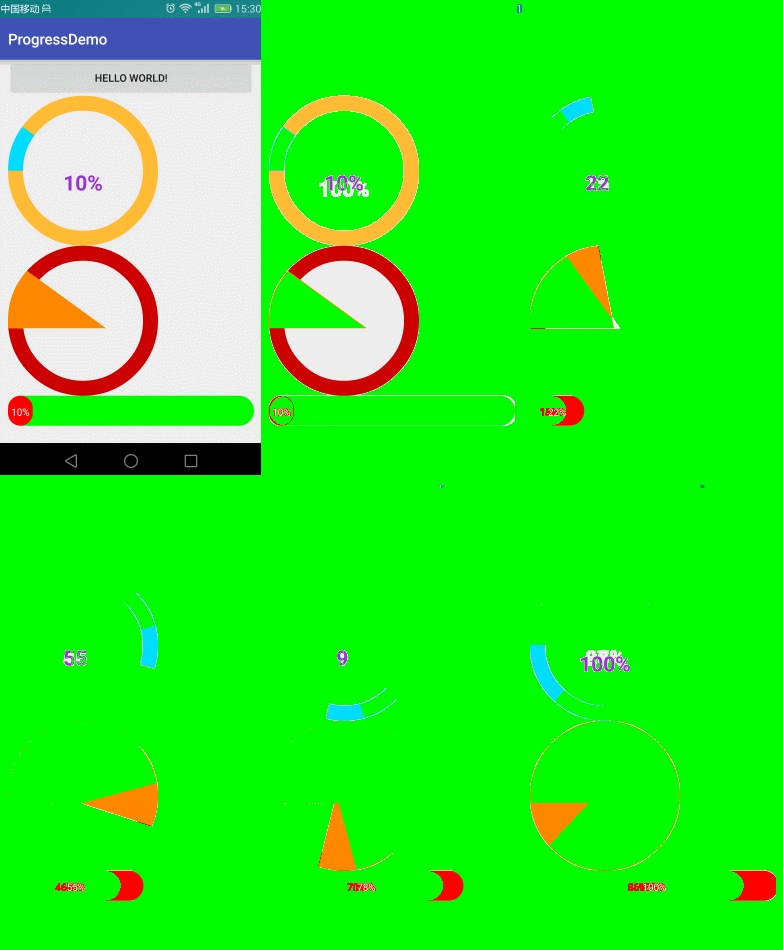
自定义属性
    <!--

    roundColor 圆环的颜色

    roundProgressColor 进度的颜色

    roundWidth 圆环的宽度

    textColor 文字颜色

    textSize  文字大小

    max 最大值

    textIsDisplayable  是否显示进度文本

    style 样式

    STROKE 空心

    FILL 实心

    -->

    <declare-styleable name="RoundProgressBar">

        <attr name="roundColor" format="color"/>

        <attr name="roundProgressColor" format="color"/>

        <attr name="roundWidth" format="dimension"></attr>

        <attr name="textColor" format="color" />

        <attr name="textSize" format="dimension" />

        <attr name="max" format="integer"></attr>

        <attr name="textIsDisplayable" format="boolean"></attr>

        <attr name="style">

            <enum name="STROKE" value="0"></enum>

            <enum name="FILL" value="1"></enum>

        </attr>

    </declare-styleable>
public RoundProgressBar(Context context, AttributeSet attrs, int defStyleAttr) {

        super(context, attrs, defStyleAttr);

        mPaint = new Paint();

        /**

         * 获取自定义的属性

         */

        TypedArray typedArray = context.obtainStyledAttributes(attrs, R.styleable.RoundProgressBar);

        //底色

        mRoundColor = typedArray.getColor(R.styleable.RoundProgressBar_roundColor, Color.RED);

        //进度的颜色

        mRoundProgressColor = typedArray.getColor(R.styleable.RoundProgressBar_roundProgressColor, Color.BLUE);

        //圆形的宽

        mRoundWidth = typedArray.getDimension(R.styleable.RoundProgressBar_roundWidth, 20);

        //字体颜色 中间

        mTextColor = typedArray.getColor(R.styleable.RoundProgressBar_textColor, Color.BLUE);

        //中间进度显示的字体大小

        mTextSize = typedArray.getDimension(R.styleable.RoundProgressBar_textSize, 15);

        //最大值

        mMax = typedArray.getInteger(R.styleable.RoundProgressBar_max, 100);

        //文字是否显示

        mTextIsDisplayable = typedArray.getBoolean(R.styleable.RoundProgressBar_textIsDisplayable, true);

        //实心或者 空心

        mStyle = typedArray.getInt(R.styleable.RoundProgressBar_style, 0);

        typedArray.recycle();

    }
绘制
        //圆心

        int centerOfCircle = getWidth() / 2;

        //radius 半径

        int radius = (int) (centerOfCircle - mRoundWidth / 2);

        //设置画笔

        mPaint.setAntiAlias(true);

        //圆环的颜色

        mPaint.setColor(mRoundColor);

        //设置空心

        mPaint.setStyle(Paint.Style.STROKE);

        //画笔宽度

        mPaint.setStrokeWidth(mRoundWidth);

        //画圆

        canvas.drawCircle(centerOfCircle, centerOfCircle, radius, mPaint);

        /**

         * 画百分比

         */

        mPaint.setStrokeWidth(0);

        //字体大小

        mPaint.setTextSize(mTextSize);

        //画笔颜色

        mPaint.setColor(mTextColor);

        //字体

        mPaint.setTypeface(Typeface.DEFAULT_BOLD);

        //计算百分比

        int percent = (int) (((float) mProgress / (float) mMax) * 100);

        //测量字体的宽度

        float textWidth = mPaint.measureText(percent + "%");

        //判断是否显示进度文字 不是0,风格是空心的

        if (mTextIsDisplayable && percent != 0 && mStyle == STROKE) {

            canvas.drawText(percent + "%", centerOfCircle - textWidth / 2, centerOfCircle + textWidth / 2, mPaint);

        }

        /**

         * 设置进度

         */

        mPaint.setColor(mRoundProgressColor);

        //画笔宽度

        mPaint.setStrokeWidth(mRoundWidth);

        mPaint.setAntiAlias(true);

        RectF oval = new RectF(centerOfCircle - radius, centerOfCircle - radius, centerOfCircle + radius, centerOfCircle + radius);

        switch (mStyle) {

            case STROKE:

                //空心

                mPaint.setStyle(Paint.Style.STROKE);

                //画圆弧

                /**

                 *

                 *开始的角度

                 */

                canvas.drawArc(oval, 180, 360 * mProgress / mMax, false, mPaint);

                break;

            case FILL:

                //实心

                mPaint.setStyle(Paint.Style.FILL_AND_STROKE);

                //画圆弧

                if(mProgress!=0) {

                    canvas.drawArc(oval, 180, 360 * mProgress / mMax, true, mPaint);

                }

                break;

        }
源码:
https://github.com/ln0491/ProgressDemo
Android进度条学习的更多相关文章
- 多种的android进度条的特效源码
多种的android进度条的特效源码,这个源码是在源码天堂那个网站上转载过来的,我已经修改一部分了,感觉很实用的,大家可以学习一下吧,我就不上传源码了,大家可以直接到那个网站上下载吧. 源码天堂下载地 ...
- android进度条
android进度条 1.达到的效果 2.布局代码 先写一个my_browser.xml文件 存放WebView <?xml version="1.0" encoding=& ...
- iOS之小功能模块--彩虹动画进度条学习和自主封装改进
前言: 首先展示一下这个iOS小示例的彩色进度条动画效果: 阅读本文先说说好处:对于基础不好的读者,可以直接阅读文末尾的"如何使用彩虹动画进度条"章节,然后将我封装好的这个功能模块 ...
- Android 进度条改变图片透明度
<?xml version="1.0" encoding="utf-8"?> <LinearLayout xmlns:android=&quo ...
- Android 进度条
<?xml version="1.0" encoding="utf-8"?> <LinearLayout xmlns:android=&quo ...
- Android—进度条
layout文件: <?xml version="1.0" encoding="utf-8"?> <LinearLayout xmlns:an ...
- Android——进度条ProgressBar
1.activity_progressbar.xml <?xml version="1.0" encoding="utf-8"?><Linea ...
- android进度条的使用
// 导入按钮事件 btnsearch.setOnClickListener(new View.OnClickListener() { @Override public void on ...
- Android 进度条按钮实现(ProgressButton)
有些App在点击下载按钮的时候,可以在按钮上显示进度,我们可以通过继承原生Button,重写onDraw来实现带进度条的按钮. Github:https://github.com/imcloudflo ...
随机推荐
- innerHTML与innerText的异同
在一道面试题中看到的. 1.功能讲解: innerHTML 设置或获取位于对象起始和结束标签内的 HTML outerHTML 设置或获取对象及其内容的 HTML 形式 innerText 设置或获取 ...
- iOS开发之微信聊天工具栏的封装
之前山寨了一个新浪微博(iOS开发之山寨版新浪微博小结),这几天就山寨个微信吧.之前已经把微信的视图结构简单的拖了一下(IOS开发之微信山寨版),今天就开始给微信加上具体的实现功能,那么就先从微信的聊 ...
- multipart数据结构
--[boundary]\r\n [headers]\r\n \r\n [content]\r\n --[boundary]\r\n [headers]\r\n \r\n [content]\r\n ...
- C# 在excel表格中检索并导出数据
由于工作需要,我经常使用excel文档来存储和处理各种数据,在生活中偶尔也会使用excel表格来记录各种开销,相信很多朋友也和我一样.Excel的功能很强大,其中一个很实用的数据处理功能就是查找和替换 ...
- 性能测试工具Locust
An open source load testing tool. 一个开源性能测试工具. define user behaviour with python code, and swarm your ...
- 彻底解决低端安卓手机touchend事件不触发(考虑scroll)
本次移动端开发时遇见了安卓4.2系统不能触发touchend的问题,有以下需求. 1. 横滑轮播图 2.下拉刷新页面内容 3.body滚动条不能失效 开始在轮播图touchmove事件中阻止了浏览器默 ...
- C#图片存入数据库及其读出显示
<1>将图片转换成二进制插入数据库 FileStream fs = new FileStream("D:\\Add.ico",FileMode.Open); byte[ ...
- 【原创】Kafka console consumer源代码分析(二)
我们继续讨论console consumer的实现原理,本篇着重探讨ZookeeperConsumerConnector的使用,即后续所有的内容都由下面这条语句而起: val connector = ...
- overflow
1. 隐藏x轴滚动条,垂直有滚动条: <body> <div style="width:100px;height:150px;overflow:scroll;overflo ...
- EC笔记,第二部分:6.若不想使用编译器默认生成的函数,就该明确拒绝
6.若不想使用编译器默认生成的函数,就该明确拒绝 1.有的时候不希望对象被复制和赋值,那么就把复制构造函数与赋值运算符放在private:中,但是这两个函数是否需要实现呢?假设实现了,那么你的类成员方 ...