
MyBatis笔记----SSM框架mybatis3整合springmvc spring4


上节 无springmvc框架 http://www.cnblogs.com/tk55/p/6661786.html
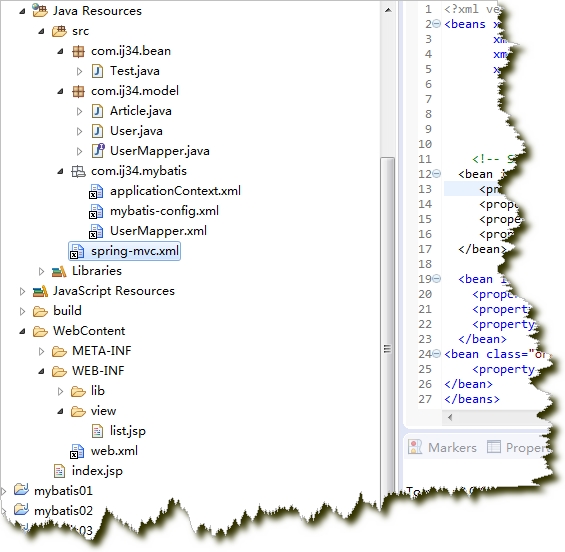
结构
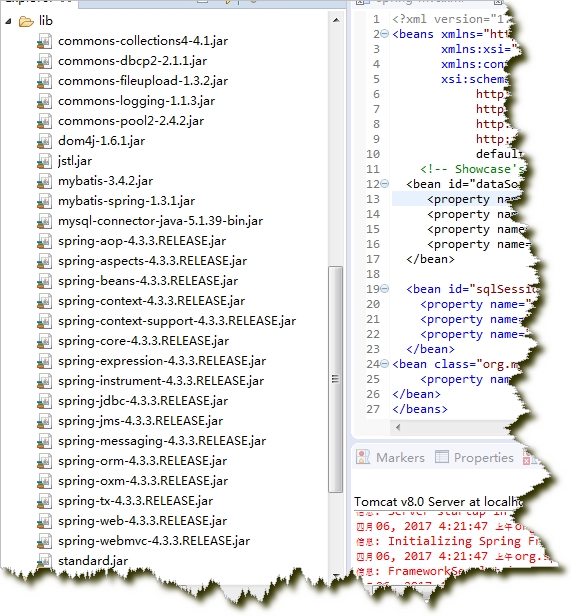
jar包
web.xml 与index.jsp
<?xml version="1.0" encoding="UTF-8"?>

<web-app xmlns:xsi="http://www.w3.org/2001/XMLSchema-instance" xmlns="http://java.sun.com/xml/ns/javaee"
xsi:schemaLocation="http://java.sun.com/xml/ns/javaee http://java.sun.com/xml/ns/javaee/web-app_2_5.xsd" id="WebApp_ID" version="2.5">

  <display-name>mybatis_springmvc</display-name>

  <welcome-file-list>

<welcome-file>index.jsp</welcome-file>

  </welcome-file-list>

 <context-param>

     <param-name>contextConfigLocation</param-name>

     <param-value>classpath:com/ij34/mybatis/applicationContext.xml</param-value>

 </context-param>

 <listener>

     <listener-class>org.springframework.web.context.ContextLoaderListener</listener-class>

 </listener>

  <listener>

     <listener-class>org.springframework.web.context.ContextCleanupListener</listener-class>

 </listener>

  <servlet>

    <servlet-name>springDispatcherServlet</servlet-name>

    <servlet-class>org.springframework.web.servlet.DispatcherServlet</servlet-class>

    <init-param>

      <param-name>contextConfigLocation</param-name>

      <param-value>classpath:spring-mvc.xml</param-value>

    </init-param>

  </servlet>

  <servlet-mapping>

    <servlet-name>springDispatcherServlet</servlet-name>

    <url-pattern>/</url-pattern>

  </servlet-mapping>

  <filter>

    <filter-name>characterEncodingfilter</filter-name>

    <filter-class>org.springframework.web.filter.CharacterEncodingFilter</filter-class>

    <init-param>

      <param-name>encoding</param-name>

      <param-value>utf8</param-value>

    </init-param>

  </filter>

  <filter-mapping>

  <filter-name>characterEncodingfilter</filter-name>

  <url-pattern>*</url-pattern>

  </filter-mapping>

</web-app>
index.jsp
<%@ page language="java" contentType="text/html; charset=UTF-8"

    pageEncoding="UTF-8"%>

<% response.sendRedirect("article/list"); %>
spring-mvc.xml
<?xml version="1.0" encoding="UTF-8"?>

<beans xmlns:xsi="http://www.w3.org/2001/XMLSchema-instance"

    xmlns="http://www.springframework.org/schema/beans"

        xmlns:p="http://www.springframework.org/schema/p"

    xmlns:context="http://www.springframework.org/schema/context"

    xsi:schemaLocation="http://www.springframework.org/schema/beans

    http://www.springframework.org/schema/beans/spring-beans-4.3.xsd

    http://www.springframework.org/schema/context

    http://www.springframework.org/schema/context/spring-context-4.3.xsd">

<!--   自动扫描加载注解的包 -->

<context:component-scan base-package="com.ij34.bean"/>

<bean id="viewResolver" class="org.springframework.web.servlet.view.InternalResourceViewResolver">

<property name="prefix" value="/WEB-INF/view/"></property>

<property name="suffix" value=".jsp" ></property>

</bean>

</beans>
com.ij34.model
package com.ij34.model;

public class User {

  private int id;

  private String name;

  private int age;

  public int getId() {

    return id;

}

public void setId(int id) {

    this.id = id;

}

public String getName() {

    return name;

}

public void setName(String name) {

    this.name = name;

}

public int getAge() {

    return age;

}

public void setAge(int age) {

    this.age = age;

}

public String toString() {

    return "User [id=" + id + ", name=" + name + ", age=" + age + "]";

}

}
package com.ij34.model;

public class Article {

  private int id;

  private User user;

  private String title;

  private String content;

public String getContent() {

    return content;

}

public void setContent(String content) {

    this.content = content;

}

public int getId() {

    return id;

}

public void setId(int id) {

    this.id = id;

}

public User getUser() {

    return user;

}

public void setUser(User user) {

    this.user = user;

}

public String getTitle() {

    return title;

}

public void setTitle(String title) {

    this.title = title;

}

}
package com.ij34.model;

import java.util.List;

public interface UserMapper {

    public List<Article> selectarticle(int id);

}
com.ij34.mybatis
UserMapper.xml
<?xml version="1.0" encoding="UTF-8" ?>

<!DOCTYPE mapper

  PUBLIC "-//mybatis.org//DTD Mapper 3.0//EN"

  "http://mybatis.org/dtd/mybatis-3-mapper.dtd">

  <mapper  namespace="com.ij34.model.UserMapper">

<resultMap type="Article" id="resultAticleList">

  <id property="id" column="aid"/>

  <result property="title" column="title"/>

  <result property="content" column="content"/>

  <association property="user" javaType="User">

  <id property="id" column="id"/>

  <result property="name" column="name"/>

  <result property="age" column="age"/>

  </association>

  </resultMap>

  <select id="selectarticle" parameterType="int" resultMap="resultAticleList">

  select users.id,users.name,users.age,article.id aid,article.title,article.content from users,article

  where users.id=article.userid and users.id=#{id}

  </select>

  </mapper>
mybatis-config.xml
<?xml version="1.0" encoding="UTF-8" ?>

<!DOCTYPE configuration

  PUBLIC "-//mybatis.org//DTD Config 3.0//EN"

  "http://mybatis.org/dtd/mybatis-3-config.dtd">

<configuration>

<typeAliases>

<typeAlias type="com.ij34.model.Article" alias="Article"/>

<typeAlias type="com.ij34.model.User" alias="User"/>

</typeAliases>

</configuration>
applicationContext.xml
<?xml version="1.0" encoding="UTF-8"?>

<beans xmlns="http://www.springframework.org/schema/beans"

       xmlns:xsi="http://www.w3.org/2001/XMLSchema-instance"

       xmlns:context="http://www.springframework.org/schema/context"

       xsi:schemaLocation="

            http://www.springframework.org/schema/beans

            http://www.springframework.org/schema/beans/spring-beans-4.3.xsd

            http://www.springframework.org/schema/context

            http://www.springframework.org/schema/context/spring-context-4.3.xsd"

            default-autowire="byName" default-lazy-init="false">

    <!-- Showcase's CustomFreemarkerManager example -->

  <bean id="dataSource" class="org.apache.commons.dbcp2.BasicDataSource">

     <property name="driverClassName" value="com.mysql.jdbc.Driver"></property>

     <property name="url" value="jdbc:mysql://localhost:3306/mybatis"></property>

     <property name="username" value="root"></property>

     <property name="password" value="123456"></property>

  </bean>

  <bean id="sqlSessionFactory" class="org.mybatis.spring.SqlSessionFactoryBean">

      <property name="dataSource" ref="dataSource"></property>

      <property name="configLocation" value="classpath:com/ij34/mybatis/mybatis-config.xml"></property>

      <property name="mapperLocations" value="classpath:com/ij34/mybatis/UserMapper.xml"></property>

  </bean>

<bean class="org.mybatis.spring.mapper.MapperScannerConfigurer">

    <property name="basePackage" value="com.ij34.model"></property>

</bean>

</beans>
com.ij34.bean
package com.ij34.bean;

import java.util.List;

import org.springframework.beans.factory.annotation.Autowired;

import org.springframework.stereotype.Controller;

import org.springframework.web.bind.annotation.RequestMapping;

import org.springframework.web.servlet.ModelAndView;

import com.ij34.model.Article;

import com.ij34.model.UserMapper;

@Controller

@RequestMapping("/article")

public class Test {

  @Autowired

  UserMapper mapper;

  @RequestMapping("/list")

  public ModelAndView show(){//@RequestParam  请求参数

     List<Article> articles=mapper.selectarticle(1);

     ModelAndView mav=new ModelAndView("list");

     mav.addObject("articles", articles);

    return mav;

  }

}
list.jsp
<%@ page language="java" contentType="text/html; charset=UTF-8"

    pageEncoding="UTF-8"%>

<%@ taglib prefix="c" uri="http://java.sun.com/jsp/jstl/core"%>

<!DOCTYPE html PUBLIC "-//W3C//DTD HTML 4.01 Transitional//EN" "http://www.w3.org/TR/html4/loose.dtd">

<html>

<head>

<meta http-equiv="Content-Type" content="text/html; charset=UTF-8">

<title>Insert title here</title>

</head>

<body>

<table>

<c:forEach var="article" items="${articles}">

<tr><td>${article.id} |</td><td> ${article.title}|</td><td> ${article.content}|</td><td>${article.user}</td> </tr>

</c:forEach>

</table>

</body>

</html
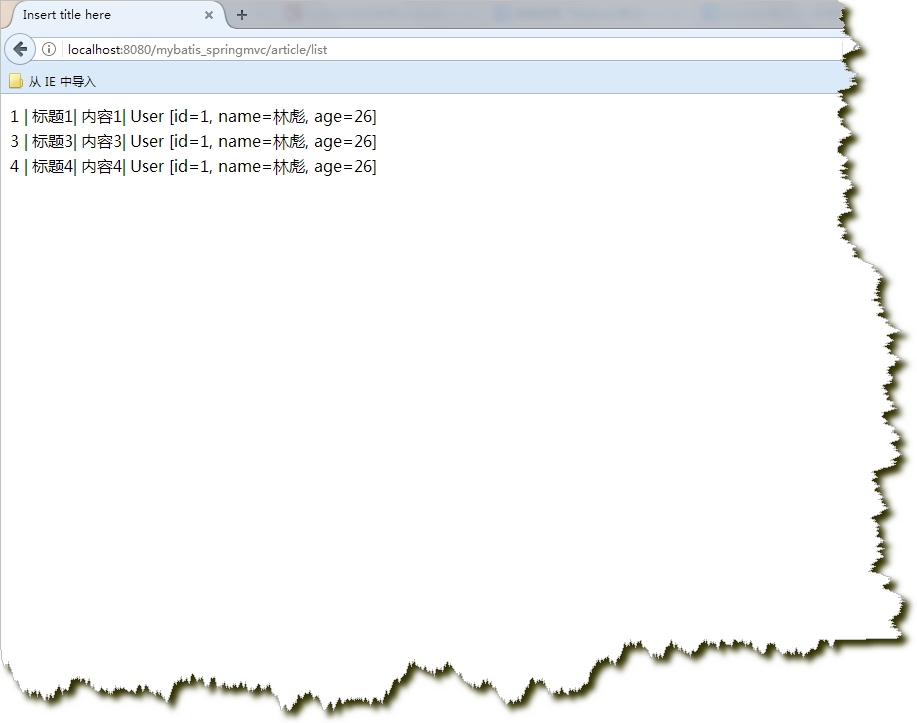
结果
MyBatis笔记----SSM框架mybatis3整合springmvc spring4的更多相关文章
- 从0开始整合SSM框架--3.整合SpringMvc
前面面已经完成了2大框架的整合,SpringMVC的配置文件单独放,然后在web.xml中配置整合.1.配置spring-mvc.xml <beans xmlns="http://ww ...
- SSM框架——详细整合教程(Spring+SpringMVC+MyBatis)【申明:来源于网络】
SSM框架--详细整合教程(Spring+SpringMVC+MyBatis)[申明:来源于网络] 地址:http://blog.csdn.net/u014662268/article/details ...
- SpringMVC笔记——SSM框架搭建简单实例
落叶枫桥 博客园 首页 新随笔 联系 订阅 管理 SpringMVC笔记——SSM框架搭建简单实例 简介 Spring+SpringMVC+MyBatis框架(SSM)是比较热门的中小型企业级项目开发 ...
- MyBatis学习总结(八)——Mybatis3.x与Spring4.x整合(转载)
孤傲苍狼 只为成功找方法,不为失败找借口! MyBatis学习总结(八)--Mybatis3.x与Spring4.x整合 一.搭建开发环境 1.1.使用Maven创建Web项目 执行如下命令: m ...
- 整合SSM框架必备基础—SpringMVC(下)
在上一篇文章<整合SSM框架必备基础-SpringMVC(上)>中,胖达介绍了关于SpringMVC的诞生.优势以及执行流程等理论知识点,这篇文章打算在实操中加深一下对SpringMVC的 ...
- SSM框架的整合思路&功能实现
这是我第一篇博客,关于SSM框架的整合思路以及简单功能实现. 首先,最近刚刚学习Spring+SpringMVC+Mybatis,在开发时遇到形形色色的问题,周遭人也为我提供了一些思路,我会一点点整理 ...
- SSM 框架快速整合实例--学生查询
一.快速准备 SSM 框架即 Spring 框架.SpringMVC 框架.MyBatis 框架,关于这几个框架的基础和入门程序,我前面已经写过几篇文章作为基础和入门介绍了.对于这 3 个框架还不熟悉 ...
- SSM框架快速整合实例——学生查询
一.快速准备 SSM 框架即 Spring 框架.SpringMVC 框架.MyBatis 框架,关于这几个框架的基础和入门程序,我前面已经写过几篇文章作为基础和入门介绍了.这里再简单的介绍一下: 1 ...
- SSM框架——详细整合教程
SSM框架——详细整合教程(Spring+SpringMVC+MyBatis) 1.基本概念 1.1.Spring Spring是一个开源框架,Spring是于2003 年兴起的一个轻量级的Jav ...
随机推荐
- 机器学习基础:(Python)训练集测试集分割与交叉验证
在上一篇关于Python中的线性回归的文章之后,我想再写一篇关于训练测试分割和交叉验证的文章.在数据科学和数据分析领域中,这两个概念经常被用作防止或最小化过度拟合的工具.我会解释当使用统计模型时,通常 ...
- Spring Boot (二)集成Jsp与生产环境部署
一.简介 提起Java不得不说的一个开发场景就是Web开发,也是Java最热门的开发场景之一,说到Web开发绕不开的一个技术就是JSP,因为目前市面上仍有很多的公司在使用JSP,所以本文就来介绍一下S ...
- RabbitMQ系列(一)RabbitMQ在Ubuntu上的环境搭建
环境配置 Ubuntu Server 18.04 RabbitMQ 3.6.10 安装之前 我们使用apt-get进行RabbitMQ安装,在安装之前,强烈建议您把apt源换位国内,大大增加下载安装的 ...
- MySQL中间件之ProxySQL(2):初试读写分离
返回ProxySQL系列文章:http://www.cnblogs.com/f-ck-need-u/p/7586194.html 1.实现一个简单的读写分离 这里通过一个简单的示例实现ProxySQL ...
- Perl匿名数组、hash和autovivification特性
可有构建匿名的对象,这样就没必要去为只用一两次的数组.hash去取名字,有时候取名是很烦的事. 使用中括号[]构建匿名数组 使用大括号{}构建匿名hash 不包含任何元素的[]和{}分别是匿名空数组. ...
- C 程序与 C++ 程序之间的相互调用
因为 C 编译器编译函数时不带参数的类型信息,只包含函数的符号名字.如 void foo( int x ) , C 编译器会将此函数编译成类似 _foo 的符号,C 链接器只要找到了调用函数的符号,就 ...
- 高德地图Javascript API设置域名白名单
在涉及到GPS地图相关应用的开发过程中,我们需要在高德开放平台注册相应的账号,并设置好相应应用来获取调用的Key值,该Key值直接放入到网站前端页面,针对任何人来说都可看到,因此我们防止他人盗用你的K ...
- ls 指令的介绍
每个文件在linux下面都会记录许多的时间参数, 其实是有三个主要的变动时间,那么三个时间的意义是什么呢? modification time (mtime) : 当该文件的“内容数据”变更时,就会更 ...
- 条件分支SQL语句<一> Case When
SELECT END ) AS MoneyIn, END ) AS MoneyOut, END ) AS BetMoney, END ) AS PctMoney, END ) AS WinMoney, ...
- 26.C++- 泛型编程之类模板(详解)
在上章25.C++- 泛型编程之函数模板(详解) 学习了后,本章继续来学习类模板 类模板介绍 和函数模板一样,将泛型思想应用于类. 编译器对类模板处理方式和函数模板相同,都是进行2次编译 类模板通 ...