
(转)Spring Boot(十七):使用 Spring Boot 上传文件
http://www.ityouknow.com/springboot/2018/01/12/spring-boot-upload-file.html
上传文件是互联网中常常应用的场景之一,最典型的情况就是上传头像等,今天就带着带着大家做一个 Spring Boot 上传文件的小案例。
1、pom 包配置
我们使用 Spring Boot 版本 2.1.0、jdk 1.8、tomcat 8.0。
<parent>

    <groupId>org.springframework.boot</groupId>

    <artifactId>spring-boot-starter-parent</artifactId>

    <version>2.1.0.RELEASE</version>

</parent>

<properties>

    <java.version>1.8</java.version>

</properties>

<dependencies>

    <dependency>

        <groupId>org.springframework.boot</groupId>

        <artifactId>spring-boot-starter-web</artifactId>

    </dependency>

    <dependency>

        <groupId>org.springframework.boot</groupId>

        <artifactId>spring-boot-starter-thymeleaf</artifactId>

    </dependency>

    <dependency>

        <groupId>org.springframework.boot</groupId>

        <artifactId>spring-boot-devtools</artifactId>

        <optional>true</optional>

    </dependency>

</dependencies>
引入了spring-boot-starter-thymeleaf做页面模板引擎,写一些简单的上传示例。
2、启动类设置
@SpringBootApplication

public class FileUploadWebApplication {

    public static void main(String[] args) throws Exception {

        SpringApplication.run(FileUploadWebApplication.class, args);

    }

    @Bean

    public TomcatServletWebServerFactory tomcatEmbedded() {

        TomcatServletWebServerFactory tomcat = new TomcatServletWebServerFactory();

        tomcat.addConnectorCustomizers((TomcatConnectorCustomizer) connector -> {

            if ((connector.getProtocolHandler() instanceof AbstractHttp11Protocol<?>)) {

                //-1 means unlimited

                ((AbstractHttp11Protocol<?>) connector.getProtocolHandler()).setMaxSwallowSize(-1);

            }

        });

        return tomcat;

    }

}
tomcatEmbedded 这段代码是为了解决,上传文件大于10M出现连接重置的问题。此异常内容 GlobalException 也捕获不到。
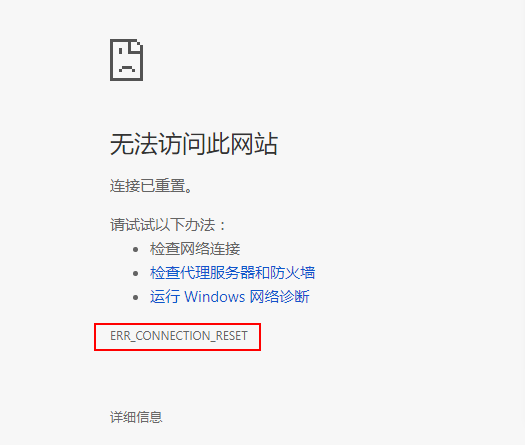
详细内容参考:Tomcat large file upload connection reset
3、编写前端页面
上传页面
<!DOCTYPE html>

<html xmlns:th="http://www.thymeleaf.org">

<body>

<h1>Spring Boot file upload example</h1>

<form method="POST" action="/upload" enctype="multipart/form-data">

    <input type="file" name="file" /><br/><br/>

    <input type="submit" value="Submit" />

</form>

</body>

</html>
非常简单的一个 Post 请求,一个选择框选择文件,一个提交按钮,效果如下:
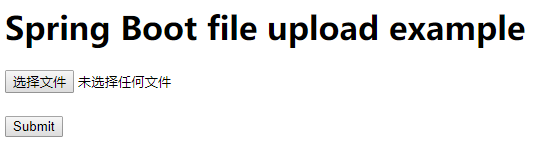
上传结果展示页面:
<!DOCTYPE html>

<html lang="en" xmlns:th="http://www.thymeleaf.org">

<body>

<h1>Spring Boot - Upload Status</h1>

<div th:if="${message}">

    <h2 th:text="${message}"/>

</div>

</body>

</html>
效果图如下:

4、编写上传控制类
访问 localhost 自动跳转到上传页面:
@GetMapping("/")

public String index() {

    return "upload";

}
上传业务处理
@PostMapping("/upload")

public String singleFileUpload(@RequestParam("file") MultipartFile file,

                               RedirectAttributes redirectAttributes) {

    if (file.isEmpty()) {

        redirectAttributes.addFlashAttribute("message", "Please select a file to upload");

        return "redirect:uploadStatus";

    }

    try {

        // Get the file and save it somewhere

        byte[] bytes = file.getBytes();

        Path path = Paths.get(UPLOADED_FOLDER + file.getOriginalFilename());

        Files.write(path, bytes);

        redirectAttributes.addFlashAttribute("message",

                "You successfully uploaded '" + file.getOriginalFilename() + "'");

    } catch (IOException e) {

        e.printStackTrace();

    }

    return "redirect:/uploadStatus";

}
上面代码的意思就是,通过MultipartFile读取文件信息,如果文件为空跳转到结果页并给出提示;如果不为空读取文件流并写入到指定目录,最后将结果展示到页面。
MultipartFile是Spring上传文件的封装类,包含了文件的二进制流和文件属性等信息,在配置文件中也可对相关属性进行配置,基本的配置信息如下:
spring.http.multipart.enabled=true#默认支持文件上传.spring.http.multipart.file-size-threshold=0#支持文件写入磁盘.spring.http.multipart.location=# 上传文件的临时目录spring.http.multipart.max-file-size=1Mb# 最大支持文件大小spring.http.multipart.max-request-size=10Mb# 最大支持请求大小
最常用的是最后两个配置内容,限制文件上传大小,上传时超过大小会抛出异常:

更多配置信息参考这里:Common application properties
5、异常处理
@ControllerAdvice

public class GlobalExceptionHandler {

    @ExceptionHandler(MultipartException.class)

    public String handleError1(MultipartException e, RedirectAttributes redirectAttributes) {

        redirectAttributes.addFlashAttribute("message", e.getCause().getMessage());

        return "redirect:/uploadStatus";

    }

}
设置一个@ControllerAdvice用来监控Multipart上传的文件大小是否受限,当出现此异常时在前端页面给出提示。利用@ControllerAdvice可以做很多东西,比如全局的统一异常处理等,感兴趣的同学可以下来了解。
6、总结
这样一个使用 Spring Boot 上传文件的简单 Demo 就完成了,感兴趣的同学可以将示例代码下载下来试试吧。
文章内容已经升级到 Spring Boot 2.x
参考:
Spring Boot file upload example
(转)Spring Boot(十七):使用 Spring Boot 上传文件的更多相关文章
- Spring Boot 静态资源映射与上传文件路由配置
默认静态资源映射目录 默认映射路径 在平常的 web 开发中,避免不了需要访问静态资源,如常规的样式,JS,图片,上传文件等;Spring Boot 默认配置对静态资源映射提供了如下路径的映射 /st ...
- Spring Boot应用上传文件时报错
问题描述 Spring Boot应用(使用默认的嵌入式Tomcat)在上传文件时,偶尔会出现上传失败的情况,后台报错日志信息如下:"The temporary upload location ...
- Spring Boot(十七):使用Spring Boot上传文件
Spring Boot(十七):使用Spring Boot上传文件 环境:Spring Boot最新版本1.5.9.jdk使用1.8.tomcat8.0 一.pom包配置 <parent> ...
- springboot(十七):使用Spring Boot上传文件
上传文件是互联网中常常应用的场景之一,最典型的情况就是上传头像等,今天就带着带着大家做一个Spring Boot上传文件的小案例. 1.pom包配置 我们使用Spring Boot最新版本1.5.9. ...
- spring boot(十七)上传文件
上传文件是互联网中常常应用的场景之一,最典型的情况就是上传头像等,今天就带着带着大家做一个Spring Boot上传文件的小案例. 1.pom包配置 我们使用Spring Boot最新版本1.5.9. ...
- Spring Boot(十七):使用 Spring Boot 上传文件
上传文件是互联网中常常应用的场景之一,最典型的情况就是上传头像等,今天就带着带着大家做一个 Spring Boot 上传文件的小案例. 1.pom 包配置 我们使用 Spring Boot 版本 ...
- 【Spring Boot】关于上传文件例子的剖析
目录 Spring Boot 上传文件 功能实现 增加ControllerFileUploadController 增加ServiceStorageService 增加一个Thymeleaf页面 修改 ...
- spring boot下MultipartHttpServletRequest如何提高上传文件大小的默认值
前言: 上传下载功能算是一个非常常见的功能,如果使用MultipartHttpServletRequest来做上传功能. 不配置上传大小的话,默认是2M.在有些场景,这个肯定不能满足条件. 上传代码: ...
- Spring Boot 使用 ServletFileUpload上传文件失败,upload.parseRequest(request)为空
使用Apache Commons FileUpload组件上传文件时总是返回null,调试发现ServletFileUpload对象为空,在Spring Boot中有默认的文件上传组件,在使用Serv ...
随机推荐
- __EF批量删除
控制器: [HttpPost] public int Delete_All(string Id) { List<int> IDS = new List<int>();//创建l ...
- c# partial 关键字的使用
C# 2.0 引入了局部类型的概念.局部类型允许我们将一个类.结构或接口分成几个部分,分别实现在几个不同的.cs文件中. 局部类型适用于以下情况: (1) 类型特别大,不宜放在一个文件中实现.(2) ...
- PHP stdClass类
stdClass 是 PHP 的一个基类,几乎所有的类都继承了这个类,所以任何时候都可以被 new,让这个变量成为一个 Object.同时,实例化之后的 stdClass 是没有任何属性和方法的,也就 ...
- Runnable和Callable接口辨析
突然发现和启动一个线程有关的有三函数,run(), call(), start(),有点小乱,所以特别梳理一下 首先说一下start(),这个是最好说的,感觉start()和run()这俩名字是真的有 ...
- 关于openSetting通过tap的调用
问题模块 框架类型 问题类型 API/组件名称 终端类型 微信版本 基础库版本 API和组件 小程序 Bug openSetting 工具 6.7.2 2.3.0 - 当前 Bug 的表现(可附上截图 ...
- Python mysql 创建连接
安装 pymysql 模块 pip3 install pymysql # python2, 默认无 pip 命令 # python3, 默认自带 pip3 命令 mysql基本操作 # 导入 pymy ...
- K8S 高级调度方式
可以使用高级调度分为: 节点选择器: nodeSelector.nodeName 节点亲和性调度: nodeAffinity Pod亲和性调度:PodAffinity Pod反亲和性调度:podAnt ...
- 在PeopleSoft中,什么是AlterAudit,Sysaudit和DDDAudit报告
Alter Audit-是一个进程,它标识任何需要SQL Alter process的记录.即:如果AD中定义的record与数据库的中定义不匹配则标识该记录为应该修改. SQL Alter-AD中的 ...
- PHP mkdir新建目录
一.在本目录下新建目录 <?php$dir_url = 'aaa/';if(!is_dir($dir_url)) { mkdir($dir_url, 0777);}?> 二.在级联创建 ...
- <自动化测试方案_5>第五章、代码单元自动化测试
第五章.代码单元自动化测试 代码单元测试需要根据编程语言,选择单元测试框架,然后访问类方法,函数.代码单元测试做自动化,相比API.UI自动化做起来更加麻烦,建议放到待API自动化测试.UI自动化测试 ...