
WEB开发的jsp例子标签库(jstl)的使用
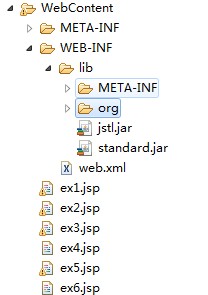
<!-- e1 -->

<%@ page language="java" contentType="text/html; charset=UTF-8"

    pageEncoding="UTF-8"%>

<%@ taglib prefix="c" uri="http://java.sun.com/jsp/jstl/core" %>

<%@ page import="java.util.*" %>

<!DOCTYPE html PUBLIC "-//W3C//DTD HTML 4.01 Transitional//EN" "http://www.w3.org/TR/html4/loose.dtd">

<html>

<head>

<meta http-equiv="Content-Type" content="text/html; charset=UTF-8">

<title>Insert title here</title>

</head>

<body>

<%

    request.setAttribute("attr_request","attr_request值");

    session.setAttribute("attr_session","attr_session值");

    application.setAttribute("attr_application","attr_application值");

%>

<div>

<div style="color:red;font-size:30px;">c:out标签的使用</div>

<div style="color:red">可以获取request,session,application的值</div>

    parameter的值(得到不了):<c:out value="${name}"/><br />

    <c:out value="${attr_request}"/>---${attr_request}<br />

    <c:out value="${attr_session}"/>---${attr_session}<br />

    <c:out value="${attr_application}"/>---${attr_application}<br />

</div>

<hr />

<%

    request.setAttribute("same_name","request值");

    session.setAttribute("same_name","session值");

    application.setAttribute("same_name","application值");

%>

<div>

<div style="color:red">相同名字的:request优先于session,session优先于application</div>

    <c:out value="${same_name}"/><br />

</div>

<hr />

<%

    HashMap map = new HashMap();

    map.put("name","嵌套值");

    request.setAttribute("result",map);

    ArrayList list = new ArrayList();

    HashMap map1 = new HashMap();

    map1.put("name","张三");

    list.add(map1);

    HashMap map2 = new HashMap();

    map2.put("name","李四");

    list.add(map2);

    request.setAttribute("list",list);

%>

<div>

<div style="color:red">可以嵌套获取值,java也一样</div>

    <c:out value="${result.name}"/> --- ${result.name}<br />

    <c:out value="${list[0].name}"/>--- ${list[0].name}<br />

    <c:out value="${list[1].name}"/>---${list[1].name}<br />

</div>

</body>

</html>

<!-- e2 -->

<%@ page language="java" contentType="text/html; charset=UTF-8"

    pageEncoding="UTF-8"%>

<%@ taglib prefix="c" uri="http://java.sun.com/jsp/jstl/core" %>

<%@ page import="java.util.*" %>

<!DOCTYPE html PUBLIC "-//W3C//DTD HTML 4.01 Transitional//EN" "http://www.w3.org/TR/html4/loose.dtd">

<html>

<head>

<meta http-equiv="Content-Type" content="text/html; charset=UTF-8">

<title>Insert title here</title>

</head>

<body>

<div style="color:red;font-size:30px;">条件判断标签的使用(c:if,c:shoose,c:when,c:otherwise)</div>

<hr />

<div>

<div style="color:red">c:if的使用</div>

<%

    request.setAttribute("result",true);

%>

<c:set var="userName" value="张三"/>

<c:if test="${result == true}"  var="flag">

    欢迎${sessionScope.userName}光临!

</c:if>

<br />

你选择的答案:${flag}

<hr />

<%

HashMap map = new HashMap();

map.put("mark",1);

request.setAttribute("result1",map);

%>

<br />

<c:if test="${result1.mark == 1}">

    还可以通过嵌套使用

</c:if>

<hr />

<div style="color:red">c:choose,when,otherwise的使用</div>

<%

request.setAttribute("month",2);

%>

    <c:choose>

        <c:when test="${month>0 && month<4}">春</c:when>

        <c:when test="${month>3 && month<7}">夏</c:when>

        <c:when test="${month>6 && month<10}">秋</c:when>

        <c:when test="${month>9 && month<13}">冬</c:when>

        <c:otherwise>错误</c:otherwise>

    </c:choose>

</div>

<hr />

</body>

</html>

<!-- e3 -->

<%@ page language="java" contentType="text/html; charset=UTF-8"

    pageEncoding="UTF-8"%>

<%@ taglib prefix="c" uri="http://java.sun.com/jsp/jstl/core" %>

<%@ page import="java.util.*" %>

<!DOCTYPE html PUBLIC "-//W3C//DTD HTML 4.01 Transitional//EN" "http://www.w3.org/TR/html4/loose.dtd">

<html>

<head>

<meta http-equiv="Content-Type" content="text/html; charset=UTF-8">

<title>Insert title here</title>

</head>

<body>

<div style="color:red;font-size:30px;">循环标签的使用(c:forEach,c:fortokens)</div>

<hr />

<div>

<div style="color:red">c:forEach的使用</div>

<%

    List<String> list = new ArrayList<String>();

    list.add("aaa1");

    list.add("aaa2");

    list.add("aaa3");

    request.setAttribute("list",list);

%>

    <c:forEach items="${list}" var="str" varStatus="xh">

      ${xh.count}序号从1开始,

      ${xh.index}序号从0开始,

      ${xh.last}最后一个序号,

      ${xh.first}第一个序号,

      :${str}<br/>

    </c:forEach>

<br />

<hr />

<div style="color:red">c:forEach的使用(空指针不会报错)</div>

    <% request.setAttribute("list1",null);%>

    <c:forEach items="${list1}" var="str">

        ${str}<br/>

    </c:forEach>

<br />

<hr />

<div style="color:red">c:forEach的使用(数组使用)</div>

<%

    String[] nums = { "1", "2", "3", "4", "5", "6", "7", "8", "9"};

    request.setAttribute("nums",nums);

%>

    <c:forEach items="${nums}" var="num">

    ${num}<br />

    </c:forEach>

<br />

<hr />

<div style="color:red">c:forEach的使用(下标从0开始)</div>

<c:forEach items="${nums}" var="num" begin="1" end="7" step="2">

    ${num}<br />

    </c:forEach>

<br />

<div style="color:red">c:forEach的使用(数组使用)</div>

<%

        ArrayList array = new ArrayList();

        HashMap m = new HashMap();

        m.put("name","张三");

        array.add(m);

        m = new HashMap();

        m.put("name","李四");

        array.add(m);

        m = new HashMap();

        m.put("name","王五");

        array.add(m);

        m = new HashMap();

        m.put("name","赵六");

        array.add(m);

        m = new HashMap();

        m.put("name","林奇");

        array.add(m);

        request.setAttribute("result_list", array);

%>

 <c:forEach items="${result_list}"  var="user">

         ${user.name}<br />

 </c:forEach>

<br />

<hr />

<div style="color:red">c:forTokens的使用</div>

<c:forTokens items="a:b:c:d" delims=":" var="token">

    <c:out value="${token}"/>

</c:forTokens>

</body>

</html>

<!-- e4 -->

<%@ page language="java" contentType="text/html; charset=UTF-8"

    pageEncoding="UTF-8"%>

<%@ taglib prefix="c" uri="http://java.sun.com/jsp/jstl/core" %>

<%@ taglib uri="http://java.sun.com/jsp/jstl/fmt" prefix="fmt" %>

<%@ page import="java.util.*" %>

<!DOCTYPE html PUBLIC "-//W3C//DTD HTML 4.01 Transitional//EN" "http://www.w3.org/TR/html4/loose.dtd">

<html>

<head>

<meta http-equiv="Content-Type" content="text/html; charset=UTF-8">

<title>Insert title here</title>

</head>

<body>

<div style="color:red;font-size:30px;">格式化标签的使用</div>

<hr />

<div style="color:red">fmt:formatNumber的使用</div>

    <fmt:formatNumber value="0.3" type="number"/><br />

    <fmt:formatNumber value="0.3" type="currency"/><br />

    <fmt:formatNumber value="0.3" type="percent"/><br />

<br />

<hr />

<div style="color:red">fmt:formatNumber的使用(精确小数点)</div>

<fmt:formatNumber value="12.31" pattern=".0000"/><br/>

<fmt:formatNumber value="1245678.61" pattern="#"/><br/>

<br />

<hr />

<div style="color:red">fmt:formatDate的使用</div>

<fmt:formatDate value="<%=new Date()%>" /><br/>

<fmt:formatDate value="<%=new Date()%>" type="time"/><br/>

<fmt:formatDate value="<%=new Date()%>" pattern="yyyy/MM/dd hh:mm:ss" /><br />

<fmt:formatDate value="<%=new Date()%>" pattern="yyyy-MM-dd HH:mm:ss" /><br />

<fmt:formatDate value="<%=new Date()%>" pattern="yyyy年MM月dd日 hh小时mm分钟ss秒" /><br />

<fmt:formatDate value="<%=new Date()%>" pattern="yy/MM/dd hh:mm:ss" /><br />

<hr>

</body>

</html>

<!-- e5 -->

<%@ page language="java" contentType="text/html; charset=UTF-8"

    pageEncoding="UTF-8"%>

<%@ taglib prefix="c" uri="http://java.sun.com/jsp/jstl/core" %>

<%@ taglib uri="http://java.sun.com/jsp/jstl/fmt" prefix="fmt" %>

<%@ page import="java.util.*" %>

<!DOCTYPE html PUBLIC "-//W3C//DTD HTML 4.01 Transitional//EN" "http://www.w3.org/TR/html4/loose.dtd">

<html>

<head>

<meta http-equiv="Content-Type" content="text/html; charset=UTF-8">

<title>Insert title here</title>

</head>

<body>

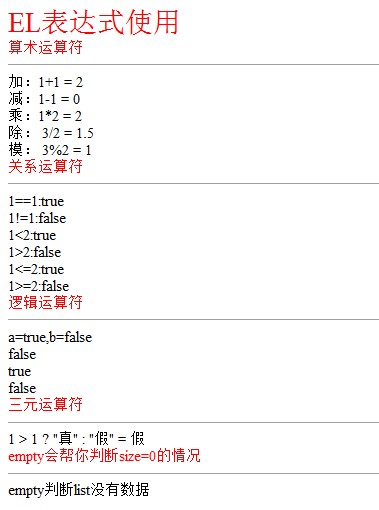
<div style="color:red;font-size:30px;">EL表达式使用</div>

<div style="color:red">算术运算符</div>

<hr />

加:1+1    = ${1+1}<br/>

减:1-1    = ${1-1}<br/>

乘:1*2    = ${1*2}<br/>

除:    3/2 = ${3/2}<br/>

模:    3%2 = ${3%2}<br/>

<div style="color:red">关系运算符</div>

<hr />

1==1:${1==1}<br/>

1!=1:${1!=1}<br/><2:${1<2}<br/>

1>2:${1>2}<br/><=2:${1<=2}<br/>

1>=2:${1>=2}<br/>

<div style="color:red">逻辑运算符</div>

<hr />

<%

request.setAttribute("a",true);

request.setAttribute("b",false);

%>

a=true,b=false<br/>

${a && b}<br/>

${a || b}<br/>

${!a}<br/>

<div style="color:red">三元运算符</div>

<hr />

1 > 1 ? "真" : "假" = ${1 > 1 ? "真" : "假"}

<div style="color:red">empty会帮你判断size=0的情况</div>

<hr />

<% request.setAttribute("list",new  ArrayList());%>

<c:if test="${empty list}">empty判断list没有数据</c:if>

</body>

</html>

<!-- e6 -->

<%@ page language="java" contentType="text/html; charset=UTF-8"

    pageEncoding="UTF-8"%>

<%@ taglib prefix="c" uri="http://java.sun.com/jsp/jstl/core" %>

<%@ taglib uri="http://java.sun.com/jsp/jstl/fmt" prefix="fmt" %>

<%@ page import="java.util.*" %>

<!DOCTYPE html PUBLIC "-//W3C//DTD HTML 4.01 Transitional//EN" "http://www.w3.org/TR/html4/loose.dtd">

<html>

<head>

<meta http-equiv="Content-Type" content="text/html; charset=UTF-8">

<title>Insert title here</title>

</head>

<body>

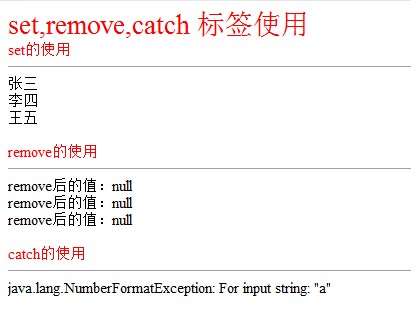
<div style="color:red;font-size:30px;">set,remove,catch 标签使用</div>

<div style="color:red">set的使用</div>

<hr />

 <c:set var="userName" value="张三" scope="request" />

 <c:set var="userName" value="李四" scope="session" />

 <c:set var="userName" value="王五" scope="application" />

 <%=request.getAttribute("userName") %><br/>

 <%=session.getAttribute("userName") %><br/>

 <%=application.getAttribute("userName") %><br/>

<br/>

<div style="color:red">remove的使用</div>

<hr />

 <c:remove var="userName" scope="request" />

 <c:remove var="userName" scope="session" />

 <c:remove var="userName" scope="application" />

 remove后的值:<%=request.getAttribute("userName") %><br/>

  remove后的值:<%=session.getAttribute("userName") %><br/>

  remove后的值:<%=application.getAttribute("userName") %><br/>

 <br/>

<div style="color:red">catch的使用</div>

<hr />

<c:catch var="error_Message">

<%

    int i = Integer.parseInt("a");

%>

</c:catch>

${error_Message}

</body>

</html>
要使用jstl标签库的话:需要自己下载jar包 jstl.jar&standard.jar
效果图:
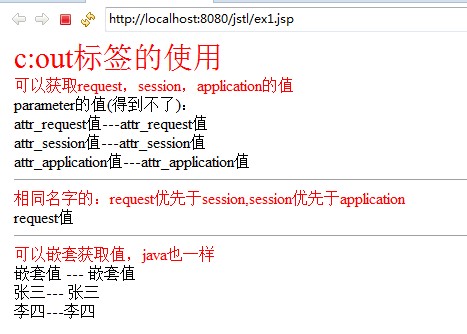
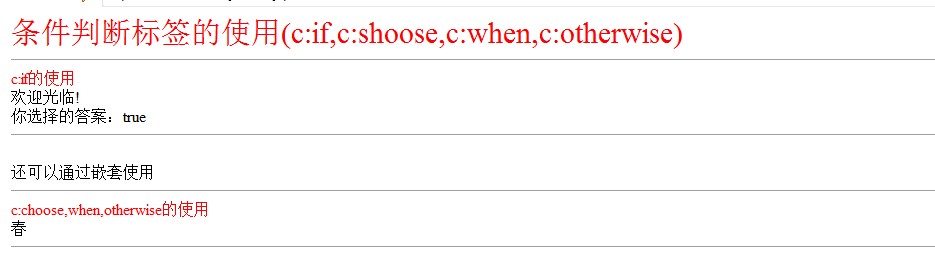

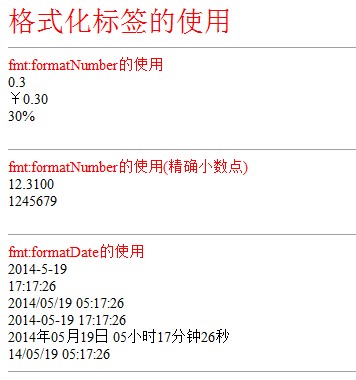
WEB开发的jsp例子标签库(jstl)的使用的更多相关文章
- JSP标准标签库(JSTL)--JSTL简介与安装
对于MVC设计模式来讲,我们一直强调,在一个JSP钟scriptlet代码越少越好,但是只靠以前的概念很难实现,因为标签的开发特别麻烦,所以为了简化标签,也为了让标签更具备一些通用性,所以一般在开发中 ...
- JSP 标准标签库(JSTL)
JSP 标准标签库(JSTL) JSP标准标签库(JSTL)是一个JSP标签集合,它封装了JSP应用的通用核心功能. JSTL支持通用的.结构化的任务,比如迭代,条件判断,XML文档操作,国际化标签, ...
- JSP 标准标签库JSTL
JSP标准标签库(JSTL)是一个JSP标签集合,它封装了JSP应用的通用核心功能. JSTL支持通用的.结构化的任务,比如迭代,条件判断,XML文档操作,国际化标签,SQL标签. 除了这些,它还提供 ...
- JSP标准标签库JSTL
1.什么是JSTL? JSP标准标签库(JSP Standard Tag Library) 2.JSTL标准标签库中的常用标签 JSTL是JSP页面的标签库,实质上是一段Java代码.我们常用的是它的 ...
- jsp标准标签库——jstl
JSP标准标签库(JSTL)是一个JSP标签集合,它封装了JSP应用的通用核心功能. JSTL支持通用的.结构化的任务,比如迭代,条件判断,XML文档操作,国际化标签,SQL标签. 除了这些,它还提供 ...
- JSP标准标签库(JSTL)--核心标签库 c
核心标签库是JSTL中最重要的部分,可以完成输出,判断,迭代等操作 功能分类: 1. 基本标签: <c:out>:输出属性内容 <c:set>:设置属性内容 <c:rem ...
- JSP标准标签库(JSTL)--XML标签库 x
³在开发中XML解析的操作是非常烦琐的,幸运的是在JSTL中专门提供了用于XML解析的操作,这样用户就可以不用费力的去研究SAX或DOM等操作的使用,就可以轻松的进行XML文件的解析处理. XML标 ...
- JSP标准标签库(JSTL)--国际化标签库 fmt
JSTL中使用fmt.tld作为格式化标签库的定义文件 No. 功能分类 标签名称 描述 1 国际化标签 <fmt:setLocale> 设置一个全局的地区代码 2 <fmt:req ...
- JSP标准标签库(JSTL)--SQL标签库 sql
了解即可.SQL标签库 No. 功能分类 标签名称 描述 1 数据源标签 <sql:setDataSource> 设置要使用的数据源名称 2 数据库操作标签 <sql:query&g ...
随机推荐
- Mongodb定时备份脚本和清除脚本
Mongodb用的是可以热备份的mongodump和对应恢复的mongorestore,在linux下面使用shell脚本写的定时备份,代码如下 1.定时备份 #!/bin/bash sourcepa ...
- idea maven install 卡住,无报错排查。
今天使用idea打包,执行install,看控制台日志,卡主了(意思是日志不继续在控制台输打印了,卡主了,也看不到错误),也没有报错,然后进行排查. 进入dos命令,进入到项目的根目录,使用 运行 m ...
- EF 连接到 Azure-SQL
using Autofac; using Autofac.Integration.Mvc; using System; using System.Collections.Generic; using ...
- SpringBoot和SpringCloud区别
SpringBoot专注于快速方便的开发单个个体微服务. SpringCloud是关注全局的微服务协调整理治理框架,它将SpringBoot开发的一个个单体微服务整合并管理起来, 为各个服 ...
- Chetsheet: 2017 01.01 ~ 01.31
Web TypeScript: the missing introduction Async HTTP API and service bus Optimizing the Performance o ...
- The Struts dispatcher cannot be found. This is usually caused by using Struts tags without the associated filter.
The Struts dispatcher cannot be found. This is usually caused by using Struts tags without the assoc ...
- JAVA常用单词
柠檬学院Java 基础常见英语词汇(共 70 个)OO: object-oriented ,面向对象 OOP: object-oriented programming,面向对象编程JDK:Java d ...
- 《JavaWeb从入门到改行》那些年一起学习的Servlet
目录 获取ServletContext : ServletContext接口中的一些方法 application域存取数据功能 代码演示: application域获取项目文件路径 代码演示: API ...
- Hibernate Annotation (Hibernate 注解)
简介: 传统上,Hibernate的配置依赖于外部 XML 文件:数据库映射被定义为一组 XML 映射文件,并且在启动时进行加载. 然而现在借助新的 Hibernate Annotation 库, ...
- JavaScript里面的居民们2-字符串
基于HTML,实现需求 按照HTML中按钮的描述以此实现功能 计算结果显示在 id 为 result 的 P 标签中 <!DOCTYPE html> <html> <he ...