
使用R语言和XML包抓取网页数据-Scraping data from web pages in R with XML package
In the last years a lot of data has been released publicly in different formats, but sometimes the data we're interested in are still inside the HTML of a web page: let's see how to get those data.
One of the existing packages for doing this job is the XML package. This package allows us to read and create XML and HTML documents; among the many features, there's a function called readHTMLTable() that analyze the parsed HTML and returns the tables present in the page. The details of the package are available in the official documentation of the package.
Let's start.
Suppose we're interested in the italian demographic info present in this page http://sdw.ecb.europa.eu/browse.do?node=2120803 from the EU website. We start loading and parsing the page:
page <- "http://sdw.ecb.europa.eu/browse.do?node=2120803"

parsed <- htmlParse(page)
Now that we have parsed HTML, we can use the readHTMLTable() function to return a list with all the tables present in the page; we'll call the function with these parameters:
- parsed: the parsed HTML
- skip.rows: the rows we want to skip (at the beginning of this table there are a couple of rows that don't contain data but just formatting elements)
- colClasses: the datatype of the different columns of the table (in our case all the columns have integer values); the rep() function is used to replicate 31 times the "integer" value
table <- readHTMLTable(parsed, skip.rows=c(1,3,4,5), colClasses = c(rep("integer", 31)))
As we can see from the page source code, this web page contains six HTML tables; the one that contains the data we're interested in is the fifth, so we extract that one from the list of tables, as a data frame:
values <- as.data.frame(table[5])
Just for convenience, we rename the columns with the period and italian data:
# renames the columns for the period and Italy

colnames(values)[1] <- 'Period'

colnames(values)[19] <- 'Italy'
The italian data lasts from 1990 to 2014, so we have to subset only those rows and, of course, only the two columns of period and italian data:
# subsets the data: we are interested only in the first and the 19th column (period and italian info)

ids <- values[c(1,19)]

# Italy has only 25 years of info, so we cut away the other rows

ids <- as.data.frame(ids[1:25,])
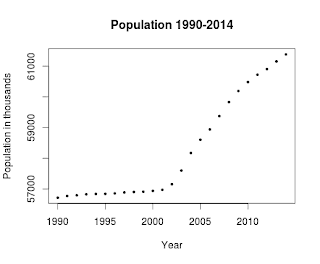
Now we can plot these data calling the plot function with these parameters:
- ids: the data to plot
- xlab: the label of the X axis
- ylab: the label of the Y axis
- main: the title of the plot
- pch: the symbol to draw for evey point (19 is a solid circle: look here for an overview)
- cex: the size of the symbol
plot(ids, xlab="Year", ylab="Population in thousands", main="Population 1990-2014", pch=19, cex=0.5)
and here is the result:
Here's the full code, also available on my github:
library(XML)

# sets the URL

url <- "http://sdw.ecb.europa.eu/browse.do?node=2120803"

# let the XML library parse the HTMl of the page

parsed <- htmlParse(url)

# reads the HTML table present inside the page, paying attention

# to the data types contained in the HTML table

table <- readHTMLTable(parsed, skip.rows=c(1,3,4,5), colClasses = c(rep("integer", 31) ))

# this web page contains seven HTML pages, but the one that contains the data

# is the fifth

values <- as.data.frame(table[5])

# renames the columns for the period and Italy

colnames(values)[1] <- 'Period'

colnames(values)[19] <- 'Italy'

# now subsets the data: we are interested only in the first and

# the 19th column (period and Italy info)

ids <- values[c(1,19)]

# Italy has only 25 year of info, so we cut away the others

ids <- as.data.frame(ids[1:25,])

# plots the data

plot(ids, xlab="Year", ylab="Population in thousands", main="Population 1990-2014", pch=19, cex=0.5)

from: http://andreaiacono.blogspot.com/2014/01/scraping-data-from-web-pages-in-r-with.html
使用R语言和XML包抓取网页数据-Scraping data from web pages in R with XML package的更多相关文章
- java抓取网页数据,登录之后抓取数据。
最近做了一个从网络上抓取数据的一个小程序.主要关于信贷方面,收集的一些黑名单网站,从该网站上抓取到自己系统中. 也找了一些资料,觉得没有一个很好的,全面的例子.因此在这里做个笔记提醒自己. 首先需要一 ...
- Asp.net 使用正则和网络编程抓取网页数据(有用)
Asp.net 使用正则和网络编程抓取网页数据(有用) Asp.net 使用正则和网络编程抓取网页数据(有用) /// <summary> /// 抓取网页对应内容 /// </su ...
- 使用JAVA抓取网页数据
一.使用 HttpClient 抓取网页数据 1 2 3 4 5 6 7 8 9 10 11 12 13 14 15 16 17 18 19 20 21 22 23 24 25 26 27 28 29 ...
- 使用HtmlAgilityPack批量抓取网页数据
原文:使用HtmlAgilityPack批量抓取网页数据 相关软件点击下载登录的处理.因为有些网页数据需要登陆后才能提取.这里要使用ieHTTPHeaders来提取登录时的提交信息.抓取网页 Htm ...
- web scraper 抓取网页数据的几个常见问题
如果你想抓取数据,又懒得写代码了,可以试试 web scraper 抓取数据. 相关文章: 最简单的数据抓取教程,人人都用得上 web scraper 进阶教程,人人都用得上 如果你在使用 web s ...
- c#抓取网页数据
写了一个简单的抓取网页数据的小例子,代码如下: //根据Url地址得到网页的html源码 private string GetWebContent(string Url) { string strRe ...
- 【iOS】正則表達式抓取网页数据制作小词典
版权声明:本文为博主原创文章,未经博主同意不得转载. https://blog.csdn.net/xn4545945/article/details/37684127 应用程序不一定要自己去提供数据. ...
- 01 UIPath抓取网页数据并导出Excel(非Table表单)
上次转载了一篇<UIPath抓取网页数据并导出Excel>的文章,因为那个导出的是table标签中的数据,所以相对比较简单.现实的网页中,有许多不是通过table标签展示的,那又该如何处理 ...
- Node.js的学习--使用cheerio抓取网页数据
打算要写一个公开课网站,缺少数据,就决定去网易公开课去抓取一些数据. 前一阵子看过一段时间的Node.js,而且Node.js也比较适合做这个事情,就打算用Node.js去抓取数据. 关键是抓取到网页 ...
随机推荐
- 不修改系统日期和时间格式,解决Delphi报错提示 '****-**-**'is not a valid date and time
假如操作系统的日期格式不是yyyy-MM-dd格式,而是用strtodate('2014-10-01')) 来转换的话,程序会提示爆粗 '****-**-**'is not a valid date ...
- AC日记——松江1843路 洛谷七月月赛
松江1843路 思路: 三分: 代码: #include <bits/stdc++.h> using namespace std; #define maxn 100005 #define ...
- HTK训练错误消息意义
在HTK训练线上数据的时候,遇到了ERROR [+6550] LoadHTKLabels: Junk at end of HTK transcription,这个问题,网上查阅是说有空行,结果根本没有 ...
- python的select和epoll
python的select和epoll 1.select模型: linux中每个套接字都是文件,都有唯一的文件描述符,这些设备的文件描述符被放在一个数组中,然后select调用的时候遍历这个数组,如果 ...
- markdown在list或者引用之后怎么去重新令其一段
多打一个空格,虽然这个方法简单的要是,但是我就是没有想到,真是尴尬到奶奶家啦!
- linux 重写rm命令
重写rm命令 replease rm to trash 必须使用root编辑/etc/bashrc vim /etc/bashrc 在最后面增加如下脚本 saferm () { if [ ! -d ...
- Java反射机制Reflection
Java反射机制 1 .class文件 2 Class类 3 Class类与反射机制 4 Java反射机制的类库支持及简介 5 反射机制的定义与应用 6 反射机制Demo Java反射机制demo(一 ...
- 后台开发常用mysql语句_v1.0
目录 一.基本信息查看 1. 表描述 二.表操作 1. 查看建表语句 2.查看表 3. 创建表 4. 更新表 5. 删除表 6. 重命名表 三.索引操作 1. 查看索引 2. 创建索引 3. 修改索引 ...
- 【SQL】175. Combine Two Tables
Table: Person +-------------+---------+ | Column Name | Type | +-------------+---------+ | PersonId ...
- Scrapy实战篇(五)爬取京东商城文胸信息
创建scrapy项目 scrapy startproject jingdong 填充 item.py文件 在这里定义想要存储的字段信息 import scrapy class JingdongItem ...