
mybatis整合redis二级缓存
mybatis默认开启了二级缓存功能,在mybatis主配置文件中,将cacheEnabled设置成false,则会关闭二级缓存功能
  <settings>

    <!--二级缓存默认开启,false关闭-->

    <setting name="cacheEnabled" value="false" />

    <!--mybatis日志打印到控制台-->

    <setting name="logImpl" value="STDOUT_LOGGING" />

  </settings>
mybatis框架虽然默认开启了二级缓存功能,但是并没有默认实现,也就是下面这句代码返回null, 然后走一级缓存
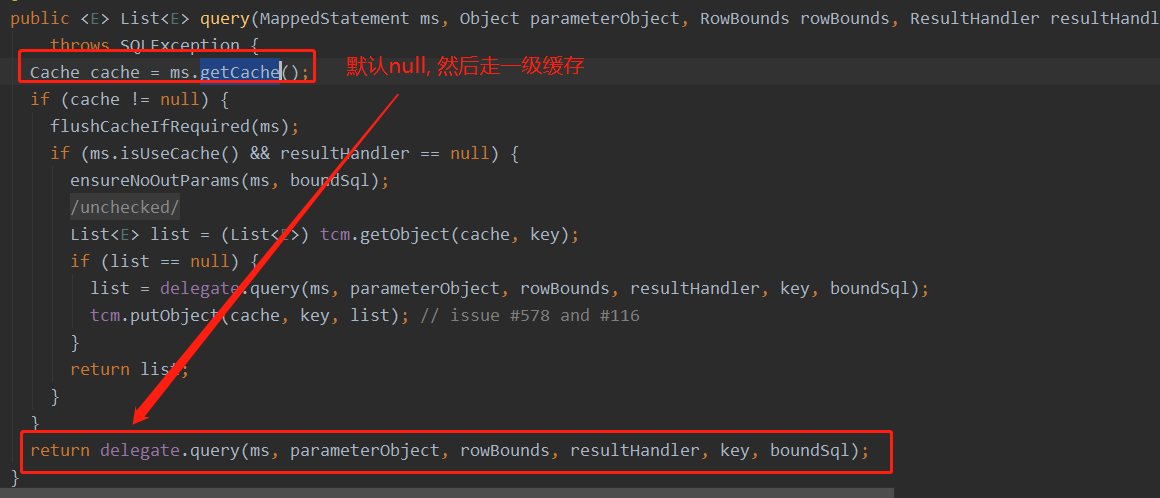
下面是配置Redis作为mybatis的二级缓存,代码如下:
(1)mybatis主配置文件mybatis-config.xml中添加如下配置
  <settings>

    <!--二级缓存默认开启,false关闭-->

    <setting name="cacheEnabled" value="true" />

    <!--mybatis日志打印到控制台,以便于观察-->

    <setting name="logImpl" value="STDOUT_LOGGING" />

  </settings>
(2)FemaleMapper.xml 配置如下
<mapper namespace="qinfeng.zheng.FemaleMapper">

    <select id="getFemaleById" resultType="qinfeng.zheng.entity.Female" parameterType="int">

      SELECT id,name FROM tb_female where id = #{id};

    </select>

    <cache eviction="LRU" type="qinfeng.zheng.RedisCache"/>

</mapper>
LRU是mybatis默认的过期策略
(3)qinfeng\zheng\RedisCache.java
import org.apache.ibatis.cache.Cache;

import redis.clients.jedis.Jedis;

import redis.clients.jedis.JedisPool;

import redis.clients.jedis.JedisPoolConfig;

import java.io.ByteArrayInputStream;

import java.io.ByteArrayOutputStream;

import java.io.ObjectInputStream;

import java.io.ObjectOutputStream;

import java.util.Map;

/**

 * 使用redis的Hash结构

 */

public class RedisCache implements Cache {

    private String id;

    private JedisPool jedisPool;

    private static int EXPIRE_TIME = 1000 * 1000;

    public RedisCache(String id) {

        if (id == null) {

            throw new IllegalArgumentException("Cache instances require an ID");

        }

        this.id = id;

        JedisPoolConfig jedisPoolConfig = new JedisPoolConfig();

        jedisPool = new JedisPool(jedisPoolConfig, "192.168.79.221", 6379, 3000, "123456");

    }

    @Override

    public String getId() {

        return id;

    }

    @Override

    public void putObject(Object key, Object value) {

        execute(jedis -> {

            try {

                ByteArrayOutputStream stream = new ByteArrayOutputStream();

                ObjectOutputStream outputStream = new ObjectOutputStream(stream);

                outputStream.writeObject(value);

                byte[] idBytes = id.getBytes();

                jedis.hset(idBytes, key.toString().getBytes(), stream.toByteArray());

                // 设置一个过期时间。。

                if (jedis.ttl(idBytes) == -1) {

                    jedis.expire(idBytes, EXPIRE_TIME);

                }

            } catch (Exception e) {

                throw new RuntimeException("put object to redis error!", e);

            }

            return null;

        });

    }

    @Override

    public Object getObject(Object key) {

        return execute(jedis -> {

            try {

                byte[] bytes = jedis.hget(id.getBytes(), key.toString().getBytes());

                if (bytes == null) {

                    return null;

                }

                ByteArrayInputStream inputStream = new ByteArrayInputStream(bytes);

                ObjectInputStream objectInputStream = new ObjectInputStream(inputStream);

                return objectInputStream.readObject();

            } catch (Exception e) {

                throw new RuntimeException("get data from redis error!", e);

            }

        });

    }

    @Override

    public Object removeObject(Object key) {

        return execute(jedis -> jedis.hdel(id.getBytes(), key.toString().getBytes()));

    }

    @Override

    public void clear() {

        execute(jedis -> jedis.del(id.getBytes()));  //因为id是String类型,所以直接jedis.del(id)也行

    }

    @Override

    public int getSize() {

        return (Integer) execute(jedis -> {

            Map<byte[], byte[]> map = jedis.hgetAll(id.getBytes());

            return map.size();

        });

    }

    private Object execute(RedisCallBack redisCallBack) {

        try (Jedis jedis = jedisPool.getResource()) {

            return redisCallBack.callBack(jedis);

        } catch (Exception e) {

            throw new RuntimeException(e.getMessage());

        }

    }

}
public interface RedisCallBack {

    Object callBack(Jedis jedis);

}
使用redis作为mybatis的二级缓存框架,最主要就是实现mybatis提供的spi接口--Cache即可,然后实现putObject,getObject这两个主要的方法即可。
除此之外,记得pom.xml文件中添加jedis依赖
      <dependency>

            <groupId>redis.clients</groupId>

            <artifactId>jedis</artifactId>

            <version>2.9.0</version>

        </dependency>
(4)修改测试代码
public class V1Test {

    public static void main(String[] args) {

        try (InputStream is = Resources.getResourceAsStream("mybatis-config.xml")) {

            SqlSessionFactory sqlSessionFactory = new SqlSessionFactoryBuilder().build(is);

            SqlSession sqlSession = sqlSessionFactory.openSession(true);

            FemaleMapper femaleMapper = sqlSession.getMapper(FemaleMapper.class);

            Female female = femaleMapper.getFemaleById(1);

            System.out.println(female);

            System.out.println("-----------分隔符----------------------------------");

            SqlSession sqlSession2 = sqlSessionFactory.openSession(true);

            FemaleMapper femaleMapper2 = sqlSession2.getMapper(FemaleMapper.class);

            Female female2 = femaleMapper2.getFemaleById(1);

            System.out.println(female2);

        } catch (Exception e) {

            e.printStackTrace();

        }

    }

}
第一次运行:
Opening JDBC Connection

Created connection 331510866.

==>  Preparing: SELECT id,name FROM tb_female where id = ?;

==> Parameters: 1(Integer)

<==    Columns: id, name

<==        Row: 1, soga

<==      Total: 1

Female(id=1, name=soga)

-----------分隔符----------------------------------

Opening JDBC Connection

Created connection 1316061703.

==>  Preparing: SELECT id,name FROM tb_female where id = ?;

==> Parameters: 1(Integer)

<==    Columns: id, name

<==        Row: 1, soga

<==      Total: 1

Female(id=1, name=soga)
哈哈,貌似还是查库两次,redis缓存好像没有起到作用。
事实上,mybatis框架为二级缓存提供了一个缓冲Map, 需要在调用commit方法之后,才会将缓冲区Map中的数据写入到redis中。
我们修改一下测试代码,然后再运行观察结果
public class V1Test {

    public static void main(String[] args) {

        try (InputStream is = Resources.getResourceAsStream("mybatis-config.xml")) {

            SqlSessionFactory sqlSessionFactory = new SqlSessionFactoryBuilder().build(is);

            SqlSession sqlSession = sqlSessionFactory.openSession(true);

            FemaleMapper femaleMapper = sqlSession.getMapper(FemaleMapper.class);

            Female female = femaleMapper.getFemaleById(1);

            System.out.println(female);

            sqlSession.commit();

            System.out.println("-----------分隔符----------------------------------");

            SqlSession sqlSession2 = sqlSessionFactory.openSession(true);

            FemaleMapper femaleMapper2 = sqlSession2.getMapper(FemaleMapper.class);

            Female female2 = femaleMapper2.getFemaleById(1);

            System.out.println(female2);

        } catch (Exception e) {

            e.printStackTrace();

        }

    }

}
运行结果:
哎哎哎,报了个错,记得Female 需要序列化
Opening JDBC Connection

Created connection 490150701.

==>  Preparing: SELECT id,name FROM tb_female where id = ?;

==> Parameters: 1(Integer)

<==    Columns: id, name

<==        Row: 1, soga

<==      Total: 1

Female(id=1, name=soga)

-----------分隔符----------------------------------

Cache Hit Ratio [qinfeng.zheng.FemaleMapper]: 0.5

Female(id=1, name=soga)
请看,这次只查了一个库,第2冲直接缓存命中、
我们再运行一次刚才的代码
Cache Hit Ratio [qinfeng.zheng.FemaleMapper]: 1.0

Female(id=1, name=soga)

-----------分隔符----------------------------------

Cache Hit Ratio [qinfeng.zheng.FemaleMapper]: 1.0

Female(id=1, name=soga)
两次都缓存命中!!
再看一下redis:

好了, mybatis整合redis为二级缓存到此完毕,下章分析一下它的源码实现!
mybatis整合redis二级缓存的更多相关文章
- Mybatis使用Redis二级缓存
在Mybatis中允许开发者自定义自己的缓存,本文将使用Redis作为Mybatis的二级缓存.在Mybatis中定义二级缓存,需要如下配置: 1. MyBatis支持二级缓存的总开关:全局配置变量参 ...
- SpringBoot + MySQL + MyBatis 整合 Redis 实现缓存操作
本地安装 Redis Redis 安装:https://www.cnblogs.com/oukele/p/11373052.html 项目结构: SpringBootRedis 工程项目结构如下: ...
- SSM+redis整合(mybatis整合redis做二级缓存)
SSM:是Spring+Struts+Mybatis ,另外还使用了PageHelper 前言: 这里主要是利用redis去做mybatis的二级缓存,mybaits映射文件中所有的select都会刷 ...
- Spring Boot + Mybatis + Redis二级缓存开发指南
Spring Boot + Mybatis + Redis二级缓存开发指南 背景 Spring-Boot因其提供了各种开箱即用的插件,使得它成为了当今最为主流的Java Web开发框架之一.Mybat ...
- 【MyBatis学习13】MyBatis中的二级缓存
1. 二级缓存的原理 前面介绍了,mybatis中的二级缓存是mapper级别的缓存,值得注意的是,不同的mapper都有一个二级缓存,也就是说,不同的mapper之间的二级缓存是互不影响的.为了更加 ...
- Mybatis一级、二级缓存
Mybatis一级.二级缓存 一级缓存 首先做一个测试,创建一个mapper配置文件和mapper接口,我这里用了最简单的查询来演示. <mapper namespace="c ...
- Mybatis整合Redis实现二级缓存
Mybatis集成ehcache . 为什么需要缓存 拉高程序的性能 . 什么样的数据需要缓存 很少被修改或根本不改的数据 业务场景比如:耗时较高的统计分析sql.电话账单查询sql等 . ehcac ...
- springboot mybatis redis 二级缓存
前言 什么是mybatis二级缓存? 二级缓存是多个sqlsession共享的,其作用域是mapper的同一个namespace. 即,在不同的sqlsession中,相同的namespace下,相同 ...
- Spring Boot 整合 Redis 实现缓存操作
摘要: 原创出处 www.bysocket.com 「泥瓦匠BYSocket 」欢迎转载,保留摘要,谢谢! 『 产品没有价值,开发团队再优秀也无济于事 – <启示录> 』 本文提纲 ...
随机推荐
- ORA-00020: maximum number of processes (800) exceeded
[oracle@db04-1 ~]$ sqlplus -prelim / as sysdba SQL*Plus: Release 11.2.0.3.0 Production on 星期四 8月 31 ...
- noi.ac#228 book
分析 代码 #include<bits/stdc++.h> using namespace std; #define int long long const int inf =1e18; ...
- 关于web开发中路径的问题的总结
web开发中的一个困扰web开发新人的是路径问题: 1:项目的静态资源的根路径:http://localhost:8080/sqec-monitor 即是部署在web服务器中(比如tomcat)中项目 ...
- gradle自动化打包apk
前堤是要在安卓项目中配置好gradle.build脚本 ## !/bin/sh ## 项目名 ##使配置文件生效,否则会报gradle:命令找不到 source /etc/profile TARGET ...
- Run Your Tensorflow Deep Learning Models on Google AI
People commonly tend to put much effort on hyperparameter tuning and training while using Tensoflow& ...
- Java中的基本类型和包装类型区别
首先看一下几个测试题,验证一下java中对基本类型和包装类型的理解,看看最后输出的答案对不对,答案在这篇博客中哦: // 第一题: 基本类型和包装类型 int a = 100; Integer b = ...
- Spring cloud学习--Zuul02
过滤器 Zuul包括两部分内容:请求的路由和过滤.而实际上请求的路由也是通过过滤器实现的,例如理由映射主要通过pre类型的过滤器完成,它将请求路径与配置的路由规则进行匹配,找到需要转发的目标地址:请求 ...
- [Linux] 008 文件处理命令
1. 文件处理命令:touch 命令名称:touch 命令所在路径:/bin/touch 执行权限:所有用户 语法:touch [文件名] 功能描述:创建空文件 范例: 文件名不包含空格 touch ...
- IDEA远程代码实时同步(可以自动实时同步)
前言 开发时一般的平台都是windows,但windows对开发极其不友好,一般都会在本地开启虚拟机,安装上linux环境进行项目的部署测试.下面介绍一种windows主机与linux虚拟机代码同步的 ...
- 为什么 Kafka 速度那么快?
来源:cnblogs.com/binyue/p/10308754.html Kafka的消息是保存或缓存在磁盘上的,一般认为在磁盘上读写数据是会降低性能的,因为寻址会比较消耗时间,但是实际上,Kafk ...