
笔记60 Spring+Mybatis整合
整合思路:将SessionFactory交给Spring管理,并且把Mapper和XML结合起来使用。
一、目录结构
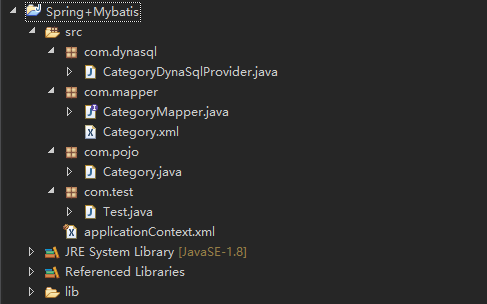
二、基本的pojo
Category.java
 package com.pojo;

 public class Category {

     private int id;

     private String name;

     public int getId() {

         return id;

     }

     public void setId(int id) {

         this.id = id;

     }

     public String getName() {

         return name;

     }

     public void setName(String name) {

         this.name = name;

     }

     public String toString() {

         return "Category [id=" + id + ", name=" + name + "]";

     }

 }
三、Mapper
在这里使用动态SQL语句,需要新增CategoryDynaSqlProvider,提供CRUD对应的SQL语句。
CategoryMapper.java
 package com.mapper;

 import java.util.List;

 import org.apache.ibatis.annotations.DeleteProvider;

 import org.apache.ibatis.annotations.InsertProvider;

 import org.apache.ibatis.annotations.SelectProvider;

 import org.apache.ibatis.annotations.UpdateProvider;

 import com.dynasql.CategoryDynaSqlProvider;

 import com.pojo.Category;

 public interface CategoryMapper {

     @InsertProvider(type = CategoryDynaSqlProvider.class, method = "add")

     public int add(Category category);

     @DeleteProvider(type = CategoryDynaSqlProvider.class, method = "delete")

     public void delete(int id);

     @SelectProvider(type = CategoryDynaSqlProvider.class, method = "get")

     public Category get(int id);

     @UpdateProvider(type = CategoryDynaSqlProvider.class, method = "update")

     public int update(Category category);

     @SelectProvider(type = CategoryDynaSqlProvider.class, method = "list")

     public List<Category> list();

 }
四、CategoryDynaSqlProvider.java
 package com.dynasql;

 import org.apache.ibatis.jdbc.SQL;

 public class CategoryDynaSqlProvider {

     public String list() {

         return new SQL().SELECT("*").FROM("category").toString();

     }

     public String get() {

         return new SQL().SELECT("*").FROM("category").WHERE("id=#{id}").toString();

     }

     public String add() {

         return new SQL().INSERT_INTO("category").VALUES("name", "#{name}").toString();

     }

     public String update() {

         return new SQL().UPDATE("category").SET("name=#{name}").WHERE("id=#{id}").toString();

     }

     public String delete() {

         return new SQL().DELETE_FROM("category").WHERE("id=#{id}").toString();

     }

 }
或者直接采用xml的方式进行配置:Category.xml
 <?xml version="1.0" encoding="UTF-8"?>

 <!DOCTYPE mapper

     PUBLIC "-//mybatis.org//DTD Mapper 3.0//EN"

     "http://mybatis.org/dtd/mybatis-3-mapper.dtd">

 <mapper namespace="com.mapper.CategoryMapper">

     <insert id="add" parameterType="Category">

         insert into category ( name ) values (#{name})

     </insert>

     <delete id="delete" parameterType="Category">

         delete from category where id= #{id}

     </delete>

     <select id="get" parameterType="_int" resultType="Category">

         select * from category where id= #{id}

     </select>

     <update id="update" parameterType="Category">

         update category set name=#{name} where id=#{id}

     </update>

     <select id="list" resultType="Category">

         select * from category

     </select>

 </mapper>
五、applicationContext.xml
1.识别注解
<context:annotation-config></context:annotation-config>
2.配置数据源
 <bean name="dataSource"

         class="org.springframework.jdbc.datasource.DriverManagerDataSource">

         <property name="driverClassName" value="com.mysql.jdbc.Driver"></property>

         <property name="url"

             value="jdbc:mysql://localhost:3306/sh?characterEncoding=UTF-8"></property>

         <property name="username" value="root"></property>

         <property name="password" value="123456"></property>

8 </bean>
3.配置Mybatis的SqlSessionFactory bean,扫描基本的pojo包、加载数据源、扫描配置xml配置文件(如果使用SQL动态语句,这一步可省略)
     <bean id="sqlSession" class="org.mybatis.spring.SqlSessionFactoryBean">

         <property name="typeAliasesPackage" value="com.pojo" />

         <property name="dataSource" ref="dataSource" />

         <property name="mapperLocations" value="classpath:com/mapper/*.xml"/>

     </bean>
4.扫描Mapper类
 <bean class="org.mybatis.spring.mapper.MapperScannerConfigurer">

         <property name="basePackage" value="com.mapper" />

 </bean>
applicationContext.xml
 <?xml version="1.0" encoding="UTF-8"?>

 <beans xmlns="http://www.springframework.org/schema/beans"

     xmlns:xsi="http://www.w3.org/2001/XMLSchema-instance" xmlns:aop="http://www.springframework.org/schema/aop"

     xmlns:tx="http://www.springframework.org/schema/tx" xmlns:context="http://www.springframework.org/schema/context"

     xsi:schemaLocation="

    http://www.springframework.org/schema/beans

    http://www.springframework.org/schema/beans/spring-beans-3.0.xsd

    http://www.springframework.org/schema/aop

    http://www.springframework.org/schema/aop/spring-aop-3.0.xsd

    http://www.springframework.org/schema/tx

    http://www.springframework.org/schema/tx/spring-tx-3.0.xsd

    http://www.springframework.org/schema/context

    http://www.springframework.org/schema/context/spring-context-3.0.xsd">

     <context:annotation-config></context:annotation-config>

     <bean id="sqlSession" class="org.mybatis.spring.SqlSessionFactoryBean">

         <property name="typeAliasesPackage" value="com.pojo" />

         <property name="dataSource" ref="dataSource" />

     </bean>

     <bean class="org.mybatis.spring.mapper.MapperScannerConfigurer">

         <property name="basePackage" value="com.mapper" />

     </bean>

     <!-- 配置数据源 -->

     <bean name="dataSource"

         class="org.springframework.jdbc.datasource.DriverManagerDataSource">

         <property name="driverClassName" value="com.mysql.jdbc.Driver"></property>

         <property name="url"

             value="jdbc:mysql://localhost:3306/sh?characterEncoding=UTF-8"></property>

         <property name="username" value="root"></property>

         <property name="password" value="123456"></property>

     </bean>

 </beans>
六、测试
 package com.test;

 import java.util.List;

 import org.junit.runner.RunWith;

 import org.springframework.beans.factory.annotation.Autowired;

 import org.springframework.test.context.ContextConfiguration;

 import org.springframework.test.context.junit4.SpringJUnit4ClassRunner;

 import com.mapper.CategoryMapper;

 import com.pojo.Category;

 @RunWith(SpringJUnit4ClassRunner.class)

 @ContextConfiguration("classpath:applicationContext.xml")

 public class Test {

     @Autowired

     private CategoryMapper categoryMapper;

     @org.junit.Test

     public void testAdd() {

         Category category = new Category();

         category.setName("new Category");

         categoryMapper.add(category);

     }

     @org.junit.Test

     public void testList() {

         System.out.println(categoryMapper);

         List<Category> cs = categoryMapper.list();

         for (Category c : cs) {

             System.out.println(c.getName());

         }

     }

 }
笔记60 Spring+Mybatis整合的更多相关文章
- 3.springMVC+spring+Mybatis整合Demo(单表的增删该查,这里主要是贴代码,不多解释了)
前面给大家讲了整合的思路和整合的过程,在这里就不在提了,直接把springMVC+spring+Mybatis整合的实例代码(单表的增删改查)贴给大家: 首先是目录结构: 仔细看看这个目录结构:我不详 ...
- Spring + mybatis整合方案总结 结合实例应用
Spring + mybatis整合实例应用 项目结构图 (Spring3.0.2 +mybatis3.0.4) 方案一: 通过配置文件整合Spring和mybatis 应用数据库 -- --数据库 ...
- SpringMVC+Spring+Mybatis整合
SpringMVC+Spring+Mybatis整合 导包 配置jdbc.properties.log4j.properties jdbc.driver=com.mysql.jdbc.Driver j ...
- SSM 即所谓的 Spring MVC + Spring + MyBatis 整合开发。
SSM 即所谓的 Spring MVC + Spring + MyBatis 整合开发.是目前企业开发比较流行的架构.代替了之前的SSH(Struts + Spring + Hibernate) 计划 ...
- Spring+Mybatis整合时 Failed to read candidate component class,Caused by:IllegalArgumentException
Spring+Mybatis整合时Caused by: java.lang.IllegalArgumentException错误 org.springframework.beans.factory.B ...
- Springmvc+Spring+Mybatis整合开发(架构搭建)
Springmvc+Spring+Mybatis整合开发(架构搭建) 0.项目结构 Springmvc:web层 Spring:对象的容器 Mybatis:数据库持久化操作 1.导入所有需要的jar包 ...
- springMVC + Spring + MyBatis 整合
整理下SSM(基于注解)的整合 1. web.xml 配置文件 <?xml version="1.0" encoding="UTF-8"?> < ...
- struts2 spring mybatis 整合(test)
这几天搭了个spring+struts2+mybatis的架子,练练手,顺便熟悉熟悉struts2. 环境:myEclipse10+tomcat7+jdk1.6(1.8的jre报错,所以换成了1.6) ...
- 2.springMVC+spring+Mybatis整合
前面已经说了,springMVC+spring+Mybatis的整合思路了,现在就照着这个思路来做一下: 在开始之前先来看一下工程的目录结构: config这个目录底下放的都是配置文件: mybati ...
随机推荐
- JQuery通过URL获取图片宽高
var img_url ='https://www.baidu.com/img/bd_logo1.png'; // 创建对象 var img = new Image(); // 改变图片的src im ...
- Linux软件管理--RPM工具
目录 Linux软件管理--RPM工具 Rpm基础概述: Rpm包安装管理 Linux软件管理--RPM工具 Rpm基础概述: RPM全称RPM Package Manager缩写,由红帽开发用于软件 ...
- httptesting HTTP(s)接口自动化测试框架
坐标: https://github.com/HttpTesting/pyhttp # HttpTesting 
转载请注明出处! 功能介绍: 可执行的命令: lspwdcd put rm get mkdir 1.用户加密认证 2.允许多用户同时登陆 3.每个用户有自己的家目录,且只可以访问自己的家目录 4.运行 ...
- 阿里云ssh免密登陆突然无效
[root@node03 ~]# ssh-copy-id node02 root@node02's password: sh: .ssh/authorized_keys: Permission den ...
- java中的成员变量、类变量,成员方法、类方法 属性和方法区别
成员变量:包括实例变量和类变量,用static修饰的是类变量,不用static修饰的是实例变量,所有类的成员变量可以通过this来引用. 类变量:静态域,静态字段,或叫静态变量,它属于该类所有实例共有 ...
- Spring data jpa 依赖配置
<properties> <project.build.sourceEncoding>UTF-8</project.build.sourceEncoding> &l ...
- Linux安装系统
服务器与PC 服务器本质上也是以太计算机,相比较家用电脑而言区别如下: 1.服务器更加稳定 2.通常性能比家用机更高 运维工程师的核心职责 保证服务器不间断运行 提升访问效率 保证数据安全 要完成上面 ...
- 【Flutter学习】基本组件之TabBar顶部导航
一,概述 TabBar,是材料设计(Material design)中很常用的一种横向标签页.在Android原生开发中,我们常用ViewPage或者一些常用的标签页开源库,来实现并行界面的横向滑动展 ...
- python selenium模拟登陆163邮箱。
selenium是可以模拟浏览器操作. 有些爬虫是异步加载的,通过爬取网页源码是得不到需要的内容.所以可以模拟浏览器去登陆该网站进行爬取操作. 需要安装selenium通过pip install xx ...