
Winform合并多个Excel文件到一个文件中(源文件.xls,实际是.xml)
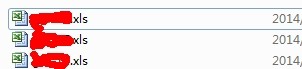
1.下面两个文件.xls是给的文件,实际上是.xml文件

2.具体的代码
  private void btOK_Click(object sender, EventArgs e)

         {

             //0.获取路径文件夹

             this.btOK.Enabled = false;

             this.textBox1.Text = System.Windows.Forms.Application.StartupPath + "\\de";

             strAllFiles = Directory.GetFiles(System.Windows.Forms.Application.StartupPath + "\\de","*.xls");

             showMessage("正在执行修改错误文件格式......");

             System.Windows.Forms.Application.DoEvents();

             Thread.Sleep();

             //1.修改文件扩展名

             EditFileName();

             //2.保存新的扩展名

             CheckExeclEditing();

             //3.读取数据并合并数据

             #region

             //strAllFiles = Directory.GetFiles(this.textBox1.Text);

             strName = new string[strAllFiles.Length * ];

             DataSet[] ds = new DataSet[strAllFiles.Length * ];

             int j = ;

             for (int i = ; i < strAllFiles.Length; i++)

             {

                 string sql = null;

                 System.Data.DataTable TableName = ExcelAPI.LoadDataFromExcel(strAllFiles[i]);

                 if (TableName.Rows.Count > )

                 {

                     foreach (DataRow item in TableName.Rows)

                     {

                         if (!item["TABLE_NAME"].ToString().Contains("Print_Titles"))

                         {

                             sql = string.Format("SELECT * FROM [{0}] WHERE F3 is not null and F3 not like '单位'", item["TABLE_NAME"].ToString());

                             ds[j] = (ExcelAPI.LoadDataFromExcel(strAllFiles[i], sql));

                             strName[j] = System.IO.Path.GetFileNameWithoutExtension(strAllFiles[i]);

                             j++;

                         }

                     }

                 }

                 showMessage("正在执行" + System.IO.Path.GetFileNameWithoutExtension(strAllFiles[i]) + "文件......");

                 System.Windows.Forms.Application.DoEvents();

                 Thread.Sleep();

             }

             string[] st = new string[];

             for (int i = ; i < st.Length; i++)

             {

                 st[i] = i.ToString();

             }

             string path = textBox1.Text.Substring(textBox1.Text.LastIndexOf("\\") + ) + "_" + DateTime.Now.ToString("yyyy年MM月dd日hh点mm分ss秒") + ".xls";

             showMessage("正在执行合并文件......");

             System.Windows.Forms.Application.DoEvents();

             Thread.Sleep();

             bool result = ExcelAPI.WebExportToExcel_1(ds, textBox1.Text, path, strName, , true);

             if (result == true)

             {

                 MessageBox.Show("成功");

                 this.btOK.Enabled = true;

                 System.Windows.Forms.Application.ExitThread();

             }

             else

             {

                 this.btOK.Enabled = true;

                 MessageBox.Show("失败");

             }

             #endregion

         }
  private void EditFileName()

         {

             try

             {

                 strAllFiles = Directory.GetFiles(this.textBox1.Text,"*.xls");

                 for (int i = ; i < strAllFiles.Length; i++)

                 {

                     byte[] bT = File.ReadAllBytes(strAllFiles[i]);

                     FileStream fs = File.Create(strAllFiles[i].Replace(".xls", ".xml"));

                     fs.Write(bT, , bT.Length);

                     fs.Close();

                     File.Delete(strAllFiles[i]);

                 }

             }

             catch (Exception ex)

             {

                 Log.WriteFileError(ex);

             }

         }

         private void CheckExeclEditing()

         {

             try

             {

                 for (int i = ; i < strAllFiles.Length; i++)

                 {

                     string strFileName = strAllFiles[i].Replace(".xls", ".xml");

                     string str = strFileName.Replace(".xml", ".xls");

                     Microsoft.Office.Interop.Excel._Application execl = new Microsoft.Office.Interop.Excel.ApplicationClass();

                     Microsoft.Office.Interop.Excel.Workbook bookDes1t = (Microsoft.Office.Interop.Excel.Workbook)execl.Workbooks.Open(strFileName);

                     bookDes1t.SaveAs(str, Microsoft.Office.Interop.Excel.XlFileFormat.xlWorkbookNormal);

                     bookDes1t.Close();

                     execl.Application.Quit();

                 }

             }

             catch (Exception ex)

             {

                 Log.WriteFileError(ex);

             }

         }
  public class ExcelAPI

  {

 /// <summary>

         /// 获取表名称

         /// </summary>

         /// <param name="filePath">路径</param>

         /// <returns></returns>

         public static System.Data.DataTable LoadDataFromExcel(string filePath)

         {

             try

             {

                 string strConn = "Provider=Microsoft.Jet.OLEDB.4.0;Data Source=" + filePath + ";Extended Properties='Excel 8.0;HDR=False;IMEX=1'";//只能打开2003

                 OleDbConnection OleConn = new OleDbConnection(strConn);

                 OleConn.Open();

                 //string sql=string.Format("SELECT * FROM  [{0}$]", strSheetName);//可更改Sheet名称,比如sheet2,等等

                 System.Data.DataTable DataNames = OleConn.GetOleDbSchemaTable(OleDbSchemaGuid.Tables, null);

                 OleConn.Close();

                 return DataNames;

             }

             catch (Exception err)

             {

                 Log.WriteFileError(err);

                 //MessageBox.Show("数据绑定Excel失败!失败原因:" + err.Message, "提示信息",

                 //    MessageBoxButtons.OK, MessageBoxIcon.Information);

                 return null;

             }

         }

   //加载Excel

         public static DataSet LoadDataFromExcel(string filePath, string sqlCmd)

         {

             try

             {

                 string strConn = "Provider=Microsoft.Jet.OLEDB.4.0;Data Source=" + filePath + ";Extended Properties='Excel 8.0;HDR=False;IMEX=1'";//只能打开2003

                 //strConn = string.Format("Provider=Microsoft.ACE.OLEDB.12.0;Data Source={0};Extended Properties='Excel 12.0 Xml;HDR=YES'", filePath);//可打开2007

                 using (OleDbConnection OleConn = new OleDbConnection(strConn))

                 {

                     //string sql =string.Format("SELECT * FROM  [{0}$]", strSheetName);//可更改Sheet名称,比如sheet2,等等

                     using (OleDbDataAdapter OleDaExcel = new OleDbDataAdapter(sqlCmd, OleConn))

                     {

                         DataSet OleDsExcle = new DataSet();

                         OleDaExcel.Fill(OleDsExcle, sqlCmd);

                         //MessageBox.Show(OleDsExcle.Tables[strSheetName].Rows[3][1].ToString());

                         return OleDsExcle;

                     }

                 }

             }

             catch (Exception err)

             {

                 Log.WriteFileError(err);

                 //MessageBox.Show("数据绑定Excel失败!失败原因:" + err.Message, "提示信息",

                 //    MessageBoxButtons.OK, MessageBoxIcon.Information);

                 return null;

             }

         }

  /// <param name="dv">用于导出的DataSET[数组]</param>

         /// <param name="tmpExpDir">导出的文件夹路径,例如d:/</param>

         /// <param name="refFileName">文件名,例如test.xls</param>

         /// <param name="sheetName">Sheet的名称,如果导出多个Sheet[数租]</param>

         /// <param name="sheetSize">每个Sheet包含的数据行数,此数值不包括标题行。所以,对于65536行数据,请将此值设置为65535</param>

         /// <param name="setBorderLine">导出完成后,是否给数据加上边框线</param>

         public static bool WebExportToExcel_1(DataSet[] dv, string tmpExpDir, string refFileName, string[] strName, int sheetSize, bool setBorderLine)

         {

             try

             {

                 string[] str = { "定额编号", "编号", "人材机名称", "人材机单位", "数量", "人材机单价" };

                 int RowsToDivideSheet = sheetSize;//计算Sheet行数

                 int sheetCount = dv.Length;

                 GC.Collect();// 回收其他的垃圾

                 Microsoft.Office.Interop.Excel.Application excel; _Workbook xBk; _Worksheet xSt = null;

                 excel = new ApplicationClass(); xBk = excel.Workbooks.Add(true);

                 int dvRowEnd; int rowIndex = ; int colIndex = ;

                 xSt = (_Worksheet)xBk.Worksheets.Add(Type.Missing, Type.Missing, , Type.Missing);

                 xSt.Name = "数据信息合并";

                 foreach (string item in str)

                 {

                     //设置标题格式

                     xSt.get_Range(excel.Cells[rowIndex, colIndex], excel.Cells[rowIndex, colIndex]).HorizontalAlignment = XlVAlign.xlVAlignCenter;

                     //设置标题居中对齐

                     xSt.get_Range(excel.Cells[rowIndex, colIndex], excel.Cells[rowIndex, colIndex]).Font.Bold = true;

                     //填值,并进行下一列

                     excel.Cells[rowIndex, colIndex++] = item;

                 }

                 //对全部Sheet进行操作

                 for (int sheetIndex = ; sheetIndex < sheetCount; sheetIndex++)

                 {

                     Log.WriteFile(strName[sheetIndex]);

                     //计算结束行

                     dvRowEnd = RowsToDivideSheet;

                     if (dvRowEnd > dv[sheetIndex].Tables[].Rows.Count)

                     { dvRowEnd = dv[sheetIndex].Tables[].Rows.Count + ; }

                     int i = ;

                     //以下代码就是经过修正后的。上面注释的代码有问题。

                     foreach (DataRow dr in dv[sheetIndex].Tables[].Rows)

                     {

                         //新起一行,当前单元格移至行首

                         rowIndex++;

                         colIndex = ;

                         excel.Cells[rowIndex, colIndex] = strName[sheetIndex];

                         excel.Cells[rowIndex, ++colIndex] = dr[].ToString();

                         excel.Cells[rowIndex, ++colIndex] = dr[].ToString();

                         excel.Cells[rowIndex, ++colIndex] = dr[].ToString();

                         excel.Cells[rowIndex, ++colIndex] = dr[].ToString();

                         excel.Cells[rowIndex, ++colIndex] = dr[].ToString();

                     }

                     Range allDataWithTitleRange = xSt.get_Range(excel.Cells[, ], excel.Cells[rowIndex, colIndex]);

                     allDataWithTitleRange.Select();

                     allDataWithTitleRange.Columns.AutoFit();

                     if (setBorderLine)

                     {

                         allDataWithTitleRange.Borders.LineStyle = ;

                     }

                 }//Sheet循环结束

                 string absFileName = System.IO.Path.Combine(tmpExpDir, refFileName);

                 xBk.SaveCopyAs(absFileName); xBk.Close(false, null, null);

                 excel.Quit();

                 System.Runtime.InteropServices.Marshal.ReleaseComObject(xBk);

                 System.Runtime.InteropServices.Marshal.ReleaseComObject(excel);

                 System.Runtime.InteropServices.Marshal.ReleaseComObject(xSt);

                 xBk = null; excel = null; xSt = null; GC.Collect();

                 return true;

             }

             catch (Exception ex)

             {

                 Log.WriteFileError(ex);

                 //MessageBox.Show("导入Excel出错!错误原因:" + ex.Message, "提示信息",

                 //  MessageBoxButtons.OK, MessageBoxIcon.Information);

                 return false;

             }

         }

 }
3.日志文件
 public class Log

     {

         public static void WriteFileError(Exception ex)

         {

             String sFileName;

             String sFilePath = Path.Combine(Application.StartupPath, @"Log\错误日志文件");

             if (Directory.Exists(sFilePath) == false)

                 Directory.CreateDirectory(sFilePath);

             else

             {

                 DirectoryInfo dInfo = new DirectoryInfo(sFilePath);

                 if (dInfo.GetFiles().Length > )

                     foreach (FileInfo fInfo in dInfo.GetFiles())

                         fInfo.Delete();

             }

             //用当前日期(年月日)作为文件名

             sFileName = DateTime.Now.ToShortDateString().Replace("/", "-") + ".log";  //文件名不能包括:

             sFilePath = Path.Combine(sFilePath, sFileName);

             StreamWriter streamWriter;

             if (File.Exists(sFilePath))

                 streamWriter = File.AppendText(sFilePath);

             else

                 streamWriter = File.CreateText(sFilePath);

             streamWriter.WriteLine();

             streamWriter.WriteLine(DateTime.Now.ToString());

             streamWriter.WriteLine(ex.ToString());

             streamWriter.WriteLine(ex.Message);

             streamWriter.WriteLine(ex.InnerException);

             if (ex is DetailException)

             {

                 streamWriter.Write(((DetailException)ex).additionalMsg);

                 streamWriter.WriteLine();

             }

             streamWriter.Close();

         }

         public static void WriteFile(string exFile)

         {

             String sFileName;

             String sFilePath = Path.Combine(Application.StartupPath, @"Log\操作文件日志");

             if (Directory.Exists(sFilePath) == false)

                 Directory.CreateDirectory(sFilePath);

             else

             {

                 DirectoryInfo dInfo = new DirectoryInfo(sFilePath);

                 if (dInfo.GetFiles().Length > )

                     foreach (FileInfo fInfo in dInfo.GetFiles())

                         fInfo.Delete();

             }

             //用当前日期(年月日)作为文件名

             sFileName = DateTime.Now.ToShortDateString().Replace("/", "-") + ".log";  //文件名不能包括:

             sFilePath = Path.Combine(sFilePath, sFileName);

             StreamWriter streamWriter;

             if (File.Exists(sFilePath))

                 streamWriter = File.AppendText(sFilePath);

             else

                 streamWriter = File.CreateText(sFilePath);

             streamWriter.WriteLine();

             streamWriter.WriteLine(DateTime.Now.ToString());

             streamWriter.WriteLine(exFile);

             streamWriter.Close();

         }

     }
  public class DetailException : Exception

     {

         public Exception exception;

         public string additionalMsg;

         public DetailException(Exception ex, string additionalMsg)

         {

             exception = ex;

             this.additionalMsg = additionalMsg;

         }

     }

     public class ExceptionHandler

     {

         public static StringBuilder strLog = new StringBuilder();

         public static void handlingExcetion(Exception ex)

         {

             if (ex == null) return;

             strLog.Append(DateTime.Now.ToLongDateString() + "  " + DateTime.Now.ToLongTimeString() + "||" + ex.Message);

             strLog.Append("------------------" + ex.StackTrace + "\r\n\r\n");

             Exception finalEx = ex;

             while (ex.InnerException != null && !ex.InnerException.Equals(finalEx))

             {

                 finalEx = ex.InnerException;

             }

             try

             {

                 Log.WriteFileError(finalEx);

             }

             catch (Exception e)

             {

                 System.Diagnostics.Trace.Write(e.Message);

             }

         }

     }
Winform合并多个Excel文件到一个文件中(源文件.xls,实际是.xml)的更多相关文章
- 压缩网站的css和js,合并多个文件到一个文件
压缩网站的css和js,合并多个文件到一个文件uglifyjs index.js html5shiv.min.js -o all.min.jsuglifycss index.min.css web.c ...
- Linux 合并多个txt文件到一个文件
Linux 或 类Unix 下实现合并多个文件内容到一个文件中 代码如下 cat b1.txt b2.txt b3.txt > b_all.txt 或者 cat *.txt > merge ...
- 在Windows下通过命令行或者.bat文件统计一个目录中文件数量
在Windows下面怎样通过命令行统计一个目录中文件的数量,或者说,如果在一个.bat文件中,统计一个目录中的文件数量? 我原来以为是不可能的,要编一个vbs程序什么的,后来到网上找了下,发现还真是可 ...
- python移动多个子文件中的文件到一个文件夹
import os import os.path import shutil def listDir(dirTemp): if None == dirTemp: return global nameL ...
- gcc 将两个文件合成一个文件(c)
一个文件是: 一个文件是: 两个文件的作用是输出一段文字,其中一个文件调用了另一个文件 gcc 命令为: -c 生成了object 文件,-o 生成了可执行文件,并且合成.
- 合并EXCEL文件到一个文件的V宏
我建的宏: Sub 合并文件的VBA() Dim MyPath, MyName, AWbName Dim Wb As Workbook, WbN As String Dim G As Long Dim ...
- python合并多个txt文件成为一个文件
#coding=utf-8 import os import os.path #文件夹遍历函数 #获取目标文件夹的路径 filedir = './data/click_data' #获取当前文件夹中的 ...
- swift 录制多个音频 并将音频转换为mp3 并合成多个mp3文件为一个文件
我的需求是可以录制多个文件,最后生成的文件格式为mp3形式,查了下各种资料,因为swift无法直接将音频录制为mp3格式,所以最后我采取的解决方案为先将每个单独的文件转为mp3,最后逐一合并形成一个m ...
- allegro把formate symbol文件从一个文件拷入另一个文件的方法
allegro画好PCB后经常需要添加一些说明谢谢,比如叠层信息.阻抗表等,但是每次都自己画太麻烦,现在就写下如何重复使用各种格式. 1.打开包含这些信息的板子,FILE-> Export -& ...
随机推荐
- jquery操作cookie {分享}
web开发过程中如果网站有一部分信息是存储在cookie中并与服务器交互的话,那么前台有时就会遇到需要对cookie中信息进行操作的情况,一个最典型的例子就是在前台判断用户是否登录过当前所访问的网站. ...
- LeetCode45 Jump Game II
题目: Given an array of non-negative integers, you are initially positioned at the first index of the ...
- C# 程序集反射
namespace AssemblyLibrary { public class AssemblyLibrary { public static object LoadAssembly(string ...
- C# unix时间戳转换
场景:由于业务需要和java 开发的xxx系统对接日志,xxx系统中用“1465195479100” 来表示时间,C# 里面需要转换做一下逻辑处理,见代码段. C#获取的unix时间戳是10位,原因是 ...
- Clairewd’s message
Problem Description Clairewd is a member of FBI. After several years concealing in BUPT, she interce ...
- 1.7.5 Faceting
1. 分面(Faceting) 分面就是将搜索结果基于索引中的terms按类整理.搜索结果带有索引的term,没有term都带有该term匹配的文档数.分面使用户更容易探究搜索结果,缩小查询结果范围以 ...
- 【Mood-12】Android开发相关书籍推荐
新年伊始,找到Android进阶干货若干,2015拜读. 1.Android应用UI设计模式 目前,谷歌Android操作系统在移动市场中风头正劲,并且未来发展势不可挡.<Android应用UI ...
- VMware系统运维(六)VMware vSphere Web Client安装
1.开始安装VMware vSphere Web Client 2.下一步 3.接受协议,下一步,大哥求你了,下次直接将这个默认下一步吧,嘿嘿 4.选择安装位置,下一步 5.配置端口号,默认9090和 ...
- gcc: error trying to exec 'cc1plus': execvp: no such file or directory
最近在安装OpenCV cmake的时,出现gcc: error trying to exec 'cc1plus': execvp: no such file or directory的错误. 导致问 ...
- Backbone.js学习之Model
首先,我们看一下官方文档中对Model的解释(或者说定义): Models are the heart of any JavaScript application, containing the in ...