
面试题:你能写一个Vue的双向数据绑定吗?
在目前的前端面试中,vue的双向数据绑定已经成为了一个非常容易考到的点,即使不能当场写出来,至少也要能说出原理。本篇文章中我将会仿照vue写一个双向数据绑定的实例,名字就叫myVue吧。结合注释,希望能让大家有所收获。
1、原理
Vue的双向数据绑定的原理相信大家也都十分了解了,主要是通过 Object对象的defineProperty属性,重写data的set和get函数来实现的,这里对原理不做过多描述,主要还是来实现一个实例。为了使代码更加的清晰,这里只会实现最基本的内容,主要实现v-model,v-bind 和v-click三个命令,其他命令也可以自行补充。
添加网上的一张图
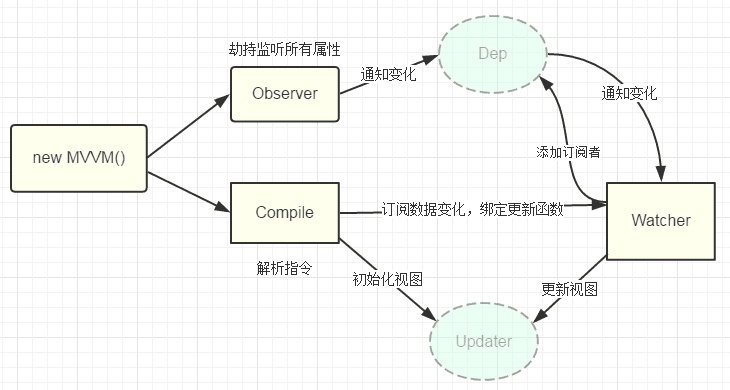
2、实现
页面结构很简单,如下
<div id="app">

    <form>

      <input type="text"  v-model="number">

      <button type="button" v-click="increment">增加</button>

    </form>

    <h3 v-bind="number"></h3>

  </div>
包含:
 1. 一个input,使用v-model指令

 2. 一个button,使用v-click指令

 3. 一个h3,使用v-bind指令。
我们最后会通过类似于vue的方式来使用我们的双向数据绑定,结合我们的数据结构添加注释
var app = new myVue({

      el:'#app',

      data: {

        number: 0

      },

      methods: {

        increment: function() {

          this.number ++;

        },

      }

    })
首先我们需要定义一个myVue构造函数:
function myVue(options) {

}
为了初始化这个构造函数,给它添加一 个_init属性
function myVue(options) {

  this._init(options);

}

myVue.prototype._init = function (options) {

    this.$options = options;  // options 为上面使用时传入的结构体,包括el,data,methods

    this.$el = document.querySelector(options.el); // el是 #app, this.$el是id为app的Element元素

    this.$data = options.data; // this.$data = {number: 0}

    this.$methods = options.methods;  // this.$methods = {increment: function(){}}

  }
接下来实现_obverse函数,对data进行处理,重写data的set和get函数
并改造_init函数
 myVue.prototype._obverse = function (obj) { // obj = {number: 0}

    var value;

    for (key in obj) {  //遍历obj对象

      if (obj.hasOwnProperty(key)) {

        value = obj[key];

        if (typeof value === 'object') {  //如果值还是对象,则遍历处理

          this._obverse(value);

        }

        Object.defineProperty(this.$data, key, {  //关键

          enumerable: true,

          configurable: true,

          get: function () {

            console.log(`获取${value}`);

            return value;

          },

          set: function (newVal) {

            console.log(`更新${newVal}`);

            if (value !== newVal) {

              value = newVal;

            }

          }

        })

      }

    }

  }

 myVue.prototype._init = function (options) {

    this.$options = options;

    this.$el = document.querySelector(options.el);

    this.$data = options.data;

    this.$methods = options.methods;

    this._obverse(this.$data);

  }
接下来我们写一个指令类Watcher,用来绑定更新函数,实现对DOM元素的更新
function Watcher(name, el, vm, exp, attr) {

    this.name = name;         //指令名称,例如文本节点,该值设为"text"

    this.el = el;             //指令对应的DOM元素

    this.vm = vm;             //指令所属myVue实例

    this.exp = exp;           //指令对应的值,本例如"number"

    this.attr = attr;         //绑定的属性值,本例为"innerHTML"

    this.update();

  }

  Watcher.prototype.update = function () {

    this.el[this.attr] = this.vm.$data[this.exp]; //比如 H3.innerHTML = this.data.number; 当number改变时,会触发这个update函数,保证对应的DOM内容进行了更新。

  }
更新_init函数以及_obverse函数
myVue.prototype._init = function (options) {

    //...

    this._binding = {};   //_binding保存着model与view的映射关系,也就是我们前面定义的Watcher的实例。当model改变时,我们会触发其中的指令类更新,保证view也能实时更新

    //...

  }

  myVue.prototype._obverse = function (obj) {

    //...

      if (obj.hasOwnProperty(key)) {

        this._binding[key] = {    // 按照前面的数据,_binding = {number: _directives: []}

          _directives: []

        };

        //...

        var binding = this._binding[key];

        Object.defineProperty(this.$data, key, {

          //...

          set: function (newVal) {

            console.log(`更新${newVal}`);

            if (value !== newVal) {

              value = newVal;

              binding._directives.forEach(function (item) {  // 当number改变时,触发_binding[number]._directives 中的绑定的Watcher类的更新

                item.update();

              })

            }

          }

        })

      }

    }

  }
那么如何将view与model进行绑定呢?接下来我们定义一个_compile函数,用来解析我们的指令(v-bind,v-model,v-clickde)等,并在这个过程中对view与model进行绑定。
 myVue.prototype._init = function (options) {

   //...

    this._complie(this.$el);

  }

myVue.prototype._complie = function (root) { root 为 id为app的Element元素,也就是我们的根元素

    var _this = this;

    var nodes = root.children;

    for (var i = 0; i < nodes.length; i++) {

      var node = nodes[i];

      if (node.children.length) {  // 对所有元素进行遍历,并进行处理

        this._complie(node);

      }

      if (node.hasAttribute('v-click')) {  // 如果有v-click属性,我们监听它的onclick事件,触发increment事件,即number++

        node.onclick = (function () {

          var attrVal = nodes[i].getAttribute('v-click');

          return _this.$methods[attrVal].bind(_this.$data);  //bind是使data的作用域与method函数的作用域保持一致

        })();

      }

      if (node.hasAttribute('v-model') && (node.tagName == 'INPUT' || node.tagName == 'TEXTAREA')) { // 如果有v-model属性,并且元素是INPUT或者TEXTAREA,我们监听它的input事件

        node.addEventListener('input', (function(key) {

          var attrVal = node.getAttribute('v-model');

           //_this._binding['number']._directives = [一个Watcher实例]

           // 其中Watcher.prototype.update = function () {

           //    node['vaule'] = _this.$data['number'];  这就将node的值保持与number一致

           // }

          _this._binding[attrVal]._directives.push(new Watcher(

            'input',

            node,

            _this,

            attrVal,

            'value'

          ))

          return function() {

            _this.$data[attrVal] =  nodes[key].value; // 使number 的值与 node的value保持一致,已经实现了双向绑定

          }

        })(i));

      }

      if (node.hasAttribute('v-bind')) { // 如果有v-bind属性,我们只要使node的值及时更新为data中number的值即可

        var attrVal = node.getAttribute('v-bind');

        _this._binding[attrVal]._directives.push(new Watcher(

          'text',

          node,

          _this,

          attrVal,

          'innerHTML'

        ))

      }

    }

  }
至此,我们已经实现了一个简单vue的双向绑定功能,包括v-bind, v-model, v-click三个指令。效果如下图
附上全部代码,不到150行
<!DOCTYPE html>

<head>

  <title>myVue</title>

</head>

<style>

  #app {

    text-align: center;

  }

</style>

<body>

  <div id="app">

    <form>

      <input type="text"  v-model="number">

      <button type="button" v-click="increment">增加</button>

    </form>

    <h3 v-bind="number"></h3>

  </div>

</body>

<script>

  function myVue(options) {

    this._init(options);

  }

  myVue.prototype._init = function (options) {

    this.$options = options;

    this.$el = document.querySelector(options.el);

    this.$data = options.data;

    this.$methods = options.methods;

    this._binding = {};

    this._obverse(this.$data);

    this._complie(this.$el);

  }

  myVue.prototype._obverse = function (obj) {

    var value;

    for (key in obj) {

      if (obj.hasOwnProperty(key)) {

        this._binding[key] = {

          _directives: []

        };

        value = obj[key];

        if (typeof value === 'object') {

          this._obverse(value);

        }

        var binding = this._binding[key];

        Object.defineProperty(this.$data, key, {

          enumerable: true,

          configurable: true,

          get: function () {

            console.log(`获取${value}`);

            return value;

          },

          set: function (newVal) {

            console.log(`更新${newVal}`);

            if (value !== newVal) {

              value = newVal;

              binding._directives.forEach(function (item) {

                item.update();

              })

            }

          }

        })

      }

    }

  }

  myVue.prototype._complie = function (root) {

    var _this = this;

    var nodes = root.children;

    for (var i = 0; i < nodes.length; i++) {

      var node = nodes[i];

      if (node.children.length) {

        this._complie(node);

      }

      if (node.hasAttribute('v-click')) {

        node.onclick = (function () {

          var attrVal = nodes[i].getAttribute('v-click');

          return _this.$methods[attrVal].bind(_this.$data);

        })();

      }

      if (node.hasAttribute('v-model') && (node.tagName == 'INPUT' || node.tagName == 'TEXTAREA')) {

        node.addEventListener('input', (function(key) {

          var attrVal = node.getAttribute('v-model');

          _this._binding[attrVal]._directives.push(new Watcher(

            'input',

            node,

            _this,

            attrVal,

            'value'

          ))

          return function() {

            _this.$data[attrVal] =  nodes[key].value;

          }

        })(i));

      }

      if (node.hasAttribute('v-bind')) {

        var attrVal = node.getAttribute('v-bind');

        _this._binding[attrVal]._directives.push(new Watcher(

          'text',

          node,

          _this,

          attrVal,

          'innerHTML'

        ))

      }

    }

  }

  function Watcher(name, el, vm, exp, attr) {

    this.name = name;         //指令名称,例如文本节点,该值设为"text"

    this.el = el;             //指令对应的DOM元素

    this.vm = vm;             //指令所属myVue实例

    this.exp = exp;           //指令对应的值,本例如"number"

    this.attr = attr;         //绑定的属性值,本例为"innerHTML"

    this.update();

  }

  Watcher.prototype.update = function () {

    this.el[this.attr] = this.vm.$data[this.exp];

  }

  window.onload = function() {

    var app = new myVue({

      el:'#app',

      data: {

        number: 0

      },

      methods: {

        increment: function() {

          this.number ++;

        },

      }

    })

  }

</script>
如果喜欢请关注我的Github,给个Star吧,我会定期分享一些JS中的知识,^_^
原文地址:https://segmentfault.com/a/1190000014274840
面试题:你能写一个Vue的双向数据绑定吗?的更多相关文章
- 写一个vue组件
写一个vue组件 我下面写的是以.vue结尾的单文件组件的写法,是基于webpack构建的项目.如果还不知道怎么用webpack构建一个vue的工程的,可以移步到vue-cli. 一个完整的vue组件 ...
- Vue基础01vue的基本示例,vue的双向数据绑定,vue中常见的几种用法,vue相关常见指令
自学vue框架,每天记录重要的知识点,与大家分享!有不足之处,希望大家指正. 本篇将讲述:vue的基本示例,vue的双向数据绑定,vue中常见的几种用法,vue相关常见指令 前期学习基础,使用vue. ...
- vue的双向数据绑定实现原理
在目前的前端面试中,vue的双向数据绑定已经成为了一个非常容易考到的点,即使不能当场写出来,至少也要能说出原理.本篇文章中我将会仿照vue写一个双向数据绑定的实例,名字就叫myVue吧.结合注释,希望 ...
- 深入vue源码,了解vue的双向数据绑定原理
大家都知道vue是一种MVVM开发模式,数据驱动视图的前端框架,并且内部已经实现了双向数据绑定,那么双向数据绑定是怎么实现的呢? 先手动撸一个最最最简单的双向数据绑定 <div> < ...
- vue实现双向数据绑定的原理
vue实现双向数据绑定的原理就是利用了 Object.defineProperty() 这个方法重新定义了对象获取属性值(get)和设置属性值(set)的操作来实现的. 在MDN上对该方法的说明是:O ...
- 浅析vue的双向数据绑定
vue 的双向数据绑定是基于es5的 object对象的defineProperty属性,重写data的set和get函数来实现的.1.defineProperty 数据展示 Object.defin ...
- 写一个Vue loading 插件
什么是vue插件? 从功能上说,插件是为Vue添加全局功能的一种机制,比如给Vue添加一个全局组件,全局指令等: 从代码结构上说,插件就是一个必须拥有install方法的对象,这个方法的接收的第一个参 ...
- 如何优雅的写一个Vue 的弹框
写Vue或者是react 都会遇见弹框的问题.也尝试了多种办法来写弹框,一直都不太满意,今天特地看了一下 Element UI 的源码,模仿着写了一个简易版. 大概有一下几个问题: 1.弹框的层级问题 ...
- 撸一个vue的双向绑定
1.前言 说起双向绑定可能大家都会说:Vue内部通过Object.defineProperty方法属性拦截的方式,把data对象里每个数据的读写转化成getter/setter,当数据变化时通知视图更 ...
随机推荐
- jsp 中声明方法的使用
1.在"<%!"和"%>"之间声明方法,该方法在整个JSP页面有效.可是该方法内定义的变量仅仅在该方法内有效. 这些方法将在Java程序片中被调用, ...
- [Python] partial改变方法默认參数
Python 标准库中 functools库中有非常多对方法非常有有操作的封装,partial Objects就是当中之中的一个,他是对方法參数默认值的改动. 以下就看下简单的应用測试. #!/usr ...
- ALSA声卡驱动中的DAPM详解之三:如何定义各种widget
上一节中,介绍了DAPM框架中几个重要的数据结构:snd_soc_dapm_widget,snd_soc_dapm_path,snd_soc_dapm_route.其中snd_soc_dapm_pat ...
- Solution:Cannot pull with rebase: You have unstaged changes in Github
You can do this to work around using following steps 1. stash your changes with: git stash 2. pull f ...
- 51nod 1353 树
树背包 设f[i][j]表示第i个点,和子节点组成的联通块大小为j,其他都可行的方案 j=0表示可行的总方案 #include<cstdio> #include<iostream&g ...
- new (C# Reference)
https://msdn.microsoft.com/en-us/library/51y09td4.aspx In C#, the new keyword can be used as an oper ...
- 最直观的poi的使用帮助(告诉你怎么使用poi的官网),操作word,excel,ppt
最直观的poi的使用帮助(告诉你怎么使用poi的官网),poi操作word,excel,ppt 写在最前面 其实poi的官网上面有poi的各种类和接口的使用说明,还有非常详细的样例,所以照着这些样例来 ...
- bzoj3011
可并堆 复习一下可并堆 维护一个大跟堆,每次把节点儿子打上边权标记,然后合并,可并堆上维护一个size,每次把大于l的弹出,size就是答案 程序中那个d写l和r速度差不多,我写l是表示右儿子到u的最 ...
- 特征选择--->卡方选择器
特征选择(Feature Selection)指的是在特征向量中选择出那些“优秀”的特征,组成新的.更“精简”的特征向量的过程.它在高维数据分析中十分常用,可以剔除掉“冗余”和“无关”的特征,提升学习 ...
- 对腾讯云服务器linux系统进行分区格式化操作