
Qt-QML-电子罗盘
使用QML中的Canvas实现电子罗盘绘制,效果图如下
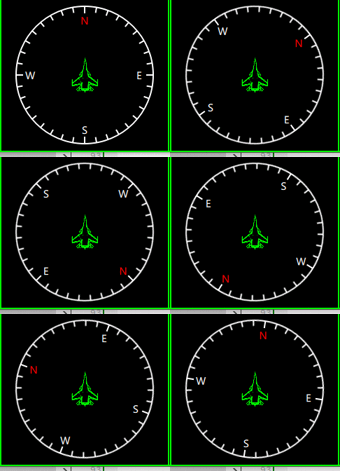
一个简单的电子罗盘,红色N极。其中中间飞机表示当前的指向,
还是比较简单的,直接上代码吧
/*
作者:张建伟
时间:2018年4月27日
简述:电子罗盘界面实现
*/
importQtQuick2.0
Rectangle
{
id:root
width:200
height:200
anchors.centerIn:parent
color:"transparent"
propertyintm_Angle:0
Rectangle
{
width:parent.width
height:parent.height
color:"transparent"
rotation:root.m_Angle
Canvas
{
anchors.fill:parent
onPaint:
{
varctx=getContext("2d");
//绘制圆圈
ctx.lineWidth=2;
ctx.strokeStyle="#FFFFFF";
ctx.globalAlpha=1.0;
ctx.beginPath();
ctx.arc(width/2,width/2,width/2-2,0,2*Math.PI);
ctx.stroke();
ctx.restore();
for(vari=0;i<36;i++)
{
ctx.save();
ctx.translate(width/2,height/2);
ctx.rotate(i*10*Math.PI/180);
ctx.beginPath();
if(i%9==0)
{
ctx.moveTo(0,-width/2+12);
ctx.lineTo(0,-width/2+2);
}
else
{
ctx.moveTo(0,-width/2+10);
ctx.lineTo(0,-width/2+2);
}
ctx.stroke();
ctx.restore();
}
}
}
Rectangle
{
width:20
height:20
anchors.horizontalCenter:parent.horizontalCenter
anchors.top:parent.top
anchors.topMargin:12
rotation:-parent.rotation
color:"#00000000"
Text{
anchors.centerIn:parent
font.family:"微软雅黑"
font.pixelSize:14
color:"#FF0000"
text:qsTr("N")
}
}
Rectangle
{
width:20
height:20
anchors.verticalCenter:parent.verticalCenter
anchors.right:parent.right
anchors.rightMargin:12
color:"#00000000"
rotation:-parent.rotation
Text{
anchors.centerIn:parent
font.family:"微软雅黑"
font.pixelSize:14
color:"#FFFFFF"
text:qsTr("E")
}
}
Rectangle
{
width:20
height:20
anchors.verticalCenter:parent.verticalCenter
anchors.left:parent.left
anchors.leftMargin:12
color:"#00000000"
rotation:-parent.rotation
Text{
anchors.centerIn:parent
font.family:"微软雅黑"
font.pixelSize:14
color:"#FFFFFF"
text:qsTr("W")
}
}
Rectangle
{
width:20
height:20
anchors.horizontalCenter:parent.horizontalCenter
anchors.bottom:parent.bottom
anchors.bottomMargin:12
color:"#00000000"
rotation:-parent.rotation
Text{
anchors.centerIn:parent
font.family:"微软雅黑"
font.pixelSize:14
color:"#FFFFFF"
text:qsTr("S")
}
}
Rectangle
{
width:50
height:50
color:"transparent"
rotation:-parent.rotation
anchors.centerIn:parent
Image{
anchors.fill:parent
source:"file:Images/Su_33_Pointer.png"
}
}
}
}

Qt-QML-电子罗盘的更多相关文章
- Qt qml 单例模式
Qt qml 单例模式,没什么好说的,看代码吧.单例模式很适合做全局的配置文件. [示例下载] http://download.csdn.net/detail/surfsky/8539313 [以下是 ...
- Qt qml listview 列表视图控件(下拉刷新、上拉分页、滚动轴)
Qt qml listview下拉刷新和上拉分页主要根据contentY来判断.但要加上顶部下拉指示器.滚动条,并封装成可简单调用的组件,着实花了我不少精力:) [先看效果] [功能] 下拉刷新 ...
- qt qml qchart 图表组件
qt qml qchart 图表组件 * Author: Julien Wintz * Created: Thu Feb 13 23:41:59 2014 (+0100) 这玩意是从chart.js迁 ...
- qt qml中PropertyAnimation的几种使用方法
qml文章 qt qml中PropertyAnimation的几种使用方法 动画应用场景有以下几种: 首先如果一个Rectangle.动画是要改变它的x和y值 1,Rectangle一旦被创建,就要移 ...
- Qt QML referenceexamples attached Demo hacking
/********************************************************************************************* * Qt ...
- Qt qml的软件架构设计
google: qt qml application architecture 有很多资源. 1 https://www.ics.com/blog/multilayered-architecture- ...
- QT QML目录导航列表视图
[功能] /目录.文件 /文件过滤 /递归 /事件 /高亮当前行 /当前选项 /目录切换动画 /限制根目录 [下载]:http://download.csdn.net/detail/surfsky/8 ...
- Qt(QML)本地化
Internationalization and Localization with Qt Quick 程序国际化 1) Use qsTr() for all Literial UI strings ...
- qt qml 利用xmlhttprequest 调用有赞api
最近朋友在有赞商城上面开了一个店铺,因为有实体店,一般卖商品后送货上门,但是打票时候老是人工用world文档人工复制黏贴订单打印小票, 所以就找我帮忙做一个软件专门打印小票的,就研究起来调用有赞第三方 ...
- QT QML 3D模型查看器
原文链接:http://amin-ahmadi.com/2018/01/28/viewing-3d-models-using-qt/ 本文使用QT Quick中的Scene3D QML类型来查看3D模 ...
随机推荐
- Go testing 库 testing.T 和 testing.B 简介
testing.T 判定失败接口 Fail 失败继续 FailNow 失败终止 打印信息接口 Log 数据流 (cout 类似) Logf format (printf 类似) SkipNow 跳过当 ...
- PHP扩展模块redis安装
PHP扩展redis模块安装 当我们安装好php之后可能会忘记装一些模块,或者需要增加模块的时候我们可以使用扩展模块安装. 查看php加载了哪些模块,使用命令 /usr/local/php/bin/p ...
- 【转】 Tomcat+redis+nginx配置
为客户开发的一个绩效系统,采用了java web的开发方式,使用了一些spring mvc, mybatis之类的框架.相比于oracle ebs的二次开发,这种开发更加灵活,虽然和ebs集成的时候遇 ...
- SDOI2018 二轮培训划水记
\(\mathcal{Day -1}\) 嗯,虽然说\(rqy\)看我们这么懵O,并不建议我们去掺和这种神仙打架,但是为了逃文化课学习OI并参观膜拜各路神仙,我毅然决然地选择去参加这次培训-- 这次一 ...
- JavaScript获取0-100之间的随机数
function (min, max) { return Math.floor(Math.random() * (max - min)) + min } 如果想获取0-100之间的随机数,则可将函数的 ...
- SpringBoot两种读取配置文件的方式
方式一 @Value("${custom.group}") private String customGroup; 方式二 @Autowired private Environme ...
- Spring Boot Admin 2.1.0 全攻略
转载请标明出处: https://www.fangzhipeng.com 本文出自方志朋的博客 Spring Boot Admin简介 Spring Boot Admin是一个开源社区项目,用于管理和 ...
- Oracle 12.2 设置LOCAL_TEMP_TABLESPACE
12.2 设置LOCAL_TEMP_TABLESPACE SQL> select username,DEFAULT_TABLESPACE,TEMPORARY_TABLESPACE,LOCAL_ ...
- 【OC底层】OC对象本质,如 isa, super-class
Objective-C的本质 1.我们编写的Objective-C,底层现实都是C/C++,代码生成步骤如下: 2.在OC中的所有面向对象的实现,都是基于C/C++的数据结构实现的 3.将Obje ...
- OO 第三次博客总结
调研规格化设计 1950年代,第一次分离,主程序和子程序的分离程序结构模型是树状模型,子程序可先于主程序编写.通过使用库函数来简化编程,实现最初的代码重用.产生基本的软件开发过程:分析—设计—编码—测 ...