
Apt下载安装包时Hash校验和不符
近期我的电脑在使用apt-get或aptitude下载Linux安装包时总是出现如下图所示的Hash校验和不符的问题。以至于下载过程被频繁中断,不得不反复运行apt-get或者在aptitude中按g键,才能够断点续传,完成全部的下载,非常讨厌。而若令电脑连接手机热点,则没有这样的问题。对此,初步判断是由网络服务提供商代理服务器的配置问题所导致的。
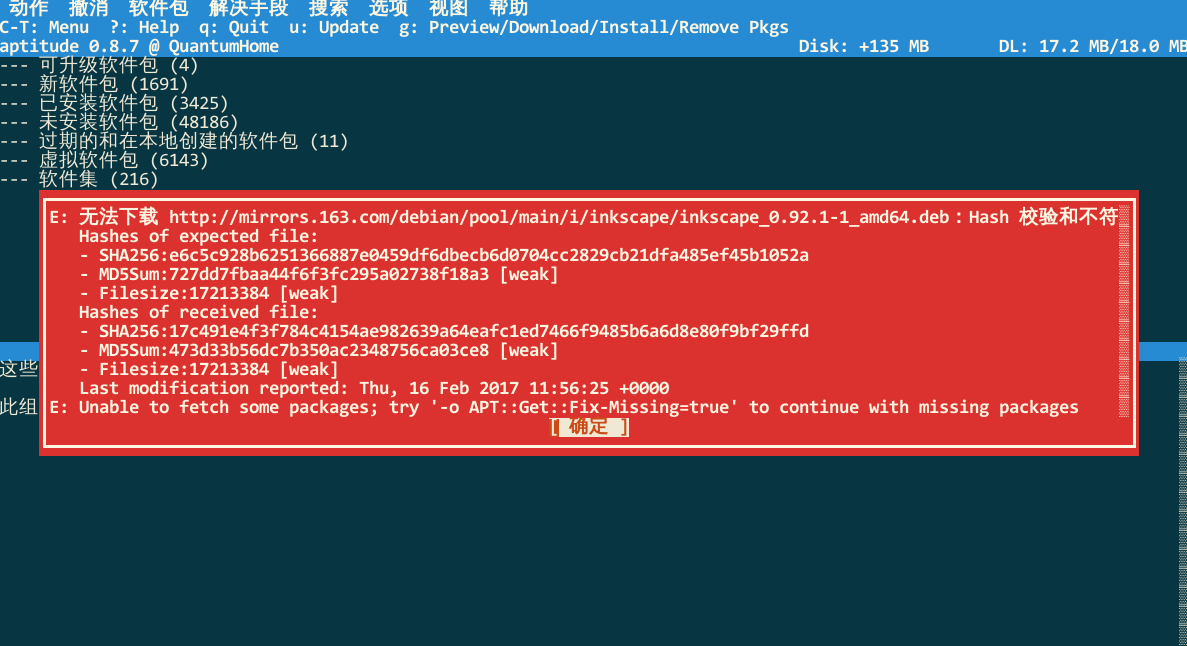

经过搜索与文档查阅,找到了解决方法:在目录/etc/apt/apt.conf.d下创建文件99FixHashCheckSumError,其中包含如下内容。
 Acquire::http::Pipeline-Depth 0;
 Acquire::http::No-Cache true;
之后,再运行apt-get或aptitude则一切正常。需要说明的是,虽然网上有人提到还应加入Acquire::BrokenProxy true;,但是该配置选项并未被apt.conf的文档提及。
参考apt.conf的man说明和RFC 2616,以上各配置条目的含义摘录如下:
Acquire::http::Pipeline-Depthcan be used to enable HTTP pipelining (RFC 2616 section 8.1.2.2) which can be beneficial e.g. on high-latency connections. It specifies how many requests are sent in a pipeline. APT tries to detect and workaround misbehaving webservers and proxies at runtime, but if you know that yours does not conform to the HTTP/1.1 specification pipelining can be disabled by setting the value to 0. It is enabled by default with the value 10.RFC 2616 8.1.2.2 Pipelining
A client that supports persistent connections MAY "pipeline" its requests (i.e., send multiple requests without waiting for each response). A server MUST send its responses to those requests in the same order that the requests were received.
Clients which assume persistent connections and pipeline immediately after connection establishment SHOULD be prepared to retry their connection if the first pipelined attempt fails. If a client does such a retry, it MUST NOT pipeline before it knows the connection is persistent. Clients MUST also be prepared to resend their requests if the server closes the connection before sending all of the corresponding responses.
Clients SHOULD NOT pipeline requests using non-idempotent methods or non-idempotent sequences of methods (see section 9.1.2). Otherwise, a premature termination of the transport connection could lead to indeterminate results. A client wishing to send a non-idempotent request SHOULD wait to send that request until it has received the response status for the previous request.
Acquire::http::No-Cachetells the proxy not to use its cached response under any circumstances.
Apt下载安装包时Hash校验和不符的更多相关文章
- apt 下载安装包
1) Try both without sudo, apt-get download will pass and apt-get -d install will fail (root required ...
- 【Ubuntu】更新系统时出现Hash校验和不符的错误(已解决)
在使用 sudo apt-get update && sudo apt-get upgrade 命令更新系统时出现类似这样的错误信息: W: 无法下载 bzip2:/var/lib/a ...
- CentOS yum安装软件时保留安装包及依赖包或者自动下载安装包及相关依赖包
CentOS上安装某个软件一般都有很多相关的依赖包,当然,这也与我们安装时software selection步骤中选择的版本有关系,我们服务器在安装CentOS时一般选择Basic Web Serv ...
- Python 解决Python安装包时提示Unable to find vcvarsall.bat的问题
解决Python安装包时提示Unable to find vcvarsall.bat的问题 by:授客 QQ:1033553122 问题 Python安装包时,提示Unable to find v ...
- Hadoop学习笔记(一)从官网下载安装包
Hadoop是一个分布式系统基础架构,由Apache基金会所开发.用户可以在不了解分布式底层细节的情况下,开发分布式程序.充分利用集群的威力进行高速运算和存储.要学习Hadoop从下载安装包开始 打开 ...
- 配置Windows Server2008+iis+php+mysql所需下载安装包
最近一个朋友让我帮忙给配置服务器iis+php+mysq 环境,遇到了很多问题,特此就在这里说一下.小弟只是在windwos2003 和windwos XP下配置过iis+php+mysql,去朋友那 ...
- How to: Installshield做安装包时如何添加文件
原文:How to: Installshield做安装包时如何添加文件 我一直以为这不是一个问题,可是没想到在几个群内,对于如何向安装包添加文件不解的大有人在,今日稍暇,整理成篇,以供参考 首先我想再 ...
- Linux(CentOS7)yum安装卸载命令,离线下载安装包
一.Linux版本 二.yum安装 比如安装vim编辑器,y是自动应答,即默认一路确认,不用中途确认 yum install -y vim 三.yum卸载 比如卸载掉刚刚安装的vim yum eras ...
- Yum 下载安装包及对应依赖包
Yum 下载安装包及对应依赖包: 安装该软件:yum install -y yum-plugin-downloadonly 以下载 openssh-server 为例 yum install -y o ...
随机推荐
- 京东商品及评论爬虫(selenium)
代码查看https://gitee.com/MarkPolaris/reptile/tree/master/jd 中的gly和demo03
- jmeter笔记(7)--参数化--用户定义的变量
录制的脚本里面有很多的相同的数据的时候,比如服务器ip,端口号等,当更换服务器的时候,就需要手动的修改脚本里面对应的服务器ip和端口号,比较繁琐,jmeter里面有一个用户自定义变量能很好的解决这个问 ...
- Java 8 特性 —— 函数式接口
函数式接口 概述:接口中只有一个抽象方法. 函数式接口,即适用于函数式编程场景的接口.而 Java 中的函数式编程体现就是 Lambda,所以函数式接口就是可以适用于 Lambda 使用的接口.只有确 ...
- (十三)事件分发器——event()函数,事件过滤
事件分发器——event()函数 事件过滤 事件进入窗口之前被拦截 eventFilter #include "mywidget.h" #include "ui_mywi ...
- JAVA之锁-cas
CAS是什么? CAS是英文单词CompareAndSwap的缩写,中文意思是:比较并替换.CAS需要有3个操作数:内存地址V,旧的预期值A,即将要更新的目标值B. CAS指令执行时,当且仅当内存地址 ...
- python 生产者 --- 消费者
值得拿出来 看看的 多进程 爬取 (生产) , 解析 (消费) 网页 同时进行,可以作为以后项目扩展使用 from bs4 import BeautifulSoup import requests i ...
- (三)初探maven之使用IDE
一.在IDE中使用maven 打开Eclipse,在菜单栏依次选中window => preferences => Maven => Installations , 然后添加 ...
- 浅入深出Vue:工具准备之WebStorm安装配置
浅入深出Vue之工具准备(一):WebStorm安装配置 工欲善其事必先利其器,让我们先做好准备工作吧 导航篇 WebStorm安装配置 所有工具的下载地址都可以在导航篇中找到,这里我们下载的是最新版 ...
- java中import详解
前言 import与package机制相关,这里先从package入手,再讲述import以及static import的作用. package package名称就像是我们的姓,而class名称就像 ...
- 【转载】PyTorch系列 (二):pytorch数据读取
原文:https://likewind.top/2019/02/01/Pytorch-dataprocess/ Pytorch系列: PyTorch系列(一) - PyTorch使用总览 PyTorc ...