
windows下 eclipse搭建spark java编译环境
环境:
win10
jdk1.8
之前有在虚拟机或者集群上安装spark安装包的,解压到你想要放spark的本地目录下,比如我的目录就是D:\Hadoop\spark-1.6.0-bin-hadoop2.6
/**
*注意:
之前在linux环境下安装的spark的版本是spark-2.2.0-bin-hadoop2.6,但后来搭建eclipse的spark开发环境时发现spark-2.2.0-bin-hadoop2.6解压后没有lib文件,也就没有关键的spark-assembly-1.6.0-hadoop2.6.0.jar这个jar包,不知道spark-2.2.0以后怎么支持eclipse的开发,所以我换了spark-1.6.0,如果有知道的大神,谢谢在下边留言指导一下。
**/
下边就简单了,先配置spark的环境变量,先添加一个SPARK_HOME,如下:
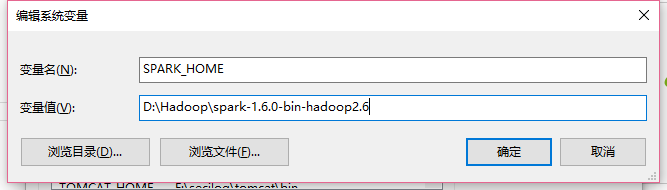
然后把SPARK_HOME配置到path,如下:
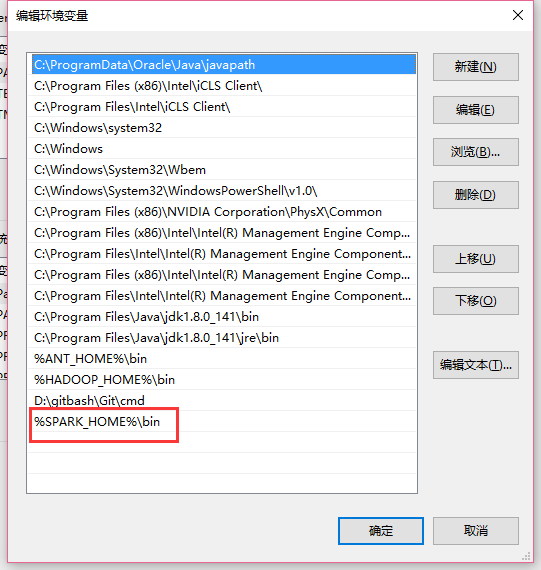
这样环境就搭好了,然后就是在eclipse上创建一个普通的java项目,然后把spark-assembly-1.6.0-hadoop2.6.0.jar这个包复制进工程并且导入,如下图
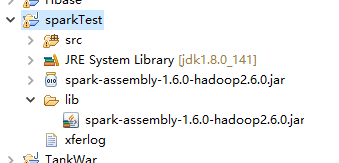
就可以开发spark程序了,下边附上一段小的测试代码:
import java.util.Arrays;

import org.apache.spark.SparkConf;

import org.apache.spark.api.java.JavaPairRDD;

import org.apache.spark.api.java.JavaRDD;

import org.apache.spark.api.java.JavaSparkContext;

import org.apache.spark.api.java.function.FlatMapFunction;

import org.apache.spark.api.java.function.Function2;

import org.apache.spark.api.java.function.PairFunction;

import org.apache.spark.api.java.function.VoidFunction;

import scala.Tuple2;

public class WordCount {

    public static void main(String[] args) {

        SparkConf conf = new SparkConf().setMaster("local").setAppName("wc");

        JavaSparkContext sc = new JavaSparkContext(conf);

        JavaRDD<String> text = sc.textFile("hdfs://master:9000/user/hadoop/input/test");

        JavaRDD<String> words = text.flatMap(new FlatMapFunction<String, String>() {

            private static final long serialVersionUID = 1L;

            @Override

            public Iterable<String> call(String line) throws Exception {

                return Arrays.asList(line.split(" "));//把字符串转化成list

            }

        });

        JavaPairRDD<String, Integer> pairs = words.mapToPair(new PairFunction<String, String, Integer>() {

            private static final long serialVersionUID = 1L;

            @Override

            public Tuple2<String, Integer> call(String word) throws Exception {

                // TODO Auto-generated method stub

                return new Tuple2<String, Integer>(word, 1);

            }

        });

        JavaPairRDD<String, Integer> results = pairs.reduceByKey(new Function2<Integer, Integer, Integer>() {

            private static final long serialVersionUID = 1L;

            @Override

            public Integer call(Integer value1, Integer value2) throws Exception {

                // TODO Auto-generated method stub

                return value1 + value2;

            }

        });

        JavaPairRDD<Integer, String> temp = results.mapToPair(new PairFunction<Tuple2<String,Integer>, Integer, String>() {

            private static final long serialVersionUID = 1L;

            @Override

            public Tuple2<Integer, String> call(Tuple2<String, Integer> tuple)

                    throws Exception {

                return new Tuple2<Integer, String>(tuple._2, tuple._1);

            }

        });

        JavaPairRDD<String, Integer> sorted = temp.sortByKey(false).mapToPair(new PairFunction<Tuple2<Integer,String>, String, Integer>() {

            private static final long serialVersionUID = 1L;

            @Override

            public Tuple2<String, Integer> call(Tuple2<Integer, String> tuple)

                    throws Exception {

                // TODO Auto-generated method stub

                return new Tuple2<String, Integer>(tuple._2,tuple._1);

            }

        });

        sorted.foreach(new VoidFunction<Tuple2<String,Integer>>() {

            private static final long serialVersionUID = 1L;

            @Override

            public void call(Tuple2<String, Integer> tuple) throws Exception {

                System.out.println("word:" + tuple._1 + " count:" + tuple._2);

            }

        });

        sc.close();

    }

}
统计的文件是下边的内容:
 Look! at the window there leans an old maid. She plucks the

withered leaf from the balsam, and looks at the grass-covered rampart,

on which many children are playing. What is the old maid thinking

of? A whole life drama is unfolding itself before her inward gaze.

    "The poor little children, how happy they are- how merrily they

play and romp together! What red cheeks and what angels' eyes! but

they have no shoes nor stockings. They dance on the green rampart,

just on the place where, according to the old story, the ground always

sank in, and where a sportive, frolicsome child had been lured by

means of flowers, toys and sweetmeats into an open grave ready dug for

it, and which was afterwards closed over the child; and from that

moment, the old story says, the ground gave way no longer, the mound

remained firm and fast, and was quickly covered with the green turf.

The little people who now play on that spot know nothing of the old

tale, else would they fancy they heard a child crying deep below the

earth, and the dewdrops on each blade of grass would be to them

tears of woe. Nor do they know anything of the Danish King who here,

in the face of the coming foe, took an oath before all his trembling

courtiers that he would hold out with the citizens of his capital, and

die here in his nest; they know nothing of the men who have fought

here, or of the women who from here have drenched with boiling water

the enemy, clad in white, and 'biding in the snow to surprise the

city.

.
当然也可以把这个工程打包成jar包,放在spark集群上运行,比如我打成jar包的名称是WordCount.jar
运行命令:/usr/local/spark/bin/spark-submit --master local --class cn.spark.test.WordCount /home/hadoop/Desktop/WordCount.jar
windows下 eclipse搭建spark java编译环境的更多相关文章
- Win7 Eclipse 搭建spark java1.8环境:WordCount helloworld例子
[学习笔记] Win7 Eclipse 搭建spark java1.8环境:WordCount helloworld例子在eclipse oxygen上创建一个普通的java项目,然后把spark-a ...
- 配置 Windows 下的 nodejs C++ 模块编译环境 安装 node-gyp
配置 Windows 下的 nodejs C++ 模块编译环境 根据 node-gyp 指示的 Windows 编译环境说明, 简单一句话就是 "Python + VC++ 编译环境&quo ...
- windows下eclipse搭建android_ndk开发环境
安装cygwin: 由于NDK编译代码时必须要用到make和gcc,所以你必须先搭建一个linux环境, cygwin是一个在windows平台上运行的unix模拟环境,它对于学习unix/linux ...
- Ubuntu杂记——Ubuntu下Eclipse搭建Maven、SVN环境
正在实习的公司项目是使用Maven+SVN管理的,所以转到Ubuntu下也要靠自己搭环境,自己动手,丰衣足食.步骤有点简略,但还是能理解的. 一.安装JDK7 打开终端(Ctrl+Alt+T),输入 ...
- Ubuntu(Linux)使用Eclipse搭建C/C++编译环境
转自:http://www.cppblog.com/kangnixi/archive/2010/02/10/107636.html 首先是安装Eclipse,方法有两种: 第一种是通过Ub ...
- Ubuntu 12.04 使用Eclipse搭建C/C++编译环境
首先是安装Eclipse,方法有两种: 第一种是通过Ubuntu自带的程序安装功能安装Eclipse,应用程序->Ubtuntu软件中心,搜Eclipse安装即可. 第二 ...
- Windows下Eclipse+PyDev配置Python开发环境
1.简介 Eclipse是一款基于Java的可扩展开发平台.其官方下载中包括J2EE.Java.C/C++.Android等诸多版本.除此之外,Eclipse还可以通过安装插件的方式进行包括Pytho ...
- Windows下Eclipse+PyDev安装Python开发环境
.简介 Eclipse是一款基于Java的可扩展开发平台.其官方下载中包括J2EE方向版本.Java方向版本.C/C++方向版本.移动应用方向版本等诸多版本.除此之外,Eclipse还可以通过安装插件 ...
- Windows下配置cygwin和ndk编译环境
cygwin安装 正确的安装步骤其实很简单:1. 下载setup-86_64.exe 2. 直接从网上下载安装,选择包时,顶部选择“default”不变 3. 搜索make,勾选make,cmake, ...
随机推荐
- 自己理解的数据库shcema
不懂就被人嘲笑呀 ,你还不知道怎么说. 从定义中我们可以看出schema为数据库对象的集合,为了区分各个集合,我们需要给这个集合起个名字,这些名字就是我们在企业管理器的方案下看到的许多类似用户名的节点 ...
- 基于SpringBoot+SpringSecurity+mybatis+layui实现的一款权限系统
这是一款适合初学者学习权限以及springBoot开发,mybatis综合操作的后台权限管理系统 其中设计到的数据查询有一对一,一对多,多对多,联合分步查询,充分利用mybatis的强大实现各种操作, ...
- 爬虫——GET请求和POST请求
urllib.parse.urlencode()和urllib.parse.unquote() 编码工作使用urllib.parse的urlencode()函数,帮我们将key:value这样的键值对 ...
- Python3 operator模块关联代替Python2 cmp() 函数
Python2 cmp() 函数 描述 cmp(x,y) 函数用于比较2个对象,如果 x < y 返回 -1, 如果 x == y 返回 0, 如果 x > y 返回 1. Python ...
- jquery图片滚动normalizy.css
article,aside,details,figcaption,figure,footer,header,hgroup,main,nav,section,summary{display:block; ...
- JS高级. 01 复习JS基础
1. JavaScript 包含: ____, ____, 和 ____. 2. JavaScript 的基本类型有 ____, ____, 和 ____. 3. JavaScript 的复合类型有 ...
- JavaSE 第二次学习随笔(二)
循环结构中的多层嵌套跳出 targeta: for(int i = 0; i < 100; i++){ for (int j = 0; j < 100; j++) { if(i + j = ...
- 【Hive二】 Hive基本使用
Hive基本使用 创建数据库 创建一个数据库,数据库在HDFS上的默认存储路径是/user/hive/warehouse/*.db create database 库名; 避免要创建的数据库已经存在错 ...
- pads怎么高亮网络
pads怎么高亮网络 选择完整个网络----再按CTRL+H 就高亮了. 取消高亮是,选择需要取消高亮的整个网络,按 CTRL+U 就取消了. PADS在生成Gerber时过孔盖油设置方法 PADS2 ...
- flask 中访问时后台错误 error: [Errno 32] Broken pipe
解决办法:app.run(threaded=True) 个人理解:flask默认单线程,访问一个页面时会访问到很多页面,比如一些图片,加入参数使其为多线程