
第三章 springboot + jedisCluster(转载)
本编博客转发自:http://www.cnblogs.com/java-zhao/p/5347703.html
如果使用的是redis2.x,在项目中使用客户端分片(Shard)机制。
如果使用的是redis3.x中的集群,在项目中使用jedisCluster。
1、项目结构
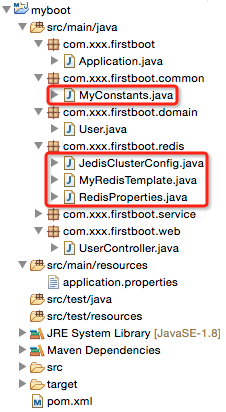
2、pom.xml
 <?xml version="1.0" encoding="UTF-8"?>

 <project xmlns="http://maven.apache.org/POM/4.0.0" xmlns:xsi="http://www.w3.org/2001/XMLSchema-instance"

     xsi:schemaLocation="http://maven.apache.org/POM/4.0.0 http://maven.apache.org/maven-v4_0_0.xsd">

     <modelVersion>4.0.0</modelVersion>

     <groupId>com.xxx</groupId>

     <artifactId>myboot</artifactId>

     <version>1.0-SNAPSHOT</version>

     <properties>

         <java.version>1.8</java.version><!-- 官方推荐 -->

     </properties>

     <!-- 引入spring-boot-starter-parent做parent是最好的方式,

          但是有时我们可能要引入我们自己的parent,此时解决方式有两种:

          1)我们自己的parent的pom.xml的parent设为spring-boot-starter-parent(没有做过验证,但是感觉可行)

          2)使用springboot文档中的方式:见spring-boot-1.2.5-reference.pdf的第13页

     -->

     <parent>

         <groupId>org.springframework.boot</groupId>

         <artifactId>spring-boot-starter-parent</artifactId>

         <version>1.2.5.RELEASE</version>

     </parent>

     <!-- <dependencyManagement>

         <dependencies>

             <dependency>

                 Import dependency management from Spring Boot

                 <groupId>org.springframework.boot</groupId>

                 <artifactId>spring-boot-dependencies</artifactId>

                 <version>1.2.5.RELEASE</version>

                 <type>pom</type>

                 <scope>import</scope>

             </dependency>

         </dependencies>

     </dependencyManagement> -->

     <!-- 引入实际依赖 -->

     <dependencies>

         <dependency>

             <groupId>org.springframework.boot</groupId>

             <artifactId>spring-boot-starter-web</artifactId>

         </dependency>

         <dependency>

             <groupId>redis.clients</groupId>

             <artifactId>jedis</artifactId>

         </dependency>

         <dependency>

             <groupId>com.alibaba</groupId>

             <artifactId>fastjson</artifactId>

             <version>1.1.15</version>

         </dependency>

         <dependency>

             <groupId>org.apache.commons</groupId>

             <artifactId>commons-lang3</artifactId>

             <version>3.3.2</version>

         </dependency>

     </dependencies>

     <build>

         <plugins>

             <!-- 用于将应用打成可直接运行的jar(该jar就是用于生产环境中的jar) 值得注意的是,如果没有引用spring-boot-starter-parent做parent,

                 且采用了上述的第二种方式,这里也要做出相应的改动 -->

             <plugin>

                 <groupId>org.springframework.boot</groupId>

                 <artifactId>spring-boot-maven-plugin</artifactId>

             </plugin>

         </plugins>

     </build>

 </project>
说明:相对于上一章的代码仅仅引入了jedis的依赖jar。
3、application.properties
 #user info

 user.id=1

 user.username=zhaojigang

 user.password=123

 #redis cluster

 redis.cache.clusterNodes=localhost:8080

 redis.cache.commandTimeout=5

 #unit:second

 redis.cache.expireSeconds=120
说明:相对于上一章的代码仅仅引入了redis cluster的配置信息
4、Application.java(springboot启动类,与上一章一样)
5、RedisProperties.java(Redis属性装配)
 package com.xxx.firstboot.redis;

 import org.springframework.boot.context.properties.ConfigurationProperties;

 import org.springframework.stereotype.Component;

 @Component

 @ConfigurationProperties(prefix = "redis.cache")

 public class RedisProperties {

     private int    expireSeconds;

     private String clusterNodes;

     private int    commandTimeout;

     public int getExpireSeconds() {

         return expireSeconds;

     }

     public void setExpireSeconds(int expireSeconds) {

         this.expireSeconds = expireSeconds;

     }

     public String getClusterNodes() {

         return clusterNodes;

     }

     public void setClusterNodes(String clusterNodes) {

         this.clusterNodes = clusterNodes;

     }

     public int getCommandTimeout() {

         return commandTimeout;

     }

     public void setCommandTimeout(int commandTimeout) {

         this.commandTimeout = commandTimeout;

     }

 }
说明:与上一章的User类似,采用@ConfigurationProperties注解自动读取application.properties文件的内容并装配到RedisProperties的每一个属性中去。
6、JedisClusterConfig.java(获取JedisCluster单例)
 package com.xxx.firstboot.redis;

 import java.util.HashSet;

 import java.util.Set;

 import org.springframework.beans.factory.annotation.Autowired;

 import org.springframework.context.annotation.Bean;

 import org.springframework.context.annotation.Configuration;

 import redis.clients.jedis.HostAndPort;

 import redis.clients.jedis.JedisCluster;

 @Configuration

 public class JedisClusterConfig {

     @Autowired

     private RedisProperties redisProperties;

     /**

      * 注意:

      * 这里返回的JedisCluster是单例的,并且可以直接注入到其他类中去使用

      * @return

      */

     @Bean

     public JedisCluster getJedisCluster() {

         String[] serverArray = redisProperties.getClusterNodes().split(",");//获取服务器数组(这里要相信自己的输入,所以没有考虑空指针问题)

         Set<HostAndPort> nodes = new HashSet<>();

         for (String ipPort : serverArray) {

             String[] ipPortPair = ipPort.split(":");

             nodes.add(new HostAndPort(ipPortPair[0].trim(), Integer.valueOf(ipPortPair[1].trim())));

         }

         return new JedisCluster(nodes, redisProperties.getCommandTimeout());

     }

 }
说明:
- 该类注入了RedisProperties类,可以直接读取其属性
- 这里没有对jedis链接池提供更多的配置(jedis-2.5.x好像不支持,jedis-2.6.x支持),具体的配置属性可以查看文章开头第一篇博客
注意:
- 该类使用了Java注解,@Configuration与@Bean,
- 在方法上使用@Bean注解可以让方法的返回值为单例,
- 该方法的返回值可以直接注入到其他类中去使用
- @Bean注解是方法级别的
- 如果使用的是常用的spring注解@Component,
- 在方法上没有注解的话,方法的返回值就会是一个多例,
- 该方法的返回值不可以直接注入到其他类去使用
- 该方式的注解是类级别的
7、MyRedisTemplate.java(具体redis操作)
 package com.xxx.firstboot.redis;

 import org.slf4j.Logger;

 import org.slf4j.LoggerFactory;

 import org.springframework.beans.factory.annotation.Autowired;

 import org.springframework.stereotype.Component;

 import redis.clients.jedis.JedisCluster;

 @Component

 public class MyRedisTemplate {

     private static final Logger LOGGER    = LoggerFactory.getLogger(MyRedisTemplate.class);

     @Autowired

     private JedisCluster        jedisCluster;

     @Autowired

     private RedisProperties     redisProperties;

     private static final String KEY_SPLIT = ":"; //用于隔开缓存前缀与缓存键值

     /**

      * 设置缓存

      * @param prefix 缓存前缀(用于区分缓存,防止缓存键值重复)

      * @param key    缓存key

      * @param value  缓存value

      */

     public void set(String prefix, String key, String value) {

         jedisCluster.set(prefix + KEY_SPLIT + key, value);

         LOGGER.debug("RedisUtil:set cache key={},value={}", prefix + KEY_SPLIT + key, value);

     }

     /**

      * 设置缓存,并且自己指定过期时间

      * @param prefix

      * @param key

      * @param value

      * @param expireTime 过期时间

      */

     public void setWithExpireTime(String prefix, String key, String value, int expireTime) {

         jedisCluster.setex(prefix + KEY_SPLIT + key, expireTime, value);

         LOGGER.debug("RedisUtil:setWithExpireTime cache key={},value={},expireTime={}", prefix + KEY_SPLIT + key, value,

             expireTime);

     }

     /**

      * 设置缓存,并且由配置文件指定过期时间

      * @param prefix

      * @param key

      * @param value

      */

     public void setWithExpireTime(String prefix, String key, String value) {

         int EXPIRE_SECONDS = redisProperties.getExpireSeconds();

         jedisCluster.setex(prefix + KEY_SPLIT + key, EXPIRE_SECONDS, value);

         LOGGER.debug("RedisUtil:setWithExpireTime cache key={},value={},expireTime={}", prefix + KEY_SPLIT + key, value,

             EXPIRE_SECONDS);

     }

     /**

      * 获取指定key的缓存

      * @param prefix

      * @param key

      */

     public String get(String prefix, String key) {

         String value = jedisCluster.get(prefix + KEY_SPLIT + key);

         LOGGER.debug("RedisUtil:get cache key={},value={}", prefix + KEY_SPLIT + key, value);

         return value;

     }

     /**

      * 删除指定key的缓存

      * @param prefix

      * @param key

      */

     public void deleteWithPrefix(String prefix, String key) {

         jedisCluster.del(prefix + KEY_SPLIT + key);

         LOGGER.debug("RedisUtil:delete cache key={}", prefix + KEY_SPLIT + key);

     }

     public void delete(String key) {

         jedisCluster.del(key);

         LOGGER.debug("RedisUtil:delete cache key={}", key);

     }

 }
注意:
这里只是使用了jedisCluster做了一些字符串的操作,对于list/set/sorted set/hash的操作,可以参考开头的两篇博客。
8、MyConstants.java(缓存前缀常量定义类)
 package com.xxx.firstboot.common;

 /**

  * 定义一些常量

  */

 public class MyConstants {

     public static final String USER_FORWARD_CACHE_PREFIX = "myboot:user";// user缓存前缀

 }
注意:
- 根据业务特点定义redis的缓存前缀,有助于防止缓存重复导致的缓存覆盖问题
- 缓存前缀使用":"做分隔符,这是推荐做法(这个做法可以在使用redis-desktop-manager的过程看出来)
9、UserController.java(测试)
 package com.xxx.firstboot.web;

 import org.apache.commons.lang3.StringUtils;

 import org.springframework.beans.factory.annotation.Autowired;

 import org.springframework.web.bind.annotation.RequestMapping;

 import org.springframework.web.bind.annotation.RequestParam;

 import org.springframework.web.bind.annotation.RestController;

 import com.alibaba.fastjson.JSON;

 import com.xxx.firstboot.common.MyConstants;

 import com.xxx.firstboot.domain.User;

 import com.xxx.firstboot.redis.MyRedisTemplate;

 import com.xxx.firstboot.service.UserService;

 /**

  * @RestController:spring mvc的注解,

  * 相当于@Controller与@ResponseBody的合体,可以直接返回json

  */

 @RestController

 @RequestMapping("/user")

 public class UserController {

     @Autowired

     private UserService userService;

     @Autowired

     private MyRedisTemplate myRedisTemplate;

     @RequestMapping("/getUser")

     public User getUser() {

         return userService.getUser();

     }

     @RequestMapping("/testJedisCluster")

     public User testJedisCluster(@RequestParam("username") String username){

         String value =  myRedisTemplate.get(MyConstants.USER_FORWARD_CACHE_PREFIX, username);

         if(StringUtils.isBlank(value)){

             myRedisTemplate.set(MyConstants.USER_FORWARD_CACHE_PREFIX, username, JSON.toJSONString(getUser()));

             return null;

         }

         return JSON.parseObject(value, User.class);

     }

 }
说明:相对于上一章,只是添加了测试缓存的方法testJedisCluster。
测试:
在Application.properties右击-->run as-->java application,在浏览器输入"localhost:8080/user/testJedisCluster?username=xxx"即可。
附:对于redis的测试,我们有时需要查看执行set后,缓存是否存入redis的db中了,有两种方式
- 执行set后,get数据,之后修改数据,在get数据,比较两次get的数据是否相同即可
- 有时,这些数据是无法修改的(假设该数据是我们从第三方接口得来的),这个时候可以使用redis-desktop-manager这个软件来查看缓存是否存入redis(该软件的使用比较简单,查看官网)
第三章 springboot + jedisCluster(转载)的更多相关文章
- 第三章 springboot + jedisCluster
如果使用的是redis2.x,在项目中使用客户端分片(Shard)机制.(具体使用方式:第九章 企业项目开发--分布式缓存Redis(1) 第十章 企业项目开发--分布式缓存Redis(2)) 如果 ...
- 第五章 springboot + mybatis(转载)
本编博客转发自:http://www.cnblogs.com/java-zhao/p/5350021.html springboot集成了springJDBC与JPA,但是没有集成mybatis,所以 ...
- 第七章 springboot + retrofit(转载)
本篇博客转发自:http://www.cnblogs.com/java-zhao/p/5350861.html retrofit:一套RESTful架构的Android(Java)客户端实现. 好处: ...
- 第六章 springboot + 事务(转载)
本篇博客转发自:http://www.cnblogs.com/java-zhao/p/5350106.html 在实际开发中,其实很少会用到事务,一般情况下事务用的比较多的是在金钱计算方面. myba ...
- 第四章 springboot + swagger(转载)
此篇博客转发自:http://www.cnblogs.com/java-zhao/p/5348113.html swagger用于定义API文档. 好处: 前后端分离开发 API文档非常明确 测试的时 ...
- 【转载】Java垃圾回收内存清理相关(虚拟机书第三章),GC日志的理解,CPU时间、墙钟时间的介绍
主要看<深入理解Java虚拟机> 第三张 P84 开始是垃圾收集相关. 1. 1960年诞生于MIT的Lisp是第一门采用垃圾回收的语言. 2. 程序计数器.虚拟机栈.本地方法栈3个区域随 ...
- 《驾驭Core Data》 第三章 数据建模
本文由海水的味道编译整理,请勿转载,请勿用于商业用途. 当前版本号:0.1.2 第三章数据建模 Core Data栈配置好之后,接下来的工作就是设计对象图,在Core Data框架中,对象图被表 ...
- [Effective Java]第三章 对所有对象都通用的方法
声明:原创作品,转载时请注明文章来自SAP师太技术博客( 博/客/园www.cnblogs.com):www.cnblogs.com/jiangzhengjun,并以超链接形式标明文章原始出处,否则将 ...
- (转)iOS Wow体验 - 第三章 - 用户体验的差异化策略
本文是<iOS Wow Factor:Apps and UX Design Techniques for iPhone and iPad>第三章译文精选,其余章节将陆续放出.上一篇:Wow ...
随机推荐
- How secure FB Messenger is?
It's reported that FB Messenge is the most secure App for instant messaging service. Let's see if FB ...
- over partition by与group by 的区别
(本文摘自scottpei的博客) over partition by与group by 的区别 今天看到一个老兄的问题, 大概如下: 查询出部门的最低工资的userid 号 表结构: D号 ...
- c语言自定义BOOL函数
C语言中没有BOOL类型变量,它是C++独有的,由于使用BOOL类型可以使代码更具有可读性,很多编程者都在C中自己定义了类似的应用,一般方法有两种: 第一种:采用宏定义方式 typedef int B ...
- java自编时间工具类
package timeTools; import java.text.ParseException; import java.text.SimpleDateFormat; import java.u ...
- 【java基础学习一】int[]、Integer[]、String[] 排序( 正序、倒叙)、去重
调用: //重复项有9.5.1.2 int[] ints = new int[]{9,4,7,8,2,5,1,6,2,5,9,1}; arrayIntTest(ints); ///////////// ...
- MySQL_订单类型细分_20161222
#目前在做一个各城市日订单角度的对比分析,因此需要对订单类型进行一下规整.由于App上产品活动许多,查询了多个表,将订单类型规则进行了统一,优惠券和满减券不能同时使用,创建的这两个表都是以订单ID为k ...
- MongoDB的基础知识
本人只是软件开发的一个菜鸟,在学习MongoDB,总结了一点自己学习的知识,监督自己学习. 如果文章中有不足的地方,还请大神指点迷津,纠正改错,谢谢. 一.MongoDB简介 MongoDB是一个基于 ...
- MySQL 第一篇
一.MySQL介绍 MySQL是一个关系型数据库管理系统,由瑞典MySQL AB公司开发,目前属于Oracle公司.MySQL是一种关联数据库管理系统,关联数据库将数据保存在不同的表中,而不是将所有数 ...
- 【网络编程/C++】修改本机ip地址
昨天学会了编程实现获取本地网卡信息,今天再接再砺学会了修改本机ip地址.其实原理很简单就是用c++调用一下dos命令而已,不得不说,dos命令实在是太强大了,当然听说还有种修改注册表的方法,不过没有试 ...
- FastDFS介绍
相关术语 1)跟踪服务器tracker server 2)存储服务器 storage server 3)元数据 meta data --- 附件上传的说明 4)客户端 client---对程序员暴露 ...