
使用HttpClient对ASP.NET Web API服务实现增删改查
本篇体验使用HttpClient对ASP.NET Web API服务实现增删改查。
创建ASP.NET Web API项目
新建项目,选择"ASP.NET MVC 4 Web应用程序"。
选择"Web API"。
在Models文件夹下创建Product类。
public class Product{public int Id { get; set; }public string Name { get; set; }public string Category { get; set; }public decimal Price { get; set; }}
在Models文件夹下创建IProductRepository接口。
public interface IProductRepository{IEnumerable<Product> GetAll();Product Get(int id);Product Add(Product item);void Remove(int id);bool Update(Product item);}
在Models文件夹下创建ProductRepository类,实现IProductRepository接口。
public class ProductRepository : IProductRepository{private List<Product> products = new List<Product>();private int _nextId = 1;public ProductRepository(){Add(new Product() {Name = "product1", Category = "sports", Price = 88M});Add(new Product() { Name = "product2", Category = "sports", Price = 98M });Add(new Product() { Name = "product3", Category = "toys", Price = 58M });}public IEnumerable<Product> GetAll(){return products;}public Product Get(int id){return products.Find(p => p.Id == id);}public Product Add(Product item){if (item == null){throw new ArgumentNullException("item");}item.Id = _nextId++;products.Add(item);return item;}public bool Update(Product item){if (item == null){throw new ArgumentNullException("item");}int index = products.FindIndex(p => p.Id == item.Id);if (index == -1){return false;}products.RemoveAt(index);products.Add(item);return true;}public void Remove(int id){products.RemoveAll(p => p.Id == id);}}
在Controllers文件夹下创建空的ProductController。
public class ProductController : ApiController{static readonly IProductRepository repository = new ProductRepository();//获取所有public IEnumerable<Product> GetAllProducts(){return repository.GetAll();}//根据id获取public Product GetProduct(int id){Product item = repository.Get(id);if (item == null){throw new HttpResponseException(HttpStatusCode.NotFound);}return item;}//根据类别查找所有产品public IEnumerable<Product> GetProductsByCategory(string category){returnrepository.GetAll().Where(p => string.Equals(p.Category, category, StringComparison.OrdinalIgnoreCase));}//创建产品public HttpResponseMessage PostProduct(Product item){item = repository.Add(item);var response = Request.CreateResponse(HttpStatusCode.Created, item);string uri = Url.Link("DefaultApi", new {id = item.Id});response.Headers.Location = new Uri(uri);return response;}//更新产品public void PutProduct(int id, Product product){product.Id = id;if (!repository.Update(product)){throw new HttpResponseException(HttpStatusCode.NotFound);}}//删除产品public void DeleteProduct(int id){Product item = repository.Get(id);if (item == null){throw new HttpResponseException(HttpStatusCode.NotFound);}repository.Remove(id);}}
在浏览器中输入:
http://localhost:1310/api/Product 获取到所有产品
http://localhost:1310/api/Product/1 获取编号为1的产品
使用HttpClient查询某个产品
在同一个解决方案下创建一个控制台程序。
依次点击"工具","库程序包管理器","程序包管理器控制台",输入如下:
Install-Package Microsoft.AspNet.WebApi.Client

在控制台程序下添加Product类,与ASP.NET Web API中的对应。
public class Product{public string Name { get; set; }public double Price { get; set; }public string Category { get; set; }}
编写如下:
static void Main(string[] args){RunAsync().Wait();Console.ReadKey();}static async Task RunAsync(){using (var client = new HttpClient()){//设置client.BaseAddress = new Uri("http://localhost:1310/");client.DefaultRequestHeaders.Accept.Clear();client.DefaultRequestHeaders.Accept.Add(new MediaTypeWithQualityHeaderValue("application/json"));//异步获取数据HttpResponseMessage response = await client.GetAsync("/api/Product/1");if (response.IsSuccessStatusCode){Product product = await response.Content.ReadAsAsync<Product>();Console.WriteLine("{0}\t{1}元\t{2}",product.Name, product.Price, product.Category);}}}
把控制台项目设置为启动项目。

HttpResponseMessage的IsSuccessStatusCode只能返回true或false,如果想让响应抛出异常,需要使用EnsureSuccessStatusCode方法。
try{HttpResponseMessage response = await client.GetAsync("/api/Product/1");response.EnsureSuccessStatusCode();//此方法确保响应失败抛出异常}catch(HttpRequestException ex){//处理异常}
另外,ReadAsAsync方法,默认接收MediaTypeFormatter类型的参数,支持 JSON, XML, 和Form-url-encoded格式,如果想自定义MediaTypeFormatter格式,参照如下:
var formatters = new List<MediaTypeFormatter>() {new MyCustomFormatter(),new JsonMediaTypeFormatter(),new XmlMediaTypeFormatter()};resp.Content.ReadAsAsync<IEnumerable<Product>>(formatters);
使用HttpClient查询所有产品
static void Main(string[] args){RunAsync().Wait();Console.ReadKey();}static async Task RunAsync(){using (var client = new HttpClient()){//设置client.BaseAddress = new Uri("http://localhost:1310/");client.DefaultRequestHeaders.Accept.Clear();client.DefaultRequestHeaders.Accept.Add(new MediaTypeWithQualityHeaderValue("application/json"));//异步获取数据HttpResponseMessage response = await client.GetAsync("/api/Product");if (response.IsSuccessStatusCode){IEnumerable<Product> products = await response.Content.ReadAsAsync<IEnumerable<Product>>();foreach (var item in products){Console.WriteLine("{0}\t{1}元\t{2}", item.Name, item.Price, item.Category);}}}}

使用HttpClient添加
static void Main(string[] args){RunAsync().Wait();Console.ReadKey();}static async Task RunAsync(){using (var client = new HttpClient()){//设置client.BaseAddress = new Uri("http://localhost:1310/");client.DefaultRequestHeaders.Accept.Clear();client.DefaultRequestHeaders.Accept.Add(new MediaTypeWithQualityHeaderValue("application/json"));//添加var myProduct = new Product() { Name = "myproduct", Price = 88, Category = "other" };HttpResponseMessage response = await client.PostAsJsonAsync("api/Product", myProduct);//异步获取数据response = await client.GetAsync("/api/Product");if (response.IsSuccessStatusCode){IEnumerable<Product> products = await response.Content.ReadAsAsync<IEnumerable<Product>>();foreach (var item in products){Console.WriteLine("{0}\t{1}元\t{2}", item.Name, item.Price, item.Category);}}}}
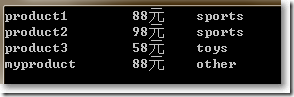
使用HttpClient修改
static void Main(string[] args){RunAsync().Wait();Console.ReadKey();}static async Task RunAsync(){using (var client = new HttpClient()){//设置client.BaseAddress = new Uri("http://localhost:1310/");client.DefaultRequestHeaders.Accept.Clear();client.DefaultRequestHeaders.Accept.Add(new MediaTypeWithQualityHeaderValue("application/json"));//添加 HTTP POSTvar myProduct = new Product() { Name = "myproduct", Price = 100, Category = "other" };HttpResponseMessage response = await client.PostAsJsonAsync("api/product", myProduct);if (response.IsSuccessStatusCode){Uri pUrl = response.Headers.Location;//修改 HTTP PUTmyProduct.Price = 80; // Update priceresponse = await client.PutAsJsonAsync(pUrl, myProduct);}//异步获取数据response = await client.GetAsync("/api/Product");if (response.IsSuccessStatusCode){IEnumerable<Product> products = await response.Content.ReadAsAsync<IEnumerable<Product>>();foreach (var item in products){Console.WriteLine("{0}\t{1}元\t{2}", item.Name, item.Price, item.Category);}}}}
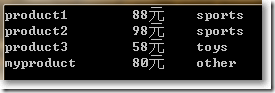
使用HttpClient删除
static void Main(string[] args){RunAsync().Wait();Console.ReadKey();}static async Task RunAsync(){using (var client = new HttpClient()){//设置client.BaseAddress = new Uri("http://localhost:1310/");client.DefaultRequestHeaders.Accept.Clear();client.DefaultRequestHeaders.Accept.Add(new MediaTypeWithQualityHeaderValue("application/json"));//添加 HTTP POSTvar myProduct = new Product() { Name = "myproduct", Price = 100, Category = "other" };HttpResponseMessage response = await client.PostAsJsonAsync("api/product", myProduct);if (response.IsSuccessStatusCode){Uri pUrl = response.Headers.Location;//修改 HTTP PUTmyProduct.Price = 80; // Update priceresponse = await client.PutAsJsonAsync(pUrl, myProduct);//删除 HTTP DELETEresponse = await client.DeleteAsync(pUrl);}//异步获取数据response = await client.GetAsync("/api/Product");if (response.IsSuccessStatusCode){IEnumerable<Product> products = await response.Content.ReadAsAsync<IEnumerable<Product>>();foreach (var item in products){Console.WriteLine("{0}\t{1}元\t{2}", item.Name, item.Price, item.Category);}}}}
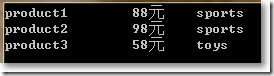
完。
使用HttpClient对ASP.NET Web API服务实现增删改查的更多相关文章
- 使用HttpClient操作ASP.NET Web API 2.1增删改查
使用NuGet包安装Microsoft ASP.NET Web API 2.1 Client Libraries, 调用方式代码如下: HttpClient client = new HttpClie ...
- 前端使用AngularJS的$resource,后端ASP.NET Web API,实现增删改查
AngularJS中的$resource服务相比$http服务更适合与RESTful服务进行交互.本篇后端使用ASP.NET Web API, 前端使用$resource,实现增删改查. 本系列包括: ...
- 使用HttpClient消费ASP.NET Web API服务
本篇体验使用HttpClient消费ASP.NET Web API服务,例子比较简单. 依次点击"文件","新建","项目". 选择&quo ...
- ASP.NET从零开始学习EF的增删改查
ASP.NET从零开始学习EF的增删改查 最近辞职了,但是离真正的离职还有一段时间,趁着这段空档期,总想着写些东西,想来想去,也不是很明确到底想写个啥,但是闲着也是够 ...
- 基于gin的golang web开发:mysql增删改查
Go语言访问mysql数据库需要用到标准库database/sql和mysql的驱动.标准库的Api使用比较繁琐这里再引入另一个库github.com/jmoiron/sqlx. go get git ...
- Android(java)学习笔记193:利用谷歌API对数据库增删改查(推荐使用)
接下来我们通过项目案例来介绍:这个利用谷歌API对数据库增删改查 1.首先项目图: 2.这里的布局文件activity_main.xml: <LinearLayout xmlns:android ...
- 通过flask实现web页面简单的增删改查bootstrap美化版
通过flask实现web页面简单的增删改查bootstrap美化版 项目目录结构 [root@node1 python]# tree -L 2 . ├── animate.css ├── fileut ...
- 通过flask实现web页面简单的增删改查
通过flask实现web页面简单的增删改查 # 1.后台程序falsk_web01.py #coding:utf-8 from flask import Flask,render_template,r ...
- Android(java)学习笔记136:利用谷歌API对数据库增删改查(推荐使用)
接下来我们通过项目案例来介绍:这个利用谷歌API对数据库增删改查 1. 首先项目图: 2. 这里的布局文件activity_main.xml: <LinearLayout xmlns:andro ...
随机推荐
- linux下查看各硬件型号
查看主板型号 # dmidecode |grep -A 8 "System Information"System Information 上网查DELL CS24-TY,找到说主板 ...
- 几种list排序方法
package com.lgx.jdk8.part02; import java.util.*; import java.util.stream.Collectors; /** * Comparato ...
- Ubuntu下SSH安装
step: 1.输入命令: sudo apt-get install openssh-server 2.验证sshserver是否启动了,以下两条命令均可 ps -e | grep ssh netst ...
- jexus配置支持Owin
vi打开配置文件,加一行 OwinMain=xxx.dll ###################### # Web Site: Default ########################### ...
- 【前端vue开发】vue开发总结
- (五)消费Dubbo服务
前面我们搞了发布Dubbo服务,发布的服务就是用来消费的,所以我们这里来调用服务,消费下: 创建maven项目 dubbo-demo-consumer pom.xml配置下: <dependen ...
- 使用abstract关键字的使用
package abstract1.demo01; //使用abstract关键字修饰的类叫做抽象类public abstract class Father { public static void ...
- dojo/domReady! 中感叹号的作用
废话 其实不算个技术问题,但实在是花了我不少时间,不记下来都对不起我这浪费掉的几十分钟. 问题 在dojo官网上看教程,跟着做点练习,看到Dojo DOM Functions那节,有一个练习是改变页面 ...
- 【LOJ】#2496. 「AHOI / HNOI2018」毒瘤
题面 还有这么诚实的出题人! 我们最多影响20个点,然后把这20个点的虚树建出来,并且枚举每个点的选举状态,如果一个点选或不选可以通过改\(dp[u][0] = 0\)或\(dp[u][1] = 0\ ...
- 修改Linux的基本配置
1.修改主机名 vi /etc/sysconfig/network 2.修改ip地址 vi /etc/sysconfig/network-scripts/ifcfg-eth0 ONBOOT=yes ...