
Vue(小案例)底部tab栏和顶部title栏的实现
---恢复内容开始---
一、前言
1、底部tab栏实现
2、顶部title栏实现
二、主要内容
1、底部tab栏实现(将底部导航提取到公共的组件中)
具体效果:当点击切换不同的tab的时候,对应的显示高亮,并且切换到对应的页面中
(1)html/css代码
<template>

    <div>

        <footer class="footer_guide border-1px">

            <a href="#" class="guide_item" @click='goTo("/")'  :class="{'on':'/'==this.$route.path}">

                <span>

                    <i class="iconfont icon-U"></i>

                </span>

                <span>外卖</span>

            </a>

            <a href="#" class="guide_item" @click='goTo("/Search")' :class="{'on':'/Search'==this.$route.path}">

                <span>

                    <i class="iconfont icon-sousuo"></i>

                </span>

                <span>搜索</span>

            </a>

            <a href="#" class="guide_item" @click='goTo("/Order")' :class="{'on':'/Order'==this.$route.path}" >

                <span>

                    <i class="iconfont icon-icon"></i>

                </span>

                <span>订单</span>

            </a>

            <a href="#" class="guide_item" @click='goTo("/Profile")' :class="{'on':'/Profile'==this.$route.path}" >

                <span>

                    <i class="iconfont icon-geren"></i>

                </span>

                <span>我的</span>

            </a>

        </footer>

    </div>

</template>

<script type="text/javascript">

    export default{

        data(){

            return{

            }

        },

        methods:{

            goTo(path){

                this.$router.replace(path)

            }

        }

    }

</script>

<style lang="stylus" rel="stylesheet/stylus">

    @import "../../common/stylus/mixins.styl"

    .footer_guide

      top-border-1px(#e4e4e4)

      position fixed;

      z-index 100

      left 0

      right 0

      bottom 0

      background-color #fff

      width 100%

      height 50px

      display flex

    .guide_item

          display flex

          flex 1

          text-align center

          flex-direction column

          align-items center

          margin 5px

          color #999

     &.on

          color #02a774

     span

              font-size 12px

              margin-top 2px

              margin-bottom 2px

     .iconfont

               font-size 22px

</style>
footerGuide.vue
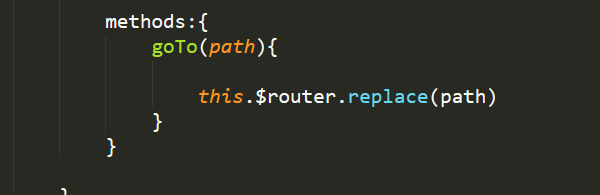
(2)给每个Tab切换标签注册一个点击事件,每次点击的时候,将当前对应页面的路由传过去,并且比较当且的路由,是否和tab上的路由一致,如果一致的时候就进行路由跳转, 并且判断当前的路由是否等于每个标签中对应的路由,如果对应就设置为高亮

2、顶部title栏实现(用到slot插槽)
(1)在很多app软件中,顶部的结构很相似(可以分为左,右,中)三个部分,
(2)也将顶部导航提取到公共导航部分
<template>

    <!--头部-->

        <header class="header">

            <slot name="left"></slot>

            <span class="header_title">

                <span class="header_title_text ellipsis">{{title}}</span>

            </span>

            <slot name="right"></slot>

        </header>

</template>

<script type="text/javascript">

    export default{

        props:{

            title: String

        }

    }

</script>

<style lang="stylus" rel="stylesheet/stylus">

          .header

              background-color #02a774

              position fixed

              z-index 100

              top 0

              left 0

              width 100%

              height 45px

              .header_search

                position absolute

                left 15px

                top 30%

                width 10%

                height 50%

                .icon-sousuo

                  font-size 25px

                  color #fff

              .header_login

                font-size 14px

                color #fff

                position absolute

                right 15px

                top 50%

                transform transformY(-50%)

                .header_login_text

                 color #fff

              .header_title

                position absolute

                top 50%

                left 50%

                transform translateX(-50%)

                width 50%

                color #fff

                text-align center

              .header_title_text

                font-size 20px

                color #fff

                display block

</style>
HeaderTop.vue
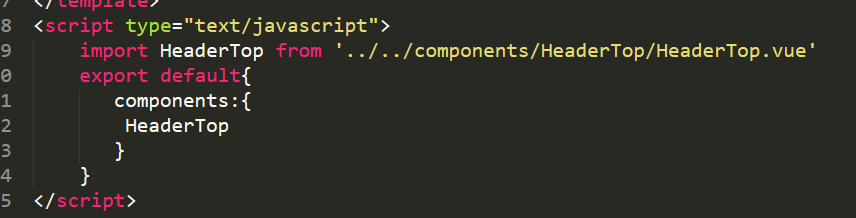
(3)由于每个导航的title不一样,可以从父组件传给子组件
父组件中:
第一步:先挂载
第二步:使用

子组件中:

三、总结
---恢复内容结束---
Vue(小案例)底部tab栏和顶部title栏的实现的更多相关文章
- Vue小案例 之 商品管理------学习过滤器 使用过滤器处理日期的格式
代码学习过滤器 过滤器介绍:过滤模型数据,在数据显示前做预处理操作: 内置过滤器:在1.x中,Vue提供了内置过滤器,但是在2.x中已经完全废除: 解决办法: (1)使用第三方库来替代1.x中的内置过 ...
- Vue小案例(一)
案例需求: 创建一个品牌展示表格,表头有编号(id),品牌名称(name),创建时间(time)和操作,需要实现的功能是对数据的增删操作,和时间的格式化. 思路分析:在开发之前需要想清楚要用到Vue中 ...
- vue小案例--简易评论区
一.小案例(评论区) 1.流程 (1)分析静态页面.(vue项目创建参考https://www.cnblogs.com/l-y-h/p/11241503.html)(2)拆分静态页面,变成一个个组件. ...
- VUE小案例--简易计算器
这个小案例主要时练习v-model的使用,功能并不完善 <!DOCTYPE html> <html lang="zh-CN"> <head> & ...
- VUE小案例--跑马灯效果
自学Vue课程中学到的一个小案例,跑马灯效果 <!DOCTYPE html> <html lang="zh-CN"> <head> <me ...
- Vue(小案例_vue+axios仿手机app)_首页(底部导航栏+轮播图+九宫格)
---恢复内容开始--- 一.前言 1.底部导航(两种做法) 2.轮播图 ...
- Vue(小案例_vue+axios仿手机app)_Vuex优化购物车功能
一.前言 1.用vuex实现加入购物车操作 2.购物车详情页面 3.点击删除按钮,删除购物详情页面里的对应商品 二.主要内容 1.用vuex加入购物车 (1)在src ...
- Vue(小案例_vue+axios仿手机app)_购物车
一.前言 1.购物车 二.主要内容 1.效果演示如下,当我们选择商品数量改变的时候,也要让购物车里面的数据改变 2.具体实现 (1)小球从上面跳到下面的效果 (2)当点击上面的“加入购物车按钮”让小球 ...
- Vue(小案例_vue+axios仿手机app)_go实现退回上一个路由
一.前言 this.$router.go(-1)返回上级路由 二.主要内容 1.小功能演示: 2.组件之间的嵌套关系为: 3.具体实现 (1)由于这种返回按钮在每个页面中的结构都是一样的,只是里面的数 ...
随机推荐
- tensorflow中使用指定的GPU及GPU显存 CUDA_VISIBLE_DEVICES
参考: https://blog.csdn.net/jyli2_11/article/details/73331126 https://blog.csdn.net/cfarmerreally/arti ...
- DotNetty 实现 Modbus TCP 系列 (一) 报文类
本文已收录至:开源 DotNetty 实现的 Modbus TCP/IP 协议 Modbus TCP/IP 报文 报文最大长度为 260 byte (ADU = 7 byte MBAP Header ...
- NotBacon
What's It Do? The application consists of two components: A Custom Vision Service project that allow ...
- 性能测试工具 Locust
https://docs.locust.io/en/latest/quickstart.html
- pysphere VMware控制模块的一些函数的说明
对于虚拟机的操作获得虚拟机对象 当你正常连接了服务器后,你就可以使用以下两种方式来得到虚拟机对象. get_vm_by_path get_vm_by_name 虚拟机路径可以从虚拟机右键信息中的”Ed ...
- HDU1251 字典树板子题
题意:中文题,统计以某字符串作为前缀的字符串个数 刚学字典树,理解起来十分简单,就是维护一个多叉树,这里用的是链表版本,后面就用的是数组版本了,个人更喜欢数组版本,这里的链表版本就因为 莫名其妙的错误 ...
- MySql的CURRENT_TIMESTAMP
在创建时间字段的时候 DEFAULT CURRENT_TIMESTAMP表示当插入数据的时候,该字段默认值为当前时间 ON UPDATE CURRENT_TIMESTAMP表示每次更新这条数据的时候, ...
- MT【279】分母为根式的两个函数
函数$f(x)=\dfrac{3+5\sin x}{\sqrt{5+4\cos x+3\sin x}}$的值域是____ 分析:注意到$f(x)=\sqrt{10}\dfrac{5\sin x+3}{ ...
- 【HDU 6036】Division Game (NTT+数学)
多校1 1004 HDU-6036 Division Game 题意 有k堆石头(0~k-1),每堆n个.\(n=\prod_{i=0}^{m}p_i^{e_i}\).\(0\le m,k \le 1 ...
- android startActivityForResult 使用实例
ActivityForResult.java public class ActivityForResult extends Activity { Button bn; EditText city; @ ...