
Solr7.4.0的API(Solrj)操作及项目中的使用
一.SolrJ的概念
solr单机版服务搭建:https://www.cnblogs.com/frankdeng/p/9615253.html
solr集群版服务搭建:https://www.cnblogs.com/frankdeng/p/9597680.html
SolrJ是一个API,它使用Java(或任何基于JVM的语言)编写的应用程序可以轻松地与Solr交谈。SolrJ隐藏了许多连接到Solr的细节,并允许您的应用程序通过简单的高级方法与Solr交互。SolrJ支持大多数Solr API,并且具有高度可配置性。
官方API参考文档: http://lucene.apache.org/solr/guide/7_4/using-solrj.html#using-solrj
这里使用Maven构建项目,请将以下内容放入pom.xml:
<dependency>

  <groupId>org.apache.solr</groupId>

  <artifactId>solr-solrj</artifactId>

  <version>7.4.0</version>

</dependency>
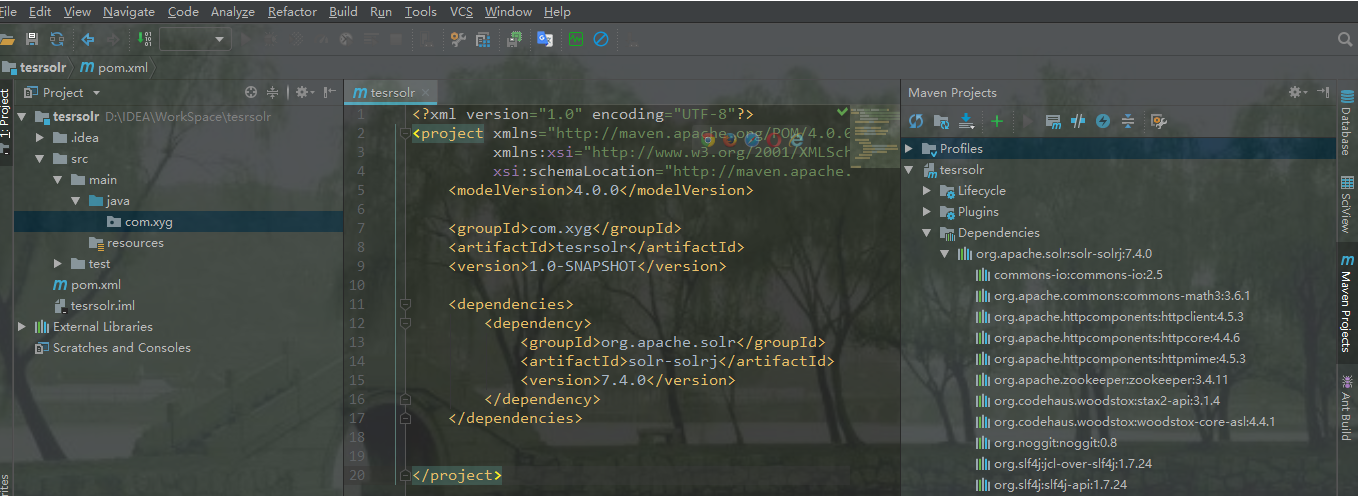
为了方便测试,导入单元测试依赖和日志依赖

<dependency>

   <groupId>junit</groupId>

   <artifactId>junit</artifactId>

   <version>4.12</version>

    <scope>test</scope>

</dependency>
<dependency>
    <groupId>org.slf4j</groupId>
    <artifactId>slf4j-nop</artifactId>
    <version>1.7.25</version>
</dependency>
二.SolrJ的单机连接
SolrClient是一个抽象类,下边有很多被实现的子类,HttpSolrClient - 面向以查询为中心的工作负载,但也是一个很好的通用客户端。直接与单个Solr节点通信。
不同solr版本solrj 的创建方式有所不同
//solr4创建方式

SolrServer solrServer = new HttpSolrServer(solrUrl);
//solr5创建方式,在url中指定core名称:core1
HttpSolrClient solrClient = new HttpSolrClient(solrUrl);
//solr7创建方式,在url中指定core名称:core1
HttpSolrClient solrClient = new HttpSolrClient.Builder(solrUrl).build();
例如:
package com.xyg.solr;

import org.apache.solr.client.solrj.impl.HttpSolrClient;

import org.junit.Test;

/**

 * Author: Mr.Deng

 * Date: 2018/9/10

 * Desc: 测试连接客户端

 */

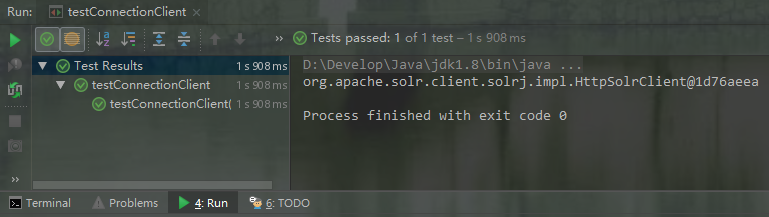
public class testConnectionClient {

    @Test

    public void testConnectionClient(){

        //设置solr客户端url地址

        String solrUrl = "http://node21:8080/solr/new_core";

        //创建solrClient同时指定超时时间,不指定走默认配置

        HttpSolrClient solrClient = new HttpSolrClient.Builder(solrUrl)

                .withConnectionTimeout(10000)

                .withSocketTimeout(60000)

                .build();

        System.out.println(solrClient);

    }

}
三.SolrJ的集群连接
CloudSolrClient - 面向与SolrCloud部署的通信。使用已记录的ZooKeeper状态来发现并将请求路由到健康的Solr节点。
package com.xyg.solrCloud;

import org.apache.solr.client.solrj.impl.CloudSolrClient;

import org.junit.Test;

/**

 * Author: Mr.Deng

 * Date: 2018/9/10

 * Desc: 测试连接客户端

 */

public class ConnectionCloudSolrClient {

    @Test

    public void connectionCloudSolrClient(){

        // 第一种方式:使用运行中的某一台solr节点

        //final String solrUrl = "http://192.168.100.21:8983/solr";

        //CloudSolrClient solrClient = new CloudSolrClient.Builder().withSolrUrl(solrUrl).build();

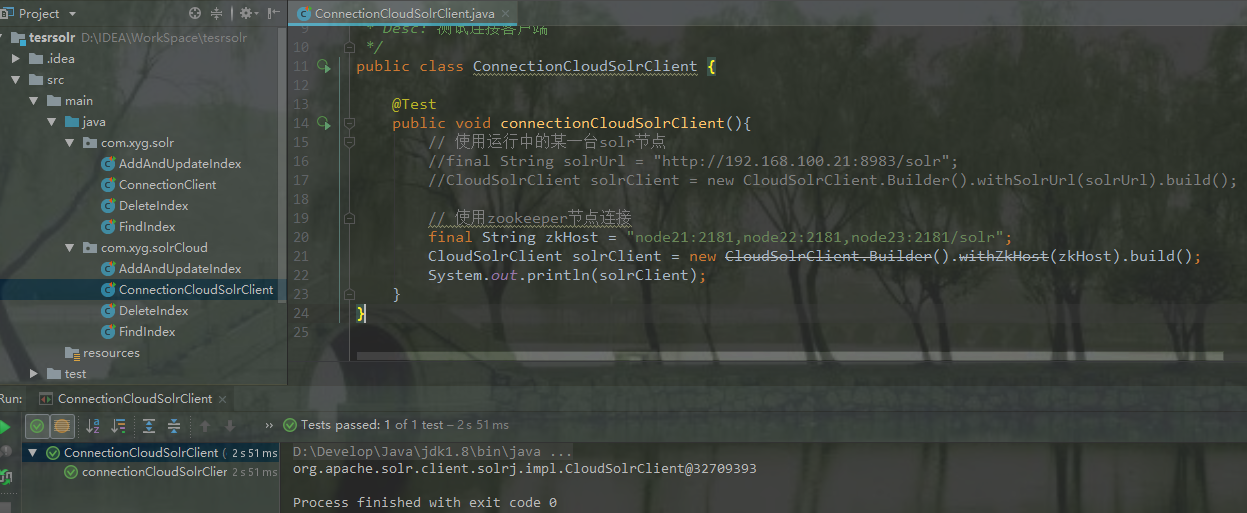
        // 第二种方式:使用zookeeper节点连接(推荐)

        final String zkHost = "node21:2181,node22:2181,node23:2181/solr";

        CloudSolrClient solrClient = new CloudSolrClient.Builder().withZkHost(zkHost).build();

        System.out.println(solrClient);

    }

}
四.SolrJ的增删改查
这里测试单机版APi操作
1.创建索引
1)指定id单条创建索引
@Test

public void addIndexById() throws IOException, SolrServerException {

    String solrUrl = "http://node21:8080/solr/new_core";

    HttpSolrClient solrClient = new HttpSolrClient.Builder(solrUrl).build();

    //创建索引文档对象

    SolrInputDocument doc = new SolrInputDocument();

    // 第一个参数:域的名称,域的名称必须是在schema.xml中定义的

    // 第二个参数:域的值,注意:id的域不能少

    doc.addField("id","1");

    doc.addField("name","红豆");

    doc.addField("price","1.2");

    //3.将文档写入索引库中

    solrClient.add(doc);

    solrClient.commit();

}
2)批量创建索引
@Test

public void addIndexByListId() throws Exception {

    String solrUrl = "http://node21:8080/solr/new_core";

    HttpSolrClient solrClient = new HttpSolrClient.Builder(solrUrl).build();

    //创建索引文档对象

    SolrInputDocument doc1 = new SolrInputDocument();

    doc1.addField( "id", "2");

    doc1.addField( "name", "绿豆");

    doc1.addField( "price", 1.8 );

    SolrInputDocument doc2 = new SolrInputDocument();

    doc2.addField( "id", "3" );

    doc2.addField( "name", "黑豆" );

    doc2.addField( "price", 2.6 );

    Collection<SolrInputDocument> docs = new ArrayList<SolrInputDocument>();

    docs.add(doc1);

    docs.add(doc2);

    //3.将文档写入索引库中

    solrClient.add(docs);

    solrClient.commit();

}
2.查询索引
1)匹配查询
    @Test

    public void findIndex1() throws IOException, SolrServerException {

        String solrUrl = "http://node21:8080/solr/new_core";

        HttpSolrClient solrClient = new HttpSolrClient.Builder(solrUrl).build();

        // 创建搜索对象

        SolrQuery query = new SolrQuery();

        // 设置搜索条件

        query.set("q","*:*");

        //设置每页显示多少条

        query.setRows(2);

        //发起搜索请求

        QueryResponse response = solrClient.query(query);

        // 查询结果

        SolrDocumentList docs = response.getResults();

        // 查询结果总数

        long cnt = docs.getNumFound();

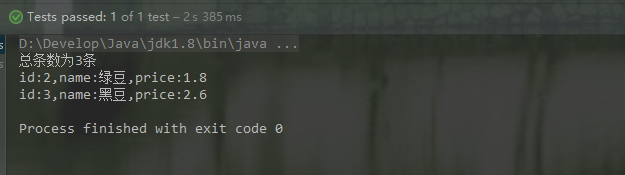
        System.out.println("总条数为"+cnt+"条");

        for (SolrDocument doc : docs) {

          System.out.println("id:"+ doc.get("id") + ",name:"+ doc.get("name") + ",price:"+ doc.get("price"));

        }

        solrClient.close();

    }
2)条件过滤查询
 @Test

    public void findIndex2() throws IOException, SolrServerException {

        String solrUrl = "http://node21:8080/solr/new_core";

        HttpSolrClient solrClient = new HttpSolrClient.Builder(solrUrl).build();

        //2 封装查询参数

        Map<String, String> queryParamMap = new HashMap<String, String>();

        queryParamMap.put("q", "*:*");

        //3 添加到SolrParams对象,SolrParams 有一个 SolrQuery 子类,它提供了一些方法极大地简化了查询操作

        MapSolrParams queryParams = new MapSolrParams(queryParamMap);

        //4 执行查询返回QueryResponse

        QueryResponse response = solrClient.query(queryParams);

        //5 获取doc文档

        SolrDocumentList docs = response.getResults();

        // 查询结果总数

        long cnt = docs.getNumFound();

        System.out.println("总条数为" + cnt + "条");

        //[6]内容遍历

        for (SolrDocument doc : docs) {

            System.out.println("id:" + doc.get("id") + ",name:" + doc.get("name") + ",price:" + doc.get("price"));

        }

        solrClient.close();

    }
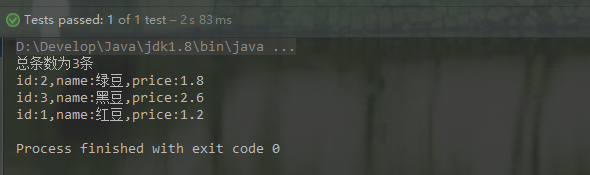
3.更新索引
    @Test

    public void updateIndex() throws IOException, SolrServerException {

        String solrUrl = "http://node21:8080/solr/new_core";

        HttpSolrClient solrClient = new HttpSolrClient.Builder(solrUrl).build();

        //创建索引文档对象

        SolrInputDocument doc = new SolrInputDocument();

        //把红豆价格修改为1.5

        doc.addField("id","1");

        doc.addField("name","红豆");

        doc.addField("price","1.5");

        //3.将文档写入索引库中

        solrClient.add(doc);

        solrClient.commit();

        //提交

        solrClient.commit();

    }
4.删除索引
1)单一条件删除
    @Test

    public void deleteIndexById() throws IOException, SolrServerException {

        String solrUrl = "http://node21:8080/solr/new_core";

        HttpSolrClient solrClient = new HttpSolrClient.Builder(solrUrl).build();

        //全删

        //solrClient.deleteByQuery("*:*");

        //模糊匹配删除(带有分词效果的删除)

        solrClient.deleteByQuery("name:红");

        //指定id删除

        //solrClient.deleteById("1");

        solrClient.commit();

    }
2)批量条件删除
    @Test

    public void deleteIndexByListId() throws IOException, SolrServerException {

        String solrUrl = "http://node21:8080/solr/new_core";

        HttpSolrClient solrClient = new HttpSolrClient.Builder(solrUrl).build();

        //通过id删除

        ArrayList<String> ids = new ArrayList<String>();

        ids.add("2");

        ids.add("3");

        solrClient.deleteById(ids);

        //[3]提交

        solrClient.commit();

        //[4]关闭资源

        solrClient.close();

    }
五.代码报错问题
1.代码添加索引报405问题
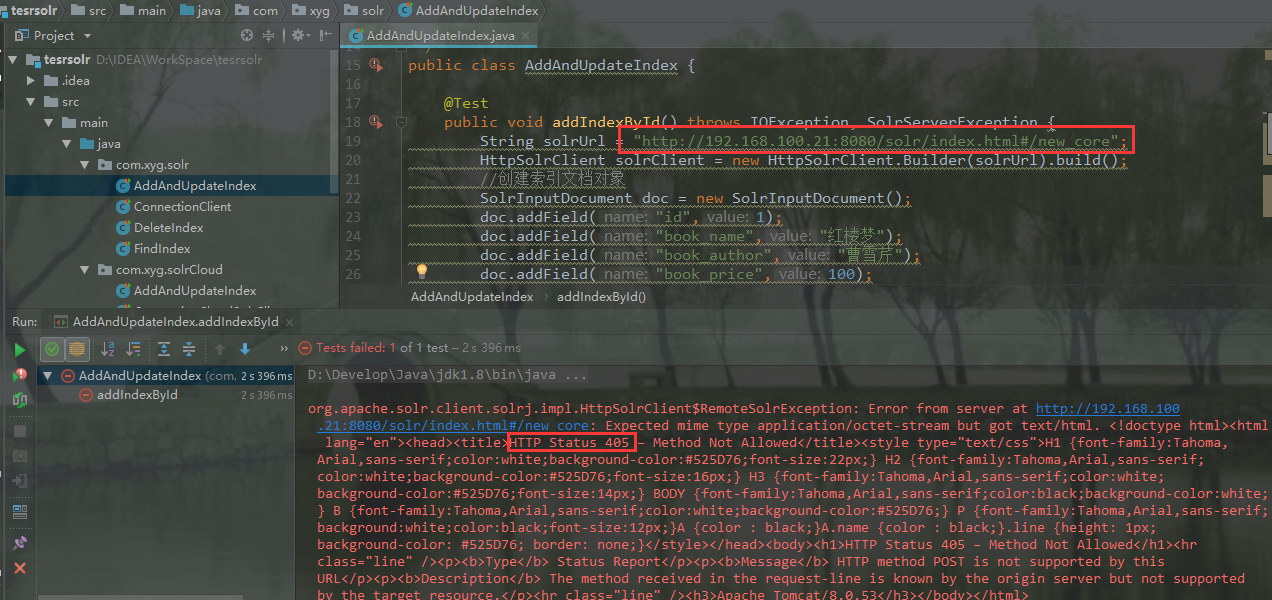
解决方法:
在使用Tomcat部署Solr后,new_core的地址为:http://node21:8080/solr/#/new_core,但使用SolrJ进行索引的时候,应该使用http://node21:8080/solr/new_core,即无中间的#号。
2.自定义索引字段
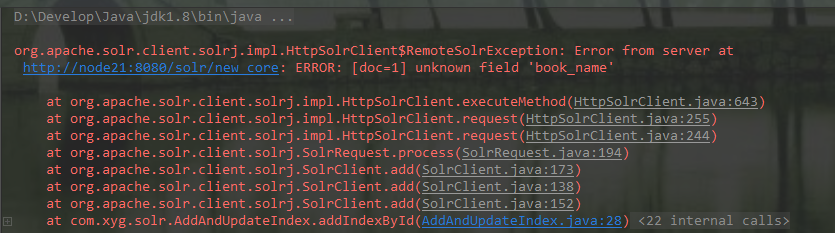
上图报错提示未识别索引字段
参考文档:
https://www.w3cschool.cn/solr_doc/solr_doc-g1az2fmd.html
https://www.cnblogs.com/gaogaoyanjiu/p/7815558.html
https://www.jianshu.com/p/11fb9cfdb2fd
Solr7.4.0的API(Solrj)操作及项目中的使用的更多相关文章
- Android 百度地图开发(一)--- 申请API Key和在项目中显示百度地图
标签: Android百度地图API Key 分类: Android 百度地图开发(2) 最近自己想研究下地图,本来想研究google Map,但是申请API key比较坑爹,于是从百度地 ...
- 【API知识】SpringBoot项目中@EnableXXX的原理
@EnableXX注解的使用场景 SpringBoot为开发人员提供了很多便利,例如如果想要定时功能,只要添加@EnableSchedule,即可配合@Schedule注解实现定时任务功能,不需要额外 ...
- Solr7.4.0的API(Solrj)操作
一.SolrJ的概念 solr单机版服务搭建:https://www.cnblogs.com/frankdeng/p/9615253.html solr集群版服务搭建:https://www.cnbl ...
- 基于 Vue3.0 Composition Api 快速构建实战项目
Quick Start 项目源码:https://github.com/Wscats/vue-cli 本项目综合运用了 Vue3.0 的新特性,适合新手学习
- django之 使用py文件操作django项目中的表
要想在一个另外的py文件中操作django,可以使用如下的代码 import os os.environ.setdefault("DJANGO_SETTINGS_MODULE",' ...
- solr7.1.0学习笔记(10)---Solr发布到Tomcat
版权声明:本文为博主原创文章,未经博主允许不得转载. https://blog.csdn.net/weixin_39082031/article/details/79069554 将solr作为一个单 ...
- (五)solr7.1.0之solrJ的使用
(五)solr7.1.0之solrJ的使用 下面是solr7的官网API介绍: 网页翻译的不是很准确,只能了解个大概,基本能获取如下信息: 一.构建和运行SolrJ应用程序 对于用Maven构建的项目 ...
- solr7.4.0+mysql+solrj(简而优美)
目录: 1 solr7部署+创建核心2 solr mysql 连接 2.1 导入相关 jar包 2.2 配置连接信息 2.3 配置中文分析器3 solrj JAVA客户端应用 3.1 solrj 构建 ...
- 利用SolrJ操作solr API完成index操作
使用SolrJ操作Solr会比利用httpClient来操作Solr要简单.SolrJ是封装了httpClient方法,来操作solr的API的.SolrJ底层还是通过使用httpClient中的方法 ...
随机推荐
- maven 解决jar冲突
那句话怎么讲来着的... 引用 如果你爱他,就请让他用Maven,因为那里是天堂,如果你恨他,就请让他用Maven,因为那里是地狱. Maven对于新手来说是<步步惊心>,因为它包罗万象, ...
- jQuery实现表格行上移下移和置顶
jQuery实现表格行上移下移和置顶 我们在操作列表数据的时候,需要将数据行排列顺序进行调整,如上移和下移行,将行数据置顶等,这些操作都可以在前端通过点击按钮来完成,并且伴随着简单的动态效果,轻松实现 ...
- 基于CentOS 7 搭建 GitLab
系统要求:CentOS 7.2 64 位操作系统 更新软件包 yum update -y 安装和启动 sshd 安装 sshd: yum install -y curl policycoreutils ...
- ceph 对象存储跨机房容灾
场景分析 每个机房的Ceph都是独立的cluster,彼此之间没有任何关系. 多个机房都独立的提供对象存储功能,每个Ceph Radosgw都有自己独立的命名空间和存储空间. 这样带来两个问题: 针对 ...
- 【SqlServer】SqlServer的游标使用
什么是游标 结果集,结果集就是select查询之后返回的所有行数据的集合. 游标则是处理结果集的一种机制吧,它可以定位到结果集中的某一行,多数据进行读写,也可以移动游标定位到你所需要的行中进行操作数据 ...
- Gradle 中 buildConfigField的巧妙应用
当用AndroidStudio来进行Android项目开发时,build.gradle就是这个工具的核心部分,所有的依赖,debug/release设置,混淆等都在这里进行配置. 下面就主要来记录下利 ...
- 12C -- 创建RMAN备份用户
1.NON-CDB环境 SQL> create user backup_admin identified by backup_admin default tablespace users; SQ ...
- selenium是如何启动浏览器的
前几天有同学问到selenium是怎么样启动浏览器的(selenium启动浏览器的原理),当时稍微讲解了一下,不过自我感觉不够具体,现在特地把启动原理通过代码和一系列操作给串联起来,希望可以帮助大家更 ...
- 去除移动端alert/confirm的网址(url)
移动端的alert.confirm都会显示来源的url,影响体验 下面的代码将alert和confirm重写了一遍,可去除url 参考了网上代码,完善了confirm不同状态跳转 示例代码: & ...
- 【Linux高级驱动】触摸屏驱动的移植
触摸屏驱动的移植 流程 注意:看框架图 1.添加input.c组件 Device Drivers ---> Input device support ---> Generic inp ...