
Spring Cloud 系列之 Stream 消息驱动(二)
本篇文章为系列文章,未读第一集的同学请猛戳这里:Spring Cloud 系列之 Stream 消息驱动(一)
本篇文章讲解 Stream 如何实现消息分组和消息分区。
消息分组
点击链接观看:Stream 消息分组视频(获取更多请关注公众号「哈喽沃德先生」)
如果有多个消息消费者,那么消息生产者发送的消息会被多个消费者都接收到,这种情况在某些实际场景下是有很大问题的,比如在如下场景中,订单系统做集群部署,都会从 RabbitMQ 中获取订单信息,如果一个订单消息同时被两个服务消费,系统肯定会出现问题。为了避免这种情况,Stream 提供了消息分组来解决该问题。
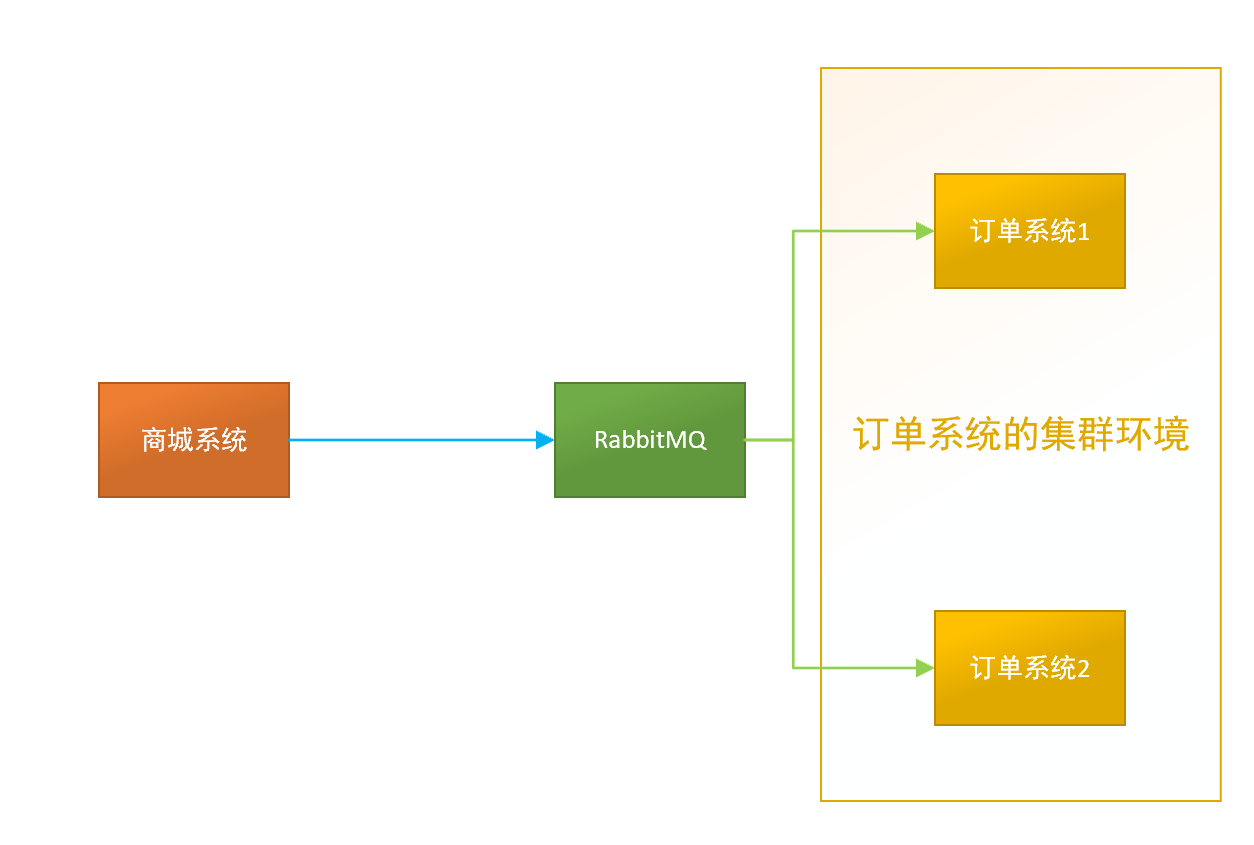
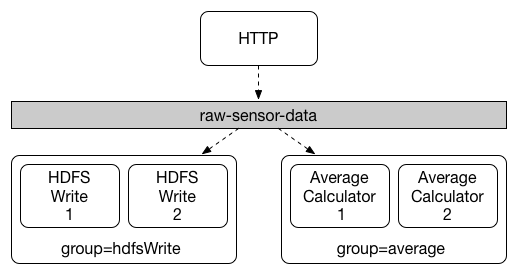
在 Stream 中处于同一个 group 中的多个消费者是竞争关系,能够保证消息只会被其中一个应用消费。不同的组是可以消费的,同一个组会发生竞争关系,只有其中一个可以消费。通过 spring.cloud.stream.bindings.<bindingName>.group 属性指定组名。
问题演示
在 stream-demo 项目下创建 stream-consumer02 子项目。
项目代码使用入门案例中消息消费者的代码。
单元测试代码如下:
package com.example;

import com.example.producer.MessageProducer;

import org.junit.jupiter.api.Test;

import org.springframework.beans.factory.annotation.Autowired;

import org.springframework.boot.test.context.SpringBootTest;

@SpringBootTest(classes = {StreamProducerApplication.class})

public class MessageProducerTest {

    @Autowired

    private MessageProducer messageProducer;

    @Test

    public void testSend() {

        messageProducer.send("hello spring cloud stream");

    }

}
测试
运行单元测试发送消息,两个消息消费者控制台打印结果如下:
stream-consumer 的控制台:
message = hello spring cloud stream
stream-consumer02 的控制台:
message = hello spring cloud stream
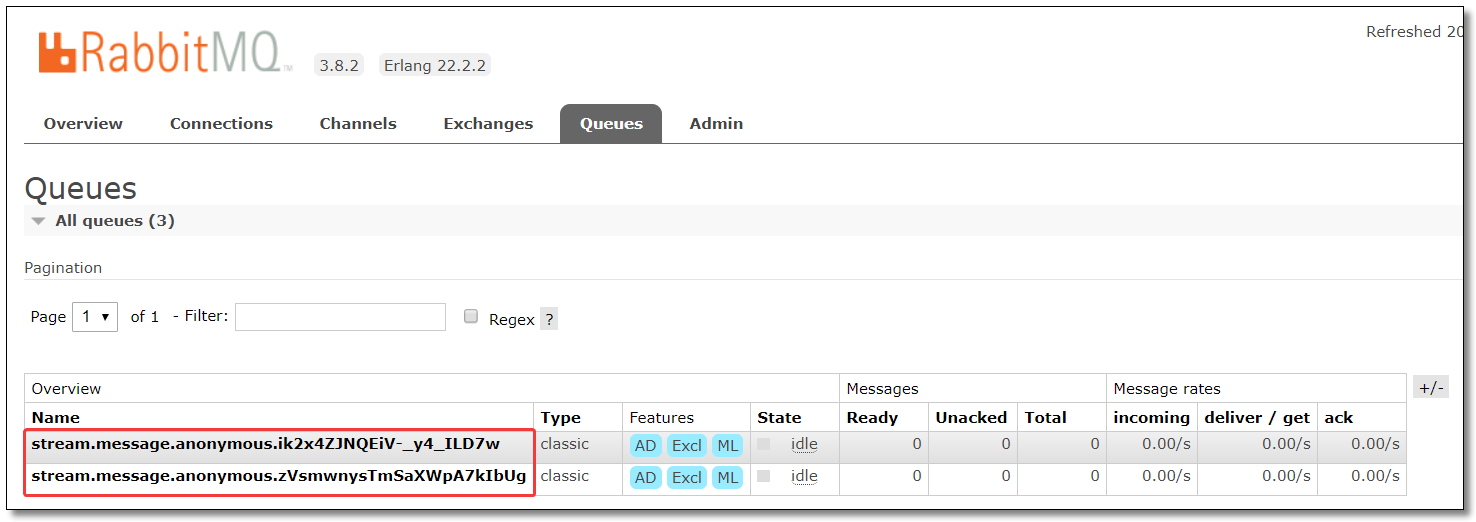
通过结果可以看到消息被两个消费者同时消费了,原因是因为它们属于不同的分组,默认情况下分组名称是随机生成的,通过 RabbitMQ 也可以得知:
配置分组
stream-consumer 的分组配置为:group-A。
server:

  port: 8002 # 端口

spring:

  application:

    name: stream-consumer # 应用名称

  rabbitmq:

    host: 192.168.10.101  # 服务器 IP

    port: 5672            # 服务器端口

    username: guest       # 用户名

    password: guest       # 密码

    virtual-host: /       # 虚拟主机地址

  cloud:

    stream:

      bindings:

        # 消息接收通道

        # 与 org.springframework.cloud.stream.messaging.Sink 中的 @Input("input") 注解的 value 相同

        input:

          destination: stream.message # 绑定的交换机名称

          group: group-A
stream-consumer02 的分组配置为:group-A。
server:

  port: 8003 # 端口

spring:

  application:

    name: stream-consumer # 应用名称

  rabbitmq:

    host: 192.168.10.101  # 服务器 IP

    port: 5672            # 服务器端口

    username: guest       # 用户名

    password: guest       # 密码

    virtual-host: /       # 虚拟主机地址

  cloud:

    stream:

      bindings:

        # 消息接收通道

        # 与 org.springframework.cloud.stream.messaging.Sink 中的 @Input("input") 注解的 value 相同

        input:

          destination: stream.message # 绑定的交换机名称

          group: group-A
测试
运行单元测试发送消息,此时多个消息消费者只有其中一个可以消费。RabbitMQ 结果如下:

消息分区
点击链接观看:Stream 消息分区视频(获取更多请关注公众号「哈喽沃德先生」)
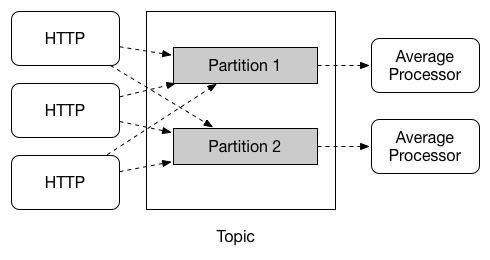
通过消息分组可以解决消息被重复消费的问题,但在某些场景下分组还不能满足我们的需求。比如,同时有多条同一个用户的数据发送过来,我们需要根据用户统计,但是消息被分散到了不同的集群节点上了,这时我们就可以考虑使用消息分区了。
当生产者将消息发送给多个消费者时,保证同一消息始终由同一个消费者实例接收和处理。消息分区是对消息分组的一种补充。
问题演示
先给大家演示一下消息未分区的效果,单元测试代码如下:
package com.example;

import com.example.producer.MessageProducer;

import org.junit.jupiter.api.Test;

import org.springframework.beans.factory.annotation.Autowired;

import org.springframework.boot.test.context.SpringBootTest;

@SpringBootTest(classes = {StreamProducerApplication.class})

public class MessageProducerTest {

    @Autowired

    private MessageProducer messageProducer;

    @Test

    public void testSend() {

        for (int i = 1; i <= 10; i++) {

            messageProducer.send("hello spring cloud stream");

        }

    }

}
测试
运行单元测试发送消息,两个消息消费者控制台打印结果如下:
stream-consumer 的控制台:
message = hello spring cloud stream

message = hello spring cloud stream

message = hello spring cloud stream

message = hello spring cloud stream

message = hello spring cloud stream
stream-consumer02 的控制台:
message = hello spring cloud stream

message = hello spring cloud stream

message = hello spring cloud stream

message = hello spring cloud stream

message = hello spring cloud stream
假设这 10 条消息都来自同一个用户,正确的方式应该都由一个消费者消费所有消息,否则系统肯定会出现问题。为了避免这种情况,Stream 提供了消息分区来解决该问题。
配置分区
消息生产者配置分区键的表达式规则和消息分区的数量。
server:

  port: 8001 # 端口

spring:

  application:

    name: stream-producer # 应用名称

  rabbitmq:

    host: 192.168.10.101  # 服务器 IP

    port: 5672            # 服务器端口

    username: guest       # 用户名

    password: guest       # 密码

    virtual-host: /       # 虚拟主机地址

  cloud:

    stream:

      bindings:

        # 消息发送通道

        # 与 org.springframework.cloud.stream.messaging.Source 中的 @Output("output") 注解的 value 相同

        output:

          destination: stream.message # 绑定的交换机名称

          producer:

            partition-key-expression: payload # 配置分区键的表达式规则

            partition-count: 2 # 配置消息分区的数量
通过 partition-key-expression 参数指定分区键的表达式规则,用于区分每个消息被发送至对应分区的输出 channel。
该表达式作用于传递给 MessageChannel 的 send 方法的参数,该参数实现 org.springframework.messaging.Message 接口的 GenericMessage 类。
源码 MessageChannel.java
package org.springframework.messaging;

@FunctionalInterface

public interface MessageChannel {

    long INDEFINITE_TIMEOUT = -1L;

    default boolean send(Message<?> message) {

        return this.send(message, -1L);

    }

    boolean send(Message<?> var1, long var2);

}
源码 GenericMessage.java
package org.springframework.messaging.support;

import java.io.Serializable;

import java.util.Map;

import org.springframework.lang.Nullable;

import org.springframework.messaging.Message;

import org.springframework.messaging.MessageHeaders;

import org.springframework.util.Assert;

import org.springframework.util.ObjectUtils;

public class GenericMessage<T> implements Message<T>, Serializable {

    private static final long serialVersionUID = 4268801052358035098L;

    private final T payload;

    private final MessageHeaders headers;

    ...

}
如果 partition-key-expression 的值是 payload,将会使用所有放在 GenericMessage 中的数据作为分区数据。payload 是消息的实体类型,可以为自定义类型比如 User,Role 等等。
如果 partition-key-expression 的值是 headers["xxx"],将由 MessageBuilder 类的 setHeader() 方法完成赋值,比如:
package com.example.producer;

import org.springframework.beans.factory.annotation.Autowired;

import org.springframework.cloud.stream.annotation.EnableBinding;

import org.springframework.cloud.stream.messaging.Source;

import org.springframework.messaging.support.MessageBuilder;

import org.springframework.stereotype.Component;

/**

 * 消息生产者

 */

@Component

@EnableBinding(Source.class)

public class MessageProducer {

    @Autowired

    private Source source;

    /**

     * 发送消息

     *

     * @param message

     */

    public void send(String message) {

        source.output().send(MessageBuilder.withPayload(message).setHeader("xxx", 0).build());

    }

}
消息消费者配置消费者总数和当前消费者的索引并开启分区支持。
stream-consumer 的 application.yml
server:

  port: 8002 # 端口

spring:

  application:

    name: stream-consumer # 应用名称

  rabbitmq:

    host: 192.168.10.101  # 服务器 IP

    port: 5672            # 服务器端口

    username: guest       # 用户名

    password: guest       # 密码

    virtual-host: /       # 虚拟主机地址

  cloud:

    stream:

      instance-count: 2 # 消费者总数

      instance-index: 0 # 当前消费者的索引

      bindings:

        # 消息接收通道

        # 与 org.springframework.cloud.stream.messaging.Sink 中的 @Input("input") 注解的 value 相同

        input:

          destination: stream.message # 绑定的交换机名称

          group: group-A

          consumer:

            partitioned: true # 开启分区支持
stream-consumer02 的 application.yml
server:

  port: 8003 # 端口

spring:

  application:

    name: stream-consumer # 应用名称

  rabbitmq:

    host: 192.168.10.101  # 服务器 IP

    port: 5672            # 服务器端口

    username: guest       # 用户名

    password: guest       # 密码

    virtual-host: /       # 虚拟主机地址

  cloud:

    stream:

      instance-count: 2 # 消费者总数

      instance-index: 1 # 当前消费者的索引

      bindings:

        # 消息接收通道

        # 与 org.springframework.cloud.stream.messaging.Sink 中的 @Input("input") 注解的 value 相同

        input:

          destination: stream.message # 绑定的交换机名称

          group: group-A

          consumer:

            partitioned: true # 开启分区支持
测试
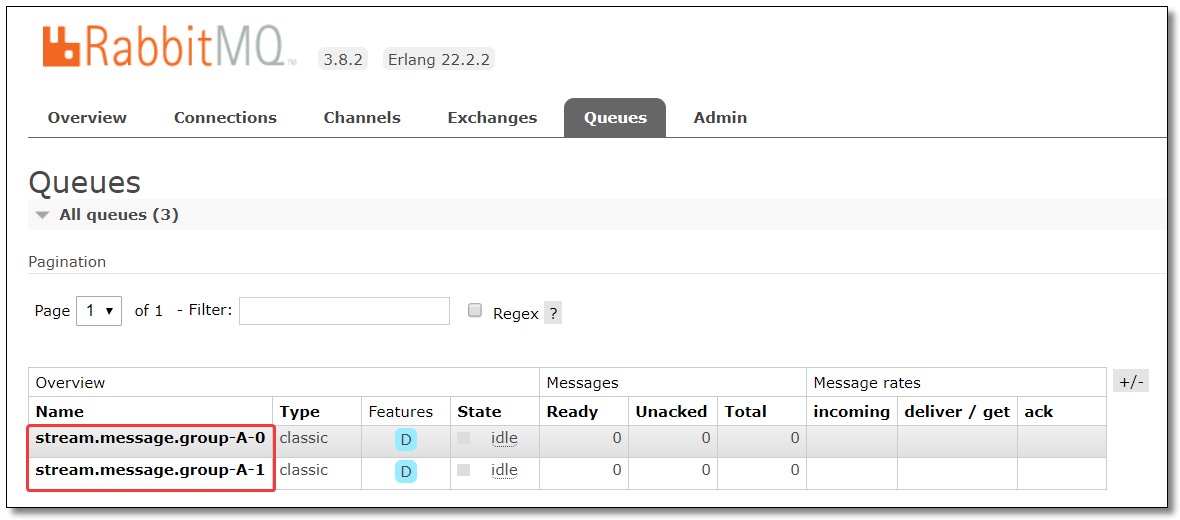
运行单元测试发送消息,此时多个消息消费者只有其中一个可以消费所有消息。RabbitMQ 结果如下:
至此 Stream 消息驱动所有的知识点就讲解结束了。
本文采用 知识共享「署名-非商业性使用-禁止演绎 4.0 国际」许可协议。
大家可以通过 分类 查看更多关于 Spring Cloud 的文章。
Spring Cloud 系列之 Stream 消息驱动(二)的更多相关文章
- Spring Cloud 系列之 Stream 消息驱动(一)
在实际开发过程中,服务与服务之间通信经常会使用到消息中间件,消息中间件解决了应用解耦.异步处理.流量削锋等问题,实现高性能,高可用,可伸缩和最终一致性架构. 不同中间件内部实现方式是不一样的,这些中间 ...
- Spring Cloud 系列之 Bus 消息总线
什么是消息总线 消息代理中间件构建一个共用的消息主题让所有微服务实例订阅,当该消息主题产生消息时会被所有微服务实例监听和消费. 消息代理又是什么?消息代理是一个消息验证.传输.路由的架构模式,主要用来 ...
- Spring Cloud 系列之 Consul 配置中心
前面我们已经学习过 Spring Cloud Config 了: Spring Cloud 系列之 Config 配置中心(一) Spring Cloud 系列之 Config 配置中心(二) Spr ...
- spring cloud 2.x版本 Spring Cloud Stream消息驱动组件基础教程(kafaka篇)
本文采用Spring cloud本文为2.1.8RELEASE,version=Greenwich.SR3 本文基于前两篇文章eureka-server.eureka-client.eureka-ri ...
- Spring Cloud系列(二) 介绍
Spring Cloud系列(一) 介绍 Spring Cloud是基于Spring Boot实现的微服务架构开发工具.它为微服务架构中涉及的配置管理.服务治理.断路器.智能路由.微代理.控制总线.全 ...
- Spring Cloud 系列之 Spring Cloud Stream
Spring Cloud Stream 是消息中间件组件,它集成了 kafka 和 rabbitmq .本篇文章以 Rabbit MQ 为消息中间件系统为基础,介绍 Spring Cloud Stre ...
- Spring Cloud 系列之 Sleuth 链路追踪(二)
本篇文章为系列文章,未读第一集的同学请猛戳这里:Spring Cloud 系列之 Sleuth 链路追踪(一) 本篇文章讲解 Sleuth 基于 Zipkin 存储链路追踪数据至 MySQL,Elas ...
- Spring Cloud 系列之 Consul 注册中心(二)
本篇文章为系列文章,未读第一集的同学请猛戳这里:Spring Cloud 系列之 Consul 注册中心(一) 本篇文章讲解 Consul 集群环境的搭建. Consul 集群 上图是一个简单的 Co ...
- Spring Cloud 系列之 Gateway 服务网关(二)
本篇文章为系列文章,未读第一集的同学请猛戳这里:Spring Cloud 系列之 Gateway 服务网关(一) 本篇文章讲解 Gateway 网关的多种路由规则.动态路由规则(配合服务发现的路由规则 ...
随机推荐
- 发现钉钉打卡定位算法的一个bug
最近公司取消了指纹打卡,改用钉钉打卡. 天天用这个打卡上班,经常忘记,困扰. 最烦的是好几次明明人在办公室,打卡地址显示在10分钟前的位置,定位失败,不得不重新打卡. 经历过几次定位失败后,我就琢磨起 ...
- C#通用类库整理--序列化类
程序员在编写应用程序的时候往往要将程序的某些数据存储在内存中,然后将其写入某个文件或是将它传输到网络中的另一台计算机上 以实现通讯.这个将程序数据转化成能被存储并传输的格式的过程被称为"序列 ...
- 1078 Hashing (25分)
The task of this problem is simple: insert a sequence of distinct positive integers into a hash tabl ...
- PTA数据结构与算法题目集(中文) 7-4
PTA数据结构与算法题目集(中文) 7-4 是否同一颗二叉搜索树 给定一个插入序列就可以唯一确定一棵二叉搜索树.然而,一棵给定的二叉搜索树却可以由多种不同的插入序列得到.例如分别按照序列{2, 1, ...
- php人民币小写转大写函数,不限长度,精确到分
原创作品,允许转载,转载时请务必以超链接形式标明文章 原始出处 .作者信息和本声明.否则将追究法律责任.http://ustb80.blog.51cto.com/6139482/1035327 在打印 ...
- 原理解密 → Spring AOP 实现动态数据源(读写分离),底层原理是什么
开心一刻 女孩睡醒玩手机,收到男孩发来一条信息:我要去跟我喜欢的人表白了! 女孩的心猛的一痛,回了条信息:去吧,祝你好运! 男孩回了句:但是我没有勇气说不来,怕被打! 女孩:没事的,我相信你!此时女孩 ...
- 给定一个整数数组 nums 和一个目标值 target,求nums和为target的两个数的下表
这个是来自力扣上的一道c++算法题目: 给定一个整数数组 nums 和一个目标值 target,请你在该数组中找出和为目标值的那 两个 整数,并返回他们的数组下标. 你可以假设每种输入只会对应一个答案 ...
- flask from_object和from_pyfile的区别
flask from_object和from_pyfile的区别 from_object接受的是一个模块对象,需求导入 from_pyfile接受的是一个文件名的字符串,文件可以不是py文件也可以是 ...
- 2015蓝桥杯五星填数(C++C组)
题目:五星填数 如[图1.png]的五星图案节点填上数字:1~12,除去7和11.要求每条直线上数字和相等.如图就是恰当的填法.请你利用计算机搜索所有可能的填法有多少种.注意:旋转或镜像后相同的算同一 ...
- JavaScript 入门 (一)
<!DOCTYPE html> <html> <head> <meta charset="utf-8"> <title> ...