
optimizing Wi-Fi solution for International School
https://aweisoft.azurewebsites.net/Knowledge/Cisco/OptimizeWiFi/OptimizeWiFi.aspx
Connect me on Linkedin BruceWang@aweisoft.net
Write on April 16 2014
Some suggestions about optimizing Wi-Fi solution for International School
My understanding of the current Wi-Fi situation in those international school especially big one:
Problem A: Wi-Fi self interference of multipath, reflection, scattering, refraction
Problem B: Bottle-neck on the cabling network.
Problem C: Configuration with the Wlan Controller.
Problem D: IP pool jam while a large amount of teachers and students are moving from APs to APs.
Problem E: Bottle-neck of the individual clients of laptops, tablets.
Problem A: Wi-Fi self interference of multipath, reflection, scattering, refraction
Multipath
Following picture show the multipath topologic. There is 3 non-overlapping channel in 2.4G. They are channel 1, 6 and 11, In Japan, there is 4 non-overlapping channels(1,6,11,14) in 2.4G which are 1,6,11,14. Let’s just talk about regularly 2.4G with 3 non-overlapping channels. Ok, if the 3 APs runs in different channels, then there is no interference(Picture1). But if there is another AP(AP4) show up, then in the overlap of the 4 APs, a laptop will run into a confused situation because of the duplication of logic access point with 2 different physical APs. In the overlap area the wireless signal will shaking. In real world, this happens a lot.
Try to minimize the 4 APs overlap area.
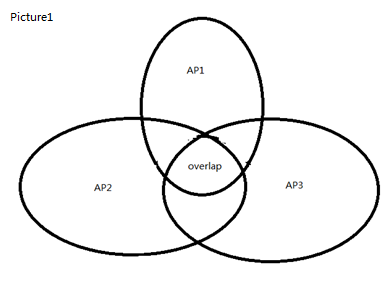
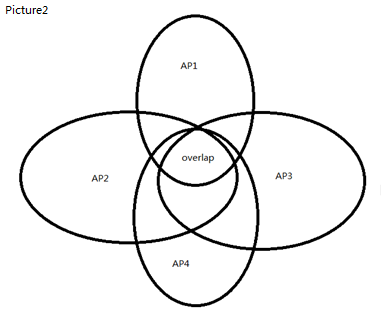
Reflection, scattering, refraction
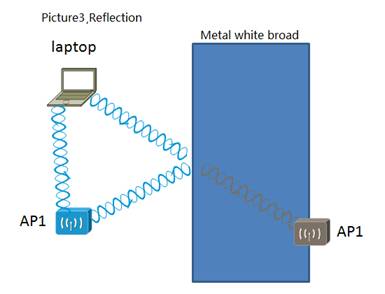
Most of the classroom, there is a big metal broad which it is a mirror for the laptop to ‘see’ the AP. Ok, the laptop, It sees two AP1 which runs in precisely the same channel. Guess what will happen, interference. So while you are doing the positing of APs, you should considering the metal white broad or some other metal things. Make sure the less reflection signals the laptops can receive.
As for scattering and refraction problems, it’s still the same reason: Laptops see one duplication signal by some way. But this two problem happens much less than reflection.
Problem B: Bottle-neck on the cabling network.
When the workers are doing the found-mental cabling, I saw many workers doing their work with kind of anxious attitude. With this attitude, they may not do the cabling with the compliance of the integrated cabling. Then this cable will be a bottle-neck on this route. As the manager of the first party, I care about the workers; I tell them where they can have a rest and have the water, tea, coca-cola and cookies. And I always drop by them and say hi to them, ask them how's going. Obviously, both XIS and I got returns: the found-mental network of the Wi-Fi projection was constructed perfectly, during the past 3 years I didn't have to worry about the found-mental network. It's been tested perfect.
Clear up the found-mental bottle-neck as much as possible, Of cause need to do many test job. Optimizing the inside routing. Add some more truck link between the Switches to increase more inside bandwidth and reliability.
Problem C: Configuration with the Wlan Controller.
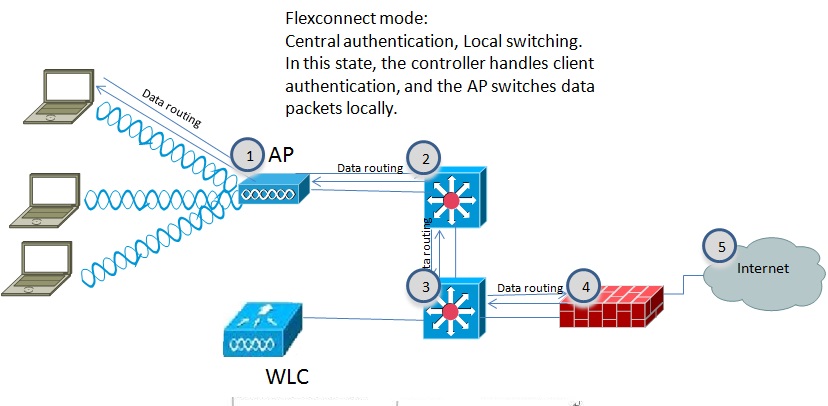
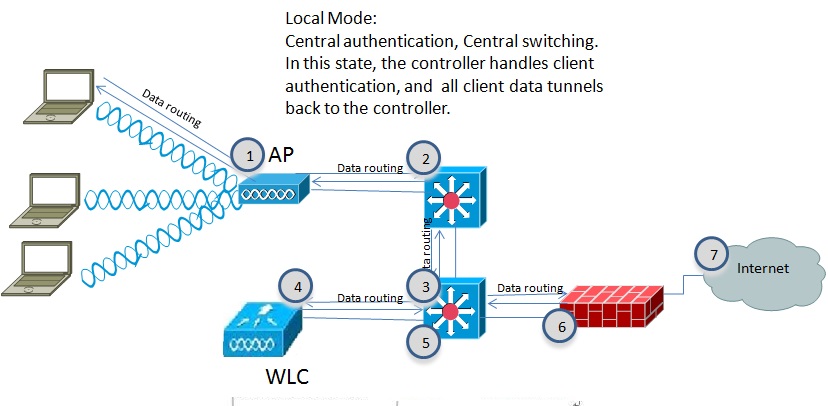
Right configuration with the Wlan Controller is one of the most important points. Update the Wlan Controller IOS. New IOS works much effective than old versions.
Suggest use the ‘FlexConnect Mode’ for Cisco APs, You can configure it in Wlan Controller. ‘FlexConnect Mode’ work 10% faster than ‘Local Mode’ as I tested in Cisco Wi-Fi solution.
Why Flexconnect mode is effective than Local mode? Following 2 picture shows how.
Problem D: IP pool jam while a large amount of teachers and students are moving from APs to APs.

For schools, especially big one, many teachers and students move from classroom to classroom, IP pool jam is also a concern. The issue tells like this: whatever the clients it is, Mac or PCs, tablet or cell phones, it’s just can’t successful associate with the SSID. But later you try it again, It works fine.
Following picture shows how to divide those APs into different Vlan and solve the Jam of IP pool.
Problem E: Bottle-neck of the individual clients of laptops, tablets.
I would like to show those test result first I take by ‘Fluke networks AIRCHECK Wi-Fi Tester’, It is a spectrum analyzer which can help to find the noise source.
Non-802.11signal(noise resource) is 26% in the whole channel 1 over 2.4GHz.

Non-802.11signal(noise resource) is 39% in the whole channel 3 over 2.4GHz.
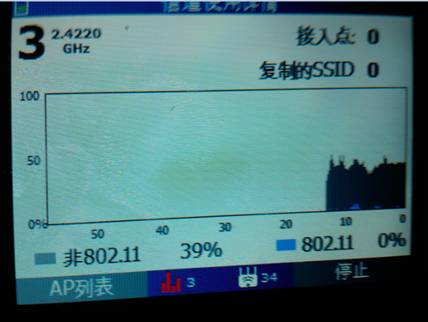
Non-802.11 interfernce on channel 1 would casue major performance issue for APs on that channel.
Non 802.11 signal(noise resource) is 0% in channel 157 over 5GHz. The signal is perfect.

As we all know that:
Max data rate of 802.11n over 2.4G is 144Mbps
Max data rate of 802.11n over 5G is 450Mbps(Year 2012 or 13, I heard that it can support 600Mbps now)
5G is like a high-way with dozens of channels, and 2.4GHz is like a country road just with a 3 non-overlapping channel(4 in Japan).
Most of the laptops Wi-Fi cards in our school have been upgraded to 5G Wi-Fi card. There are still some laptops which doesn’t support 5G Wi-Fi card.
The weak point for 5G channel is: Distance between the laptops and AP. The more distance the less speed. When you are out of the classroom, the signal is too weak to work.
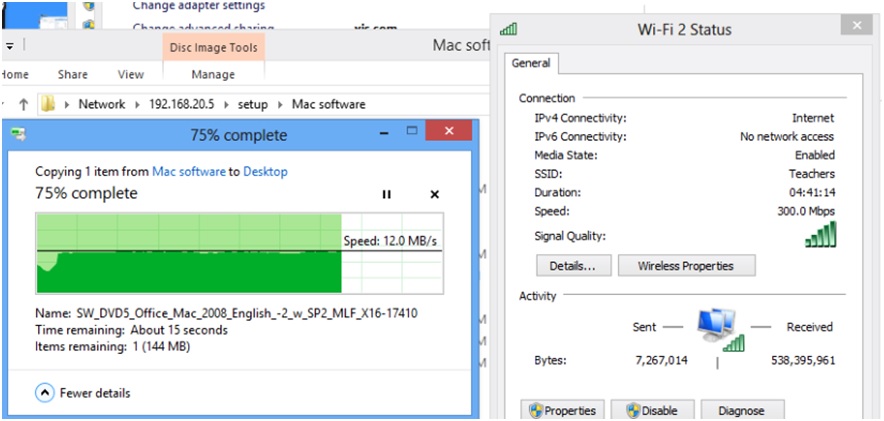
Real time speed of copying data by 5G Wi-Fi card.
optimizing Wi-Fi solution for International School的更多相关文章
- 严格次小生成树[BJWC2010] (树链剖分,倍增,最小生成树)
题目链接 Solution 有几点关键,首先,可以证明次小生成树一定是由最小生成树改变一条边而转化来. 所以需要枚举所有非最小生成树的边\((u,v)\).并且找到 \(u\) 到 \(v\) 的边中 ...
- 【Win10 应用开发】扫描和连接Wi-fi网络
老周今天带大家去“扫雷”了,别当真,是扫描并连接指定无线网络,时尚一点叫Wi-fi. 所以,今天的任务要求你的设备至少有1张无线网卡,目前老周没看到过有N张无线网卡的设备.像笔记本.平板等设备都可以, ...
- 全文检索引擎 Solr 部署与基本原理
全文检索引擎 Solr 部署与基本原理 搜索引擎Solr环境搭建实例 关于 solr , schema.xml 的配置说明 全文检索引擎Solr系列-–全文检索基本原理 一.搜索引擎Solr环境搭建实 ...
- Solr搭建大数据查询平台
参考文章:http://www.freebuf.com/articles/database/100423.html 对上面链接的补充: solr-5.5.0版本已被删除,新url:http://mir ...
- 我与solr(五)--关于schema.xml中的相关配置的详解
先把文件的代码贴上来: <?xml version="1.0" encoding="UTF-8" ?> <!-- 版权说明... --> ...
- Solr:文本分析
文本分析时搜索引擎的核心工作之一,对文本包含许多处理步骤,比如:分词.大写转小写.词干化.同义词转化等.简单的说,文本分析就说将一个文本字段的值转为一个一个的token,然后被保存到Lucene的索引 ...
- Solr:Schema设计
本文已挪至 http://www.zhoujingen.cn/blog/8546.html Solr将数据以结构化的方式存入系统中,存储的过程中可以对数据建立索引,这个结构的定义就是通过schema ...
- McAfee重返科技业 研制D-Central防政府监视
新闻链接:http://tech.qq.com/a/20131008/016127.htm 新闻时间: 10月8日编译 新闻正文:McAfee重返科技业 研制D-Central防政府监视 约翰·迈克菲 ...
- 【Android】 Android-wifi 直连 wifi direct wifi p2p
现在,Android的支持Wi -Fi的直接点对点点对点(P2P)Android系统的供电设备和其他类型的设备,没有一个热点或互联网连接之间的连接.Android框架提供了一套Wi - Fi的P2P的 ...
随机推荐
- 信息熵、信息增益、信息增益率、gini、woe、iv、VIF
整理一下这几个量的计算公式,便于记忆 采用信息增益率可以解决ID3算法中存在的问题,因此将采用信息增益率作为判定划分属性好坏的方法称为C4.5.需要注意的是,增益率准则对属性取值较少的时候会有偏好,为 ...
- Ananconda常用指令
Anaconda指的是一个开源的Python发行版本,其包含了conda.Python等180多个科学包及其依赖项,可用于解决开发过程中遇到python版本需要切换的问题. conda有一点好处是,如 ...
- Python-SSH批量登陆并执行命令
Python-SSH批量登陆并执行命令 #!/usr/bin/env python #-*- coding:utf-8 -*- import paramiko from time import cti ...
- 吴裕雄--天生自然HTML学习笔记:HTML 表格
<!DOCTYPE html> <html> <head> <meta charset="utf-8"> <title> ...
- ffmpeg android移植
CMake语法简介(androidstudio中利用CMake开发NDK): http://blog.csdn.net/u013718120/article/details/62883711FFmpe ...
- python——pymysql的安装
pymysql是python程序连接mysql数据库的的第三方库,通过运行import pymysql 查看系统中是否有该模块,没有的话需要自行安装. 安装教程如下: 1.下载pymysql安装包,下 ...
- python基础局部变量、全局变量
局部变量的作用域只作用与当前函数块(或代码块)中,对函数块(或代码块)之外的重名变量,没有任何影响. 在函数块(或代码块)中,局部变量可用通过global关键字声明变量来改变在函数块(或代码块)之外对 ...
- 通过zxing生成二维码
二维码现在随处可见,在日常的开发中,也会经常涉及到二维码的生成,特别是开发一些活动或者推广方面的功能时,二维码甚至成为必备功能点.本文介绍通过 google 的 zxing 包生成带 logo 的二维 ...
- IDEA 详细使用教程
第一步:安装 略 安装首先需要Java语言的运行环境,这里不做概述. 第二步:破解 这里使用的是2016版的,所以直接在网上搜索秘钥即可 https://blog.csdn.net/ksksjipen ...
- Dykin's blog
回归分析是一种很重要的预测建模技术.主要是研究自变量与因变量之间的因果关系.本文将会从数学角度与代码角度分析不同类型的回归.当你想预测连续型的非独立变量,或者对一系列独立变量或输入项有所反应时,就会使 ...