
基于ThinkPHP的在线编辑器调用
开源的在线编辑器有很多,比如FCKEditor,UEditor,Kindeditor等,调用方式也都大同小异
下面列举UEditor在线编辑器插件在ThinkPHP里面的应用
1、Ueditor下载地址:http://ueditor.baidu.com/website/download.html(注意编码)
2、使用ThinkPHP版本为ThinkPHP3.1.2
先下载Ueditor插件解压放置ThinkPHP项目的根目录并将文件夹名称重命名为ueditor
如下图:

编写测试类:
 class IndexAction extends Action {

     public function index(){

         $this->display();

     }
对应映射Html静态页面:
<!DOCTYPE html PUBLIC "-//W3C//DTD XHTML 1.0 Transitional//EN" "http://www.w3.org/TR/xhtml1/DTD/xhtml1-transitional.dtd">

<html xmlns="http://www.w3.org/1999/xhtml" xml:lang="en">

<head>

    <meta http-equiv="Content-Type" content="text/html;charset=UTF-8">

    <title>Ueditor</title>

    <script type="text/javascript" src="__ROOT__/ueditor/ueditor.config.js"></script>

    <script type="text/javascript" src="__ROOT__/ueditor/ueditor.all.js"></script>

        <script type="text/javascript">

            function edit(){

                UE.getEditor('content');

            }

        </script>

</head>

<body onload="edit()">

    <form action="__URL__/edit" method="post">

        标题:<br/>

        <input type="text" name="info"/><br/>

        内容:<textarea id="content" name="content" style="width:700px;height:300px;"></textarea>

        <input type="submit" value="提交"/>

    </form>

</body>

</html>
在静态页面HTML用Javascript调用,分别引入ueditor.config.js、ueditor.all.js两个JS文件,可直接用UE.getEditor(参数1,{参数2});进行调用
参数1:
需要和下面的TextArea的ID名对应。
参数2:(非必须)
一些初始化参数,比如宽度,高度,各种按钮,样式等。
若不填写此参数,默认下是用TextArea的Style样式的宽高来定义Ueditor
效果如下图:

提交表单:

-------------------------------------------------------------华丽的分割线-------------------------------------------------------------------
来说下关于参数二,毕竟一般的在线编辑器是不需要那么多功能的,使其简洁。
<!DOCTYPE html PUBLIC "-//W3C//DTD XHTML 1.0 Transitional//EN" "http://www.w3.org/TR/xhtml1/DTD/xhtml1-transitional.dtd">

<html xmlns="http://www.w3.org/1999/xhtml" xml:lang="en">

<head>

    <meta http-equiv="Content-Type" content="text/html;charset=UTF-8">

    <title>Ueditor</title>

    <script type="text/javascript" src="__ROOT__/ueditor/ueditor.config.js"></script>

    <script type="text/javascript" src="__ROOT__/ueditor/ueditor.all.js"></script>

        <script type="text/javascript">

            function edit(){

                UE.getEditor('content',{

                //这里可以选择自己需要的工具按钮名称,此处仅选择如下五个

                toolbars:[['FullScreen', 'Source', 'Undo', 'Redo','bold','test']],

                //focus时自动清空初始化时的内容

                autoClearinitialContent:true,

                //关闭字数统计

                wordCount:false,

                //关闭elementPath

                elementPathEnabled:false,

                //默认的编辑区域高度

                initialFrameHeight:300

                //更多其他参数,请参考ueditor.config.js中的配置项

            });

        }

        </script>

</head>

<body onload="edit()">

    <form action="__URL__/edit" method="post">

        标题:<br/>

        <input type="text" name="info"/><br/>

        内容:<textarea id="content" name="content" style="width:700px;height:300px;"></textarea>

        <input type="submit" value="提交"/>

    </form>

</body>

</html>
关于参数二的toolbars在开发文档ueditor.config.js中有给出:
toolbars: [[

            'fullscreen', 'source', '|', 'undo', 'redo', '|',

            'bold', 'italic', 'underline', 'fontborder', 'strikethrough', 'superscript', 'subscript', 'removeformat', 'formatmatch', 'autotypeset', 'blockquote', 'pasteplain', '|', 'forecolor', 'backcolor', 'insertorderedlist', 'insertunorderedlist', 'selectall', 'cleardoc', '|',

            'rowspacingtop', 'rowspacingbottom', 'lineheight', '|',

            'customstyle', 'paragraph', 'fontfamily', 'fontsize', '|',

            'directionalityltr', 'directionalityrtl', 'indent', '|',

            'justifyleft', 'justifycenter', 'justifyright', 'justifyjustify', '|', 'touppercase', 'tolowercase', '|',

            'link', 'unlink', 'anchor', '|', 'imagenone', 'imageleft', 'imageright', 'imagecenter', '|',

            'simpleupload', 'insertimage', 'emotion', 'scrawl', 'insertvideo', 'music', 'attachment', 'map', 'gmap', 'insertframe', 'insertcode', 'webapp', 'pagebreak', 'template', 'background', '|',

            'horizontal', 'date', 'time', 'spechars', 'snapscreen', 'wordimage', '|',

            'inserttable', 'deletetable', 'insertparagraphbeforetable', 'insertrow', 'deleterow', 'insertcol', 'deletecol', 'mergecells', 'mergeright', 'mergedown', 'splittocells', 'splittorows', 'splittocols', 'charts', '|',

            'print', 'preview', 'searchreplace', 'help', 'drafts'

        ]]
按照个人需求填写所需就成
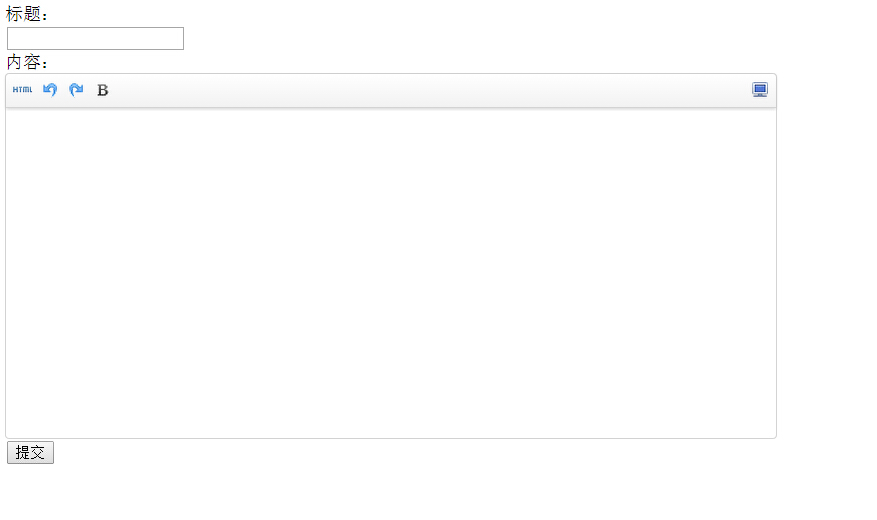
上图代码效果图:
基于ThinkPHP的在线编辑器调用的更多相关文章
- 基于thinkphp的在线编辑器kindeditor-v4.1.3
首先,去官网下载最新版的kindeditor,然后把里面asp,jsp,net,example的全删除,然后改名为editor放进public(最外层目录的public)文件夹里面. 在目录lib目录 ...
- thinkphp——通过在线编辑器添加的内容在模板里正确显示(只显示内容,而不是html代码)
thinkphp编辑器回显问题如下: 解决办法如下: 对于编辑器发布的内容,前台模板显示为html的解决办法是: 在模板输出字段加入html_entity_decode()函数 也就是:PHP输出时的 ...
- Html在线编辑器--基于Jquery的xhEditor轻量级编辑器
xhEditor V1.2.2 下载地址 开源中国社区: http://www.oschina.net/p/xheditor xhEditor是一个基于jQuery开发的简单迷你并且高效的可视化XHT ...
- 20个最强的基于浏览器的在线代码编辑器 - OPEN资讯
20个最强的基于浏览器的在线代码编辑器 - OPEN资讯 20个最强的基于浏览器的在线代码编辑器
- 在线编辑器ACE Editor的使用
ACE 是一个开源的.独立的.基于浏览器的代码编辑器,可以嵌入到任何web页面或JavaScript应用程序中.ACE支持超过60种语言语法高亮,并能够处理代码多达400万行的大型文档.ACE开发团队 ...
- 在线编辑器CKeditor,CKfinder
在线编辑器的分类: 常见的在线编辑器有很多,比较常用的有FCKeditor(在线编辑器——Ajax 浏览器 端服务器文件管理器),CKeditor(在线编辑器与服务器端文件管理器的分离,) 其中CKe ...
- N个富文本编辑器/基于Web的HTML编辑器
转自:http://www.cnblogs.com/lingyuan/archive/2010/11/15/1877447.html 基于WEB的HTML 编辑器,WYSIWYG所见即所得的编辑器,或 ...
- 在ASP.NET Core中使用百度在线编辑器UEditor
在ASP.NET Core中使用百度在线编辑器UEditor 0x00 起因 最近需要一个在线编辑器,之前听人说过百度的UEditor不错,去官网下了一个.不过服务端只有ASP.NET版的,如果是为了 ...
- 在线编辑器的使用-KindEditor
第一种:KindEditor编辑器 步骤一:加载相应的核心的文件 下载地址:http://kindeditor.net/demo.php <link rel="stylesheet&q ...
随机推荐
- svn 版本管理与自动部分发布
作为团队开发项目时,会遇到项目的版本管理,测试部署与发布部署,下面是摘至他人的关于版本管理和自动部署的方案. svn自动部署的实现: 使用svn的hook功能 1.在版本库的hooks目录下面,有一些 ...
- libXext.so.6: cannot open shared object file:
在64位的centos安装64位的oracle的时候,有时候会出现“libXext.so.6: cannot open shared object file:”的错误. 这个原因主要是oracle在安 ...
- CTF中常见Web源码泄露总结
目录00x1 .ng源码泄露 00x2 git源码泄露 00x3 .DS_Store文件泄漏 00x4 网站备份压缩文件 00x5 SVN导致文件泄露 00x6 WEB-INF/web.xml泄露 ...
- [转]javaweb学习总结(二十九)——EL表达式
原文地址:https://www.cnblogs.com/xdp-gacl/p/3938361.html 一.EL表达式简介 EL 全名为Expression Language.EL主要作用: 1.获 ...
- android中画图类的介绍Path
Paint类相关属性: /** * Paint类介绍 * * Paint即画笔,在绘图过程中起到了极其重要的作用,画笔主要保存了颜色, * 样式等绘制信息,指定了如何绘制文本和图形,画笔对象有很多设置 ...
- centosmini7安装GNOME
1.在命令行下输入下面的命令来安装 Gnome 包 #:$sudo yum groupinstall "GNOME Desktop" "Graphical Admini ...
- Java编程的逻辑 (33) - Joda-Time
本系列文章经补充和完善,已修订整理成书<Java编程的逻辑>,由机械工业出版社华章分社出版,于2018年1月上市热销,读者好评如潮!各大网店和书店有售,欢迎购买,京东自营链接:http:/ ...
- android开发(41) Fragment中使用POP_BACK_STACK_INCLUSIVE达到一次跳转到栈底。类似Activity的 采用FLAG_ACTIVITY_CLEAR_TOP
需求场景: 在开发中遇到下面这样场景: 1.创建 Fragment A 显示. 这时栈的结构是: .Fragment A 2.创建 Fragment B 并 显示. 从下到上看,这时栈的结构是: ...
- Ubuntu free以及Linux内存占用大的解释
-bash-3.00$ free total used free shared buffers cached Mem: 514020 465932 48088 0 15864 348844 -/ bu ...
- iOS 实时音频采集与播放Audio Unit使用
前言 在iOS中有很多方法可以进行音视频采集.如 AVCaptureDevice, AudioQueue以及Audio Unit.其中 Audio Unit是最底层的接口,它的优点是功能强大,延迟低; ...