
Oracle 12c 安装手册
Oracle 12C 首次安装
期待已久的Oracle 12C 终于发布了,我迫不及待的下载了介质,一睹风采。
下载地址:http://www.oracle.com/technetwork/database/enterprise-edition/downloads/index.html
或者直接到edelivery下载:https://edelivery.oracle.com
V38500-01_1of2.zip
V38500-01_2of2.zip
官方安装文档地址:http://docs.oracle.com/cd/E16655_01/install.121/e17718/toc.htm
1、安装依赖包 对于linux5,官方给出的如下:
binutils-2.17.50.0.6

compat-libstdc++-33-3.2.3

compat-libstdc++-33-3.2.3 (32 bit)

gcc-4.1.2

gcc-c++-4.1.2

glibc-2.5-58

glibc-2.5-58 (32 bit)

glibc-devel-2.5-58

glibc-devel-2.5-58 (32 bit)

ksh

libaio-0.3.106

libaio-0.3.106 (32 bit)

libaio-devel-0.3.106

libaio-devel-0.3.106 (32 bit)

libgcc-4.1.2

libgcc-4.1.2 (32 bit)

libstdc++-4.1.2

libstdc++-4.1.2 (32 bit)

libstdc++-devel 4.1.2

libXext-1.0.1

libXext-1.0.1 (32 bit)

libXtst-1.0.1

libXtst-1.0.1 (32 bit)

libX11-1.0.3

libX11-1.0.3 (32 bit)

libXau-1.0.1

libXau-1.0.1 (32 bit)

libXi-1.0.1

libXi-1.0.1 (32 bit)

make-3.81

sysstat-7.0.2
额外增加x86_64
. compat-libcap1-1.10- (x86_64)

. compat-libstdc++--3.2.-.el6 (x86_64)

. gcc-4.4.-.el6 (x86_64)

. gcc-c++-4.4.-.el6 (x86_64)

. glibc-devel-2.12-1.7.el6 (x86_64)

. ksh  <== any version of ksh is acceptable

. libstdc++-devel-4.4.-.el6 (x86_64)

. libaio-devel-0.3.-.el6 (x86_64)
将安装光盘挂载到虚拟机,进入Server目录。使用rpm -qa查询包是否安装,使用rpm -ivh安装未安装的包
[root@ora12c Server]# pwd

/media/OL5.7 x86_64 dvd 20110728/Server

[root@ora12c Server]# rpm -qa compat-libstdc

[root@ora12c Server]# rpm -ivh compat-libstdc++-33-3.2.3-61.

compat-libstdc++-33-3.2.3-61.i386.rpm

compat-libstdc++-33-3.2.3-61.x86_64.rpm

[root@ora12c Server]# rpm -ivh compat-libstdc++-33-3.2.3-61.i386.rpm

warning: compat-libstdc++-33-3.2.3-61.i386.rpm: Header V3 DSA signature: NOKEY, key ID 1e5e0159

Preparing...                ########################################### [100%]

     package compat-libstdc++-33-3.2.3-61.i386 is already installed

[root@ora12c Server]# rpm -ivh compat-libstdc++-33-3.2.3-61.x86_64.rpm

warning: compat-libstdc++-33-3.2.3-61.x86_64.rpm: Header V3 DSA signature: NOKEY, key ID 1e5e0159

Preparing...                ########################################### [100%]

     package compat-libstdc++-33-3.2.3-61.x86_64 is already installed
按照此方法将所有包安装
2、创建oracle用户和组
[root@ora12c Server]# groupadd oinstall

[root@ora12c Server]# groupadd dba

[root@ora12c Server]# useradd -g oinstall -G dba oracle

[root@ora12c Server]# passwd oracle

Changing password for user oracle.

New UNIX password:

BAD PASSWORD: it is based on a dictionary word

Retype new UNIX password:

passwd: all authentication tokens updated successfully.
3、创建目录
[root@ora12c Server]# mkdir -p /oracle/

[root@ora12c Server]# chown -R oracle:oinstall /oracle/

[root@ora12c Server]# chmod -R 775 /oracle/
4、修改内核参数
在/etc/sysctl.conf文件下加入如下参数
[root@ora12c Server]# vim /etc/sysctl.conf

fs.aio-max-nr = 1048576

fs.file-max = 6815744

kernel.shmall = 2097152

kernel.shmmax = 536870912

kernel.shmmni = 4096

kernel.sem = 250 32000 100 128

net.ipv4.ip_local_port_range = 9000 65500

net.core.rmem_default = 262144

net.core.rmem_max = 4194304

net.core.wmem_default = 262144

net.core.wmem_max = 1048586
/sbin/sysctl -p 使参数生效
[root@ora12c Server]# /sbin/sysctl -p

fs.aio-max-nr = 1048576

fs.file-max = 6815744

kernel.shmall = 2097152

kernel.shmmax = 536870912

kernel.shmmni = 4096

kernel.sem = 250 32000 100 128

net.ipv4.ip_local_port_range = 9000 65500

net.core.rmem_default = 262144

net.core.rmem_max = 4194304

net.core.wmem_default = 262144

net.core.wmem_max = 1048586

net.ipv4.ip_forward = 0

net.ipv4.conf.default.rp_filter = 2

net.ipv4.conf.default.accept_source_route = 0

kernel.sysrq = 0

kernel.core_uses_pid = 1

net.ipv4.tcp_syncookies = 1

kernel.msgmnb = 65536

kernel.msgmax = 65536

kernel.shmmax = 68719476736

kernel.shmall = 4294967296
5、修改用户限制
在/etc/security/limits.conf加入相关配置
[root@ora12c Server]# vim /etc/security/limits.conf

oracle           soft    nproc   2047

oracle           hard    nproc   16384

oracle           soft    nofile  1024

oracle           hard    nofile  65536

oracle           soft    stack  10240

oracle           hard    stack  10240
6、配置环境变量
在 .bash_profile配置如下变量
oracle@ora12c ~]$ vim .bash_profile

export ORACLE_BASE=/oracle/12c

export ORACLE_HOME=$ORACLE_BASE/db1

export ORACLE_SID=orcl12c

export PATH=$ORACLE_HOME/bin:$PATH:$HOME/bin

export EDITOR=/bin/vi
使配置文件生效
[oracle@ora12c ~]$ source .bash_profile
7、ftp上传数据库安装文件(或者使用共享文件夹--虚拟机)
8、解压文件
#unzip V38500-01_1of2.zip
#unzip V38500-01_2of2.zip
9、运行OUI安装
#xhost +
#su - oracle
cd database
./runInstaller
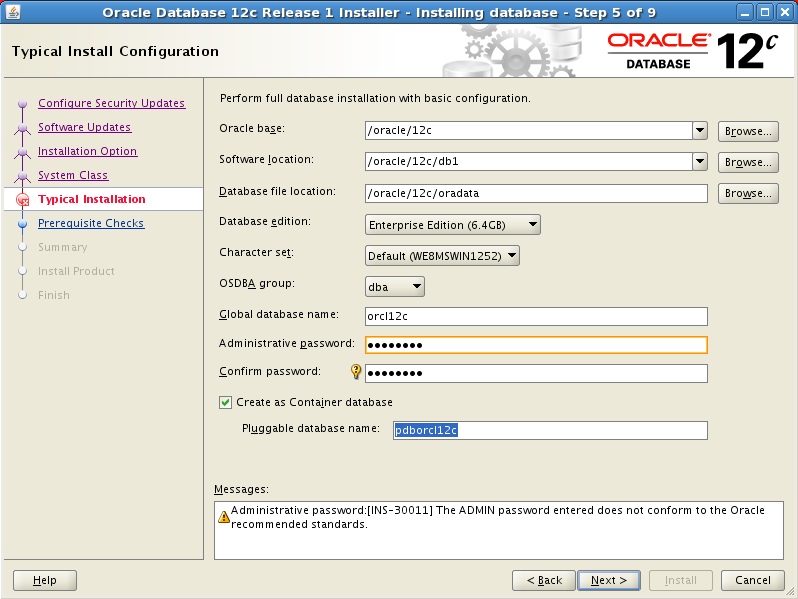
下一步下一步
Oracle linux上安装oracle 12c文档
配置
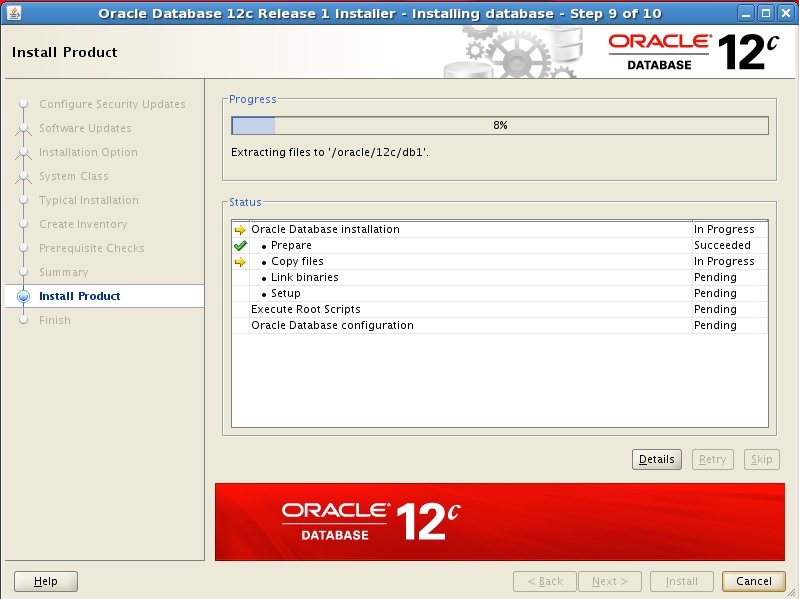
正在安装
root运行2个脚本
[root@ora12c Server]# cd /oracle/oraInventory/

[root@ora12c oraInventory]# ./orainstRoot.sh

Changing permissions of /oracle/oraInventory.

Adding read,write permissions for group.

Removing read,write,execute permissions for world.

Changing groupname of /oracle/oraInventory to oinstall.

The execution of the script is complete.

[root@ora12c oraInventory]# cd /oracle/12c/db1/

[root@ora12c db1]# ./root.sh

Performing root user operation for Oracle 12c

The following environment variables are set as:

    ORACLE_OWNER= oracle

    ORACLE_HOME=  /oracle/12c/db1

Enter the full pathname of the local bin directory: [/usr/local/bin]:

   Copying dbhome to /usr/local/bin ...

   Copying oraenv to /usr/local/bin ...

   Copying coraenv to /usr/local/bin ...

Creating /etc/oratab file...

Entries will be added to the /etc/oratab file as needed by

Database Configuration Assistant when a database is created

Finished running generic part of root script.

Now product-specific root actions will be performed.
初始化数据库
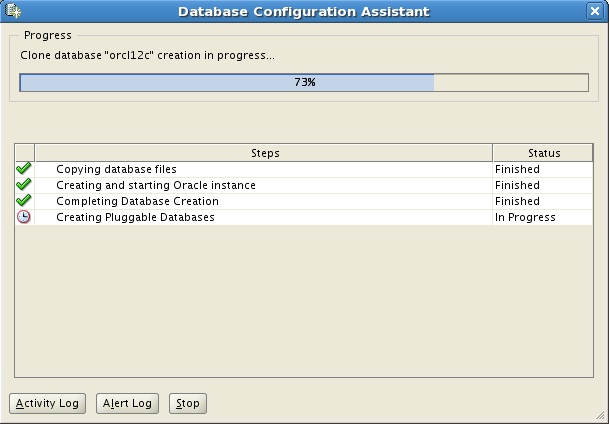
在创建数据库时,12c会自动创建监听
[oracle@ora12c ~]$ lsnrctl status

LSNRCTL for Linux: Version 12.1.0.1.0 - Production on 27-JUN-2013 12:41:16

Copyright (c) 1991, 2013, Oracle.  All rights reserved.

Connecting to (DESCRIPTION=(ADDRESS=(PROTOCOL=IPC)(KEY=EXTPROC1521)))

STATUS of the LISTENER

------------------------

Alias                     LISTENER

Version                   TNSLSNR for Linux: Version 12.1.0.1.0 - Production

Start Date                27-JUN-2013 12:01:32

Uptime                    0 days 0 hr. 39 min. 45 sec

Trace Level               off

Security                  ON: Local OS Authentication

SNMP                      OFF

Listener Parameter File   /oracle/12c/db1/network/admin/listener.ora

Listener Log File         /oracle/12c/diag/tnslsnr/ora12c/listener/alert/log.xml

Listening Endpoints Summary...

  (DESCRIPTION=(ADDRESS=(PROTOCOL=ipc)(KEY=EXTPROC1521)))

  (DESCRIPTION=(ADDRESS=(PROTOCOL=tcp)(HOST=ora12c)(PORT=1521)))

  (DESCRIPTION=(ADDRESS=(PROTOCOL=tcps)(HOST=ora12c)(PORT=5500))(Security=(my_wallet_directory=/oracle/12c/admin/orcl12c/xdb_wallet))(Presentation=HTTP)(Session=RAW))

Services Summary...

Service "orcl12c" has 1 instance(s).

  Instance "orcl12c", status READY, has 1 handler(s) for this service...

Service "orcl12cXDB" has 1 instance(s).

  Instance "orcl12c", status READY, has 1 handler(s) for this service...

Service "pdborcl12c" has 1 instance(s).

  Instance "orcl12c", status READY, has 1 handler(s) for this service...

The command completed successfully
使用sqlplus连接数据库
[oracle@ora12c ~]$ sqlplus / as sysdba

SQL*Plus: Release 12.1.0.1.0 Production on Thu Jun 27 12:41:41 2013

Copyright (c) 1982, 2013, Oracle.  All rights reserved.

Connected to:

Oracle Database 12c Enterprise Edition Release 12.1.0.1.0 - 64bit Production

With the Partitioning, OLAP, Advanced Analytics and Real Application Testing options

SQL> set linesize 150

SQL> select * from v$version;

BANNER                                                       CON_ID

-------------------------------------------------------------------------------- ----------

Oracle Database 12c Enterprise Edition Release 12.1.0.1.0 - 64bit Production            0

PL/SQL Release 12.1.0.1.0 - Production                                     0

CORE     12.1.0.1.0     Production                                          0

TNS for Linux: Version 12.1.0.1.0 - Production                                0

NLSRTL Version 12.1.0.1.0 - Production                                     0
显示数据库版本
Oracle 12c 安装手册的更多相关文章
- windows Sever 2012下Oracle 12c安装配置方法图文教程
windows Sever 2012下Oracle 12c安装配置方法图文教程 Oracle 12c安装配置方法图文教程,具体内容如下 1.我们开启虚拟机 2.Windows Sever 2012启动 ...
- ArcSDE 10.2 for Oracle 12C安装注意事项
ArcSDE 10.2 for Oracle 12C安装注意事项 1.环境说明 从ArcSDE10.2.1开始支持Oracle 12C. 2.安装注意事项 SDE空间数据库可以安装到PDB中,使用Cr ...
- Oracle 12C安装教程
Oracle 12C安装教程 由 Alma 创建, 最后一次修改 2018-06-04 10:32:31 Oracle 12c,全称Oracle Database 12c,是Oracle 11g的升级 ...
- CentOS 6.8_x64 Oracle 12C 安装
1.下载地址 (需要注册oracle账号) 点击 2.登录CentOS 做准备工作 groupadd oinstall groupadd dba useradd -g oinstall -g dba ...
- oracle 12c安装详细教程
数据库下载:www.orcale.com访问官网自行下载. 一,将下载好的两个压缩包在同一目录中进行解压(文件目录尽量用英文) 解压后如下使用管理员身份运行setup安装程序 注意:对于学习阶段,这一 ...
- Oracle 12c 安装问题及解决方案
1. 介绍 今天在我的开发电脑上安装Oracle12c,电脑环境是windows10家庭中文版,安装的Oracle数据库版本Oracle(12.1.0.2.0) - Standard Edition ...
- Windows server 2016 安装及ORACLE 12C 安装
首先创建虚拟机,选择windows server 2016 启动虚拟机,进入安装界面,语言默认中文,选择下一步 选择标准安装(桌面) 选择接受条款 选择自定义安装 进行分区,如下图所示 进行安装 设定 ...
- Oracle 12c安装详细步骤,带截图
1,在官网上下载oracle的压缩文件,两个都要下载. 并两个同时选中解压在一个文件夹里面. 2,解压之后,如下图,点击setup.exe稍等一会儿 ,3,开始安装: 不选点击下一步,或者直接点击下一 ...
- oracle 12c 安装补丁报错
环境: centos 7.5 oracle 12.2.0.1 报错: 执行一下报错: 更新dba_registry_sqlpatch $ORACLE_HOME/OPatch/datapatch -ve ...
随机推荐
- 【kd-tree】bzoj2850 巧克力王国
分四种情况讨论:a,b>=0 a,b<0 a>=0,b<0 a<0,b>=0 然后每次检验是否进入一个矩形框 或者 是否直接利用这个矩形框的答案 仅仅利用两个对角的 ...
- 斯坦福第十八课:应用实例:图片文字识别(Application Example: Photo OCR)
18.1 问题描述和流程图 18.2 滑动窗口 18.3 获取大量数据和人工数据 18.4 上限分析:哪部分管道的接下去做 18.1 问题描述和流程图
- ubuntu wireshark 没有接口
There are no interfaces on which a capture can be done 解决方法: Open a terminal by pressing Ctrl+Alt+T ...
- (01背包 当容量特别大的时候) Knapsack problem (fzu 2214)
http://acm.fzu.edu.cn/problem.php?pid=2214 Problem Description Given a set of n items, each with a ...
- 时间格式转化 String2datestyle
时间格式转化成string工具类: package cn.javass.util; import java.text.DateFormat; import java.text.SimpleDateFo ...
- codeforces 425C
题意:给定长度为n,m<=100000的范围在100000以内的数组a,b. 现在给定两种操作: 第一种是ai,bj相等,ai,bj之前的数全删掉,费用为e,收益为1 第二种是把剩下的全部删掉, ...
- don't forget the bigger picture
Imagine a circle that contains all of human knowledge: By the time you finish elementary school, you ...
- What's New in C# 6.0
Static Types as using So, we are all quite familiar with this notion of accessing static class membe ...
- CentOS6.5下Tomcat7 Nginx Redis配置步骤
所有配置均在一台机器上完成,部署拓扑信息如下: 注意:由于Redis配置对jar包和tomcat版本比较严格,请务必使用tomcat7和本文中提供的jar包.下载地址: http://pan.baid ...
- 将枚举定义生成SQL中的Case-When-then语句
using System; using System.Collections.Generic; using System.Linq; using System.Web; using System.We ...