
【gulp】gulp-file-include 合并 html 文件
gulp-file-include 是 gulp 插件,它提供了一个 include 方法让我们可以像后端模板那样把公共部分的页面导入进来。
安装依赖包(包括了 gulp-file-include 和 del)
npm install --save-dev gulp-file-include del
项目结构目录
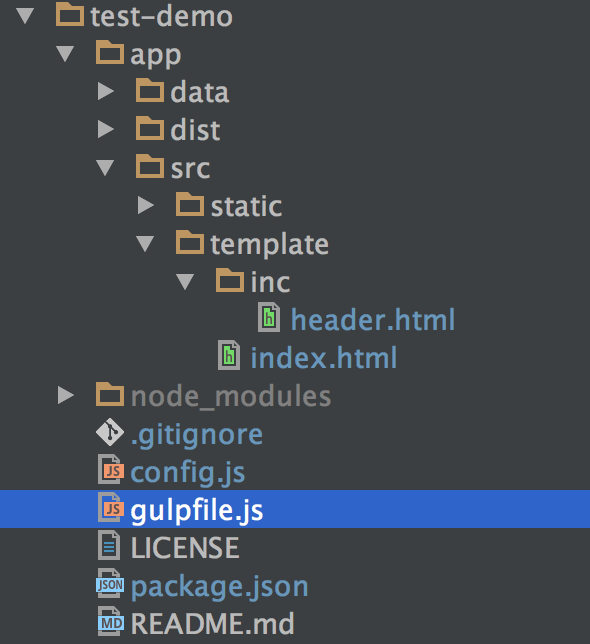
修改 gulpfile.js,结合 browser-sync 一起使用
'use strict';

var gulp = require('gulp'),

    del = require('del'),

    fileinclude = require('gulp-file-include'),

    browserSync = require('browser-sync').create();

// 清除 dist 文件夹

gulp.task('clean', function () {

    return del.sync('./app/dist');

});

// html 整合

gulp.task('html', function () {

    return gulp.src('./app/src/template/*.html')

    .pipe(fileinclude())

    .pipe(gulp.dest('./app/dist'));

});

// 配置服务器

gulp.task('serve', function () {

    browserSync.init({

        server: {

            baseDir: './app/dist'

        },

        port: 8000

    });

    // 监听 html

    gulp.watch('./app/src/template/**/*.html', ['html']).on('change', browserSync.reload);
});

gulp.task('default', ['clean', 'html', 'serve']);
html:
<!doctype html>

<html lang="en">

<head>

    <meta charset="UTF-8">

    <meta name="viewport"

          content="width=device-width, user-scalable=no, initial-scale=1.0, maximum-scale=1.0, minimum-scale=1.0">

    <meta http-equiv="X-UA-Compatible" content="ie=edge">

    <title>Document</title>

</head>

<body>

    @@include('inc/header.html', {"title": "home"})

    <p></p>

</body>

</html>
header.html:
<h1>@@title</h1>
打包:
gulp
浏览器会自动打开页面 http://localhost:8000,显示 home。在 dist 文件夹中查看 index.html:
<!doctype html>

<html lang="en">

<head>

    <meta charset="UTF-8">

    <meta name="viewport"

          content="width=device-width, user-scalable=no, initial-scale=1.0, maximum-scale=1.0, minimum-scale=1.0">

    <meta http-equiv="X-UA-Compatible" content="ie=edge">

    <title>Document</title>

</head>

<body>

    <h1>home</h1>

    <p></p>

</body>

</html>
当然,gulp-file-include 还有很多强大的功能,具体内容可以参考官网,这里我就不多说了。
【gulp】gulp-file-include 合并 html 文件的更多相关文章
- 一篇迟到的gulp文章,代码合并压缩,less编译
前言 这篇文章本应该在去年17年写的,但因为种种原因没有写,其实主要是因为懒(捂脸).gulp出来的时间已经很早了,16年的时候还很流行,到17年就被webpack 碾压下去了,不过由于本人接触gul ...
- gulp完成javascript压缩合并,css压缩
最近需要对项目进行优化,主要是对js的压缩合并和css文件的压缩,查找相关资料之后发现gulp可以实现相关的功能,特此分享一下使用心得. 1.安装gulp gulp是基于Node.js的前端构建工具. ...
- Gulp压缩前端CS,JS,图片文件
Gulp 基于Node.js的前端构建工具,Gulp有许多插件(这里是插件),使用Gulp可以实现前端代码的编译(sass.less).压缩.图片的压缩等,当然主要是前端工程化,不过我目前只是需要压缩 ...
- 合并Excel文件
//合并Excel文件 private void MargeExcelFile(string destFile, string dirPath) { DirectoryInfo dir = new D ...
- 合并BIN文件的两种方法(转)
源:http://blog.chinaunix.net/uid-20745340-id-1878803.html 合并BIN文件的两种方法 在单片机的开发过程中,经常需要将两个单独的BIN文件合并成一 ...
- 转:Intellij idea Version Control File Status Colors ( 版本控制文件状态颜色 )
https://blog.csdn.net/Bruce_Lee__/article/details/80261308 Added —— 添加 Added in not active changelis ...
- 使用Python批量合并PDF文件(带书签功能)
网上找了几个合并pdf的软件,发现不是很好用,一般都没有添加书签的功能. 又去找了下python合并pdf的脚本,发现也没有添加书签的功能的. 于是自己动手编写了一个小工具,使用了PyPDF2. 下面 ...
- MVC学习十一:合并资源文件(BundleConfig)
在BundleConfig.cs文件下 //1.用户可以 手动 添加 js绑定对象,取一个 名字(虚拟路径),添加要绑定的JS文件 路径 bundles.Add(new ScriptBundle(&q ...
- Aspose.Pdf合并PDF文件
使用Aspose.Pdf类库,有很多种方法可以合并PDF文件,这里简单介绍小生见到的几种: Doucment.Pages.Add PdfFileEditor.Append PdfFileEditor. ...
- [原]Nginx+Lua服务端合并静态文件
http://homeway.me 0x01.About 源代码已经上传到github:https://github.com/grasses/nginx-lua-static-merger nginx ...
随机推荐
- Compiling U-Boot
To configure and build U-Boot for a target board "cd" to, or copy the source tree to somew ...
- shell脚本8--录制终端会话
准备: script -t 2> timing.log -a output.session type commands; ... . .. exit 回放: scriptreplay timin ...
- bzoj1051: [HAOI2006]受欢迎的牛(tarjan板子)
1051: [HAOI2006]受欢迎的牛 Time Limit: 10 Sec Memory Limit: 162 MBSubmit: 6064 Solved: 3179[Submit][Sta ...
- windows下安装mysql遇到的问题
windows下安装mysql5.6.41步骤:http://www.cnblogs.com/sjy18039225956/p/9203052.html 系统错误2详见MySQL安装过程net sta ...
- Egret EUI的学习
官方地址:https://developer.egret.com/cn/article/index/id/518 官方案例:https://github.com/egret-labs/egret-ex ...
- 服务端API 工作经验(没有工作的是体会不到的)
1.慢慢了解以下内容 [{xx:xxx,xx:xxx},{xx:xxx,xx:xxx},{xx:xxx,xx:xxx},]-- 数据 data 服务端API 状态代码(01代表成功) message ...
- __c语言__结构体、共用体、枚举__笔记
2017-09-16 21:14:09 结构体,共用体,枚举 1.结构体 把不同的类型整合成一个有机的整体,以便于引用,这个类型就叫做结构体 1)结构体变量的定义方式(3种)和引用成员变量: 定义一个 ...
- Python3 与 C# 网络编程之~ 网络基础篇
最新版本查看:https://www.cnblogs.com/dotnetcrazy/p/9919202.html 入门篇 官方文档:https://docs.python.org/3/library ...
- springboot获取properties文件的配置内容(转载)
1.使用@Value注解读取读取properties配置文件时,默认读取的是application.properties. application.properties: demo.name=Name ...
- Css3实现波浪效果3-静态波纹
一.外框宽度等比例3个椭圆拼合 .container { position: absolute; width: 400px; height: 200px; border: 5px solid rgb( ...