
51job_selenium测试2
Python爬虫视频教程零基础小白到scrapy爬虫高手-轻松入门
https://item.taobao.com/item.htm?spm=a1z38n.10677092.0.0.482434a6EmUbbW&id=564564604865
# -*- coding: utf-8 -*-

"""

Spyder Editor

This is a temporary script file.

"""

import requests,bs4,openpyxl,time,selenium

from openpyxl.cell import get_column_letter,column_index_from_string

from selenium import webdriver

excelName="51job.xlsx"

sheetName="Sheet1"

wb1=openpyxl.load_workbook(excelName)

sheet=wb1.get_sheet_by_name(sheetName)

start=1

charset="gb2312"

site="http://jobs.51job.com/all/co198308.html"

browser=webdriver.Firefox()

browser.get(site)

linkElem=browser.find_element_by_link_text("下一页")

linkElem.click()

#elem = browser.find_element_by_class_name('el')

#返回标签的值

#elem.text

#elems = browser.find_elements_by_class_name('el')

elem=browser.find_elements_by_class_name('el')

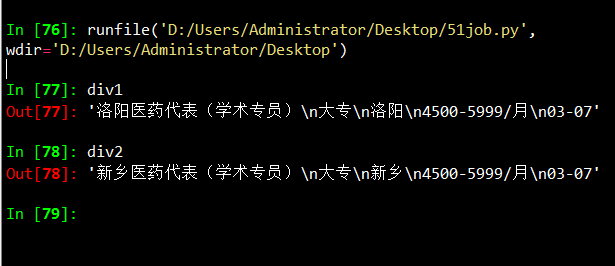
div1=elem[0].text

div2=elem[1].text

#每个网站爬取相应数据

def Craw(site):

    res=requests.get(site)

    res.encoding = charset

    soup1=bs4.BeautifulSoup(res.text,"lxml")

    div=soup1.select('.el')

    len_div=len(div)

    for i in range(len_div):

        #print ("i:",i)

        content=div[i].getText()

        content_list=content.split('\n')

        name=content_list[1]

        #print ("name:",name)

        education=content_list[2]

        #print ("education:",education)

        position=content_list[3]

        #print ("position:",position)

        salary=content_list[4]

        #print ("salary:",salary)

        date=content_list[5]

        #print ("date:",date)

        sheet['A'+str(i+2)].value=name

        sheet['B'+str(i+2)].value=education

        sheet['C'+str(i+2)].value=position

        sheet['D'+str(i+2)].value=salary

        sheet['E'+str(i+2)].value=date

'''

Craw(site)

wb1.save(excelName)

    '''
Finding Elements on the Page
WebDriver objects have quite a few methods for finding elements on a page. They are divided into the find_element_* and find_elements_* methods. Thefind_element_* methods return a single WebElement object, representing the first element on the page that matches your query. The find_elements_* methods return a list of WebElement_* objects for every matching element on the page.
Table 11-3 shows several examples of find_element_* and find_elements_* methods being called on a WebDriver object that’s stored in the variable browser.
Table 11-3. Selenium’s WebDriver Methods for Finding Elements
|
Method name |
WebElement object/list returned |
|---|---|
browser.find_element_by_class_name(name) |
Elements that use the CSS class |
browser.find_element_by_css_selector(selector) |
Elements that match the CSS |
browser.find_element_by_id(id) |
Elements with a matching |
browser.find_element_by_link_text(text) |
|
browser.find_element_by_partial_link_text(text) |
|
browser.find_element_by_name(name) |
Elements with a matching |
browser.find_element_by_tag_name(name) |
Elements with a matching tag |
Except for the *_by_tag_name() methods, the arguments to all the methods are case sensitive. If no elements exist on the page that match what the method is looking for, the selenium module raises a NoSuchElement exception. If you do not want this exception to crash your program, add try and except statements to your code.
Once you have the WebElement object, you can find out more about it by reading the attributes or calling the methods in Table 11-4.
Table 11-4. WebElement Attributes and Methods
|
Attribute or method |
Description |
|---|---|
|
|
The tag name, such as |
|
|
The value for the element’s |
|
|
The text within the element, such as |
|
|
For text field or text area elements, clears the text typed into it |
|
|
Returns |
|
|
For input elements, returns |
|
|
For checkbox or radio button elements, returns |
|
|
A dictionary with keys |
Table 11-5. Commonly Used Variables in the selenium.webdriver.common.keysModule
|
Attributes |
Meanings |
|---|---|
|
|
The keyboard arrow keys |
|
|
The ENTER and RETURN keys |
|
|
The |
|
|
The ESC, BACKSPACE, and DELETE keys |
|
|
The F1 to F12 keys at the top of the keyboard |
|
|
The TAB key |
51job_selenium测试2的更多相关文章
- 51job_selenium测试
Python爬虫视频教程零基础小白到scrapy爬虫高手-轻松入门 https://item.taobao.com/item.htm?spm=a1z38n.10677092.0.0.482434a6E ...
- SignalR系列续集[系列8:SignalR的性能监测与服务器的负载测试]
目录 SignalR系列目录 前言 也是好久没写博客了,近期确实很忙,嗯..几个项目..头要炸..今天忙里偷闲.继续我们的小系列.. 先谢谢大家的支持.. 我们来聊聊SignalR的性能监测与服务器的 ...
- Apache Ignite之集群应用测试
集群发现机制 在Ignite中的集群号称是无中心的,而且支持命令行启动和嵌入应用启动,所以按理说很简单.而且集群有自动发现机制感觉对于懒人开发来说太好了,抱着试一试的心态测试一下吧. 在Apache ...
- 测试一下StringBuffer和StringBuilder及字面常量拼接三种字符串的效率
之前一篇里写过字符串常用类的三种方式<java中的字符串相关知识整理>,只不过这个只是分析并不知道他们之间会有多大的区别,或者所谓的StringBuffer能提升多少拼接效率呢?为此写个简 ...
- TechEmpower 13轮测试中的ASP.NET Core性能测试
应用性能直接影响到托管服务的成本,因此公司在开发应用时需要格外注意应用所使用的Web框架,初创公司尤其如此.此外,糟糕的应用性能也会影响到用户体验,甚至会因此受到相关搜索引擎的降级处罚.在选择框架时, ...
- .NET Core系列 :4 测试
2016.6.27 微软已经正式发布了.NET Core 1.0 RTM,但是工具链还是预览版,同样的大量的开源测试库也都是至少发布了Alpha测试版支持.NET Core, 这篇文章 The Sta ...
- 渗透测试工具BurpSuite做网站的安全测试(基础版)
渗透测试工具BurpSuite做网站的安全测试(基础版) 版权声明:本文为博主原创文章,未经博主允许不得转载. 学习网址: https://t0data.gitbooks.io/burpsuite/c ...
- 在ubuntu16.10 PHP测试连接MySQL中出现Call to undefined function: mysql_connect()
1.问题: 测试php7.0 链接mysql数据库的时候发生错误: Fatal error: Uncaught Error: Call to undefined function mysqli_con ...
- 【初学python】使用python调用monkey测试
目前公司主要开发安卓平台的APP,平时测试经常需要使用monkey测试,所以尝试了下用python调用monkey,代码如下: import os apk = {'j': 'com.***.test1 ...
随机推荐
- 开源的CAS实现SSO
https://www.ibm.com/developerworks/cn/opensource/os-cn-cas/index.html ISC是基于CAS定制的,使用的高级的代理模式. https ...
- Qt__自定义事件
#include <QApplication> #include <QEvent> #include <QObject> #include <QDebug&g ...
- Test Scenarios for Filter Criteria
1 User should be able to filter results using all parameters on the page2 refine search functionalit ...
- python之itemgetter函数:对字典列表进行多键排序
itemgetter函数:对字典列表进行多键排序 from operator import itemgetter list_people = [ {'name': 'Mike', 'age': 22, ...
- 03 基于umi搭建React快速开发框架(封装列表增删改查)
前言 大家在做业务系统的时候,很多地方都是列表增删改查,做这些功能占据了大家很长时间,如果我们有类似的业务,半个小时就能做出一套那是不是很爽呢. 这样我们就可以有更多的时间学习一些新的东西.我们这套框 ...
- BZOJ4200 NOI2015小园丁与老司机(动态规划+上下界网络流)
一看上去就是一个二合一的题.那么先解决第一部分求最优路线(及所有可能在最优路线上的线段). 由于不能往下走,可以以y坐标作为阶段.对于y坐标不同的点,我们将可以直接到达的两点连边,显然这样的边的个数是 ...
- ACG图片站\python爬虫\LAMP环境
最近突然对web很感兴趣,碰巧看到阿里云服务器学生价十块钱一个月,果断买了一个自己搭建了一个网站. 网址 这里 LAMP环境就搭建了好久,linux+apache2+mysql+php,都是开源的软件 ...
- SpringBoot基础入门
1.SpringBoot核心相关内容 1.1入口类 SpringBoot通常有一个入口类*Application,内部有一个main方法,是启动SpringBoot的入口.使用@SpringBootA ...
- Minimum Cost POJ - 2516(模板题。。没啥好说的。。)
题意: 从发货地到商家 送货 求送货花费的最小费用... 有m个发货地,,,n个商家,,每个商家所需要的物品和物品的个数都不一样,,,每个发货地有的物品和物品的个数也不一样,,, 从不同的发货地到不同 ...
- BZOJ5286: [Hnoi2018]转盘 (线段树)
题意 给你绕成一圈的物品共 \(n\) 个 , 然后从其中一个开始选 , 每次有两种操作 , 一是继续选择当前物品 , 二是选择这个后一个物品 . 选择后一个物品要求当前的时刻大于后一个的 \(T_i ...